Planes
The film's code
import manimgx as m


class PlanesHero(m.Scene):
    def construct(self) -> None:
        plane = m.ComplexPlane().add_coordinates()
        z = m.Dot(plane.n2p(2 + 1j), color=m.YELLOW)
        label = m.MathTex("2 + i", color=m.YELLOW).next_to(z, m.UR, buff=0.1)
        self.play(m.Create(plane, run_time=2))
        self.play(m.GrowFromCenter(z), m.Write(label))
        self.play(plane.animate.apply_complex_function(lambda w: w**2 / 4), run_time=3)
        self.wait()
A plane is axes with a grid: a line at every step of each axis. Unless you size it, a number plane fills the frame, with the frame's own coordinates, so that a point of the plane is the point of the frame: it is the grid to see positions by. A complex plane reads its points as complex numbers, and a polar plane draws circles around its center and rays out of it.
A plane bends with everything on it: insert more curves first (prepare_for_nonlinear_transform), and its lines curve smoothly.
NumberPlane 
Code
import manimgx as m


class NumberPlaneExample(m.Scene):
    def construct(self) -> None:
        plane = m.NumberPlane(
            x_range=[-6.5, 6.5, 1],
            y_range=[-4, 4, 1],
            faded_line_ratio=2,
            background_line_style={"stroke_color": m.TEAL},
        )
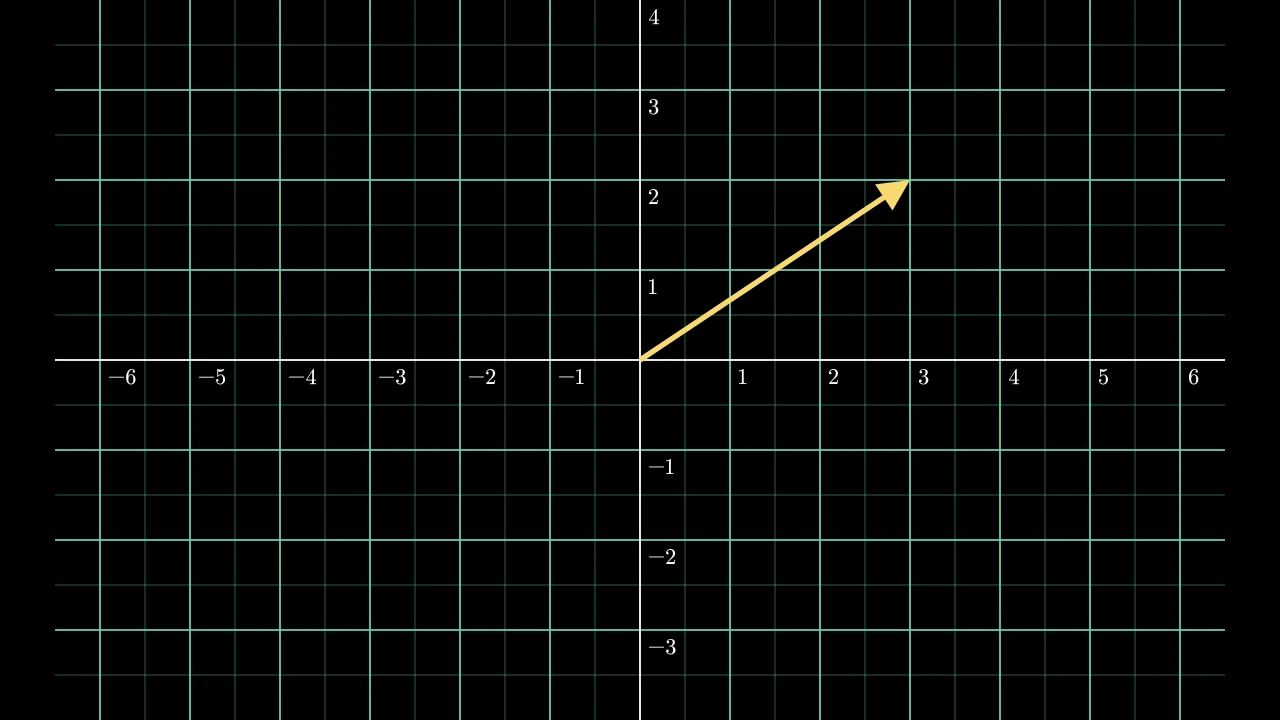
        arrow = m.Arrow(plane.c2p(0, 0), plane.c2p(3, 2), buff=0)
        self.add(plane.add_coordinates(), arrow.set_color(m.YELLOW))
A number plane: axes over a grid, a line at every step of each axis's range; filling the frame, with the scene's own coordinates, unless sized.
The grid's lines are blue (BLUE_D) and 2 wide; with a faded_line_ratio above
1, fainter lines divide each step further, half as wide and half as opaque unless
styled. The lines are drawn behind the axes, which are white, 2 wide, without
ticks or tips; their numbers, when written, are small (font size 24), below and to
the right of their points. By default the ranges span the frame, one scene unit
per unit, so the plane's coordinates are the scene's. Everything
Axes do, the plane does: converting coordinates, plotting,
labeling.
Background styles and the faded-line ratio are construction inputs; the plane retains its drawn grid rather than those setup attributes.
x_rangeThe x-axis's range,
[x_min, x_max, x_step]: a vertical line of the grid at every step. None for the frame's width when the plane is made, by 1.y_rangeThe y-axis's range,
[y_min, y_max, y_step]: a horizontal line of the grid at every step. None for the frame's height when the plane is made, by 1.x_lengthThe x-axis's length, in scene units; None for one scene unit per unit.
y_lengthThe y-axis's length, in scene units; None for one scene unit per unit.
background_line_styleStyle keywords for the grid's lines, over their defaults; None for none.
faded_line_styleStyle keywords for the fainter lines; None for the grid lines' style, at half their width and opacity.
faded_line_ratioHow many parts the fainter lines divide each step of the grid into: 1 for no fainter lines, 2 for one between each two grid lines.
It also takes
the Axes keywords.
Source
src/manimgx/mobjects/plotting.py
prepare_for_nonlinear_transform 
Code
import numpy as np

import manimgx as m


class PlanePrepareForNonlinearTransformExample(m.Scene):
    def construct(self) -> None:
        plane = m.ComplexPlane(x_range=[-3, 3, 0.5], y_range=[-2, 2, 0.5])
        plane.prepare_for_nonlinear_transform()
        self.add(plane)
        self.play(plane.animate.apply_complex_function(np.sin), run_time=3)
Split the plane's lines into many curves, so that a nonlinear function bends them smoothly.
A function applied to the plane (with
apply_function or
apply_complex_function) moves the
points of its lines, and a straight line is a single curve: moving its few
points would barely bend it. Each part of the plane with fewer curves than
num_inserted_curves is divided into that many.
num_inserted_curvesHow many curves each line has at least.
Source
src/manimgx/mobjects/plotting.py
ComplexPlane 
Code
import manimgx as m


class ComplexPlaneExample(m.Scene):
    def construct(self) -> None:
        plane = m.ComplexPlane(x_range=[-6.5, 6.5, 1]).add_coordinates()
        self.add(plane)
        for z, name in ((2 + 1j, "2+i"), (-3 - 2j, "-3-2i")):
            dot = m.Dot(plane.n2p(z), radius=0.12, color=m.YELLOW)
            self.add(dot, m.MathTex(name).next_to(dot, m.UR, buff=0.1))
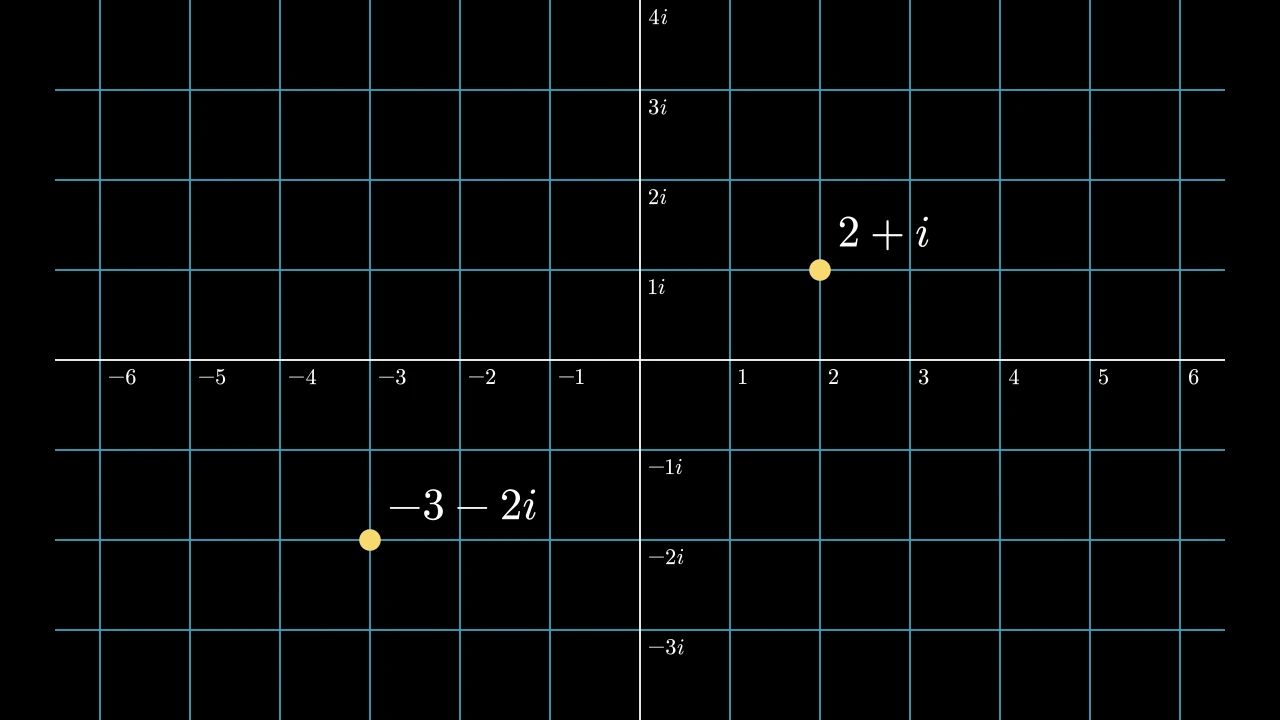
A complex plane: a NumberPlane whose points are complex numbers, x + yi at the point of coordinates (x, y).
number_to_point (n2p) and
point_to_number (p2n) convert between
numbers and points, and add_coordinates
writes the real numbers along the x-axis and the imaginary ones (with i) along
the y-axis. A function of complex numbers maps the plane with
apply_complex_function. It takes the
arguments of a NumberPlane, and does everything it does.
It also takes
the Axes keywords.
Source
src/manimgx/mobjects/plotting.py
number_to_point 
Convert a complex number to its point on the plane: x + yi to the point of coordinates (x, y).
n2p is its short name.
numberThe number; a real number is on the x-axis.
Returns The point, in scene coordinates.
Source
src/manimgx/mobjects/plotting.py
point_to_number 
Convert a point to the complex number at it: x + yi, for the point's coordinates (x, y).
p2n is its short name.
pointThe point, in scene coordinates.
Source
src/manimgx/mobjects/plotting.py
get_coordinate_labels 
Make labels for numbers of the plane: a real number by its point on the
x-axis, an imaginary one, with i, by its point on the y-axis.
A number is written as its larger part: its imaginary part, by the y-axis, if that is larger in size than its real part; its real part, by the x-axis, otherwise. Each is written as the axis numbers its ticks (see get_number_mobject).
*numbersThe numbers to label; none for the ticks of both axes, but 0.
It also takes
the DecimalNumber keywords.
Returns
A new group of the labels, kept as the plane's coordinate_labels; not
added to the plane.
Source
src/manimgx/mobjects/plotting.py
add_coordinates 
Label numbers of the plane, as get_coordinate_labels makes the labels, and add them to the plane.
*numbersThe numbers to label; none for the ticks of both axes, but 0.
It also takes
the DecimalNumber keywords.
Source
src/manimgx/mobjects/plotting.py
PolarPlane 
Code
import manimgx as m


class PolarPlaneExample(m.Scene):
    def construct(self) -> None:
        planes = m.VGroup(
            m.PolarPlane(radius_max=2, size=5.5, radius_step=0.5),
            m.PolarPlane(
                radius_max=2,
                size=5.5,
                azimuth_units="degrees",
                azimuth_step=12,
                faded_line_ratio=2,
            ),
        )
        for plane in planes:
            plane.add_coordinates()
        self.add(planes.arrange(buff=1.5))
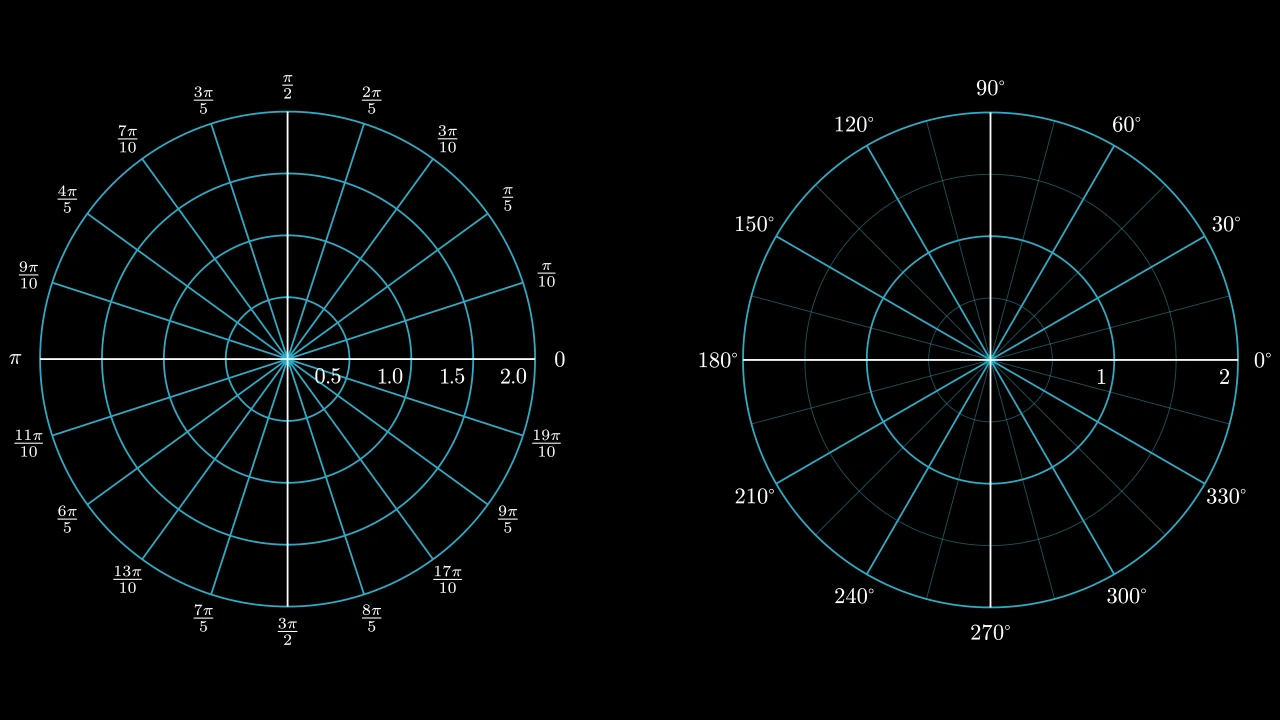
A polar plane: circles around its origin, one at every step of the radius, and lines out from it, a fraction of a turn apart; blue over white axes without ticks or tips, unless styled.
The plane is a disc of radius radius_max, centered on the scene's origin, its x-
and y-axes its radii. add_coordinates numbers
the radii and labels the lines' angles, in azimuth_units: fractions of π (3π/4),
of τ, degrees, gradians, or fractions of a turn.
polar_to_point (pr2pt) converts polar coordinates
to points, and plot_polar_graph plots curves
r = f(θ); everything Axes do, the plane does.
Background styles and the faded-line ratio are construction inputs; the plane retains its drawn grid rather than those setup attributes.
m.PolarPlane(radius_max=None, size=None, radius_step=1, azimuth_step=None, azimuth_units='PI radians', azimuth_compact_fraction=True, azimuth_offset=0, azimuth_direction='CCW', azimuth_label_buff=SMALL_BUFF, azimuth_label_font_size=24, radius_config=None, background_line_style=None, faded_line_style=None, faded_line_ratio=1, **kwargs)
radius_maxThe radius of the outer circle, in the plane's units; None for half the frame's short side when the plane is made (4).
sizeThe plane's width, its diameter, in scene units; None for one scene unit per unit.
radius_stepThe distance between two circles, in the plane's units.
azimuth_stepHow many lines divide the full turn: a line every turn divided by it; None for the units' own: 20 for radians, 36 for degrees, 40 for gradians, 1 for fractions of a turn.
azimuth_unitsHow the angles are labeled:
"PI radians"(fractions of π),"TAU radians"(fractions of τ),"degrees","gradians", or None (fractions of a turn, as decimals).azimuth_compact_fractionWhether a fraction of π or τ is written with the constant in its numerator (3π/4), rather than after it (¾ π).
azimuth_offsetThe angle of the line labeled 0, in radians, counterclockwise from the right: the lines and their labels turn with it.
azimuth_directionThe direction the angles increase in:
"CCW", counterclockwise, or"CW", clockwise.azimuth_label_buffThe gap between the outer circle and the angles' labels, in scene units.
azimuth_label_font_sizeThe font size of the angles' labels.
radius_configNumber line keywords for the radii's axes, over the plane's own (no ticks, no tips, 2 wide, font size 24, numbers below and to the left); None for none.
background_line_styleStyle keywords for the circles and lines, over their defaults: blue (
BLUE_D), 2 wide, opaque; None for none.faded_line_styleStyle keywords for the fainter circles and lines; None for the others' style, at half their width and opacity.
faded_line_ratioHow many parts fainter circles and lines divide each step into: 1 for none.
colorThe color of both fill and stroke (default white); None for the class's default.
fill_colorThe fill's color;
colorif not given. Several colors make a gradient alongsheen_direction.fill_opacityThe fill's opacity, from 0 to 1 (default 0: no fill).
stroke_colorThe stroke's color;
colorif not given. Several colors make a gradient.stroke_opacityThe stroke's opacity, from 0 to 1 (default 1).
stroke_widthThe stroke's width, in hundredths of a scene unit (default 4; 0: no stroke).
background_stroke_colorThe color of an outline drawn behind the fill (default black).
background_stroke_opacityThe outline's opacity, from 0 to 1 (default 1).
background_stroke_widthThe outline's width, in hundredths of a scene unit (default 0: none).
sheen_factorHow much the colors lighten toward
sheen_direction, from -1 to 1 (default 0); a negative factor darkens.sheen_directionThe direction the colors lighten toward (default
UL).joint_typeHow the stroke is joined where its path turns: round, beveled or mitered, as a two-dimensional scene draws it (see LineJointType; default AUTO: mitered).
cap_styleHow the stroke ends, at each end it shows (an open path's, a dash's): round, butt or square, as a two-dimensional scene draws it (see CapStyleType; default AUTO: butt).
shade_in_3dWhether a three-dimensional scene's light shades the mobject.
materialHow its surface reflects the scene's lights in a three-dimensional scene (see Material); None: Manim's shading (default).
nameA name for the mobject; its class's name if not given.
z_indexIts place in the drawing order: a higher index is drawn over a lower one (default 0).
targetThe state
MoveToTargetmoves the mobject to.
It also takes the style keywords.
Source
src/manimgx/mobjects/plotting.py
3538 3539 3540 3541 3542 3543 3544 3545 3546 3547 3548 3549 3550 3551 3552 3553 3554 3555 3556 3557 3558 3559 3560 3561 3562 3563 3564 3565 3566 3567 3568 3569 3570 3571 3572 3573 3574 3575 3576 3577 3578 3579 3580 3581 3582 3583 3584 3585 3586 3587 3588 3589 3590 3591 3592 3593 3594 3595 3596 3597 3598 3599 | |
get_coordinate_labels 
Number the plane's radii, and make labels for its angles.
The radii are numbered along the x-axis, right of the center; the numbers are
added to the axis. The angles' labels, in the plane's azimuth_units, go around
the outer circle, azimuth_label_buff beyond it: placed for a plane centered on
the scene's origin, as it is made.
r_valuesThe radii to number, in the plane's units; None for every circle's but 0.
a_valuesThe angles to label, as fractions of a turn (0.25 is a quarter turn); None for every line's.
Returns
A new group of the x-axis, now numbered, and a group of the angles' labels
(not added to the plane); kept as the plane's coordinate_labels.
Source
src/manimgx/mobjects/plotting.py
add_coordinates 
Number the plane's radii along its x-axis, and label its angles around it, as get_coordinate_labels makes them.
r_valuesThe radii to number, in the plane's units; None for every circle's but 0.
a_valuesThe angles to label, as fractions of a turn (0.25 is a quarter turn); None for every line's.
Source
src/manimgx/mobjects/plotting.py
get_radian_label 
Make the label of an angle in radians: a fraction of π, or of τ if the
plane's units are "TAU radians".
The fraction is the nearest with a denominator up to 100, written as the plane's
azimuth_compact_fraction says: 3π/4, or ¾ π.
numberThe angle, as a fraction of a turn (0.375 for 3π/4).
It also takes
the MathTex keywords and the style keywords.
Returns A new MathTex.
Source
src/manimgx/mobjects/plotting.py
Complex numbers and points
A point [x, y, 0] stands for the complex number x + yi.
complex_to_R3 
The point of a complex number: its real part as x, its imaginary part as y.
complex_numThe number.
Returns The point, with a z of 0.
Source
src/manimgx/drawing/geometry.py
R3_to_complex 
complex_func_to_R3_func 
A function of complex numbers as a function of points: a point (x, y, z) goes where the function sends x + iy, with a z of 0.
complex_funcThe function of complex numbers.
Returns The function of points.
Source
src/manimgx/drawing/geometry.py