Images and SVG
The film's code
import manimgx as m
import numpy as np


class ImagesAndSvgHero(m.Scene):
    def construct(self) -> None:
        x = np.linspace(-1, 1, 64)
        pixels = np.zeros((64, 64, 3), dtype=np.uint8)
        pixels[..., 0] = 255 * (x[None, :] + 1) / 2
        pixels[..., 2] = 255 * (x[:, None] + 1) / 2
        image = m.ImageMobject(pixels).scale_to_fit_height(4)
        image.set_resampling_algorithm(m.RESAMPLING_ALGORITHMS["nearest"])
        self.play(m.FadeIn(image))
        self.play(image.animate.rotate(m.PI / 8).scale(0.8))
        self.wait()
An image is a picture on a rectangle: read from a file (PNG, JPEG and the rest), or made from an array of pixels. It moves, scales, turns and fades as any mobject; its pixels stay its own. An SVG drawing is different: its shapes become paths, each a part to color, move and draw in, as a shape of manimgx's own.
ImageMobject 
Code
import numpy as np

import manimgx as m


class ImageMobjectExample(m.Scene):
    def construct(self) -> None:
        ramp = np.linspace(0, 255, 256)
        pixels = np.zeros((256, 256, 3), dtype=np.uint8)
        pixels[..., 0] = ramp  # red grows to the right
        pixels[..., 2] = ramp[:, np.newaxis]  # blue grows downward
        image = m.ImageMobject(pixels, scale_to_resolution=400)
        self.play(m.FadeIn(image))
Code
import numpy as np

import manimgx as m


class ImageMobjectResamplingExample(m.Scene):
    def construct(self) -> None:
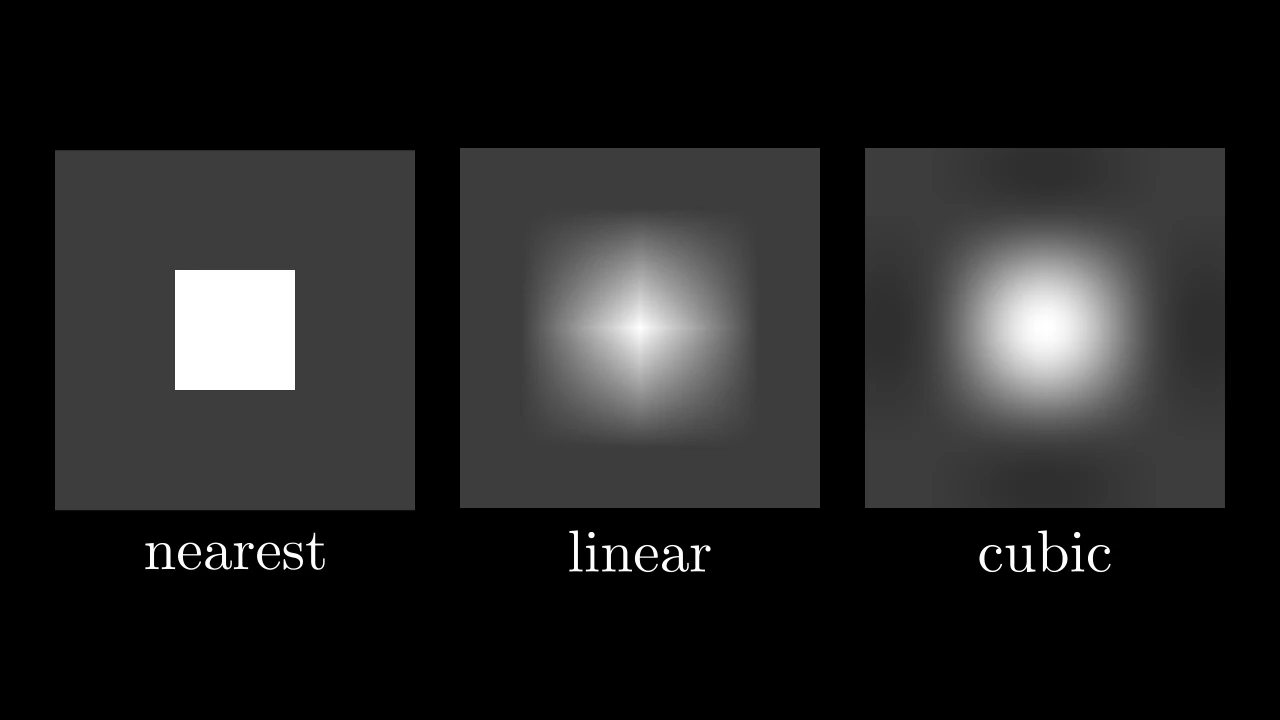
        pixels = np.full((3, 3), 60, dtype=np.uint8)
        pixels[1, 1] = 255  # one white pixel, amid gray ones
        images = m.Group()
        for name in ("nearest", "linear", "cubic"):
            image = m.ImageMobject(
                pixels,
                scale_to_resolution=6,
                resampling_algorithm=m.RESAMPLING_ALGORITHMS[name],
            )
            images.add(m.Group(image, m.Text(name).next_to(image, m.DOWN)))
        self.add(images.arrange(buff=0.5))
A picture: an image file or an array of pixels, on a rectangle as tall as its pixels make it.
An image scale_to_resolution pixels tall (1080 unless given) is as tall as the
frame's short side, 8 scene units, and any other in proportion. Shown larger than its
pixels, the picture is reconstructed from them by resampling_algorithm: by default
a smooth cubic through every pixel; linear blends neighboring pixels; nearest shows
each pixel as a square of its color. Shown smaller, it is sampled, not averaged. The
mobject's opacity multiplies its pixels' own.
filename_or_arrayThe picture: an image file's path, the file's contents (bytes), or an array of pixel values from 0 to 255: (h, w) gray, (h, w, 3) RGB or (h, w, 4) RGBA.
scale_to_resolutionHow many pixels tall an image as tall as the frame's short side is; 0 for an image 3 units tall, whatever its size.
invertWhether its colors are inverted (not its transparency).
image_modeThe mode, as the Pillow library names them, a file is read in: "RGBA", or "L" for gray.
resampling_algorithmHow the picture is reconstructed from its pixels, by the Pillow library's number: 0, nearest; 2, linear; 3, cubic (Keys' cubic convolution, Pillow's bicubic); RESAMPLING_ALGORITHMS gives them by name.
stroke_widthThe width of a border around the picture, in hundredths of a scene unit; 0 for none.
stroke_colorThe border's color.
background_stroke_colorThe color of an outline drawn behind the fill (default black).
background_stroke_opacityThe outline's opacity, from 0 to 1 (default 1).
background_stroke_widthThe outline's width, in hundredths of a scene unit (default 0: none).
sheen_factorHow much the colors lighten toward
sheen_direction, from -1 to 1 (default 0); a negative factor darkens.sheen_directionThe direction the colors lighten toward (default
UL).joint_typeHow the stroke is joined where its path turns: round, beveled or mitered, as a two-dimensional scene draws it (see LineJointType; default AUTO: mitered).
cap_styleHow the stroke ends, at each end it shows (an open path's, a dash's): round, butt or square, as a two-dimensional scene draws it (see CapStyleType; default AUTO: butt).
shade_in_3dWhether a three-dimensional scene's light shades the mobject.
materialHow its surface reflects the scene's lights in a three-dimensional scene (see Material); None: Manim's shading (default).
nameA name for the mobject; its class's name if not given.
z_indexIts place in the drawing order: a higher index is drawn over a lower one (default 0).
targetThe state
MoveToTargetmoves the mobject to.
It also takes the style keywords.
Source
src/manimgx/mobjects/images.py
pixel_array 
The current picture's (h, w, 4) RGBA pixels, from 0 to 255.
Pictures decoded or tinted by this image are read-only. Becoming another textured mesh adopts its texture, including whether it is writable.
Source
src/manimgx/mobjects/images.py
set_color 
Paint every pixel color, keeping its opacity: the picture becomes a
silhouette in that color.
alphaEvery pixel's opacity too, from 0 to 1; None keeps each one's.
familyAccepted for Manim compatibility; ignored: the picture alone is painted.
Source
src/manimgx/mobjects/images.py
set_opacity 
Set the picture's opacity, which multiplies its pixels' own.
opacityThe opacity, from 0 to 1.
familyWhether its whole family is set (a border too), or the picture alone.
alphaThe opacity, by the name Manim's images give it; given, it wins over
opacity.
Source
src/manimgx/mobjects/images.py
set_resampling_algorithm 
Set how the picture is reconstructed from its pixels where it is shown larger than they are.
resampling_algorithmThe filter, by the Pillow library's number: 0, nearest (each pixel a square of its color); 2, linear; 3, cubic (smooth, and through every pixel); RESAMPLING_ALGORITHMS gives them by name.
Source
src/manimgx/mobjects/images.py
m.RESAMPLING_ALGORITHMS 
The filters an image can be reconstructed with, by name, each with its number (see Resampling): "nearest" or "none", "bilinear" or "linear", "bicubic" or "cubic".
Resampling 
Resampling = Literal[0, 2, 3]
How an image is reconstructed from its pixels where it is drawn larger than they are, numbered as the Pillow library numbers its filters: 0, nearest (each pixel a square of its color); 2, linear; 3, cubic (Keys' cubic convolution with a = −½, Pillow's BICUBIC: smooth, and through every pixel).
SVGMobject 
A drawing read from an SVG file: each of its shapes a part, painted as the file paints it, 2 units tall unless sized.
Paths, lines, rectangles (rounded too), circles, ellipses, polygons and polylines
become parts, in the file's order, with the file's fills, strokes and transforms;
groups and <use> are followed, and text is skipped, with a warning. What the file
leaves unpainted takes SVG's defaults, a black fill and no stroke, unless
svg_default says otherwise. The file's groups are kept by their ids, in
id_to_vgroup_dict.
file_nameThe SVG file.
should_centerWhether the drawing is centered on the origin.
heightThe height to scale the drawing to, in scene units; None keeps the file's size, a scene unit per SVG unit.
widthThe width to scale the drawing to, in scene units, after
height(so it wins); None: asheightmakes it.colorAccepted for Manim compatibility; no effect: the parts keep the file's colors (paint over them with
fill_colorandstroke_color, or color what the file leaves unpainted throughsvg_default).opacityAccepted for Manim compatibility; ignored.
fill_colorA fill color for every part; None keeps the file's.
fill_opacityA fill opacity for every part, from 0 to 1; None keeps the file's.
stroke_colorA stroke color for every part; None keeps the file's.
stroke_opacityA stroke opacity for every part, from 0 to 1; None keeps the file's.
stroke_widthA stroke width for every part, in hundredths of a scene unit; None keeps the file's.
svg_defaultPaint keywords for what the file leaves unpainted; None for
{"stroke_width": 0}: no stroke.path_string_configSVG path keywords for every path.
use_svg_cacheWhether parsed drawings are kept and copied for the same SVG content and path settings. The file is always read for changes.
background_stroke_colorThe color of an outline drawn behind the fill (default black).
background_stroke_opacityThe outline's opacity, from 0 to 1 (default 1).
background_stroke_widthThe outline's width, in hundredths of a scene unit (default 0: none).
sheen_factorHow much the colors lighten toward
sheen_direction, from -1 to 1 (default 0); a negative factor darkens.sheen_directionThe direction the colors lighten toward (default
UL).joint_typeHow the stroke is joined where its path turns: round, beveled or mitered, as a two-dimensional scene draws it (see LineJointType; default AUTO: mitered).
cap_styleHow the stroke ends, at each end it shows (an open path's, a dash's): round, butt or square, as a two-dimensional scene draws it (see CapStyleType; default AUTO: butt).
shade_in_3dWhether a three-dimensional scene's light shades the mobject.
materialHow its surface reflects the scene's lights in a three-dimensional scene (see Material); None: Manim's shading (default).
nameA name for the mobject; its class's name if not given.
z_indexIts place in the drawing order: a higher index is drawn over a lower one (default 0).
targetThe state
MoveToTargetmoves the mobject to.

It also takes the style keywords.
Source
src/manimgx/mobjects/svg.py
id_to_vgroup_dict 
The drawing's groups, by their ids: each <g> element's id names a group of
the shapes inside it, and "root" all of them; an element without an id is named
"numbered_group_" and a number.
PathOptions 

How an SVG path becomes curves: an SVGMobject's
path_string_config, the keywords of each path it reads.
Beyond these, they take the style keywords.
long_linesAccepted for Manim compatibility; ignored (default False).
should_subdivide_sharp_curvesAccepted for Manim compatibility; ignored (default False).
should_remove_null_curvesAccepted for Manim compatibility; ignored (default False).
colorThe color of both fill and stroke (default white); None for the class's default.
fill_colorThe fill's color;
colorif not given. Several colors make a gradient alongsheen_direction.fill_opacityThe fill's opacity, from 0 to 1 (default 0: no fill).
stroke_colorThe stroke's color;
colorif not given. Several colors make a gradient.stroke_opacityThe stroke's opacity, from 0 to 1 (default 1).
stroke_widthThe stroke's width, in hundredths of a scene unit (default 4; 0: no stroke).
background_stroke_colorThe color of an outline drawn behind the fill (default black).
background_stroke_opacityThe outline's opacity, from 0 to 1 (default 1).
background_stroke_widthThe outline's width, in hundredths of a scene unit (default 0: none).
sheen_factorHow much the colors lighten toward
sheen_direction, from -1 to 1 (default 0); a negative factor darkens.sheen_directionThe direction the colors lighten toward (default
UL).joint_typeHow the stroke is joined where its path turns: round, beveled or mitered, as a two-dimensional scene draws it (see LineJointType; default AUTO: mitered).
cap_styleHow the stroke ends, at each end it shows (an open path's, a dash's): round, butt or square, as a two-dimensional scene draws it (see CapStyleType; default AUTO: butt).
shade_in_3dWhether a three-dimensional scene's light shades the mobject.
materialHow its surface reflects the scene's lights in a three-dimensional scene (see Material); None: Manim's shading (default).
nameA name for the mobject; its class's name if not given.
z_indexIts place in the drawing order: a higher index is drawn over a lower one (default 0).
targetThe state
MoveToTargetmoves the mobject to.


