Skip to content

Style

The film's code
import manimgx as m


class StyleHero(m.Scene):
    def construct(self) -> None:
        stroked = m.Circle(color=m.BLUE, stroke_width=8)
        filled = m.Circle(color=m.GREEN, fill_opacity=0.6)
        gradient = m.Circle(fill_opacity=1, stroke_width=0).set_color(
            [m.BLUE, m.YELLOW]
        )
        faint = m.Circle(color=m.RED, fill_opacity=1).fade(0.7)
        circles = m.VGroup(stroked, filled, gradient, faint).arrange(buff=0.8)
        names = m.VGroup(
            m.Text("stroke", font="monospace", font_size=24),
            m.Text("fill", font="monospace", font_size=24),
            m.Text("gradient", font="monospace", font_size=24),
            m.Text("fade", font="monospace", font_size=24),
        )
        for circle, name in zip(circles, names, strict=True):
            name.next_to(circle, m.DOWN, buff=0.5)
        self.play(
            m.LaggedStart(*[m.Create(circle) for circle in circles], lag_ratio=0.2)
        )
        self.play(m.FadeIn(names))
        self.wait()

A shape has a stroke, its outline, and a fill, its inside. Each has a color and an opacity, from 0 (unseen) to 1 (solid), and the stroke has a width, in hundredths of a unit. Most shapes are made with a stroke and no fill: give fill_opacity to fill them.

Every mobject takes the same style keywords when you make it, and each kind sets its own defaults (a circle is red, a dot is filled). The methods below change the style later, for the mobject and all its parts.

Style

The style keywords: one vocabulary for every mobject and every group.

Every mobject takes these keywords, and each class sets its own defaults for them (a Circle is red, a Dot is filled). A color is anything ManimColor parses: a named color such as BLUE, a hex string, or RGB values.

color

The color of both fill and stroke (default white); None for the class's default.

fill_color

The fill's color; color if not given. Several colors make a gradient along sheen_direction.

fill_opacity

The fill's opacity, from 0 to 1 (default 0: no fill).

stroke_color

The stroke's color; color if not given. Several colors make a gradient.

stroke_opacity

The stroke's opacity, from 0 to 1 (default 1).

stroke_width

The stroke's width, in hundredths of a scene unit (default 4; 0: no stroke).

background_stroke_color

The color of an outline drawn behind the fill (default black).

background_stroke_opacity

The outline's opacity, from 0 to 1 (default 1).

background_stroke_width

The outline's width, in hundredths of a scene unit (default 0: none).

sheen_factor

How much the colors lighten toward sheen_direction, from -1 to 1 (default 0); a negative factor darkens.

sheen_direction

The direction the colors lighten toward (default UL).

joint_type

How the stroke is joined where its path turns: round, beveled or mitered, as a two-dimensional scene draws it (see LineJointType; default AUTO: mitered).

cap_style

How the stroke ends, at each end it shows (an open path's, a dash's): round, butt or square, as a two-dimensional scene draws it (see CapStyleType; default AUTO: butt).

shade_in_3d

Whether a three-dimensional scene's light shades the mobject.

material

How its surface reflects the scene's lights in a three-dimensional scene (see Material); None: Manim's shading (default).

name

A name for the mobject; its class's name if not given.

z_index

Its place in the drawing order: a higher index is drawn over a lower one (default 0).

target

The state MoveToTarget moves the mobject to.

color

The color of both fill and stroke (default white); None for the class's default.

fill_color

The fill's color; color if not given. Several colors make a gradient along sheen_direction.

fill_opacity

The fill's opacity, from 0 to 1 (default 0: no fill).

stroke_color

The stroke's color; color if not given. Several colors make a gradient.

stroke_opacity

The stroke's opacity, from 0 to 1 (default 1).

stroke_width

The stroke's width, in hundredths of a scene unit (default 4; 0: no stroke).

background_stroke_color

The color of an outline drawn behind the fill (default black).

background_stroke_opacity

The outline's opacity, from 0 to 1 (default 1).

background_stroke_width

The outline's width, in hundredths of a scene unit (default 0: none).

sheen_factor

How much the colors lighten toward sheen_direction, from -1 to 1 (default 0); a negative factor darkens.

sheen_direction

The direction the colors lighten toward (default UL).

joint_type

How the stroke is joined where its path turns: round, beveled or mitered, as a two-dimensional scene draws it (see LineJointType; default AUTO: mitered).

cap_style

How the stroke ends, at each end it shows (an open path's, a dash's): round, butt or square, as a two-dimensional scene draws it (see CapStyleType; default AUTO: butt).

shade_in_3d

Whether a three-dimensional scene's light shades the mobject.

material

How its surface reflects the scene's lights in a three-dimensional scene (see Material); None: Manim's shading (default).

z_index

Its place in the drawing order: a higher index is drawn over a lower one (default 0).

name

A name for the mobject; its class's name if not given.

target

The state MoveToTarget moves the mobject to.

Color and opacity

set_color

Code
import manimgx as m


class MobjectSetColorExample(m.Scene):
    def construct(self) -> None:
        circle = m.Circle(radius=1.5)
        square = m.Square(side_length=3, fill_opacity=0.5)
        shapes = m.VGroup(circle, square).arrange(buff=2)
        self.add(shapes)
        self.play(shapes.animate.set_color(m.YELLOW))
        self.play(square.animate.set_color([m.BLUE, m.GREEN]))

Color the mobject: its fill and its stroke, which keep their opacities (an unfilled shape stays unfilled).

mobject.set_color(color, family=True)
color

The color; several make a gradient across the mobject, from the first to the last toward its sheen direction (UL unless set).

family

Whether its whole family is colored, or the mobject alone.

Source

src/manimgx/mobject.py

def set_color(
    self,
    color: ParsableManimColor | Iterable[ParsableManimColor],
    family: bool = True,
) -> Self:
    """Color the mobject: its fill and its stroke, which keep their opacities (an
    unfilled shape stays unfilled).

    Args:
        color: The color; several make a gradient across the mobject, from the first
            to the last toward its sheen direction (UL unless set).
        family: Whether its whole family is colored, or the mobject alone.

    Examples:
        ```python
        import manimgx as m


        class MobjectSetColorExample(m.Scene):
            def construct(self) -> None:
                circle = m.Circle(radius=1.5)
                square = m.Square(side_length=3, fill_opacity=0.5)
                shapes = m.VGroup(circle, square).arrange(buff=2)
                self.add(shapes)
                self.play(shapes.animate.set_color(m.YELLOW))
                self.play(square.animate.set_color([m.BLUE, m.GREEN]))
        ```
    """
    self.set_fill(color, family=family)
    return self.set_stroke(color, family=family)

set_fill

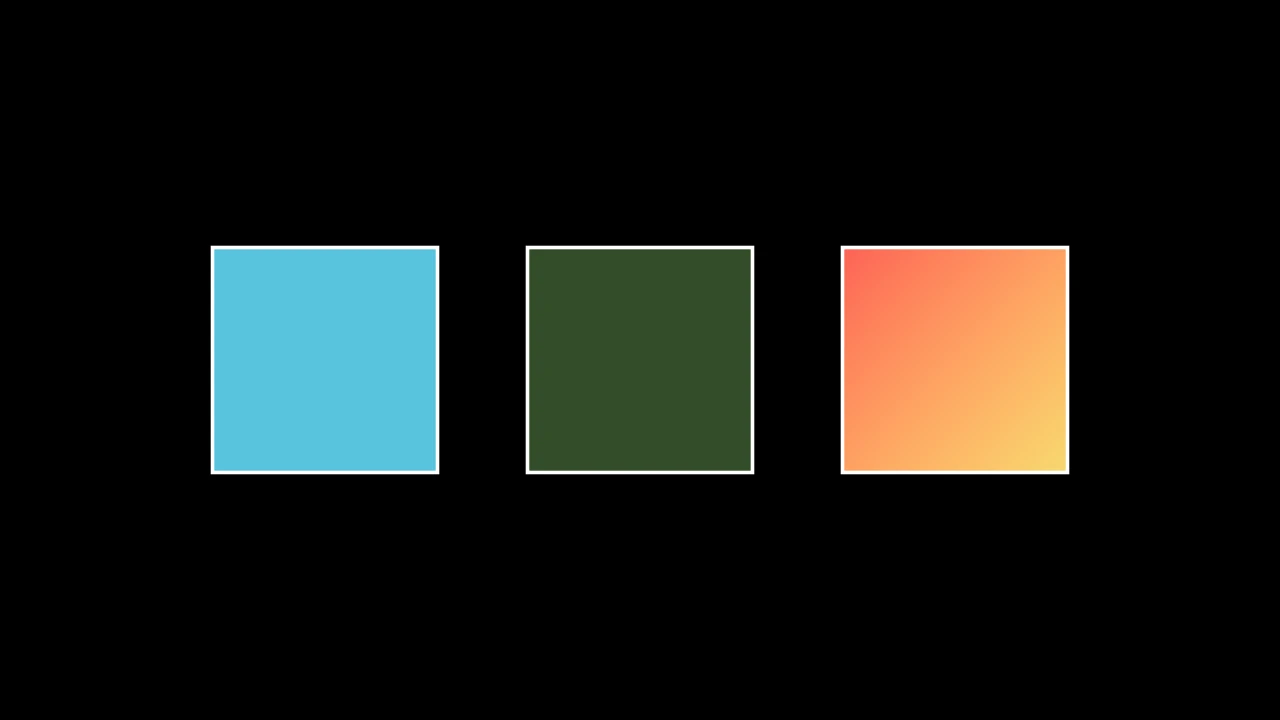
MobjectSetFillExample
Code
import manimgx as m


class MobjectSetFillExample(m.Scene):
    def construct(self) -> None:
        a, b, c = (m.Square(side_length=2.5) for _ in range(3))
        m.VGroup(a, b, c).arrange(buff=1)
        a.set_fill(m.BLUE, opacity=1)
        b.set_fill(m.GREEN, opacity=0.4)
        c.set_fill([m.YELLOW, m.RED], opacity=1)
        self.add(a, b, c)

Set the mobject's fill: its color, its opacity, or both.

mobject.set_fill(color=None, opacity=None, family=True)
color

The color; several make a gradient across the mobject, from the first to the last toward its sheen direction (UL unless set). None keeps the present one.

opacity

The opacity, from 0 (no fill) to 1 (opaque); several make a gradient of opacities. None keeps the present one.

family

Whether its whole family is filled, or the mobject alone.

Source

src/manimgx/mobject.py

def set_fill(
    self,
    color: ParsableManimColor | Iterable[ParsableManimColor] | None = None,
    opacity: float | Iterable[float] | None = None,
    family: bool = True,
) -> Self:
    """Set the mobject's fill: its color, its opacity, or both.

    Args:
        color: The color; several make a gradient across the mobject, from the first
            to the last toward its sheen direction (UL unless set). None keeps the
            present one.
        opacity: The opacity, from 0 (no fill) to 1 (opaque); several make a
            gradient of opacities. None keeps the present one.
        family: Whether its whole family is filled, or the mobject alone.

    Examples:
        ```python
        import manimgx as m


        class MobjectSetFillExample(m.Scene):
            def construct(self) -> None:
                a, b, c = (m.Square(side_length=2.5) for _ in range(3))
                m.VGroup(a, b, c).arrange(buff=1)
                a.set_fill(m.BLUE, opacity=1)
                b.set_fill(m.GREEN, opacity=0.4)
                c.set_fill([m.YELLOW, m.RED], opacity=1)
                self.add(a, b, c)
        ```
    """
    for mob in reversed(self._each(family)):
        mob.paint = mob.paint.updated("fill", color, opacity)
    return self

set_stroke

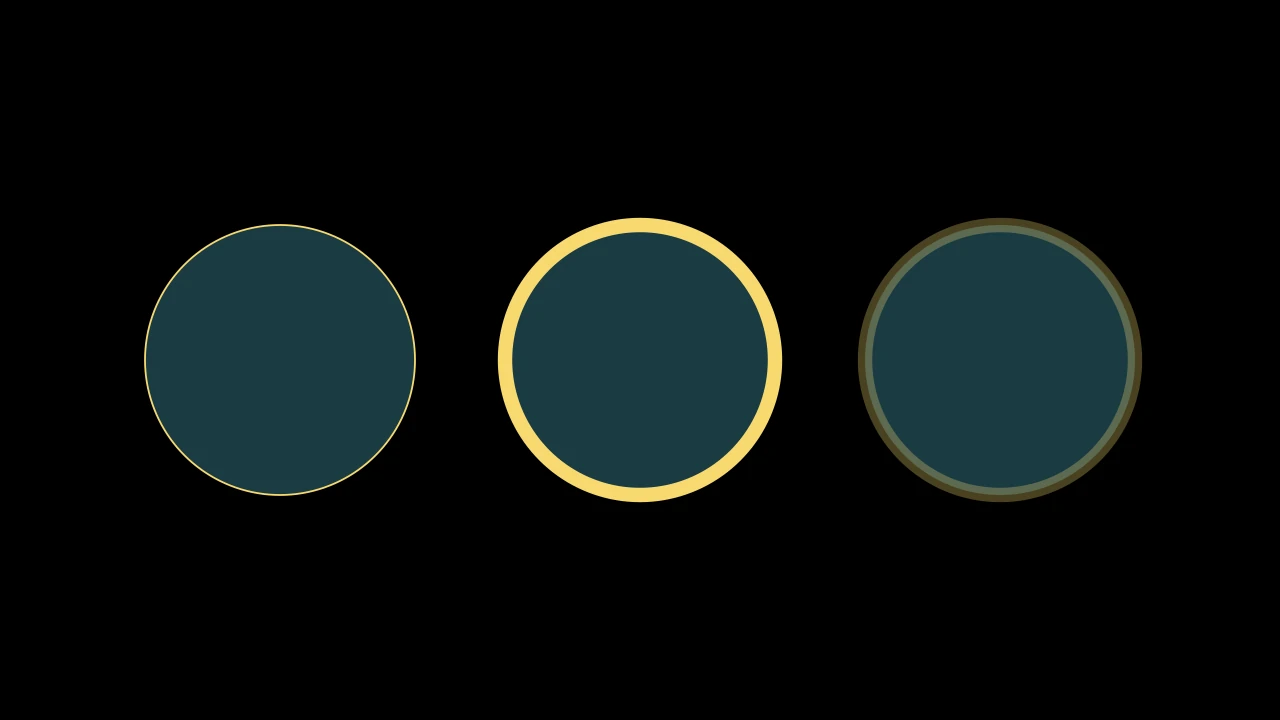
MobjectSetStrokeExample
Code
import manimgx as m


class MobjectSetStrokeExample(m.Scene):
    def construct(self) -> None:
        a = m.Circle(radius=1.5, color=m.BLUE, fill_opacity=0.3)
        b, c = a.copy(), a.copy()
        m.VGroup(a, b, c).arrange(buff=1)
        a.set_stroke(m.YELLOW, width=2)
        b.set_stroke(m.YELLOW, width=16)
        c.set_stroke(m.YELLOW, width=16, opacity=0.3)
        self.add(a, b, c)

Set the mobject's stroke, its outline: its color, width and opacity, any of them.

mobject.set_stroke(color=None, width=None, opacity=None, background=False, family=True)
color

The color; several make a gradient, from the first to the last toward the mobject's sheen direction (UL unless set). None keeps the present one.

width

The width, in hundredths of a scene unit (4 unless styled; 0: no stroke); None keeps the present one.

opacity

The opacity, from 0 to 1; several make a gradient of opacities. None keeps the present one.

background

Whether to set the background stroke instead: an outline drawn behind the fill.

family

Whether its whole family is stroked, or the mobject alone.

Source

src/manimgx/mobject.py

def set_stroke(
    self,
    color: ParsableManimColor | Iterable[ParsableManimColor] | None = None,
    width: float | None = None,
    opacity: float | Iterable[float] | None = None,
    background: bool = False,
    family: bool = True,
) -> Self:
    """Set the mobject's stroke, its outline: its color, width and opacity, any of
    them.

    Args:
        color: The color; several make a gradient, from the first to the last toward
            the mobject's sheen direction (UL unless set). None keeps the present
            one.
        width: The width, in hundredths of a scene unit (4 unless styled; 0: no
            stroke); None keeps the present one.
        opacity: The opacity, from 0 to 1; several make a gradient of opacities.
            None keeps the present one.
        background: Whether to set the background stroke instead: an outline drawn
            behind the fill.
        family: Whether its whole family is stroked, or the mobject alone.

    Examples:
        ```python
        import manimgx as m


        class MobjectSetStrokeExample(m.Scene):
            def construct(self) -> None:
                a = m.Circle(radius=1.5, color=m.BLUE, fill_opacity=0.3)
                b, c = a.copy(), a.copy()
                m.VGroup(a, b, c).arrange(buff=1)
                a.set_stroke(m.YELLOW, width=2)
                b.set_stroke(m.YELLOW, width=16)
                c.set_stroke(m.YELLOW, width=16, opacity=0.3)
                self.add(a, b, c)
        ```
    """
    channel = "background" if background else "stroke"
    for mob in reversed(self._each(family)):
        paint = mob.paint.updated(channel, color, opacity)
        if width is not None:
            paint = (
                paint.but(background_width=width)
                if background
                else paint.but(stroke_width=width)
            )
        mob.paint = paint
    return self

set_opacity

Code
import manimgx as m


class MobjectSetOpacityExample(m.Scene):
    def construct(self) -> None:
        square = m.Square(side_length=3, color=m.BLUE, fill_opacity=1)
        circle = m.Circle(radius=1.5, color=m.YELLOW, fill_opacity=1)
        square.shift(m.LEFT)
        circle.shift(m.RIGHT)
        self.add(square, circle)
        self.play(circle.animate.set_opacity(0.3))

Set the opacity of the mobject's fill, stroke and background stroke alike — so an unfilled shape gets a fill of that opacity.

mobject.set_opacity(opacity, family=True)
opacity

The opacity, from 0 (invisible) to 1 (opaque).

family

Whether its whole family gets it, or the mobject alone.

Source

src/manimgx/mobject.py

def set_opacity(self, opacity: float, family: bool = True) -> Self:
    """Set the opacity of the mobject's fill, stroke and background stroke alike —
    so an unfilled shape gets a fill of that opacity.

    Args:
        opacity: The opacity, from 0 (invisible) to 1 (opaque).
        family: Whether its whole family gets it, or the mobject alone.

    Examples:
        ```python
        import manimgx as m


        class MobjectSetOpacityExample(m.Scene):
            def construct(self) -> None:
                square = m.Square(side_length=3, color=m.BLUE, fill_opacity=1)
                circle = m.Circle(radius=1.5, color=m.YELLOW, fill_opacity=1)
                square.shift(m.LEFT)
                circle.shift(m.RIGHT)
                self.add(square, circle)
                self.play(circle.animate.set_opacity(0.3))
        ```
    """
    self.set_fill(opacity=opacity, family=family)
    self.set_stroke(opacity=opacity, family=family)
    return self.set_stroke(opacity=opacity, background=True, family=family)

fade

Make the mobject fainter: its fill's, stroke's and background stroke's opacities each times 1 − darkness.

mobject.fade(darkness=0.5, family=True)
darkness

How much fainter, from 0 (as it is) to 1 (invisible).

family

Whether its whole family fades, or the mobject alone.

Source

src/manimgx/mobject.py

def fade(self, darkness: float = 0.5, family: bool = True) -> Self:
    """Make the mobject fainter: its fill's, stroke's and background stroke's
    opacities each times 1 − `darkness`.

    Args:
        darkness: How much fainter, from 0 (as it is) to 1 (invisible).
        family: Whether its whole family fades, or the mobject alone.
    """
    factor = 1.0 - darkness
    if factor == 1.0:
        return self
    for mob in self._each(family):
        p, faded = mob.paint, {}
        for name in ("fill", "stroke", "background"):  # every row: stops, points
            rows = getattr(p, name)
            if len(rows):
                faded[name] = rows * [1.0, 1.0, 1.0, factor]
        mob.paint = p.but(**faded)
    return self

fade_to

Blend the mobject's color toward another: each drawn member's own color, mixed alpha of the way to color.

mobject.fade_to(color, alpha, family=True)
color

The color to blend toward.

alpha

How far, from 0 (as it is) to 1 (color).

family

Whether its whole family blends, or the mobject alone.

Source

src/manimgx/mobject.py

def fade_to(
    self, color: ParsableManimColor, alpha: float, family: bool = True
) -> Self:
    """Blend the mobject's color toward another: each drawn member's own color,
    mixed `alpha` of the way to `color`.

    Args:
        color: The color to blend toward.
        alpha: How far, from 0 (as it is) to 1 (`color`).
        family: Whether its whole family blends, or the mobject alone.
    """
    if self.has_points():
        self.set_color(
            interpolate_color(self.get_color(), ManimColor(color), alpha),
            family=False,
        )
    if family:
        for sub in self.submobjects:
            sub.fade_to(color, alpha)
    return self

set_style

Set any of the mobject's style at once: what is None stays as it is.

See set_fill, set_stroke and set_sheen; the sheen changes only with a nonzero sheen_factor.

mobject.set_style(fill_color=None, fill_opacity=None, stroke_color=None, stroke_width=None, stroke_opacity=None, background_stroke_color=None, background_stroke_width=None, background_stroke_opacity=None, sheen_factor=None, sheen_direction=None, family=True)
fill_color

The fill's color; several make a gradient.

fill_opacity

The fill's opacity, from 0 to 1.

stroke_color

The stroke's color; several make a gradient.

stroke_width

The stroke's width, in hundredths of a scene unit.

stroke_opacity

The stroke's opacity, from 0 to 1.

background_stroke_color

The color of the outline drawn behind the fill.

background_stroke_width

That outline's width, in hundredths of a scene unit.

background_stroke_opacity

That outline's opacity, from 0 to 1.

sheen_factor

How much the colors lighten toward sheen_direction, from -1 to 1; None or 0 leaves the sheen as it is.

sheen_direction

The direction they lighten toward, set with sheen_factor.

family

Whether its whole family is styled, or the mobject alone.

Source

src/manimgx/mobject.py

def set_style(
    self,
    fill_color: ParsableManimColor | Iterable[ParsableManimColor] | None = None,
    fill_opacity: float | Iterable[float] | None = None,
    stroke_color: ParsableManimColor | Iterable[ParsableManimColor] | None = None,
    stroke_width: float | None = None,
    stroke_opacity: float | Iterable[float] | None = None,
    background_stroke_color: (
        ParsableManimColor | Iterable[ParsableManimColor] | None
    ) = None,
    background_stroke_width: float | None = None,
    background_stroke_opacity: float | Iterable[float] | None = None,
    sheen_factor: float | None = None,
    sheen_direction: Vector3DLike | None = None,
    family: bool = True,
) -> Self:
    """Set any of the mobject's style at once: what is None stays as it is.

    See [set_fill][manimgx.Mobject.set_fill],
    [set_stroke][manimgx.Mobject.set_stroke] and
    [set_sheen][manimgx.Mobject.set_sheen]; the sheen changes only with a nonzero
    `sheen_factor`.

    Args:
        fill_color: The fill's color; several make a gradient.
        fill_opacity: The fill's opacity, from 0 to 1.
        stroke_color: The stroke's color; several make a gradient.
        stroke_width: The stroke's width, in hundredths of a scene unit.
        stroke_opacity: The stroke's opacity, from 0 to 1.
        background_stroke_color: The color of the outline drawn behind the fill.
        background_stroke_width: That outline's width, in hundredths of a scene
            unit.
        background_stroke_opacity: That outline's opacity, from 0 to 1.
        sheen_factor: How much the colors lighten toward `sheen_direction`, from -1
            to 1; None or 0 leaves the sheen as it is.
        sheen_direction: The direction they lighten toward, set with `sheen_factor`.
        family: Whether its whole family is styled, or the mobject alone.
    """
    self.set_fill(fill_color, fill_opacity, family)
    self.set_stroke(stroke_color, stroke_width, stroke_opacity, family=family)
    self.set_stroke(
        background_stroke_color,
        background_stroke_width,
        background_stroke_opacity,
        background=True,
        family=family,
    )
    if sheen_factor:
        self.set_sheen(sheen_factor, sheen_direction, family)
    return self

match_style

Give the mobject another's style: its colors, opacities, stroke widths, sheen and the rest of its look, all but how much of it a reveal shows.

mobject.match_style(mobject, family=True)
mobject

The mobject whose style to take.

family

Whether the submobjects take the style of the other's too, in order: paired evenly when their numbers differ, and each taking the other mobject's own if it has none.

Source

src/manimgx/mobject.py

def match_style(self, mobject: "Mobject", family: bool = True) -> Self:
    """Give the mobject another's style: its colors, opacities, stroke widths, sheen
    and the rest of its look, all but how much of it a reveal shows.

    Args:
        mobject: The mobject whose style to take.
        family: Whether the submobjects take the style of the other's too, in order:
            paired evenly when their numbers differ, and each taking the other
            mobject's own if it has none.
    """
    self.paint = mobject.paint.but(trim=self.paint.trim)
    if family:
        subs1, subs2 = self.submobjects, mobject.submobjects
        if subs1:
            subs2 = subs2 or [mobject]
            n = max(len(subs1), len(subs2))
            for i in range(n):
                subs1[i * len(subs1) // n].match_style(subs2[i * len(subs2) // n])
    return self

match_color

Color the mobject and its whole family with another's color.

mobject.match_color(mobject)
mobject

The mobject whose color to take.

Source

src/manimgx/mobject.py

def match_color(self, mobject: "Mobject") -> Self:
    """Color the mobject and its whole family with another's
    [color][manimgx.Mobject.color].

    Args:
        mobject: The mobject whose color to take.
    """
    return self.set_color(mobject.get_color())

color

The mobject's own color: its fill's, or its stroke's if it has no fill. Set it to color the whole family (see set_color).

mobject.color
Source

src/manimgx/mobject.py

def color(self) -> ManimColor:
    """The mobject's own color: its fill's, or its stroke's if it has no fill. Set
    it to color the whole family (see [set_color][manimgx.Mobject.set_color])."""
    return self.get_color()

fill_color

The mobject's own fill color (for a gradient, its first). Set it to fill the whole family with a color (see set_fill).

fill_opacity

The opacity of the mobject's own fill, from 0 to 1. Set it to set the whole family's.

stroke_color

The mobject's own stroke color (for a gradient, its first). Set it to stroke the whole family with a color (see set_stroke).

stroke_opacity

The opacity of the mobject's own stroke, from 0 to 1. Set it to set the whole family's.

stroke_width

The width of the mobject's own stroke, in hundredths of a scene unit. Set it to set the whole family's.

Over a source's colors

Text and SVG drawings come with colors of their own. These keywords paint over them.

Repaint

Paint over the paint a mobject's source gives its parts.

An SVG file and typeset text color their own parts; each of these keywords, when given, paints over them, and when absent (or None) keeps the source's.

color

The color of both fill and stroke.

opacity

The opacity of both fill and stroke, from 0 to 1.

fill_color

The fill's color.

fill_opacity

The fill's opacity, from 0 to 1.

stroke_color

The stroke's color.

stroke_opacity

The stroke's opacity, from 0 to 1.

stroke_width

The stroke's width, in hundredths of a scene unit.

color

The color of both fill and stroke.

opacity

The opacity of both fill and stroke, from 0 to 1.

fill_color

The fill's color.

fill_opacity

The fill's opacity, from 0 to 1.

stroke_color

The stroke's color.

stroke_opacity

The stroke's opacity, from 0 to 1.

stroke_width

The stroke's width, in hundredths of a scene unit.

Gradients and sheen

A list of colors, given where one color goes, makes a gradient: set_color([m.BLUE, m.YELLOW]) blends one into the other across the mobject.

set_color_by_gradient

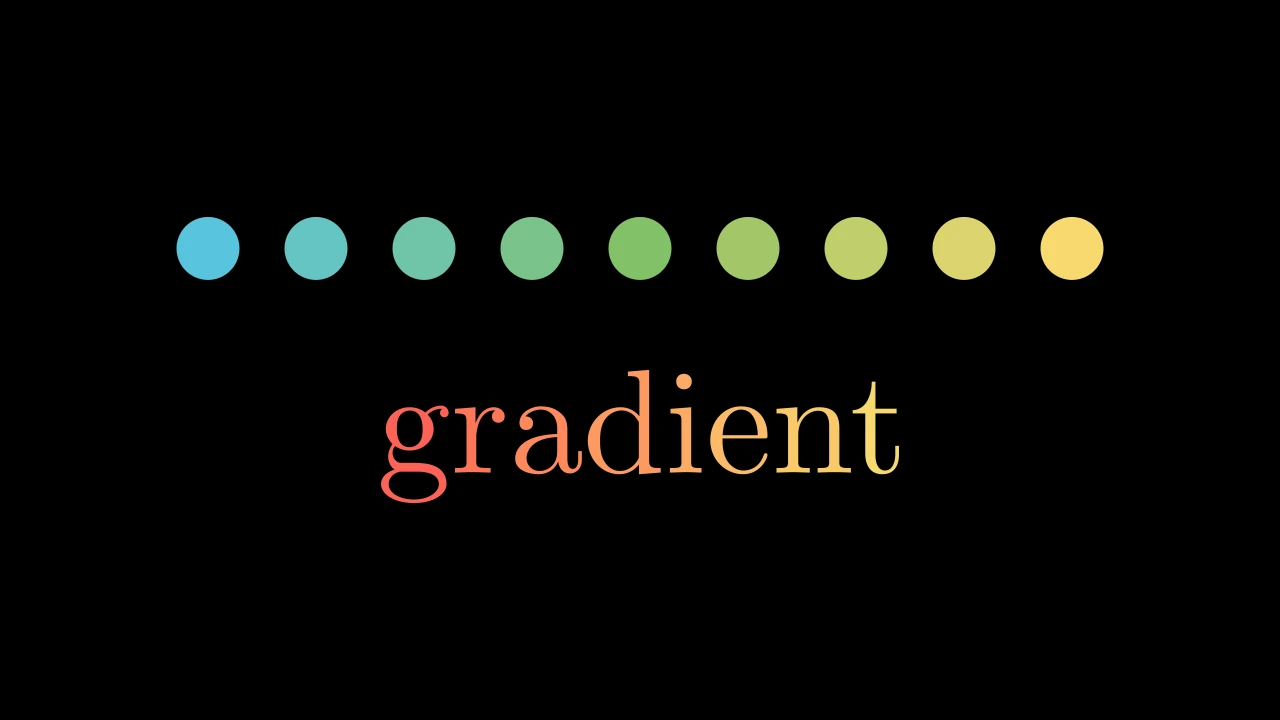
MobjectSetColorByGradientExample
Code
import manimgx as m


class MobjectSetColorByGradientExample(m.Scene):
    def construct(self) -> None:
        dots = m.VGroup(*(m.Dot(radius=0.35) for _ in range(9)))
        dots.arrange(buff=0.5)
        dots.set_color_by_gradient(m.BLUE, m.GREEN, m.YELLOW)
        word = m.Text("gradient", font_size=120)
        word.set_color_by_gradient(m.RED, m.YELLOW)
        self.add(m.VGroup(dots, word).arrange(m.DOWN, buff=1))

Color the drawn members of the family along a gradient: in family order, each one solid, from the first color to the last.

One color colors them all; none raises an exception.

mobject.set_color_by_gradient(*colors)
*colors

The colors the gradient runs through, evenly.

Source

src/manimgx/mobject.py

def set_color_by_gradient(self, *colors: ParsableManimColor) -> Self:
    """Color the drawn members of the family along a gradient: in family order, each
    one solid, from the first color to the last.

    One color colors them all; none raises an exception.

    Args:
        *colors: The colors the gradient runs through, evenly.

    Examples:
        ```python
        import manimgx as m


        class MobjectSetColorByGradientExample(m.Scene):
            def construct(self) -> None:
                dots = m.VGroup(*(m.Dot(radius=0.35) for _ in range(9)))
                dots.arrange(buff=0.5)
                dots.set_color_by_gradient(m.BLUE, m.GREEN, m.YELLOW)
                word = m.Text("gradient", font_size=120)
                word.set_color_by_gradient(m.RED, m.YELLOW)
                self.add(m.VGroup(dots, word).arrange(m.DOWN, buff=1))
        ```
    """
    return self.set_submobject_colors_by_gradient(*colors)

set_colors_by_radial_gradient

Color the mobject by distance from a point: inner_color there, blending to outer_color at radius and beyond.

Each drawn member of the family is one solid color, by its center's distance.

mobject.set_colors_by_radial_gradient(center=None, radius=1, inner_color=WHITE, outer_color='#000000')
center

The point; None for the mobject's center.

radius

The distance at which the color is outer_color, in scene units.

inner_color

The color at the point.

outer_color

The color at radius and beyond.

Source

src/manimgx/mobject.py

def set_colors_by_radial_gradient(
    self,
    center: Point3DLike | None = None,
    radius: float = 1,
    inner_color: ParsableManimColor = WHITE,
    outer_color: ParsableManimColor = "#000000",
) -> Self:
    """Color the mobject by distance from a point: `inner_color` there, blending to
    `outer_color` at `radius` and beyond.

    Each drawn member of the family is one solid color, by its center's distance.

    Args:
        center: The point; None for the mobject's center.
        radius: The distance at which the color is `outer_color`, in scene units.
        inner_color: The color at the point.
        outer_color: The color at `radius` and beyond.
    """
    c = self.get_center() if center is None else np.asarray(center)
    for mob in self.family_members_with_points():
        t = min(float(np.linalg.norm(mob.get_center() - c)) / radius, 1)
        mob.set_color(
            interpolate_color(ManimColor(inner_color), ManimColor(outer_color), t),
            family=False,
        )
    return self

set_submobject_colors_by_radial_gradient

Color the drawn members of the family by how far their centers are from a point: inner_color there, blending to outer_color at radius and beyond; each member one solid color.

mobject.set_submobject_colors_by_radial_gradient(center=None, radius=1, inner_color=WHITE, outer_color='#000000')
center

The point; None for the mobject's center.

radius

The distance at which the color is outer_color, in scene units.

inner_color

The color at the point.

outer_color

The color at radius and beyond.

Source

src/manimgx/mobject.py

def set_submobject_colors_by_radial_gradient(
    self,
    center: Point3DLike | None = None,
    radius: float = 1,
    inner_color: ParsableManimColor = WHITE,
    outer_color: ParsableManimColor = "#000000",
) -> Self:
    """Color the drawn members of the family by how far their centers are from a
    point: `inner_color` there, blending to `outer_color` at `radius` and beyond;
    each member one solid color.

    Args:
        center: The point; None for the mobject's center.
        radius: The distance at which the color is `outer_color`, in scene units.
        inner_color: The color at the point.
        outer_color: The color at `radius` and beyond.
    """
    c = self.get_center() if center is None else np.asarray(center)
    for mob in self.family_members_with_points():
        t = min(float(np.linalg.norm(mob.get_center() - c)) / radius, 1.0)
        mob.set_color(
            interpolate_color(ManimColor(inner_color), ManimColor(outer_color), t),
            family=False,
        )
    return self

set_sheen

Give the mobject a sheen: its colors lighten across it, toward a direction.

With a nonzero factor, its fill and its stroke each become a gradient from their color to that color lightened by the factor.

mobject.set_sheen(factor, direction=None, family=True)
factor

How much the colors lighten, from -1 to 1: 0 for no sheen, a negative factor darkens.

direction

The direction they lighten toward, copied as a value; None keeps the present one (UL unless styled). The caller's array is unchanged.

family

Whether its whole family gets it, or the mobject alone.

Source

src/manimgx/mobject.py

def set_sheen(
    self, factor: float, direction: Vector3DLike | None = None, family: bool = True
) -> Self:
    """Give the mobject a sheen: its colors lighten across it, toward a direction.

    With a nonzero factor, its fill and its stroke each become a gradient from their
    color to that color lightened by the factor.

    Args:
        factor: How much the colors lighten, from -1 to 1: 0 for no sheen, a
            negative factor darkens.
        direction: The direction they lighten toward, copied as a value; None
            keeps the present one (UL unless styled). The caller's array is
            unchanged.
        family: Whether its whole family gets it, or the mobject alone.
    """
    if direction is not None:
        direction = frozen(np.array(direction, dtype=float, copy=True))
    for mob in self._each(family):
        mob.paint = (
            mob.paint.but(sheen_factor=factor)
            if direction is None
            else mob.paint.but(sheen_factor=factor, sheen_direction=direction)
        )
        if factor != 0:
            mob.paint = mob.paint.updated("stroke", mob.get_stroke_color(), None)
            mob.paint = mob.paint.updated("fill", mob.get_fill_color(), None)
    return self

set_sheen_direction

Set the direction the mobject's colors lighten toward, which its gradients run along too.

mobject.set_sheen_direction(direction, family=True)
direction

The direction, copied as a value without changing the caller's array.

family

Whether its whole family gets it, or the mobject alone.

Source

src/manimgx/mobject.py

def set_sheen_direction(self, direction: Vector3DLike, family: bool = True) -> Self:
    """Set the direction the mobject's colors lighten toward, which its gradients
    run along too.

    Args:
        direction: The direction, copied as a value without changing the
            caller's array.
        family: Whether its whole family gets it, or the mobject alone.
    """
    direction = frozen(np.array(direction, dtype=float, copy=True))
    for mob in self._each(family):
        mob.paint = mob.paint.but(sheen_direction=direction)
    return self

Ends and corners of a stroke

CapStyleType

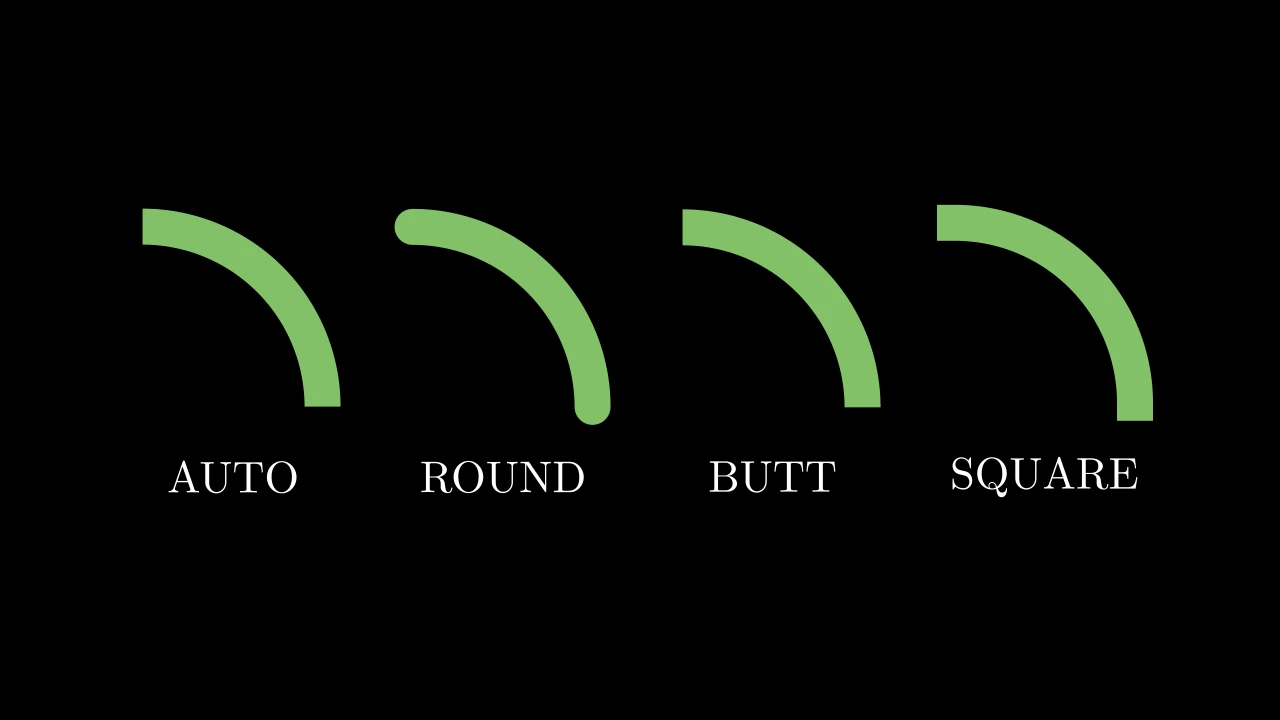
CapStyleTypeExample
Code
import manimgx as m


class CapStyleTypeExample(m.Scene):
    def construct(self) -> None:
        arcs = m.VGroup()
        for cap in m.CapStyleType:
            arc = m.Arc(radius=2, color=m.GREEN, stroke_width=40)
            arc.set_cap_style(cap)
            label = m.Text(cap.name, font_size=36).next_to(arc, m.DOWN, 0.6)
            arcs.add(m.VGroup(arc, label))
        self.add(arcs.arrange(buff=1))

How a stroke ends (cap_style): round, butt or square.

Every end a stroke shows is capped: the ends of an open path, the moving end of a reveal (Create, Write, …) and both ends of every dash. A closed path shown whole has no ends, and a stroke of no length (a path that stays at one point) shows as a dot with round caps, a square with square ones. The default, AUTO, is butt. A two-dimensional scene draws the caps, of a stroke and of its background stroke alike; a three-dimensional scene ends every stroke flat.

AUTO

The default: flat at the end, as BUTT.

ROUND

A half disk past the end.

BUTT

Flat, at the end.

SQUARE

Flat, half the stroke's width past the end.

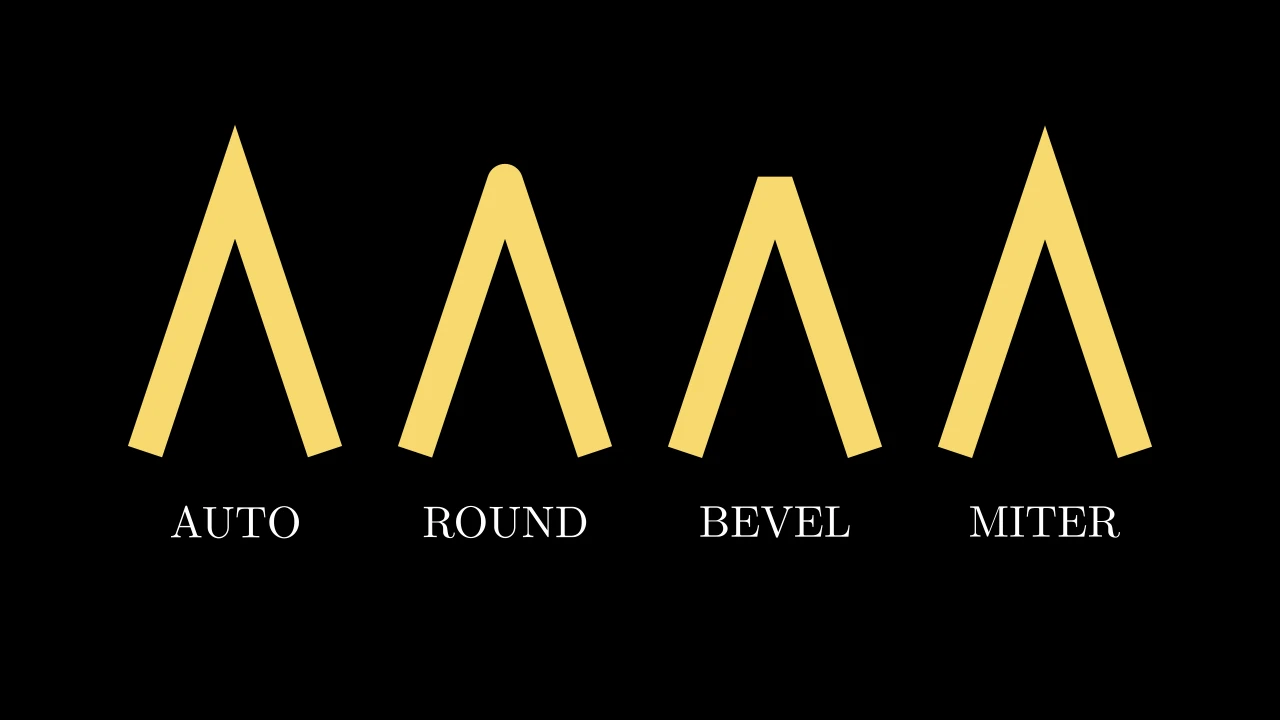
LineJointType

LineJointTypeExample
Code
import manimgx as m


class LineJointTypeExample(m.Scene):
    def construct(self) -> None:
        corners = [[-1, -1.5, 0], [0, 1.5, 0], [1, -1.5, 0]]
        paths = m.VGroup()
        for joint in m.LineJointType:
            path = m.VMobject(color=m.YELLOW, stroke_width=40, joint_type=joint)
            path.set_points_as_corners(corners)
            label = m.Text(joint.name, font_size=36).next_to(path, m.DOWN, 0.6)
            paths.add(m.VGroup(path, label))
        self.add(paths.arrange(buff=1))

How a stroke is joined where its path turns (joint_type): round, beveled or mitered.

The default, AUTO, is mitered. A two-dimensional scene draws the joints, of a stroke and of its background stroke alike; a three-dimensional scene miters every stroke.

AUTO

The default: mitered, as MITER.

ROUND

Round corners.

BEVEL

Corners cut straight across.

MITER

Pointed corners, where the stroke's edges meet; cut straight across where the point would be more than ten stroke widths long.

set_cap_style

Set how the strokes of the path and its family end, at each end they show: an open path's ends, a reveal's moving end, each dash's ends.

A two-dimensional scene draws the caps; a three-dimensional scene ends every stroke flat (see CapStyleType).

path.set_cap_style(cap_style)
cap_style

The cap: round, butt or square.

Source

src/manimgx/mobject.py

def set_cap_style(self, cap_style: CapStyleType) -> Self:
    """Set how the strokes of the path and its family end, at each end they show:
    an open path's ends, a reveal's moving end, each dash's ends.

    A two-dimensional scene draws the caps; a three-dimensional scene ends every
    stroke flat (see [CapStyleType][manimgx.CapStyleType]).

    Args:
        cap_style: The cap: round, butt or square.
    """
    for mob in self.get_family():
        mob.paint = mob.paint.but(cap=cap_style)
    return self

What covers what

A mobject added later covers one added before. A higher z-index covers a lower one, whatever the order.

set_z_index

MobjectSetZIndexExample
Code
import manimgx as m


class MobjectSetZIndexExample(m.Scene):
    def construct(self) -> None:
        red = m.Square(3, color=m.RED, fill_opacity=1).shift(m.LEFT + m.UP)
        blue = m.Square(3, color=m.BLUE, fill_opacity=1)
        green = m.Square(3, color=m.GREEN, fill_opacity=1)
        green.shift(m.RIGHT + m.DOWN)
        red.set_z_index(1)  # added first, drawn on top
        self.add(red, blue, green)

Set the mobject's place in the drawing order: a higher z-index is drawn over a lower one, anywhere in the scene.

Mobjects of an equal z-index are drawn in the scene's order: the ones added later over the ones added earlier, and a mobject's submobjects each over those before it. Every mobject's z-index is 0 unless set.

mobject.set_z_index(z_index_value, family=True)
z_index_value

The z-index.

family

Whether its whole family gets it, or the mobject alone (which orders only its own points).

Source

src/manimgx/mobject.py

def set_z_index(self, z_index_value: float, family: bool = True) -> Self:
    """Set the mobject's place in the drawing order: a higher z-index is drawn over
    a lower one, anywhere in the scene.

    Mobjects of an equal z-index are drawn in the scene's order: the ones added
    later over the ones added earlier, and a mobject's submobjects each over those
    before it. Every mobject's z-index is 0 unless set.

    Args:
        z_index_value: The z-index.
        family: Whether its whole family gets it, or the mobject alone (which orders
            only its own points).

    Examples:
        ```python
        import manimgx as m


        class MobjectSetZIndexExample(m.Scene):
            def construct(self) -> None:
                red = m.Square(3, color=m.RED, fill_opacity=1).shift(m.LEFT + m.UP)
                blue = m.Square(3, color=m.BLUE, fill_opacity=1)
                green = m.Square(3, color=m.GREEN, fill_opacity=1)
                green.shift(m.RIGHT + m.DOWN)
                red.set_z_index(1)  # added first, drawn on top
                self.add(red, blue, green)
        ```
    """
    if family:
        for sub in self.submobjects:
            sub.set_z_index(z_index_value, family)
    self.z_index = z_index_value
    return self

z_index

The mobject's place in the drawing order: a higher index is drawn over a lower one (default 0); see set_z_index.

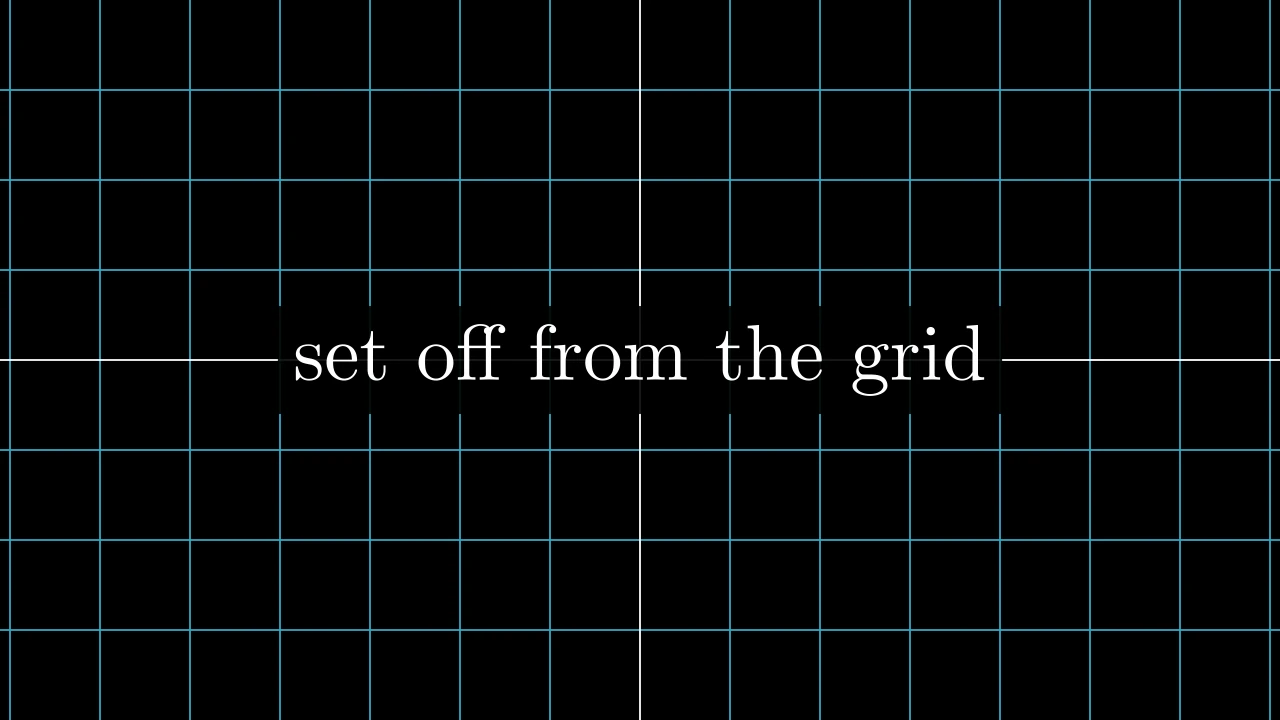
add_background_rectangle

MobjectAddBackgroundRectangleExample
Code
import manimgx as m


class MobjectAddBackgroundRectangleExample(m.Scene):
    def construct(self) -> None:
        label = m.Text("set off from the grid", font_size=64)
        label.add_background_rectangle(color=m.BLACK, opacity=0.9, buff=0.2)
        self.add(m.NumberPlane(), label)

Put a rectangle behind the mobject, to set it off from whatever is behind it: a BackgroundRectangle around it, added as its first submobject.

The rectangle moves with the mobject; it is the mobject's background_rectangle.

mobject.add_background_rectangle(color=None, opacity=0.75, **kwargs)
color

The rectangle's color; None for the scene's background color.

opacity

The rectangle's opacity, from 0 to 1 (default 0.75).

buff

The margin around the mobject, in scene units: one for both directions, or (horizontal, vertical) (default 0).

corner_radius

The radius of the rectangle's corners, in scene units (default 0: square corners).

stroke_width

The width of the rectangle's outline, in hundredths of a scene unit (default 0: none).

stroke_opacity

The outline's opacity, from 0 to 1 (default 0).

stroke_color

The outline's color (default: the rectangle's color).

background_stroke_color

The color of an outline drawn behind the fill (default black).

background_stroke_opacity

The outline's opacity, from 0 to 1 (default 1).

background_stroke_width

The outline's width, in hundredths of a scene unit (default 0: none).

sheen_factor

How much the colors lighten toward sheen_direction, from -1 to 1 (default 0); a negative factor darkens.

sheen_direction

The direction the colors lighten toward (default UL).

joint_type

How the stroke is joined where its path turns: round, beveled or mitered, as a two-dimensional scene draws it (see LineJointType; default AUTO: mitered).

cap_style

How the stroke ends, at each end it shows (an open path's, a dash's): round, butt or square, as a two-dimensional scene draws it (see CapStyleType; default AUTO: butt).

shade_in_3d

Whether a three-dimensional scene's light shades the mobject.

material

How its surface reflects the scene's lights in a three-dimensional scene (see Material); None: Manim's shading (default).

name

A name for the mobject; its class's name if not given.

z_index

Its place in the drawing order: a higher index is drawn over a lower one (default 0).

target

The state MoveToTarget moves the mobject to.

Source

src/manimgx/mobject.py

def add_background_rectangle(
    self,
    color: ParsableManimColor | None = None,
    opacity: float = 0.75,
    **kwargs: Unpack[BackgroundOptions],
) -> Self:
    """Put a rectangle behind the mobject, to set it off from whatever is behind it:
    a [BackgroundRectangle][manimgx.BackgroundRectangle] around it, added as its
    first submobject.

    The rectangle moves with the mobject; it is the mobject's
    [background_rectangle][manimgx.Mobject.background_rectangle].

    Args:
        color: The rectangle's color; None for the scene's background color.
        opacity: The rectangle's opacity, from 0 to 1 (default 0.75).
        **kwargs: [Background keywords][manimgx.mobject.BackgroundOptions]: its
            margin, corners and outline.

    Examples:
        ```python
        import manimgx as m


        class MobjectAddBackgroundRectangleExample(m.Scene):
            def construct(self) -> None:
                label = m.Text("set off from the grid", font_size=64)
                label.add_background_rectangle(color=m.BLACK, opacity=0.9, buff=0.2)
                self.add(m.NumberPlane(), label)
        ```
    """
    from manimgx.mobjects.annotations import BackgroundRectangle

    self.background_rectangle = BackgroundRectangle(
        self, color=color, fill_opacity=opacity, **kwargs
    )
    return self.add_to_back(self.background_rectangle)

background_rectangle

The rectangle last put behind the mobject (see add_background_rectangle); None if none.

A class's defaults

set_default

Change the defaults of the class's constructor keywords, for every mobject of the class made from then on; with none given, restore them.

After Text.set_default(font_size=100), a Text is 100 points unless it is made with another size. The keywords are checked when a mobject is made.

Changing or restoring defaults discards remembered constructions. Existing mobjects keep their state; later construction reads the current defaults.

Repeated calls replace this class's keyword defaults. Reset restores its original constructor, or normal inheritance if it had no constructor of its own. The defaults are applied when a mobject is made, to the constructor then in force: the class's own, or the next one in the made mobject's class's order (so a parent's later defaults reach a configured child, and a configured mixin calls the class after it in a subclass's order).

Mobject.set_default(**kwargs)

Keywords of the class's constructor, with their new defaults.

Source

src/manimgx/mobject.py

@classmethod
def set_default(cls, **kwargs: object) -> None:
    """Change the defaults of the class's constructor keywords, for every mobject of
    the class made from then on; with none given, restore them.

    After `Text.set_default(font_size=100)`, a `Text` is 100 points unless it is
    made with another size. The keywords are checked when a mobject is made.

    Changing or restoring defaults discards remembered constructions. Existing
    mobjects keep their state; later construction reads the current defaults.

    Repeated calls replace this class's keyword defaults. Reset restores its
    original constructor, or normal inheritance if it had no constructor of its own.
    The defaults are applied when a mobject is made, to the constructor then in
    force: the class's own, or the next one in the made mobject's class's order (so a
    parent's later defaults reach a configured child, and a configured mixin calls the
    class after it in a subclass's order).

    Args:
        **kwargs: Keywords of the class's constructor, with their new defaults.
    """
    if kwargs:
        original = cls.__dict__.get(
            "_original__init__", cls.__dict__.get("__init__")
        )
        defaults = dict(kwargs)

        # The constructor checks the keywords when it runs: defaults applied to a
        # signature have no static type
        def init(self: Mobject, *args: object, **given: object) -> None:
            merged = defaults | given
            if original is not None:
                original(self, *args, **merged)
            else:
                super(cls, self).__init__(*args, **merged)

        setattr(cls, "_original__init__", original)  # noqa: B010
        setattr(cls, "__init__", init)  # noqa: B010
    elif "_original__init__" in cls.__dict__:
        original = cls.__dict__["_original__init__"]
        delattr(cls, "_original__init__")
        if original is None:
            delattr(cls, "__init__")
        else:
            setattr(cls, "__init__", original)  # noqa: B010
    caches.clear()