Skip to content

Groups

The film's code
import manimgx as m


class GroupsHero(m.Scene):
    def construct(self) -> None:
        shapes = m.VGroup(
            m.Circle(color=m.BLUE, fill_opacity=0.5),
            m.Square(color=m.GREEN, fill_opacity=0.5),
            m.Triangle(color=m.YELLOW, fill_opacity=0.5),
            m.Star(color=m.RED, fill_opacity=0.5),
        )
        shapes.arrange(buff=0.6)
        self.play(m.LaggedStart(*[m.Create(shape) for shape in shapes], lag_ratio=0.2))
        self.play(shapes.animate.arrange_in_grid(rows=2, buff=0.6))
        self.play(shapes.animate.arrange(m.DOWN, buff=0.3).scale(0.6))
        self.play(shapes.animate.set_color(m.TEAL))
        self.wait()

A mobject can hold other mobjects, its parts. A group holds nothing else: its parts are what it shows. Move, scale, color or animate a group, and every part changes with it.

m.VGroup and m.Group are one class, by two names: Manim CE's code writes both. A group is a list of its parts: group[0] is the first one, group[1:3] is a group of the second and the third, len(group) counts them, and for part in group: goes through them. Every mobject's parts work the same way: a formula's terms, a graph's axes.

Group

Code
import manimgx as m


class GroupExample(m.Scene):
    def construct(self) -> None:
        shapes = m.Group(
            m.Circle(color=m.BLUE), m.Square(color=m.GREEN), m.Triangle()
        ).arrange(buff=1)
        self.play(m.Create(shapes))
        self.play(shapes.animate.scale(1.5).set_fill(opacity=0.5))
        self.play(shapes[1].animate.shift(m.UP))

Mobjects together, of any kinds: paths, text, images, point clouds, other groups.

A group has no points of its own: its members are its submobjects, and whatever is done to the group — moving, scaling, styling, animating — is done to them all. VGroup is another name for it. A group can be indexed (group[0]), sliced (group[1:3] is a new group of those members) and iterated over, and group + mobject, group - mobject, += and -= add and remove members.

Its member type is inferred from what it is made with; a group meant to hold several kinds says so once, as Group[Mobject](…), and Group[Integer](…) holds integers only, so group[0] is an Integer to a type checker.

m.Group(*mobjects, **kwargs)
*mobjects

The members, in drawing order: mobjects, or iterables of mobjects (each of their mobjects a member).

color

The color of both fill and stroke (default white); None for the class's default.

fill_color

The fill's color; color if not given. Several colors make a gradient along sheen_direction.

fill_opacity

The fill's opacity, from 0 to 1 (default 0: no fill).

stroke_color

The stroke's color; color if not given. Several colors make a gradient.

stroke_opacity

The stroke's opacity, from 0 to 1 (default 1).

stroke_width

The stroke's width, in hundredths of a scene unit (default 4; 0: no stroke).

background_stroke_color

The color of an outline drawn behind the fill (default black).

background_stroke_opacity

The outline's opacity, from 0 to 1 (default 1).

background_stroke_width

The outline's width, in hundredths of a scene unit (default 0: none).

sheen_factor

How much the colors lighten toward sheen_direction, from -1 to 1 (default 0); a negative factor darkens.

sheen_direction

The direction the colors lighten toward (default UL).

joint_type

How the stroke is joined where its path turns: round, beveled or mitered, as a two-dimensional scene draws it (see LineJointType; default AUTO: mitered).

cap_style

How the stroke ends, at each end it shows (an open path's, a dash's): round, butt or square, as a two-dimensional scene draws it (see CapStyleType; default AUTO: butt).

shade_in_3d

Whether a three-dimensional scene's light shades the mobject.

material

How its surface reflects the scene's lights in a three-dimensional scene (see Material); None: Manim's shading (default).

name

A name for the mobject; its class's name if not given.

z_index

Its place in the drawing order: a higher index is drawn over a lower one (default 0).

target

The state MoveToTarget moves the mobject to.

It also takes the style keywords.

Source

src/manimgx/mobject.py

def __init__(
    self, *mobjects: Mobject | Iterable[Mobject], **kwargs: Unpack[Style]
) -> None:
    super().__init__(**kwargs)
    Mobject.add(self, *_members(mobjects))

submobjects

The group's members, in drawing order.

add

Add members after the ones the group has: mobjects, or iterables of mobjects (each of their mobjects a member).

A member already in the group moves to the end. Adding anything but mobjects, or the group to itself, raises an exception.

group.add(*mobjects)
*mobjects

The members to add, in order.

Source

src/manimgx/mobject.py

def add(  # pyright: ignore[reportIncompatibleMethodOverride]  # ty: ignore[invalid-method-override]  # a Group[T] adds T
    self, *mobjects: T | Iterable[T]
) -> Self:
    """Add members after the ones the group has: mobjects, or iterables of mobjects
    (each of their mobjects a member).

    A member already in the group moves to the end. Adding anything but mobjects, or
    the group to itself, raises an exception.

    Args:
        *mobjects: The members to add, in order.
    """
    return super().add(*_members(mobjects))

m.VGroup

Another name for Group, which holds mobjects of any kind.

Add and remove parts

add_to_back

Add submobjects before the ones the mobject has: they are drawn under them (at an equal z-index).

A mobject that is a submobject already moves to the front; what add refuses, this refuses too.

mobject.add_to_back(*mobjects)
*mobjects

The mobjects to add, in order.

Source

src/manimgx/mobject.py

def add_to_back(self, *mobjects: "Mobject") -> Self:
    """Add submobjects before the ones the mobject has: they are drawn under them
    (at an equal z-index).

    A mobject that is a submobject already moves to the front; what `add` refuses,
    this refuses too.

    Args:
        *mobjects: The mobjects to add, in order.
    """
    return self._place(0, mobjects)

insert

Insert a submobject at a place among the mobject's other submobjects.

A mobject that is a submobject already moves there; what add refuses, this refuses too.

mobject.insert(index, mobject)
index

Its place in the list of the other submobjects, as list.insert takes it.

mobject

The mobject to insert.

Source

src/manimgx/mobject.py

def insert(self, index: int, mobject: "Mobject") -> Self:
    """Insert a submobject at a place among the mobject's other submobjects.

    A mobject that is a submobject already moves there; what `add` refuses, this
    refuses too.

    Args:
        index: Its place in the list of the other submobjects, as `list.insert`
            takes it.
        mobject: The mobject to insert.
    """
    return self._place(index, (mobject,))

remove

Remove submobjects: those given that are among the mobject's own submobjects (not its submobjects' submobjects); the rest are ignored.

mobject.remove(*mobjects)
*mobjects

The mobjects to remove.

Source

src/manimgx/mobject.py

def remove(self, *mobjects: "Mobject") -> Self:
    """Remove submobjects: those given that are among the mobject's own submobjects
    (not its submobjects' submobjects); the rest are ignored.

    Args:
        *mobjects: The mobjects to remove.
    """
    for m in mobjects:
        if m in self.submobjects:
            self.submobjects.remove(m)
    return self

get_family

The mobject and all its descendants: itself, then each submobject's family in turn, each member once (where it last occurs, if the tree holds it twice).

mobject.get_family()

Returns A new list.

Source

src/manimgx/mobject.py

def get_family(self) -> list["Mobject"]:
    """The mobject and all its descendants: itself, then each submobject's family in
    turn, each member once (where it last occurs, if the tree holds it twice).

    Returns:
        A new list.
    """
    if not self.submobjects:
        return [self]
    return _family((self,))

family_members_with_points

The members of the mobject's family that have points of their own: the ones that are drawn.

mobject.family_members_with_points()

Returns A new list, in family order.

Source

src/manimgx/mobject.py

def family_members_with_points(self) -> list["Mobject"]:
    """The members of the mobject's family that have points of their own: the ones
    that are drawn.

    Returns:
        A new list, in family order.
    """
    return [m for m in self.get_family() if m.has_points()]

Lay parts out

arrange

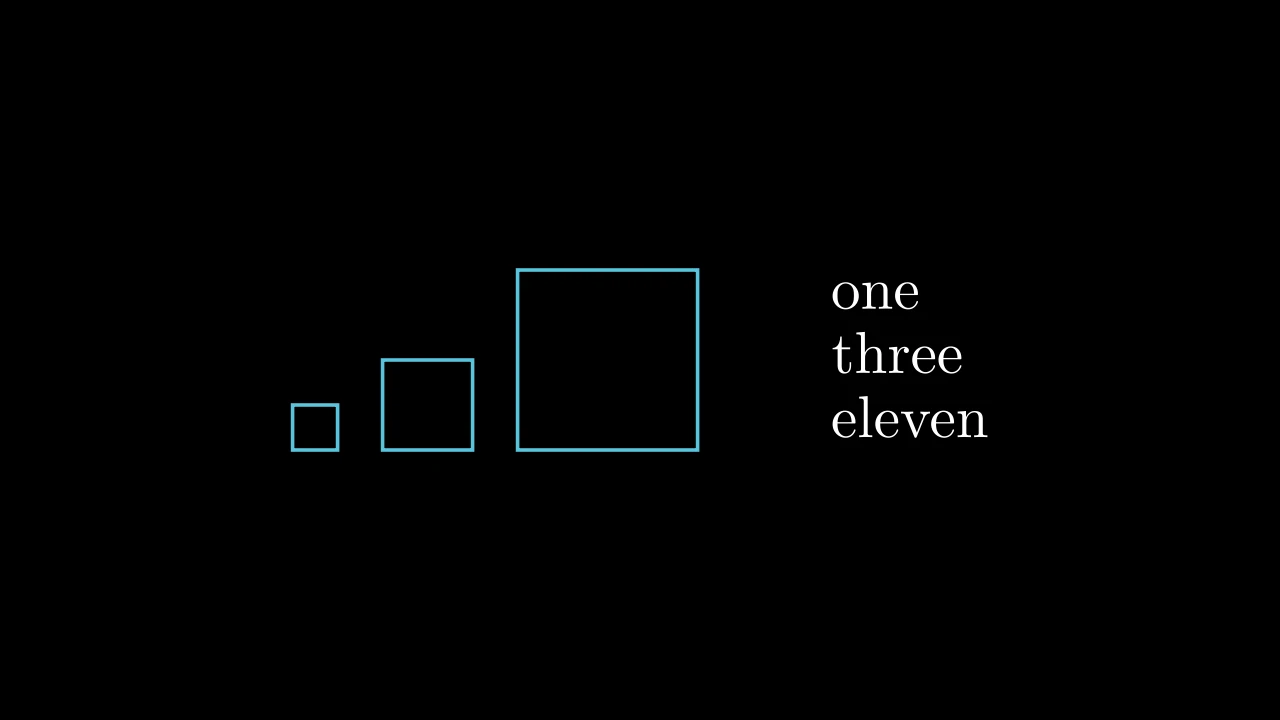
MobjectArrangeExample
Code
import manimgx as m


class MobjectArrangeExample(m.Scene):
    def construct(self) -> None:
        sizes = (0.5, 1, 2)
        squares = m.VGroup(*(m.Square(s, color=m.BLUE) for s in sizes))
        squares.arrange(buff=0.5, aligned_edge=m.DOWN)
        words = m.VGroup(m.Text("one"), m.Text("three"), m.Text("eleven"))
        words.arrange(m.DOWN, aligned_edge=m.LEFT)
        self.add(m.VGroup(squares, words).arrange(buff=1.5))

Lay the submobjects out in a row: each one beside the one before it (see next_to), buff apart; then center the whole at the origin.

mobject.arrange(direction=RIGHT, buff=DEFAULT_MOBJECT_TO_MOBJECT_BUFFER, center=True, **kwargs)
direction

The way the row goes: RIGHT (default), DOWN for a column, …

buff

The gap between neighbours, in scene units (default 0.25).

center

Whether to center the mobject at the origin afterwards; if not, the first submobject stays where it was.

aligned_edge

The edge, as a direction, along which the two line up besides the side they meet at: with the direction RIGHT and UP here, their tops line up (default ORIGIN: centered).

submobject_to_align

A part of the mobject to put beside the other in its place; the rest moves with it (default None: the whole mobject).

index_of_submobject_to_align

The index of the part of each mobject to line up: this one's part goes beside the other's (default None: the whole of each).

coor_mask

Which coordinates may change: 1 for each axis the mobject moves along, 0 for one it keeps (default (1, 1, 1)).

Source

src/manimgx/mobject.py

def arrange(
    self,
    direction: Vector3DLike = RIGHT,
    buff: float = DEFAULT_MOBJECT_TO_MOBJECT_BUFFER,
    center: bool = True,
    **kwargs: Unpack[Beside],
) -> Self:
    """Lay the submobjects out in a row: each one beside the one before it (see
    [next_to][manimgx.Mobject.next_to]), `buff` apart; then center the whole at the
    origin.

    Args:
        direction: The way the row goes: RIGHT (default), DOWN for a column, …
        buff: The gap between neighbours, in scene units (default 0.25).
        center: Whether to center the mobject at the origin afterwards; if not, the
            first submobject stays where it was.
        **kwargs: [Beside keywords][manimgx.mobject.Beside]: how neighbours
            line up (`aligned_edge=DOWN` puts their bottoms on one line).

    Examples:
        ```python
        import manimgx as m


        class MobjectArrangeExample(m.Scene):
            def construct(self) -> None:
                sizes = (0.5, 1, 2)
                squares = m.VGroup(*(m.Square(s, color=m.BLUE) for s in sizes))
                squares.arrange(buff=0.5, aligned_edge=m.DOWN)
                words = m.VGroup(m.Text("one"), m.Text("three"), m.Text("eleven"))
                words.arrange(m.DOWN, aligned_edge=m.LEFT)
                self.add(m.VGroup(squares, words).arrange(buff=1.5))
        ```
    """
    for m1, m2 in zip(self.submobjects[:-1], self.submobjects[1:], strict=True):
        m2.next_to(m1, direction, buff, **kwargs)
    return self.center() if center else self

arrange_in_grid

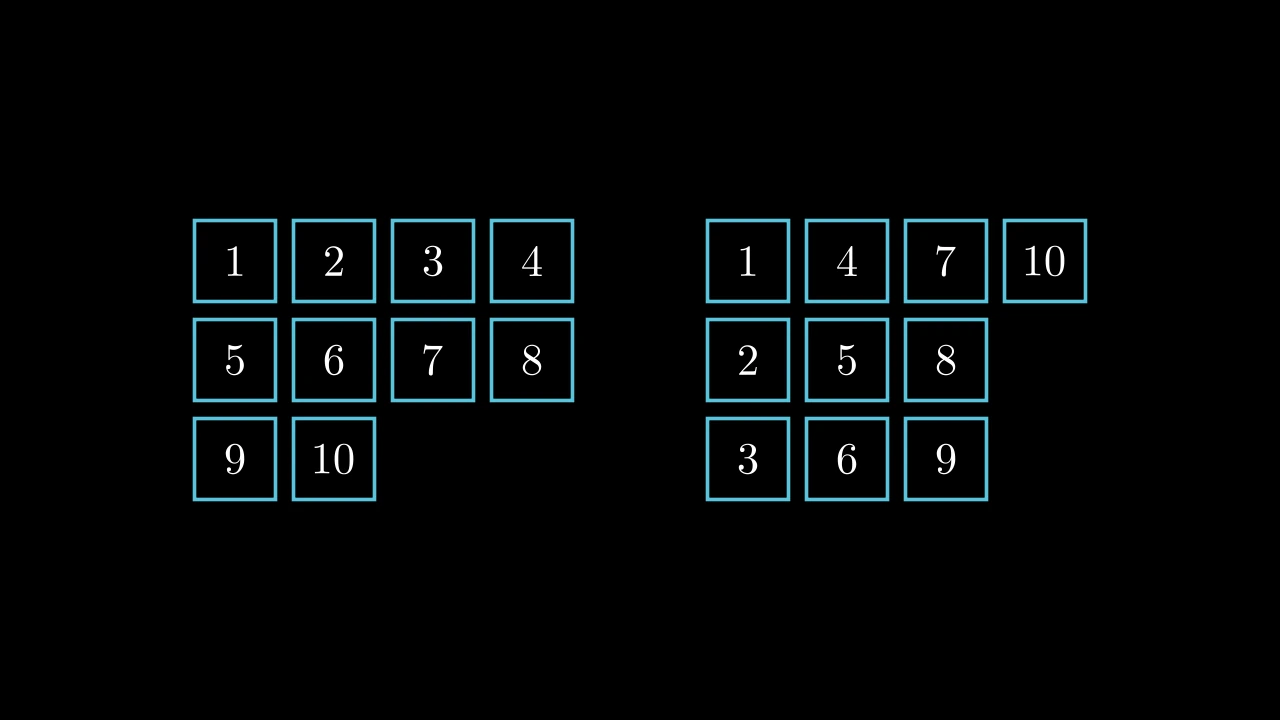
MobjectArrangeInGridExample
Code
import manimgx as m


def cells() -> m.VGroup:
    return m.VGroup(
        *(
            m.Square(0.9, color=m.BLUE).add(m.Text(str(i), font_size=36))
            for i in range(1, 11)
        )
    )


class MobjectArrangeInGridExample(m.Scene):
    def construct(self) -> None:
        by_rows = cells().arrange_in_grid(rows=3, buff=0.2)
        by_cols = cells().arrange_in_grid(rows=3, buff=0.2, flow_order="dr")
        self.add(m.VGroup(by_rows, by_cols).arrange(buff=1.5))

Lay the submobjects out in a grid of rows and columns, centered where the mobject was.

Each row is as tall as its tallest mobject and each column as wide as its widest, unless given. Each mobject sits in its cell as cell_alignment says, but vertically as row_alignments says for its row and horizontally as col_alignments says for its column, where they are given. Too few rows and columns for the submobjects raise an exception.

mobject.arrange_in_grid(rows=None, cols=None, buff=MED_SMALL_BUFF, cell_alignment=ORIGIN, row_alignments=None, col_alignments=None, row_heights=None, col_widths=None, flow_order='rd')
rows

How many rows; None for as many as row_alignments or row_heights lists, else as many as the submobjects need. With neither rows nor cols, the grid is as square as it can be.

cols

How many columns; None for as many as col_alignments or col_widths lists, else as many as the submobjects need.

buff

The gap between cells, in scene units: one for both directions, or (horizontal, vertical) (default 0.25).

cell_alignment

Where each mobject sits in its cell, named by a direction: UL for its top left corner (default ORIGIN: centered).

row_alignments

Each row's vertical alignment, top to bottom: a letter per row, "u" (up), "c" (center) or "d" (down); None: as the vertical part of cell_alignment says (UL: up).

col_alignments

Each column's horizontal alignment, left to right: a letter per column, "l" (left), "c" (center) or "r" (right); None: as the horizontal part of cell_alignment says (UL: left).

row_heights

Each row's height, top to bottom, in scene units; None (for the grid or a row) for the height of the row's tallest mobject.

col_widths

Each column's width, left to right, in scene units; None (for the grid or a column) for the width of the column's widest mobject.

flow_order

The order the cells are filled in: two letters, the direction a line of cells fills and then the direction the lines follow each other, "r" (right), "l" (left), "u" (up) or "d" (down). The default "rd" fills rows left to right, from the top down; "dr" fills columns top to bottom, from the left.

Source

src/manimgx/mobject.py

def arrange_in_grid(
    self,
    rows: int | None = None,
    cols: int | None = None,
    buff: float | tuple[float, float] = MED_SMALL_BUFF,
    cell_alignment: Vector3DLike = ORIGIN,
    row_alignments: str | None = None,
    col_alignments: str | None = None,
    row_heights: Iterable[float | None] | None = None,
    col_widths: Iterable[float | None] | None = None,
    flow_order: str = "rd",
) -> Self:
    """Lay the submobjects out in a grid of rows and columns, centered where the
    mobject was.

    Each row is as tall as its tallest mobject and each column as wide as its
    widest, unless given. Each mobject sits in its cell as `cell_alignment` says,
    but vertically as `row_alignments` says for its row and horizontally as
    `col_alignments` says for its column, where they are given. Too few rows and
    columns for the submobjects raise an exception.

    Args:
        rows: How many rows; None for as many as `row_alignments` or `row_heights`
            lists, else as many as the submobjects need. With neither `rows` nor
            `cols`, the grid is as square as it can be.
        cols: How many columns; None for as many as `col_alignments` or `col_widths`
            lists, else as many as the submobjects need.
        buff: The gap between cells, in scene units: one for both directions, or
            (horizontal, vertical) (default 0.25).
        cell_alignment: Where each mobject sits in its cell, named by a direction:
            UL for its top left corner (default ORIGIN: centered).
        row_alignments: Each row's vertical alignment, top to bottom: a letter per
            row, "u" (up), "c" (center) or "d" (down); None: as the vertical part of
            `cell_alignment` says (UL: up).
        col_alignments: Each column's horizontal alignment, left to right: a letter
            per column, "l" (left), "c" (center) or "r" (right); None: as the
            horizontal part of `cell_alignment` says (UL: left).
        row_heights: Each row's height, top to bottom, in scene units; None (for the
            grid or a row) for the height of the row's tallest mobject.
        col_widths: Each column's width, left to right, in scene units; None (for
            the grid or a column) for the width of the column's widest mobject.
        flow_order: The order the cells are filled in: two letters, the direction a
            line of cells fills and then the direction the lines follow each other,
            "r" (right), "l" (left), "u" (up) or "d" (down). The default "rd" fills
            rows left to right, from the top down; "dr" fills columns top to bottom,
            from the left.

    Examples:
        ```python
        import manimgx as m


        def cells() -> m.VGroup:
            return m.VGroup(
                *(
                    m.Square(0.9, color=m.BLUE).add(m.Text(str(i), font_size=36))
                    for i in range(1, 11)
                )
            )


        class MobjectArrangeInGridExample(m.Scene):
            def construct(self) -> None:
                by_rows = cells().arrange_in_grid(rows=3, buff=0.2)
                by_cols = cells().arrange_in_grid(rows=3, buff=0.2, flow_order="dr")
                self.add(m.VGroup(by_rows, by_cols).arrange(buff=1.5))
        ```
    """
    mobs = list(self.submobjects)
    start_pos = self.get_center()
    heights_in = list(row_heights) if row_heights is not None else None
    widths_in = list(col_widths) if col_widths is not None else None
    cols = cols or (
        len(col_alignments)
        if col_alignments
        else len(widths_in)
        if widths_in
        else None
    )
    rows = rows or (
        len(row_alignments)
        if row_alignments
        else len(heights_in)
        if heights_in
        else None
    )
    if rows is None:
        cols = math.ceil(math.sqrt(len(mobs))) if cols is None else cols
        rows = math.ceil(len(mobs) / cols)
    elif cols is None:
        cols = math.ceil(len(mobs) / rows)
    if rows * cols < len(mobs):
        raise ValueError("Too few rows and columns to fit all submobjetcs.")
    bx, by = buff if isinstance(buff, tuple) else (buff, buff)
    cell = np.asarray(cell_alignment, dtype=float)
    rdirs = (  # a row aligns its cells vertically, a column horizontally
        [cell * UP] * rows
        if row_alignments is None
        else [{"u": UP, "c": ORIGIN, "d": DOWN}[c] for c in row_alignments]
    )
    cdirs = (
        [cell * RIGHT] * cols
        if col_alignments is None
        else [{"l": LEFT, "c": ORIGIN, "r": RIGHT}[c] for c in col_alignments]
    )
    index = {
        "dr": lambda r, c: rows - r - 1 + c * rows,
        "dl": lambda r, c: rows - r - 1 + (cols - c - 1) * rows,
        "ur": lambda r, c: r + c * rows,
        "ul": lambda r, c: r + (cols - c - 1) * rows,
        "rd": lambda r, c: (rows - r - 1) * cols + c,
        "ld": lambda r, c: (rows - r - 1) * cols + (cols - c - 1),
        "ru": lambda r, c: r * cols + c,
        "lu": lambda r, c: r * cols + (cols - c - 1),
    }[flow_order]
    rdirs.reverse()
    heights_given = list(reversed(heights_in)) if heights_in else [None] * rows
    placeholder = Mobject()
    mobs.extend([placeholder] * (rows * cols - len(mobs)))
    grid = [[mobs[index(r, c)] for c in range(cols)] for r in range(rows)]
    heights = [
        h if h is not None else max(grid[r][c].height for c in range(cols))
        for r, h in enumerate(heights_given)
    ]
    widths = [
        w if w is not None else max(grid[r][c].width for r in range(rows))
        for c, w in enumerate(widths_in or [None] * cols)
    ]
    y = 0.0
    for r in range(rows):
        x = 0.0
        for c in range(cols):
            if grid[r][c] is not placeholder:
                lo, hi = (
                    np.array([x, y, 0.0]),
                    np.array([x + widths[c], y + heights[r], 0.0]),
                )
                align = rdirs[r] + cdirs[c]
                corner = np.where(
                    align < 0, lo, np.where(align > 0, hi, (lo + hi) / 2)
                )
                grid[r][c].move_to(corner, align)
            x += widths[c] + bx
        y += heights[r] + by
    return self.move_to(start_pos)

Order parts

sort

Sort the submobjects by a number: one computed from each one's center (by default its x coordinate, so left to right), or from each one itself.

Their order is the order they are drawn in (at an equal z-index), and the order a lag_ratio staggers their animation in.

mobject.sort(point_to_num_func=lambda p: p[0], submob_func=None)
point_to_num_func

A function of a submobject's center, giving the number to sort it by.

submob_func

A function of a submobject, giving the number to sort it by, in place of point_to_num_func.

Source

src/manimgx/mobject.py

def sort(
    self,
    point_to_num_func: Callable[[Point3D], float] = lambda p: p[0],
    submob_func: Callable[["Mobject"], float] | None = None,
) -> Self:
    """Sort the submobjects by a number: one computed from each one's center (by
    default its x coordinate, so left to right), or from each one itself.

    Their order is the order they are drawn in (at an equal z-index), and the order
    a `lag_ratio` staggers their animation in.

    Args:
        point_to_num_func: A function of a submobject's center, giving the number to
            sort it by.
        submob_func: A function of a submobject, giving the number to sort it by, in
            place of `point_to_num_func`.
    """
    key = submob_func or (lambda m: point_to_num_func(m.get_center()))
    self.submobjects.sort(key=key)
    return self

shuffle

Put the submobjects in a random order, drawn from Python's random.

mobject.shuffle(recursive=False)
recursive

Whether each submobject's submobjects are shuffled too, and theirs.

Source

src/manimgx/mobject.py

def shuffle(self, recursive: bool = False) -> Self:
    """Put the submobjects in a random order, drawn from Python's `random`.

    Args:
        recursive: Whether each submobject's submobjects are shuffled too, and
            theirs.
    """
    if recursive:
        for sub in self.submobjects:
            sub.shuffle(recursive=True)
    random.shuffle(self.submobjects)
    return self

invert

Reverse the order of the submobjects.

mobject.invert(recursive=False)
recursive

Whether each submobject's submobjects are reversed too, and theirs.

Source

src/manimgx/mobject.py

def invert(self, recursive: bool = False) -> Self:
    """Reverse the order of the submobjects.

    Args:
        recursive: Whether each submobject's submobjects are reversed too, and
            theirs.
    """
    if recursive:
        for sub in self.submobjects:
            sub.invert(recursive=True)
    self.submobjects.reverse()
    return self

Name parts

VDict

Code
import manimgx as m


class VDictExample(m.Scene):
    def construct(self) -> None:
        shapes = m.VDict(
            {
                "circle": m.Circle(radius=0.9, color=m.RED),
                "square": m.Square(side_length=1.8, color=m.GREEN),
            },
            show_keys=True,
        )
        shapes["triangle"] = m.Triangle(color=m.BLUE)
        self.add(shapes.arrange(buff=1))
        self.play(shapes["square"].animate.set_color(m.YELLOW))

A group whose members have keys, as a dictionary has: vdict[key] is a member.

Members of any kind are added, replaced (vdict[key] = mobject) and removed by key; like any group, it draws, moves and styles them together, in the order they were added. With show_keys, each member is labeled with its key.

m.VDict(mapping_or_iterable={}, show_keys=False, **kwargs)
mapping_or_iterable

The first members: a dictionary of keys and mobjects, or (key, mobject) pairs.

show_keys

Whether each member, added now or later, is labeled with its key: a Tex of str(key) at its left, added to the member itself, so the label moves, animates and leaves with it, and counts in its size.

color

The color of both fill and stroke (default white); None for the class's default.

fill_color

The fill's color; color if not given. Several colors make a gradient along sheen_direction.

fill_opacity

The fill's opacity, from 0 to 1 (default 0: no fill).

stroke_color

The stroke's color; color if not given. Several colors make a gradient.

stroke_opacity

The stroke's opacity, from 0 to 1 (default 1).

stroke_width

The stroke's width, in hundredths of a scene unit (default 4; 0: no stroke).

background_stroke_color

The color of an outline drawn behind the fill (default black).

background_stroke_opacity

The outline's opacity, from 0 to 1 (default 1).

background_stroke_width

The outline's width, in hundredths of a scene unit (default 0: none).

sheen_factor

How much the colors lighten toward sheen_direction, from -1 to 1 (default 0); a negative factor darkens.

sheen_direction

The direction the colors lighten toward (default UL).

joint_type

How the stroke is joined where its path turns: round, beveled or mitered, as a two-dimensional scene draws it (see LineJointType; default AUTO: mitered).

cap_style

How the stroke ends, at each end it shows (an open path's, a dash's): round, butt or square, as a two-dimensional scene draws it (see CapStyleType; default AUTO: butt).

shade_in_3d

Whether a three-dimensional scene's light shades the mobject.

material

How its surface reflects the scene's lights in a three-dimensional scene (see Material); None: Manim's shading (default).

name

A name for the mobject; its class's name if not given.

z_index

Its place in the drawing order: a higher index is drawn over a lower one (default 0).

target

The state MoveToTarget moves the mobject to.

It also takes the style keywords.

Source

src/manimgx/mobject.py

def __init__(
    self,
    mapping_or_iterable: (
        Mapping[Hashable, Mobject] | Iterable[tuple[Hashable, Mobject]]
    ) = {},
    show_keys: bool = False,
    **kwargs: Unpack[Style],
) -> None:
    super().__init__(**kwargs)
    self.show_keys = show_keys
    self.submob_dict: dict[Hashable, T] = {}
    """The members, by key."""
    self.add(
        mapping_or_iterable  # ty: ignore[invalid-argument-type]  # a VDict[T] is given T
    )

submob_dict

The members, by key.

add

Add members by key, after the group's.

Each is labeled with its key if the group shows its keys. A key the group has already is given the new mobject, but the old one stays in the group: to replace a member, set it (vdict[key] = mobject).

vdict.add(mapping_or_iterable)
mapping_or_iterable

A dictionary of keys and mobjects, or (key, mobject) pairs.

Source

src/manimgx/mobject.py

def add(  # pyright: ignore[reportIncompatibleMethodOverride]  # ty: ignore[invalid-method-override]  # CE's: by key
    self, mapping_or_iterable: Mapping[Hashable, T] | Iterable[tuple[Hashable, T]]
) -> Self:
    """Add members by key, after the group's.

    Each is labeled with its key if the group shows its keys. A key the group has already
    is given the new mobject, but the old one stays in the group: to replace a
    member, set it (`vdict[key] = mobject`).

    Args:
        mapping_or_iterable: A dictionary of keys and mobjects, or (key, mobject)
            pairs.
    """
    for key, value in dict(mapping_or_iterable).items():
        self.add_key_value_pair(key, value)
    return self

remove

Remove the member with a key from the group.

Raises an exception if the group has no such key.

vdict.remove(key)
key

The member's key.

Source

src/manimgx/mobject.py

def remove(  # pyright: ignore[reportIncompatibleMethodOverride]  # ty: ignore[invalid-method-override]  # CE's: by key
    self, key: Hashable
) -> Self:
    """Remove the member with a key from the group.

    Raises an exception if the group has no such key.

    Args:
        key: The member's key.
    """
    super().remove(self.submob_dict.pop(key))
    return self

index_labels

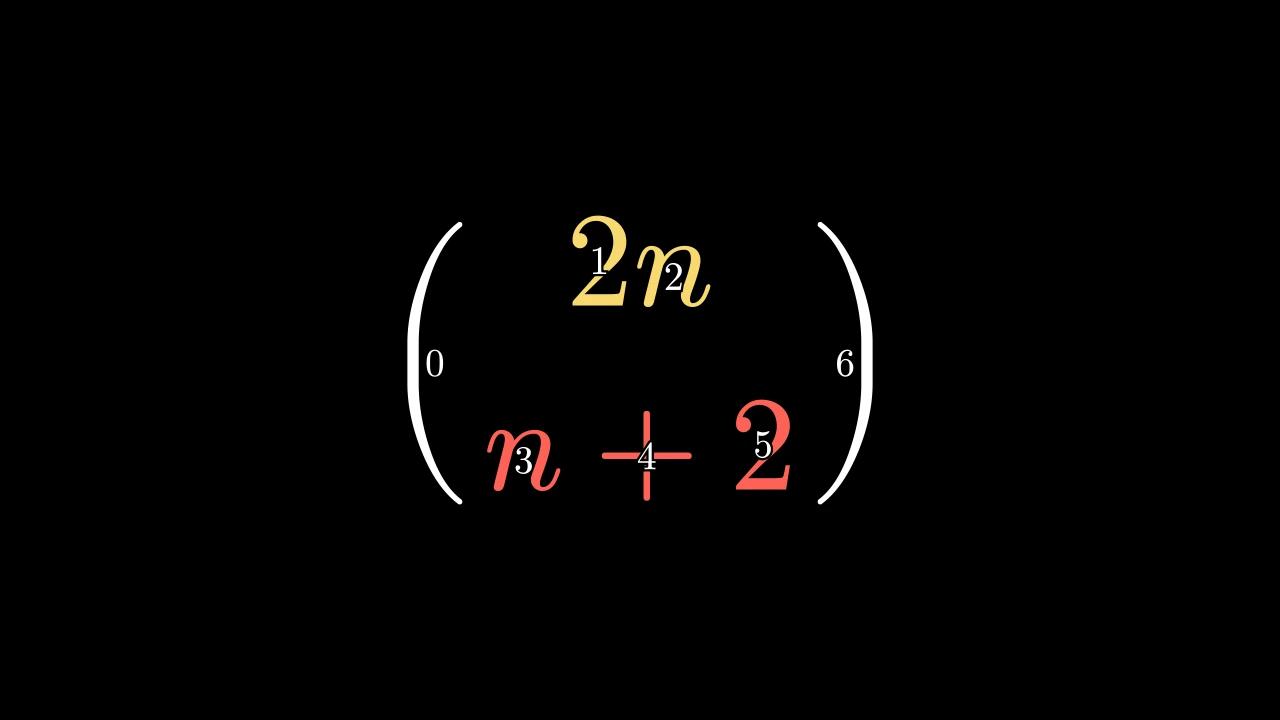
IndexLabelsExample
Code
import manimgx as m


class IndexLabelsExample(m.Scene):
    def construct(self) -> None:
        formula = m.MathTex(r"\binom{2n}{n+2}", font_size=144)
        formula[0][1:3].set_color(m.YELLOW)
        formula[0][3:6].set_color(m.RED)
        self.add(formula, m.index_labels(formula[0], label_height=0.3))

Number the submobjects of a mobject: an Integer at the center of each, on a dark outline, to find a part's index.

A debugging help: add the labels to the scene to see them; they don't follow the mobject.

m.index_labels(mobject, label_height=0.15, **kwargs)
mobject

The mobject whose submobjects are numbered, from 0.

label_height

Each label's height, in scene units.

It also takes the DecimalNumber keywords.

Returns A new group of the labels, in order.

Source

src/manimgx/mobjects/numbers.py

def index_labels(
    mobject: Mobject, label_height: float = 0.15, **kwargs: Unpack[NumberStyle]
) -> VGroup:
    r"""Number the submobjects of a mobject: an [Integer][manimgx.Integer] at the center
    of each, on a dark outline, to find a part's index.

    A debugging help: add the labels to the scene to see them; they don't follow the
    mobject.

    Args:
        mobject: The mobject whose submobjects are numbered, from 0.
        label_height: Each label's height, in scene units.
        **kwargs: [Number keywords][manimgx.mobjects.numbers.NumberStyle] (a black
            background stroke 5 wide unless given).

    Returns:
        A new group of the labels, in order.

    Examples:
        ```python
        import manimgx as m


        class IndexLabelsExample(m.Scene):
            def construct(self) -> None:
                formula = m.MathTex(r"\binom{2n}{n+2}", font_size=144)
                formula[0][1:3].set_color(m.YELLOW)
                formula[0][3:6].set_color(m.RED)
                self.add(formula, m.index_labels(formula[0], label_height=0.3))
        ```
    """
    kwargs.setdefault("background_stroke_width", 5)
    kwargs.setdefault("background_stroke_color", BLACK)
    labels = VGroup()
    for n, submob in enumerate(mobject):
        label = Integer(n, **kwargs)
        label.height = label_height
        labels.add(label.move_to(submob))
    return labels