Lights and materials
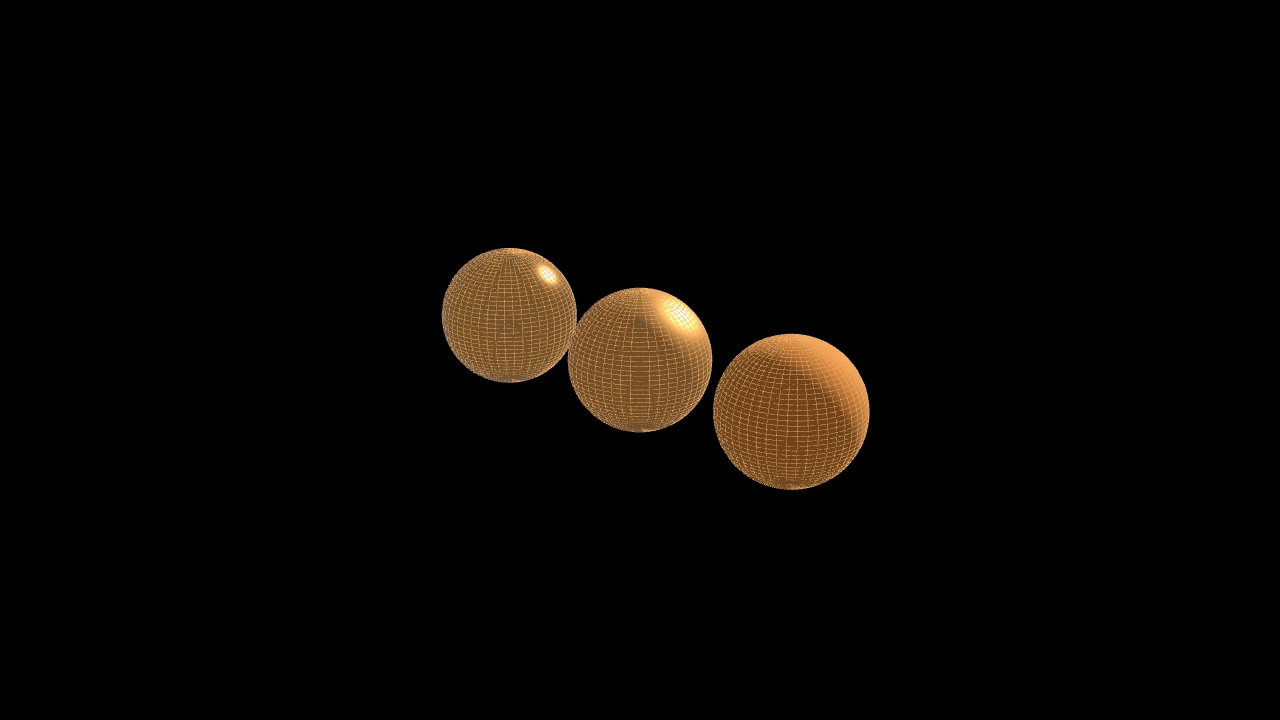
The film's code
import manimgx as m


class LightsHero(m.ThreeDScene):
    def construct(self) -> None:
        self.set_camera_orientation(phi=70 * m.DEGREES, theta=-45 * m.DEGREES)
        self.add(m.SunLight(5 * m.UP + 3 * m.OUT), m.AmbientLight(intensity=0.2))
        spheres = m.Group()
        for roughness in [0.2, 0.5, 0.9]:
            sphere = m.Sphere(radius=0.8, resolution=(48, 48)).set_color(m.GOLD)
            spheres.add(
                sphere.set_material(m.Material(metallic=1, roughness=roughness))
            )
        spheres.arrange(buff=0.6)
        self.add(spheres)
        self.wait()
A 3D scene is lit by its lights: add them as you add mobjects. A sun lights everything from one direction; a bulb lights around it, fading with distance; a spotlight lights a cone; the sky lights everything a little, from all around. Without lights, a scene keeps Manim's plain shading.
A mobject's material says how its surface reflects light: rough or smooth, plastic or metal.
Lights
Light 
A light: its color and how bright it is, at its point (each kind reads the point its own way).
m.Light(location=ORIGIN, color=WHITE, intensity=1.0, **kwargs)
locationWhere it is, in scene coordinates.
colorIts color.
intensityHow bright it is: 1 makes a white matte surface facing it white.
background_stroke_colorThe color of an outline drawn behind the fill (default black).
background_stroke_opacityThe outline's opacity, from 0 to 1 (default 1).
background_stroke_widthThe outline's width, in hundredths of a scene unit (default 0: none).
sheen_factorHow much the colors lighten toward
sheen_direction, from -1 to 1 (default 0); a negative factor darkens.sheen_directionThe direction the colors lighten toward (default
UL).joint_typeHow the stroke is joined where its path turns: round, beveled or mitered, as a two-dimensional scene draws it (see LineJointType; default AUTO: mitered).
cap_styleHow the stroke ends, at each end it shows (an open path's, a dash's): round, butt or square, as a two-dimensional scene draws it (see CapStyleType; default AUTO: butt).
shade_in_3dWhether a three-dimensional scene's light shades the mobject.
materialHow its surface reflects the scene's lights in a three-dimensional scene (see Material); None: Manim's shading (default).
nameA name for the mobject; its class's name if not given.
z_indexIts place in the drawing order: a higher index is drawn over a lower one (default 0).
targetThe state
MoveToTargetmoves the mobject to.
It also takes the style keywords.
Source
src/manimgx/mobjects/lights.py
kind 
How the renderer reads it: 0 ambient, 1 sun, 2 point, 3 spot, 4 environment.
SunLight 
Code
import manimgx as m


class SunLightExample(m.ThreeDScene):
    def construct(self) -> None:
        self.set_camera_orientation(phi=65 * m.DEGREES, theta=-45 * m.DEGREES)
        sun = m.SunLight(5 * m.RIGHT + 3 * m.OUT)
        self.add(sun, m.AmbientLight(intensity=0.15))
        self.add(m.Sphere(resolution=(48, 48)).set_material(m.Material()))
        self.play(
            m.Rotate(sun, m.PI, axis=m.OUT, about_point=m.ORIGIN), run_time=3
        )
Parallel light from far away, coming from where its point is as seen from the origin: move the point around the origin to turn the light.
locationWhere the light comes from: its direction from the origin.
colorIts color.
intensityHow bright it is: 1 makes a white matte surface facing it white.
shadowsWhether what it lights casts shadows (on the mobjects with a material).
background_stroke_colorThe color of an outline drawn behind the fill (default black).
background_stroke_opacityThe outline's opacity, from 0 to 1 (default 1).
background_stroke_widthThe outline's width, in hundredths of a scene unit (default 0: none).
sheen_factorHow much the colors lighten toward
sheen_direction, from -1 to 1 (default 0); a negative factor darkens.sheen_directionThe direction the colors lighten toward (default
UL).joint_typeHow the stroke is joined where its path turns: round, beveled or mitered, as a two-dimensional scene draws it (see LineJointType; default AUTO: mitered).
cap_styleHow the stroke ends, at each end it shows (an open path's, a dash's): round, butt or square, as a two-dimensional scene draws it (see CapStyleType; default AUTO: butt).
shade_in_3dWhether a three-dimensional scene's light shades the mobject.
materialHow its surface reflects the scene's lights in a three-dimensional scene (see Material); None: Manim's shading (default).
nameA name for the mobject; its class's name if not given.
z_indexIts place in the drawing order: a higher index is drawn over a lower one (default 0).
targetThe state
MoveToTargetmoves the mobject to.
It also takes the style keywords.
Source
src/manimgx/mobjects/lights.py
PointLight 
Code
import manimgx as m


class PointLightExample(m.ThreeDScene):
    def construct(self) -> None:
        self.set_camera_orientation(phi=70 * m.DEGREES, theta=-30 * m.DEGREES)
        lamp = m.PointLight(2 * m.OUT + 2 * m.LEFT, m.ORANGE, intensity=6)
        self.add(lamp, m.AmbientLight(intensity=0.05))
        floor = m.Surface(
            lambda u, v: [u, v, -1], u_range=[-4, 4], v_range=[-4, 4]
        )
        self.add(floor.set_material(m.Material(roughness=0.4)))
        self.play(lamp.animate.shift(4 * m.RIGHT), run_time=3)
Light from its point in every direction, a bulb's: it falls off with the square of the
distance, and fades out entirely by radius.
m.PointLight(location=3 * OUT, color=WHITE, intensity=1.0, radius=20.0, **kwargs)
locationWhere it is, in scene coordinates.
colorIts color.
intensityHow bright it is one unit away: 1 makes a white matte surface facing it there white.
radiusHow far its light reaches, in scene units.
background_stroke_colorThe color of an outline drawn behind the fill (default black).
background_stroke_opacityThe outline's opacity, from 0 to 1 (default 1).
background_stroke_widthThe outline's width, in hundredths of a scene unit (default 0: none).
sheen_factorHow much the colors lighten toward
sheen_direction, from -1 to 1 (default 0); a negative factor darkens.sheen_directionThe direction the colors lighten toward (default
UL).joint_typeHow the stroke is joined where its path turns: round, beveled or mitered, as a two-dimensional scene draws it (see LineJointType; default AUTO: mitered).
cap_styleHow the stroke ends, at each end it shows (an open path's, a dash's): round, butt or square, as a two-dimensional scene draws it (see CapStyleType; default AUTO: butt).
shade_in_3dWhether a three-dimensional scene's light shades the mobject.
materialHow its surface reflects the scene's lights in a three-dimensional scene (see Material); None: Manim's shading (default).
nameA name for the mobject; its class's name if not given.
z_indexIts place in the drawing order: a higher index is drawn over a lower one (default 0).
targetThe state
MoveToTargetmoves the mobject to.
It also takes the style keywords.
Source
src/manimgx/mobjects/lights.py
SpotLight 
Code
import manimgx as m


class SpotLightExample(m.ThreeDScene):
    def construct(self) -> None:
        self.set_camera_orientation(phi=60 * m.DEGREES, theta=-60 * m.DEGREES)
        self.add(
            m.SpotLight(
                4 * m.OUT, toward=m.ORIGIN, intensity=20, angle=m.PI / 8
            )
        )
        floor = m.Surface(
            lambda u, v: [u, v, 0], u_range=[-4, 4], v_range=[-4, 4]
        )
        self.add(floor.set_material(m.Material(roughness=0.7)))
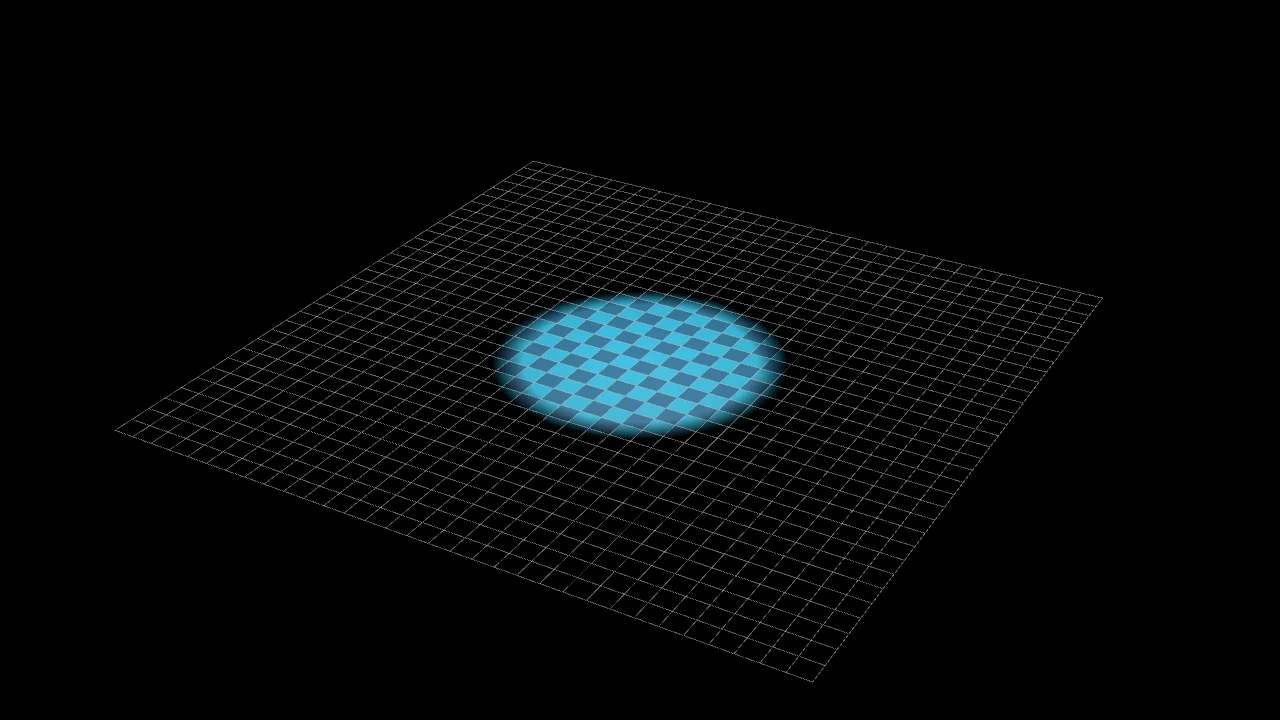
A point light's cone: from its point to the point toward, as wide as angle either
side of its axis, its edge softened over the outer softness of the angle.
locationWhere it is, in scene coordinates.
towardThe point it shines toward.
colorIts color.
intensityHow bright it is one unit away, on its axis.
radiusHow far its light reaches, in scene units.
angleHalf its cone's opening, in radians.
softnessThe fraction of
angle, at the cone's edge, over which its light fades.shadowsWhether what it lights casts shadows (on the mobjects with a material).
background_stroke_colorThe color of an outline drawn behind the fill (default black).
background_stroke_opacityThe outline's opacity, from 0 to 1 (default 1).
background_stroke_widthThe outline's width, in hundredths of a scene unit (default 0: none).
sheen_factorHow much the colors lighten toward
sheen_direction, from -1 to 1 (default 0); a negative factor darkens.sheen_directionThe direction the colors lighten toward (default
UL).joint_typeHow the stroke is joined where its path turns: round, beveled or mitered, as a two-dimensional scene draws it (see LineJointType; default AUTO: mitered).
cap_styleHow the stroke ends, at each end it shows (an open path's, a dash's): round, butt or square, as a two-dimensional scene draws it (see CapStyleType; default AUTO: butt).
shade_in_3dWhether a three-dimensional scene's light shades the mobject.
materialHow its surface reflects the scene's lights in a three-dimensional scene (see Material); None: Manim's shading (default).
nameA name for the mobject; its class's name if not given.
z_indexIts place in the drawing order: a higher index is drawn over a lower one (default 0).
targetThe state
MoveToTargetmoves the mobject to.
It also takes the style keywords.
Source
src/manimgx/mobjects/lights.py
AmbientLight 
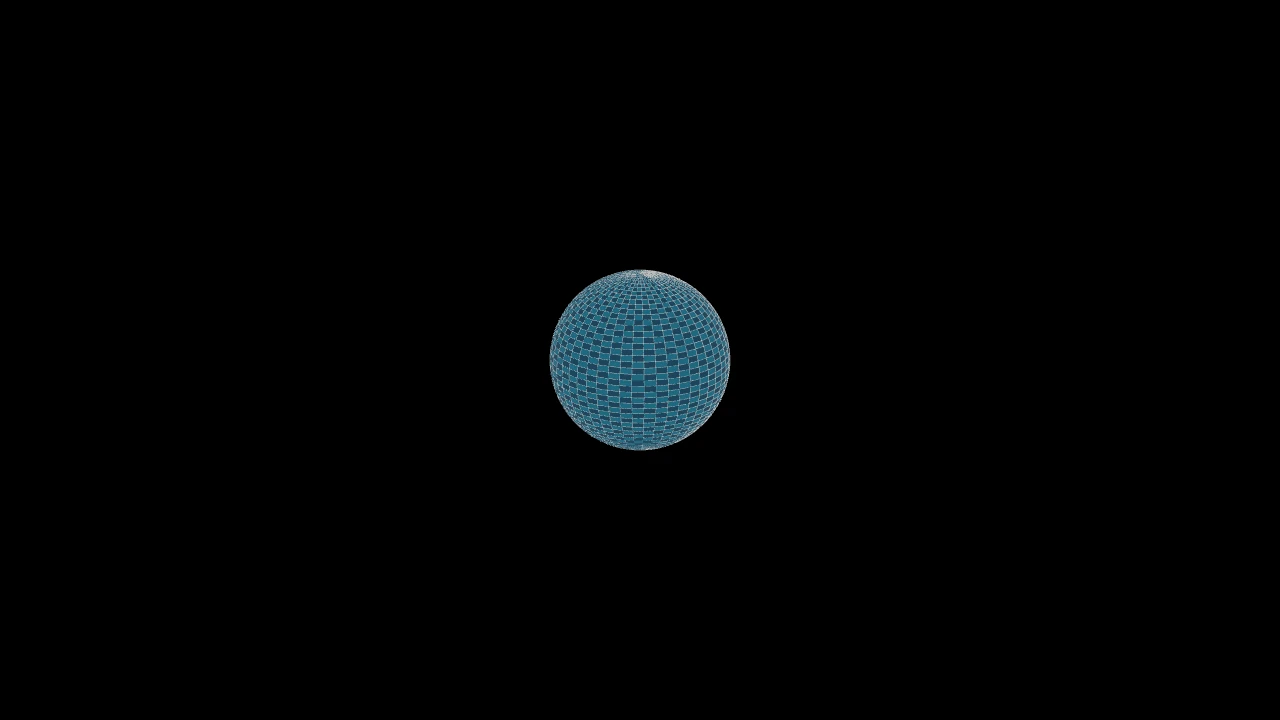
Light from every direction alike: the sky, or a room's light come back from its walls. It lights what no other light reaches, so that nothing goes black.
colorIts color.
intensityHow bright it is: 1 makes a white matte surface white, from every side.
background_stroke_colorThe color of an outline drawn behind the fill (default black).
background_stroke_opacityThe outline's opacity, from 0 to 1 (default 1).
background_stroke_widthThe outline's width, in hundredths of a scene unit (default 0: none).
sheen_factorHow much the colors lighten toward
sheen_direction, from -1 to 1 (default 0); a negative factor darkens.sheen_directionThe direction the colors lighten toward (default
UL).joint_typeHow the stroke is joined where its path turns: round, beveled or mitered, as a two-dimensional scene draws it (see LineJointType; default AUTO: mitered).
cap_styleHow the stroke ends, at each end it shows (an open path's, a dash's): round, butt or square, as a two-dimensional scene draws it (see CapStyleType; default AUTO: butt).
shade_in_3dWhether a three-dimensional scene's light shades the mobject.
materialHow its surface reflects the scene's lights in a three-dimensional scene (see Material); None: Manim's shading (default).
nameA name for the mobject; its class's name if not given.
z_indexIts place in the drawing order: a higher index is drawn over a lower one (default 0).
targetThe state
MoveToTargetmoves the mobject to.
It also takes the style keywords.
Source
src/manimgx/mobjects/lights.py
EnvironmentLight 
Code
import manimgx as m


class EnvironmentLightExample(m.ThreeDScene):
    def construct(self) -> None:
        self.set_camera_orientation(phi=70 * m.DEGREES, theta=-50 * m.DEGREES)
        studio = m.EnvironmentLight()
        self.add(studio)
        for i, roughness in enumerate([0.05, 0.35, 0.8]):
            ball = m.Sphere(radius=0.8, resolution=(64, 64)).set_color(m.GREY_A)
            ball.set_material(m.Material(metallic=1, roughness=roughness))
            self.add(ball.shift(2 * (i - 1) * m.RIGHT))
        self.play(m.Rotate(studio, m.TAU, axis=m.OUT), run_time=4)
Light from all around: a picture of the surroundings, each direction's light the picture's there, as at the place it was taken. Metals mirror it, rough ones blur it, and matte surfaces take its light from every side. A sun in the picture lights as a sun does: its light comes from its direction alone, and it casts shadows. A scene lights by one picture (a second environment light shows the first's).
The picture is a panorama (equirectangular: a Radiance .hdr file, its width twice
its height), its up the scene's up (OUT), its centre seen looking along RIGHT.
Rotate the light to turn its surroundings: its points are where it is and, a unit
away, its picture's RIGHT and up.
pictureA Radiance (
.hdr) file's path; None, a studio's (built in: a dim room with softboxes: a key light where Manim's light source is, a fill, a strip for rims, a light overhead).colorIts tint: the picture's light times this color.
intensityHow bright it is: the picture's light times this (a picture of light 1 all around makes a white matte surface white).
shadowsWhether its picture's sun, if it has one, casts shadows (on the mobjects with a material).
background_stroke_colorThe color of an outline drawn behind the fill (default black).
background_stroke_opacityThe outline's opacity, from 0 to 1 (default 1).
background_stroke_widthThe outline's width, in hundredths of a scene unit (default 0: none).
sheen_factorHow much the colors lighten toward
sheen_direction, from -1 to 1 (default 0); a negative factor darkens.sheen_directionThe direction the colors lighten toward (default
UL).joint_typeHow the stroke is joined where its path turns: round, beveled or mitered, as a two-dimensional scene draws it (see LineJointType; default AUTO: mitered).
cap_styleHow the stroke ends, at each end it shows (an open path's, a dash's): round, butt or square, as a two-dimensional scene draws it (see CapStyleType; default AUTO: butt).
shade_in_3dWhether a three-dimensional scene's light shades the mobject.
materialHow its surface reflects the scene's lights in a three-dimensional scene (see Material); None: Manim's shading (default).
nameA name for the mobject; its class's name if not given.
z_indexIts place in the drawing order: a higher index is drawn over a lower one (default 0).
targetThe state
MoveToTargetmoves the mobject to.
It also takes the style keywords.
Source
src/manimgx/mobjects/lights.py
Materials
Material 
Code
import manimgx as m


class MaterialExample(m.ThreeDScene):
    def construct(self) -> None:
        self.set_camera_orientation(phi=70 * m.DEGREES, theta=-45 * m.DEGREES)
        self.add(
            m.SunLight(5 * m.UP + 3 * m.OUT), m.AmbientLight(intensity=0.2)
        )
        for i, roughness in enumerate([0.2, 0.5, 0.9]):
            sphere = m.Sphere(radius=0.8, resolution=(48, 48))
            sphere.set_color(m.GOLD).shift(2 * (i - 1) * m.RIGHT)
            self.add(
                sphere.set_material(m.Material(metallic=1, roughness=roughness))
            )
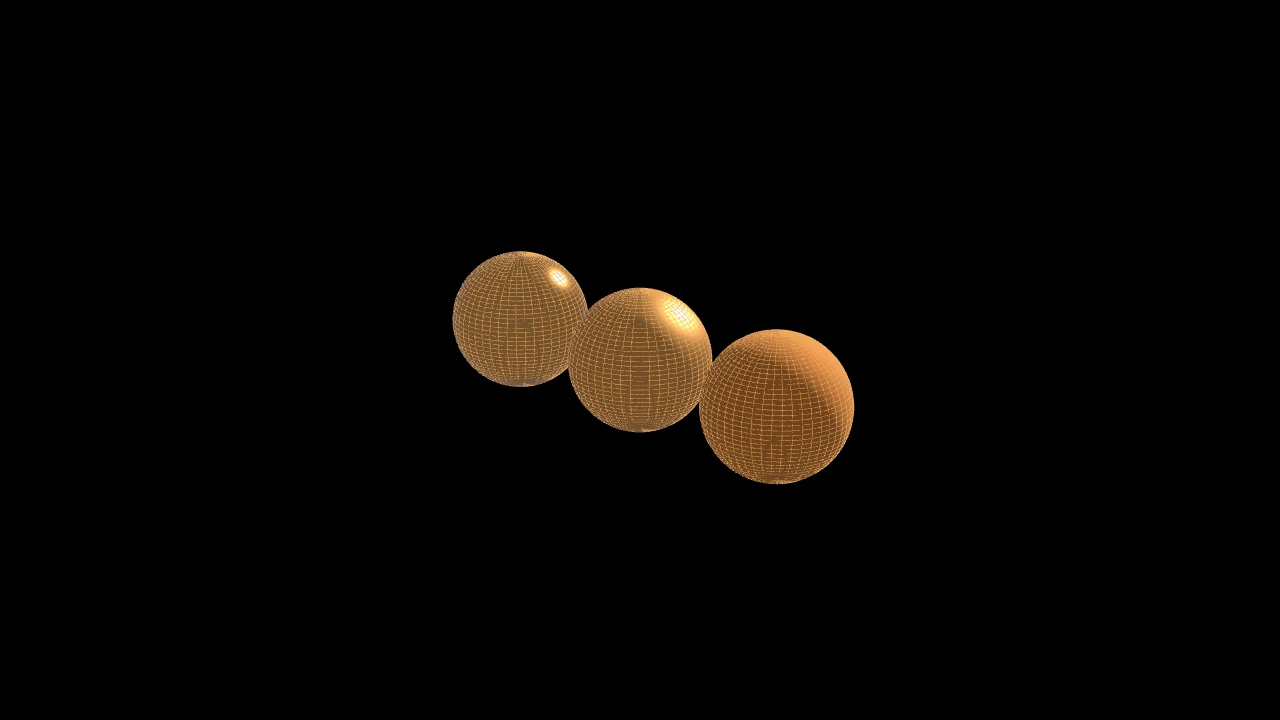
How a surface reflects light: Filament's standard model, its base color the mobject's fill.
A mobject with a material is lit by the scene's lights
(SunLight, PointLight,
SpotLight, AmbientLight,
EnvironmentLight) in a three-dimensional scene, and a mobject without one keeps Manim's shading
(shade_in_3d). Surfaces are lit, and so are flat filled shapes (their fill: a
shape's strokes keep their color); the shadows of whatever the scene shows fall on
them. What is fixed in the frame is not in the scene, and is not lit. A material
tweens: its numbers are mixed like colors.
metallicHow metallic it is, from 0 (a dielectric: plastic, paint, stone, skin) to 1 (a metal, whose reflections take its color).
roughnessHow rough it is, from 0 (a mirror finish: sharp highlights) to 1 (matte).
reflectanceHow much a dielectric reflects when seen head on, from 0 to 1 (0.5: 4%, most materials; 0.35: water's 2%; 1: 16%, gems).
set_material 
Code
import manimgx as m


class MobjectSetMaterialExample(m.ThreeDScene):
    def construct(self) -> None:
        self.set_camera_orientation(
            phi=65 * m.DEGREES, theta=-50 * m.DEGREES
        )
        self.add(
            m.SunLight(4 * m.LEFT + 6 * m.OUT),
            m.AmbientLight(intensity=0.15),
        )
        torus = m.Torus(resolution=(48, 24)).set_color(m.TEAL)
        self.add(torus.set_material(m.Material(roughness=0.25)))
        self.play(
            torus.animate.set_material(
                m.Material(metallic=1, roughness=0.6)
            )
        )
Give the mobject a surface the scene's lights reflect from, in a three-dimensional scene: its fill color is the surface's base color.
materialHow the surface reflects light (see Material); None for Manim's shading.
familyWhether its whole family takes the material, or the mobject alone.
Returns This mobject, for chaining.
Source
src/manimgx/mobject.py
set_shade_in_3d 
Set whether a three-dimensional scene's light shades the path and its family.
valueWhether the light shades them.
z_index_as_groupWhether each member of the family also takes the path as its z-index group, which is kept for Manim compatibility (the renderer draws a three-dimensional scene by depth).
Source
src/manimgx/mobject.py