3D scenes
The film's code
import manimgx as m
import numpy as np


class ThreeDScenesHero(m.ThreeDScene):
    def construct(self) -> None:
        axes = m.ThreeDAxes(
            x_range=[-3, 3],
            y_range=[-3, 3],
            z_range=[0, 2],
            x_length=7,
            y_length=7,
            z_length=3,
        )

        def height(u: float, v: float) -> np.ndarray:
            return axes.c2p(u, v, 2 * np.exp(-(u**2 + v**2) / 2))

        hill = m.Surface(height, u_range=[-2.5, 2.5], v_range=[-2.5, 2.5])
        title = m.Text("A hill", font_size=40).to_corner(m.UL)
        self.add_fixed_in_frame_mobjects(title)
        self.add(axes, hill)
        self.move_camera(phi=65 * m.DEGREES, theta=-45 * m.DEGREES, run_time=2)
        self.begin_ambient_camera_rotation(rate=0.3)
        self.wait(3)
A 3D scene is a scene whose camera looks at the frame from an angle. Two angles give it:
phi, from straight above (0 looks straight down, as a flat scene does), and theta,
around the vertical axis. The camera stays aimed at the frame's center; it shows the scene in
perspective, and what is nearer covers what is farther.
ThreeDScene 
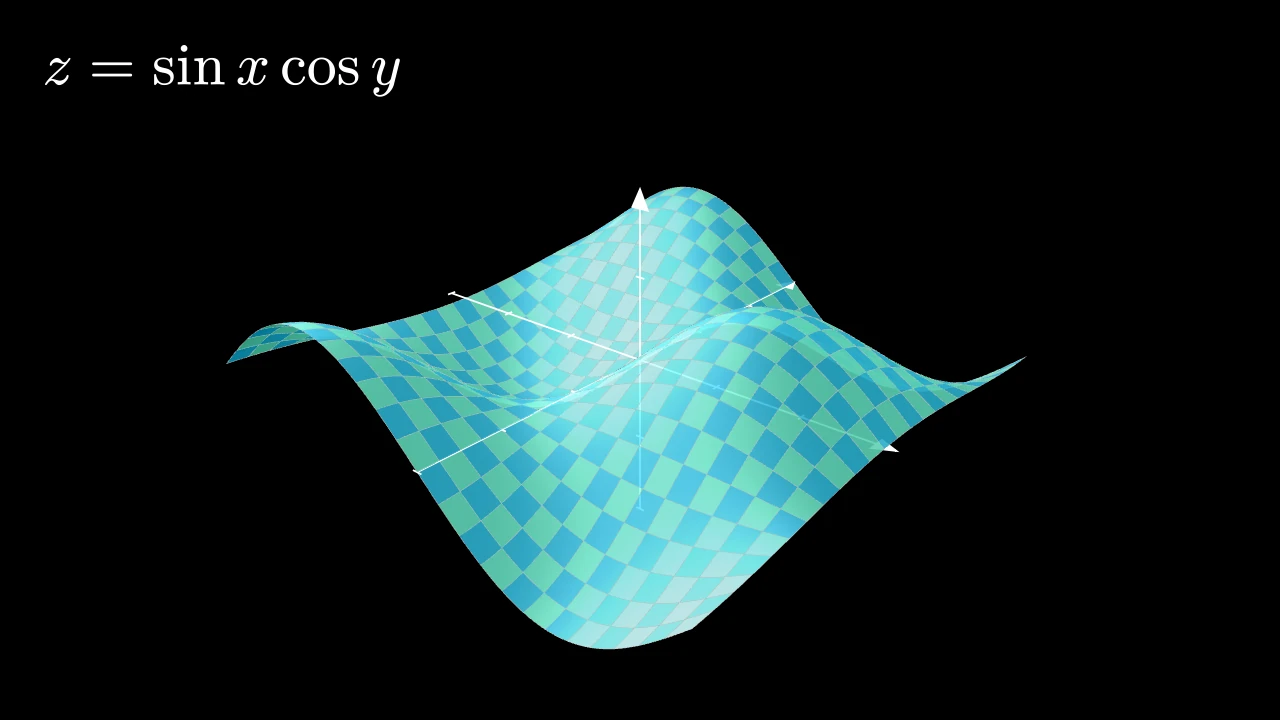
Code
import numpy as np

import manimgx as m


class ThreeDSceneExample(m.ThreeDScene):
    def construct(self) -> None:
        self.set_camera_orientation(
            phi=65 * m.DEGREES, theta=-50 * m.DEGREES, zoom=0.6
        )
        axes = m.ThreeDAxes(x_range=(-3, 3), y_range=(-3, 3), z_range=(-2, 2))
        surface = m.Surface(
            lambda u, v: axes.c2p(u, v, np.sin(u) * np.cos(v)),
            u_range=(-3, 3),
            v_range=(-3, 3),
            resolution=(24, 24),
        ).set_fill_by_checkerboard(m.BLUE_D, m.TEAL, opacity=0.9)
        title = m.MathTex(r"z = \sin x \cos y", font_size=64).to_corner(m.UL)
        self.add_fixed_in_frame_mobjects(title)
        self.add(axes, surface)
A scene seen in three dimensions: from a camera that orbits it, with perspective and depth.
The camera looks at the center of its frame from the angles phi, from the z axis
(0 looks straight down on the xy plane), and theta, around it (−90° by default, so
that x points right); gamma turns it about its line of sight, zoom magnifies,
and focal_distance is how far it is from the point it looks at. Each is a
value tracker of the camera, so it moves
as any mobject does: move_camera animates it,
and an ambient rotation keeps it turning. Nearer surfaces hide farther ones;
mobjects fixed in the frame are drawn flat on the screen, over everything.
Source
src/manimgx/scene.py
set_camera_orientation 
Set where the camera looks from, at once: each setting given; the others stay as they are.
phiThe angle between the camera's line of sight and the z axis, in radians: 0 looks straight down on the xy plane.
thetaThe camera's angle around the z axis, in radians, counterclockwise from the x axis: at −90° it looks from the side of negative y, so that x points right.
gammaHow far the camera turns about its line of sight, in radians.
zoomHow much the camera magnifies: 2 shows everything twice as large.
focal_distanceThe camera's distance from the point it looks at, in scene units: the nearer, the stronger the perspective.
frame_centerThe point the camera looks at, or a mobject whose center it is: the camera's frame moves there.
Source
src/manimgx/scene.py
begin_ambient_camera_rotation 
Code
import manimgx as m


class ThreeDSceneAmbientRotationExample(m.ThreeDScene):
    def construct(self) -> None:
        self.set_camera_orientation(
            phi=70 * m.DEGREES, theta=-45 * m.DEGREES
        )
        torus = m.Torus(major_radius=2.5, minor_radius=0.8)
        self.add(m.ThreeDAxes(), torus.set_color(m.TEAL))
        self.begin_ambient_camera_rotation(rate=m.PI / 4)  # 45° a second
        self.wait(4)
Start turning the camera steadily, through plays and waits alike, until
stop_ambient_camera_rotation.
One of the camera's angles grows at a steady rate: its tracker gets an updater (a flow) and joins the scene.
rateHow fast the angle grows, in radians per second; a negative rate turns the other way.
aboutThe angle: "theta" (around the z axis), "phi" or "gamma", in any case.
Source
src/manimgx/scene.py
stop_ambient_camera_rotation 
Stop turning the camera: every updater of the angle's tracker is removed, and the tracker leaves the scene. The camera stays where it turned to.
aboutThe angle: "theta", "phi" or "gamma", in any case.
Source
src/manimgx/scene.py
begin_3dillusion_camera_rotation 
Start swaying the camera around its orientation, for an illusion of depth,
through plays and waits alike, until stop_3dillusion_camera_rotation.
The camera circles a little: theta swings 0.2 radians either side of
origin_theta, and phi between origin_phi and 0.2 radians less, a quarter
of a cycle apart. The trackers of the two angles get updaters (flows) and join
the scene.
rateHow fast it sways, in radians of its cycle per second: a cycle takes 2π /
rateseconds.origin_phiThe
phiit sways from; None for the camera's present one.origin_thetaThe
thetait sways about; None for the camera's present one.
Source
src/manimgx/scene.py
stop_3dillusion_camera_rotation 
Stop swaying the camera: every updater of the theta and phi trackers is
removed, and they leave the scene. The camera stays where the sway left it.
Source
src/manimgx/scene.py
move_camera 
Code
import manimgx as m


class ThreeDSceneMoveCameraExample(m.ThreeDScene):
    def construct(self) -> None:
        cube = m.Cube(side_length=2.5, fill_opacity=0.8, fill_color=m.BLUE)
        self.add(m.ThreeDAxes(), cube)
        self.move_camera(
            phi=70 * m.DEGREES, theta=-45 * m.DEGREES, run_time=2
        )
        self.move_camera(theta=45 * m.DEGREES, zoom=1.5, run_time=2)
Animate the camera to a new orientation, in one play: each setting given; the others stay as they are.
Each setting moves steadily from its value to the new one, eased by the rate
function, so a theta 2π greater takes the camera once around. The frame moves
to frame_center if given, and added_anims play along.
phiThe angle between the camera's line of sight and the z axis, in radians: 0 looks straight down on the xy plane.
thetaThe camera's angle around the z axis, in radians, counterclockwise from the x axis.
gammaHow far the camera turns about its line of sight, in radians.
zoomHow much the camera magnifies: 2 shows everything twice as large.
focal_distanceThe camera's distance from the point it looks at, in scene units.
frame_centerThe point for the camera to look at, or a mobject whose center it is.
added_animsAnimations to play along.
run_timeHow long the animation plays, in seconds (default 1).
lag_ratioHow the parts of the mobject are staggered: each begins this fraction of its run after the one before it begins (default 0: all together; 1: one after another).
rate_funcHow the animation's progress runs with time: a function from [0, 1] to [0, 1] (default
smooth; see rate functions).reverse_rate_functionWhether to run the animation backward (default False).
nameA name for the animation.
removerWhether the mobject leaves the scene when the animation finishes (default False).
suspend_mobject_updatingWhether the mobject's updaters run beneath the animation (default True): they keep acting on the mobject, and each frame shows the animation applied to the result. If False, they act on the animated mobject itself.
introducerWhether the mobject joins the scene when the animation begins (default False); otherwise the play brings it in when the play begins, if the scene lacks it.
use_overrideWhether a mobject whose class plays another animation in place of this one does so (default True).
It also takes the transform keywords.
Source
src/manimgx/scene.py
2075 2076 2077 2078 2079 2080 2081 2082 2083 2084 2085 2086 2087 2088 2089 2090 2091 2092 2093 2094 2095 2096 2097 2098 2099 2100 2101 2102 2103 2104 2105 2106 2107 2108 2109 2110 2111 2112 2113 2114 2115 2116 2117 2118 2119 2120 2121 2122 2123 2124 2125 2126 2127 2128 2129 2130 2131 2132 2133 2134 2135 2136 2137 2138 2139 2140 | |
add_fixed_in_frame_mobjects 
Add mobjects pinned to the screen: each is drawn where its points are, as in a two-dimensional view centered on the origin, over everything else.
They are added to the scene, and stay where they are on the screen whatever the
camera's angles, zoom and center: a title placed with to_corner stays in its
corner. Everything in them is pinned, now and later: a member added later (a
number's new digits, what an updater or a Transform makes) is pinned too.
Source
src/manimgx/scene.py