Surfaces and solids
The film's code
import manimgx as m


class SurfacesHero(m.ThreeDScene):
    def construct(self) -> None:
        self.set_camera_orientation(phi=65 * m.DEGREES, theta=-50 * m.DEGREES)
        shapes = m.Group(
            m.Sphere(radius=0.9),
            m.Torus(major_radius=0.8, minor_radius=0.3),
            m.Cylinder(radius=0.7, height=1.6),
            m.Cone(base_radius=0.8, height=1.6),
            m.Cube(side_length=1.4),
            m.Icosahedron(edge_length=1.2),
        )
        shapes.arrange_in_grid(rows=2, buff=0.9)
        self.add(m.SunLight(4 * m.UP + 3 * m.OUT), m.AmbientLight(intensity=0.3))
        self.play(m.LaggedStart(*[m.FadeIn(shape) for shape in shapes], lag_ratio=0.15))
        self.wait()
A surface is the set of points a function of two numbers makes: func(u, v) for u and v over
their ranges. A sphere, a torus, a cylinder and a cone are surfaces with their functions
made for you. A solid with flat faces is a polyhedron, from a cube to an icosahedron. All
show in a 3D scene, shaded by its lights.
Surfaces
Surface 
Code
import numpy as np

import manimgx as m


class SurfaceExample(m.ThreeDScene):
    def construct(self) -> None:
        self.set_camera_orientation(phi=60 * m.DEGREES, theta=-60 * m.DEGREES)

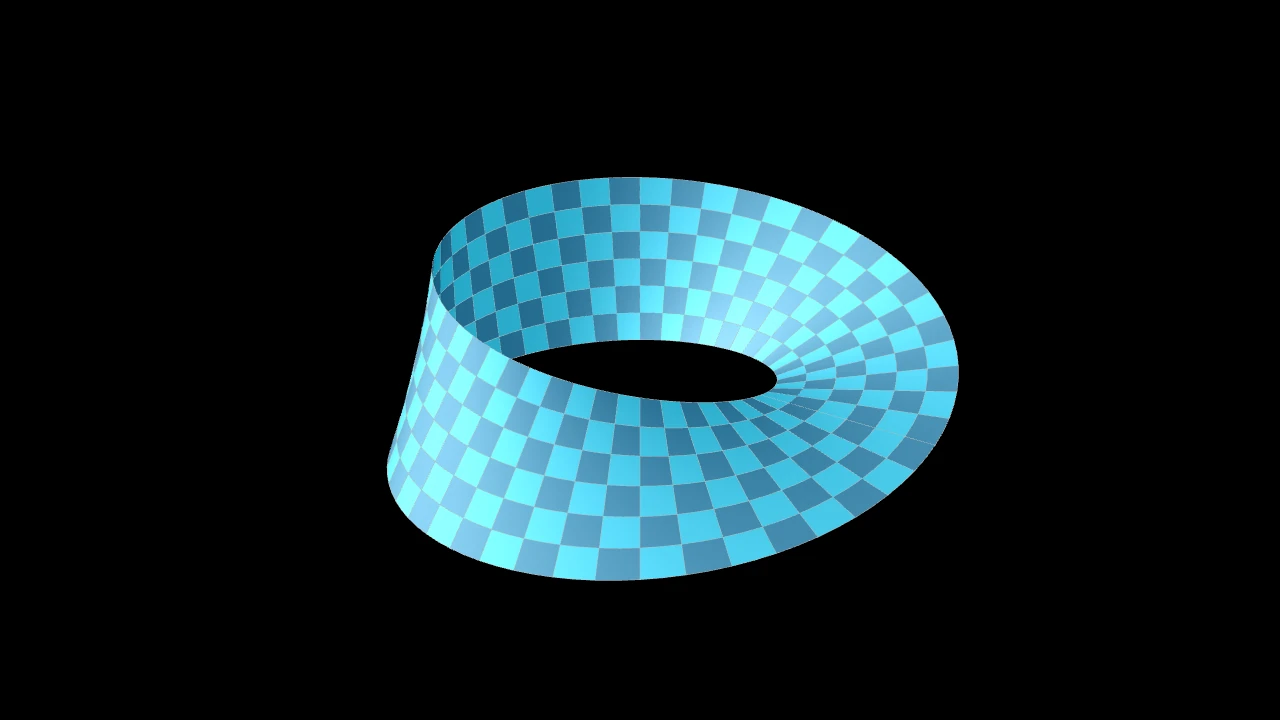
        def mobius(u: float, v: float) -> np.ndarray:
            r = 2.5 + v * np.cos(u / 2)
            return np.array([r * np.cos(u), r * np.sin(u), v * np.sin(u / 2)])

        strip = m.Surface(
            mobius, u_range=(0, m.TAU), v_range=(-1, 1), resolution=(48, 6)
        )
        self.add(strip)
A parametric surface: the points func(u, v) for u and v over their ranges,
drawn as the smooth surface through them; checkered in two blues, with thin light
grey edges, and shaded by a three-dimensional scene's light, unless styled.
The ranges are divided into resolution steps, along u and along v, and the
function is sampled at the corners of the grid's cells, the surface's faces. What is
drawn is the smooth surface through those samples, not flat faces: resolution sets
how closely it follows the function, and the light shades it smoothly, across the
seam too where the surface closes on itself (a sphere, a torus, a cylinder). Each
face keeps its own colors, so a checkerboard keeps sharp cells, and the stroke draws
the faces' edges, curved with the surface. The faces are one mesh (a
MeshMobject): it morphs into other meshes (drawn as flat
faces while it morphs into one of another grid), and Create draws
it in face by face, each face with its edges.
set_fill_by_checkerboard and
set_fill_by_value color it.
The checkerboard palette supplies the initial paint; use set_fill_by_checkerboard to recolor the surface later. The initial palette and ignored compatibility options are not retained as instance attributes.
funcThe function, from (u, v) to a point in scene coordinates (on axes, their c2p of coordinates).
u_rangeThe range of u,
(u_min, u_max).v_rangeThe range of v,
(v_min, v_max).resolutionHow many faces the surface has along u and along v: one positive integer for both, or a pair of positive integers
(u, v).surface_piece_configAccepted for Manim compatibility; ignored.
checkerboard_colorsThe initial checkerboard colors, in turn; False for the fill color alone.
should_make_jaggedAccepted for Manim compatibility; ignored.
pre_function_handle_to_anchor_scale_factorAccepted for Manim compatibility; ignored.
colorThe color of both fill and stroke (default white); None for the class's default.
fill_colorThe fill's color;
colorif not given. Several colors make a gradient alongsheen_direction.fill_opacityThe fill's opacity, from 0 to 1 (default 0: no fill).
stroke_colorThe stroke's color;
colorif not given. Several colors make a gradient.stroke_opacityThe stroke's opacity, from 0 to 1 (default 1).
stroke_widthThe stroke's width, in hundredths of a scene unit (default 4; 0: no stroke).
background_stroke_colorThe color of an outline drawn behind the fill (default black).
background_stroke_opacityThe outline's opacity, from 0 to 1 (default 1).
background_stroke_widthThe outline's width, in hundredths of a scene unit (default 0: none).
sheen_factorHow much the colors lighten toward
sheen_direction, from -1 to 1 (default 0); a negative factor darkens.sheen_directionThe direction the colors lighten toward (default
UL).joint_typeHow the stroke is joined where its path turns: round, beveled or mitered, as a two-dimensional scene draws it (see LineJointType; default AUTO: mitered).
cap_styleHow the stroke ends, at each end it shows (an open path's, a dash's): round, butt or square, as a two-dimensional scene draws it (see CapStyleType; default AUTO: butt).
shade_in_3dWhether a three-dimensional scene's light shades the mobject.
materialHow its surface reflects the scene's lights in a three-dimensional scene (see Material); None: Manim's shading (default).
nameA name for the mobject; its class's name if not given.
z_indexIts place in the drawing order: a higher index is drawn over a lower one (default 0).
targetThe state
MoveToTargetmoves the mobject to.
It also takes the style keywords.
Source
src/manimgx/mobjects/three_d.py
func 
The surface's point at (u, v): its function's value.
uThe first parameter.
vThe second parameter.
Returns The point, in scene coordinates, as the surface was made (before it was moved).
Source
src/manimgx/mobjects/three_d.py
set_fill_by_checkerboard 
Color the faces like a checkerboard: the colors in turn, along u and along v.
The face at place (i, j) of the grid takes the color i + j places along
colors, cycling: two colors make a checkerboard, more make diagonal stripes.
It replaces the colors set_fill_by_value
gave.
*colorsThe colors, in turn.
opacityThe faces' opacity, from 0 to 1; None to keep theirs.
Source
src/manimgx/mobjects/three_d.py
set_fill_by_value 
Code
import numpy as np

import manimgx as m


class SurfaceSetFillByValueExample(m.ThreeDScene):
    def construct(self) -> None:
        self.set_camera_orientation(
            phi=65 * m.DEGREES, theta=-130 * m.DEGREES
        )
        axes = m.ThreeDAxes(
            x_range=(0, 5),
            y_range=(0, 5),
            z_range=(-1, 1, 0.5),
            x_length=7,
            y_length=7,
            z_length=3,
        )
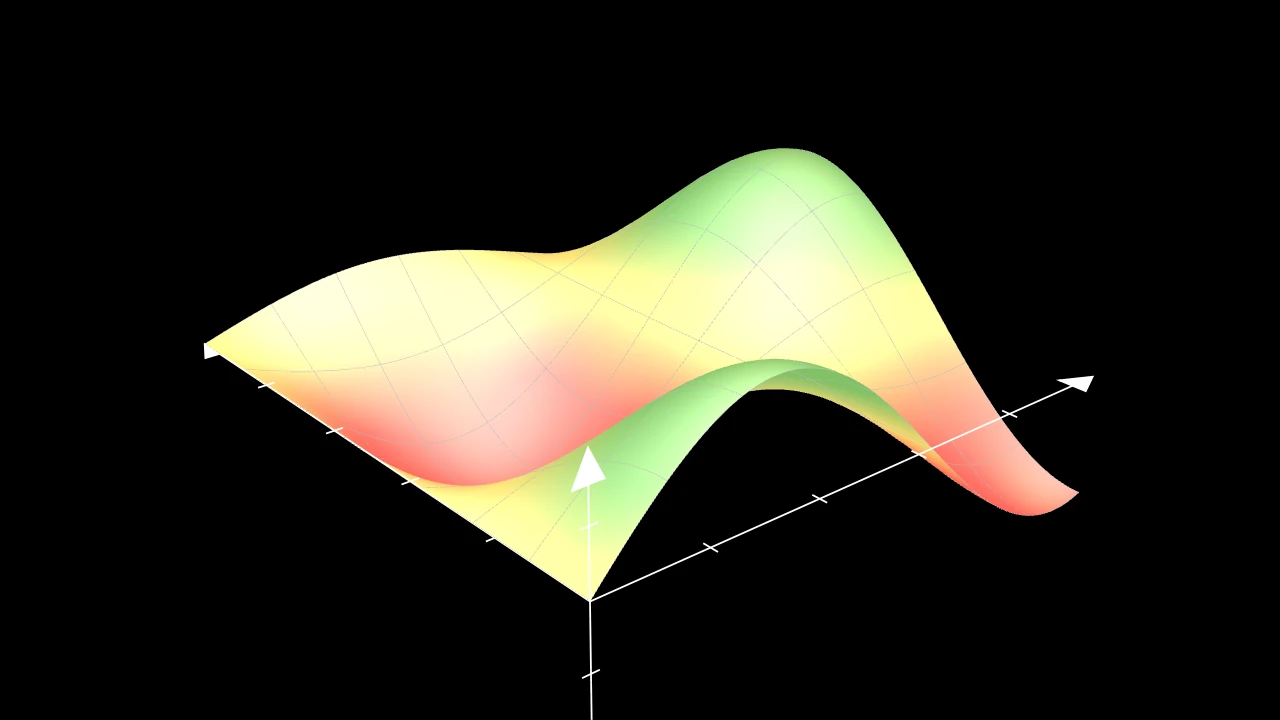
        surface = m.Surface(
            lambda u, v: axes.c2p(u, v, np.sin(u) * np.cos(v)),
            u_range=(0, 5),
            v_range=(0, 5),
            resolution=8,
        )
        surface.set_fill_by_value(
            axes, colorscale=[(m.RED, -0.5), (m.YELLOW, 0), (m.GREEN, 0.5)]
        )
        self.add(axes, surface)
Color the surface point by point by a coordinate on axes: its height, z, by default, on a colorscale.
Each sample of the surface has its coordinate along axis, and the values are
blended across the surface before the colorscale maps them: the colors follow
the surface smoothly, and a face whose corners straddle a color of the scale
shows it. The colors are the fill's, lit as a fill color is, at the fill's
opacity: a fill color set later (set_fill,
set_color) replaces them, as
set_fill_by_checkerboard does.
Without a colorscale, it warns and leaves the colors as they are.
axesThe axes whose coordinates color the surface.
colorscaleThe colors: spread evenly over the axes' range along
axis, or(color, value)pairs, which span their own values; blended between, and held beyond the ends.axisThe coordinate: 0 for x, 1 for y, 2 for z.
colorsThe colorscale by its older name, accepted for Manim compatibility: used when
colorscaleis None.
Source
src/manimgx/mobjects/three_d.py
355 356 357 358 359 360 361 362 363 364 365 366 367 368 369 370 371 372 373 374 375 376 377 378 379 380 381 382 383 384 385 386 387 388 389 390 391 392 393 394 395 396 397 398 399 400 401 402 403 404 405 406 407 408 409 410 411 412 413 414 415 416 417 418 419 420 421 422 423 424 425 426 427 428 429 430 431 432 433 434 435 436 437 438 439 440 441 442 443 444 445 446 447 448 449 | |
Sphere 
Code
import manimgx as m


class SphereExample(m.ThreeDScene):
    def construct(self) -> None:
        self.set_camera_orientation(phi=70 * m.DEGREES, theta=-90 * m.DEGREES)
        self.add(
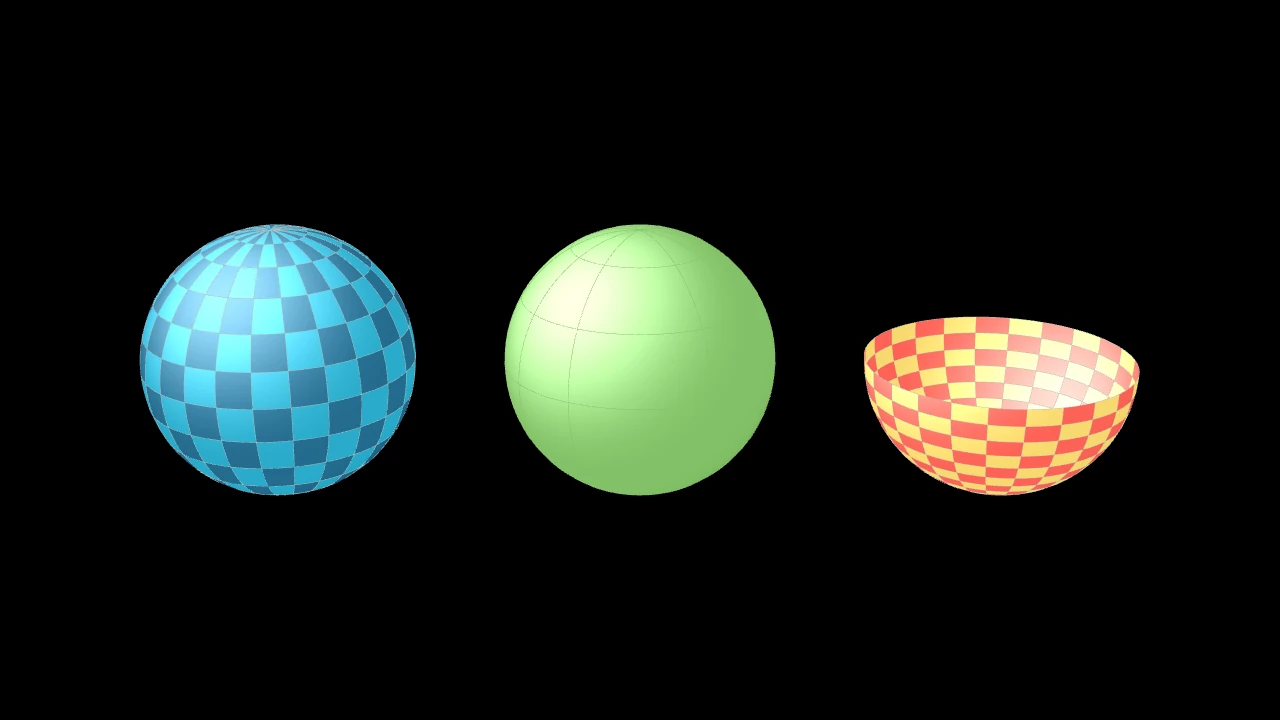
            m.Sphere(center=(-4, 0, 0), radius=1.5),
            m.Sphere(radius=1.5, resolution=(12, 6)).set_color(m.GREEN),
            m.Sphere(
                center=(4, 0, 0),
                radius=1.5,
                v_range=(0, m.PI / 2),
                checkerboard_colors=[m.RED, m.YELLOW],
            ),
        )
A sphere: checkered in two blues and shaded by a three-dimensional scene's light, unless styled.
It is a Surface of u, the longitude, and v, the angle from the south pole (the bottom, along z): their ranges may cut out a part of it.
centerWhere its center goes.
radiusIts radius, in scene units.
resolutionHow many faces it has around and from pole to pole: one number for both, or
(u, v); None for (24, 12).u_rangeThe range of the longitude, in radians: (0, τ) goes all the way around.
v_rangeThe range of the angle from the south pole, in radians: (0, π) goes from pole to pole.
It also takes
the Surface keywords.
Source
src/manimgx/mobjects/three_d.py
func 
The sphere's point at a longitude and an angle from its south pole, as it is made around the origin.
uThe longitude, in radians, counterclockwise from the x-axis.
vThe angle from the south pole, in radians: 0 at the bottom, π at the top.
Returns The point, relative to the sphere's center.
Source
src/manimgx/mobjects/three_d.py
Torus 
Code
import manimgx as m


class TorusExample(m.ThreeDScene):
    def construct(self) -> None:
        self.set_camera_orientation(phi=65 * m.DEGREES, theta=-60 * m.DEGREES)
        self.add(
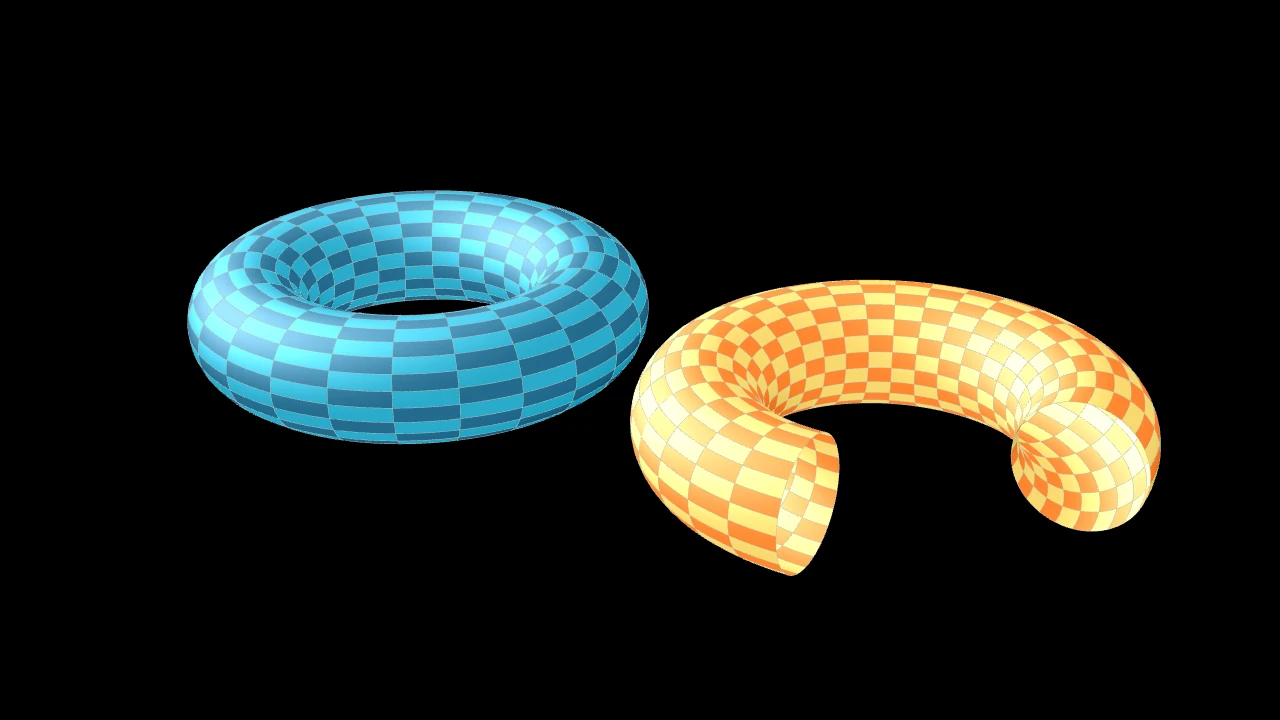
            m.Torus(major_radius=2, minor_radius=0.7).shift(3 * m.LEFT),
            m.Torus(
                major_radius=2,
                minor_radius=0.7,
                u_range=(0, 1.5 * m.PI),
                checkerboard_colors=[m.ORANGE, m.YELLOW],
            ).shift(3 * m.RIGHT),
        )
A torus: a tube around a circle in the xy-plane, centered at the origin; checkered in two blues and shaded by a three-dimensional scene's light, unless styled.
It is a Surface of u, the angle around its axis (z), and v, the angle around its tube: their ranges may cut out a part of it.
major_radiusThe radius of the circle the tube runs around: from the torus's center to the middle of its tube, in scene units.
minor_radiusThe tube's radius, in scene units.
u_rangeThe range of the angle around its axis, in radians: (0, τ) goes all the way around.
v_rangeThe range of the angle around its tube, in radians.
resolutionHow many faces it has around its axis and around its tube: one number for both, or
(u, v); None for (24, 24).
It also takes
the Surface keywords.
Source
src/manimgx/mobjects/three_d.py
func 
The torus's point, as it is made around the origin, at an angle around its axis and an angle around its tube.
uThe angle around the axis, in radians, counterclockwise from the x-axis.
vThe angle around the tube, in radians: 0 on its inner side.
Returns The point, in scene coordinates.
Source
src/manimgx/mobjects/three_d.py
Cylinder 
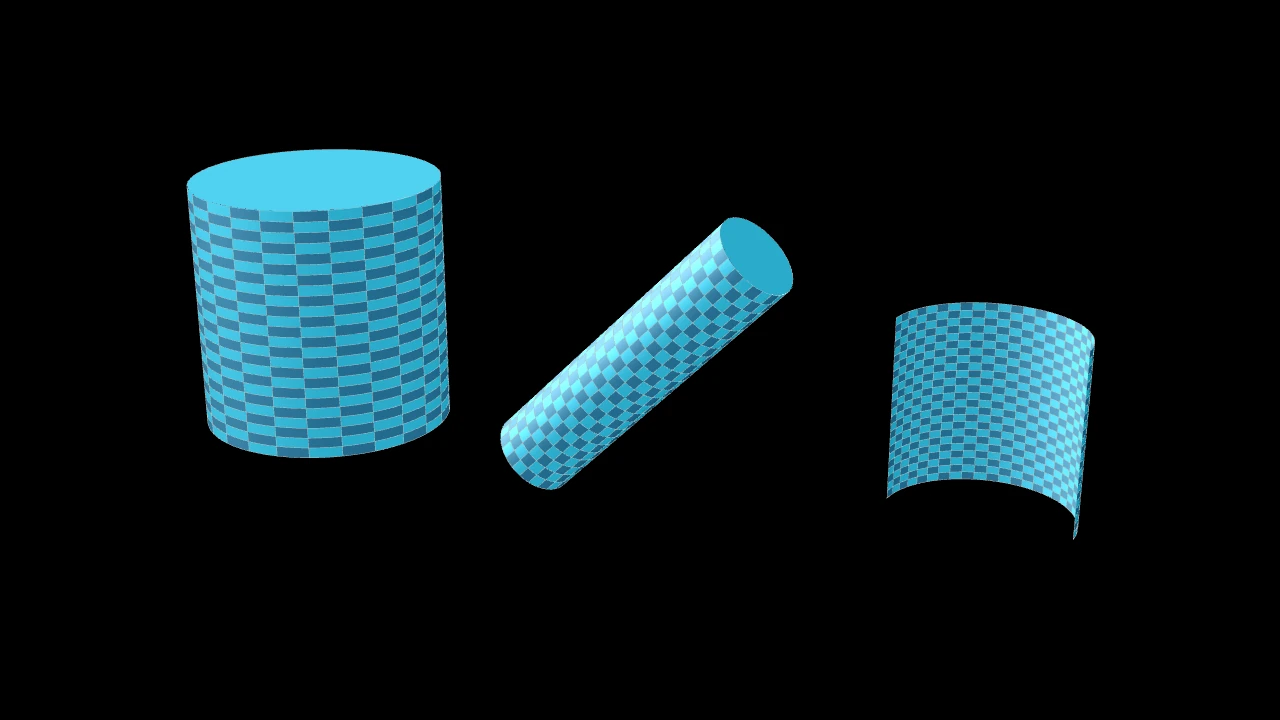
Code
import manimgx as m


class CylinderExample(m.ThreeDScene):
    def construct(self) -> None:
        self.set_camera_orientation(phi=70 * m.DEGREES, theta=-60 * m.DEGREES)
        self.add(
            m.Cylinder(radius=1.5, height=3).shift(4.5 * m.LEFT),
            m.Cylinder(radius=0.5, height=4, direction=m.X_AXIS + m.Z_AXIS),
            m.Cylinder(show_ends=False, v_range=(0, m.PI)).shift(4 * m.RIGHT),
        )
A cylinder, centered at the origin, its axis along direction: checkered in two
blues, closed at both ends by discs, and shaded by a three-dimensional scene's
light, unless styled.
It is a Surface of u, the height along its axis, and v, the
angle around it: v_range may cut out a slice.
radiusIts radius, in scene units.
heightIts height, along its axis, in scene units.
directionThe direction of its axis.
v_rangeThe range of the angle around its axis, in radians: (0, τ) goes all the way around.
show_endsWhether discs close its ends.
resolutionHow many faces it has along its axis and around it: one number for both, or
(u, v).
It also takes
the Surface keywords.
Source
src/manimgx/mobjects/three_d.py
set_direction 
Turn the surface's axis to a direction, undoing its previous direction.
Both turns are about the origin, preserving other changes to the surface.
directionThe direction of the axis, from a cone's base to its apex.
Source
src/manimgx/mobjects/three_d.py
func 
The cylinder's point, as it is made along z and centered on the origin, at a height along its axis and an angle around it.
uThe height along the axis, in scene units, from the middle.
vThe angle around the axis, in radians.
Returns The point, in scene coordinates.
Source
src/manimgx/mobjects/three_d.py
Cone 
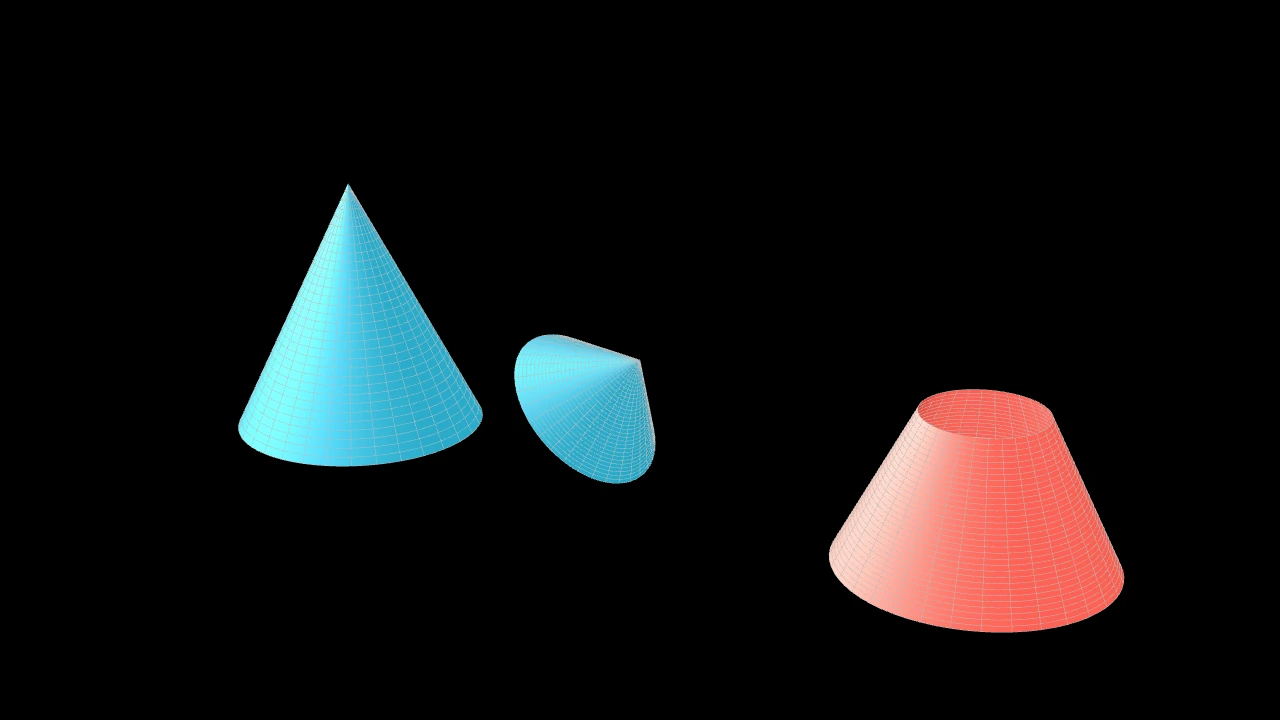
Code
import manimgx as m


class ConeExample(m.ThreeDScene):
    def construct(self) -> None:
        self.set_camera_orientation(phi=70 * m.DEGREES, theta=-60 * m.DEGREES)
        frustum = m.Cone(base_radius=1.5, height=3, u_min=1.5, fill_color=m.RED)
        self.add(
            m.Cone(base_radius=1.5, height=3).shift(4 * m.LEFT + 1.5 * m.OUT),
            m.Cone(direction=m.X_AXIS + m.Z_AXIS, show_base=True),
            frustum.shift(4 * m.RIGHT + 1.5 * m.OUT),
        )
A cone, its apex at the origin, pointing along direction from its base; blue,
shaded by a three-dimensional scene's light, and open at the base, unless styled.
It is a Surface of u, the distance from the apex along its side,
and v, the angle around its axis: v_range may cut out a slice, and u_min its
tip. It is one color, not checkered, unless given checkerboard_colors.
base_radiusThe radius of its base, in scene units.
heightIts height, from its base to its apex, in scene units.
directionThe direction it points in, from its base to its apex.
show_baseWhether a disc closes its base.
v_rangeThe range of the angle around its axis, in radians: (0, τ) goes all the way around.
u_minWhere its side begins, as a distance from the apex along it, in scene units: above 0, the tip is cut off.
It also takes
the Surface keywords.
Source
src/manimgx/mobjects/three_d.py
base_circle 
The disc of its base, in its fill color: part of the cone with
show_base.
set_direction 
Turn the surface's axis to a direction, undoing its previous direction.
Both turns are about the origin, preserving other changes to the surface.
directionThe direction of the axis, from a cone's base to its apex.
Source
src/manimgx/mobjects/three_d.py
func 
The cone's point, as it is made pointing up (along z) with its apex at the origin, at a distance from the apex along its side and an angle around its axis.
uThe distance from the apex, along the side, in scene units.
vThe angle around the axis, in radians.
Returns The point, in scene coordinates.
Source
src/manimgx/mobjects/three_d.py
Solids
Cube 
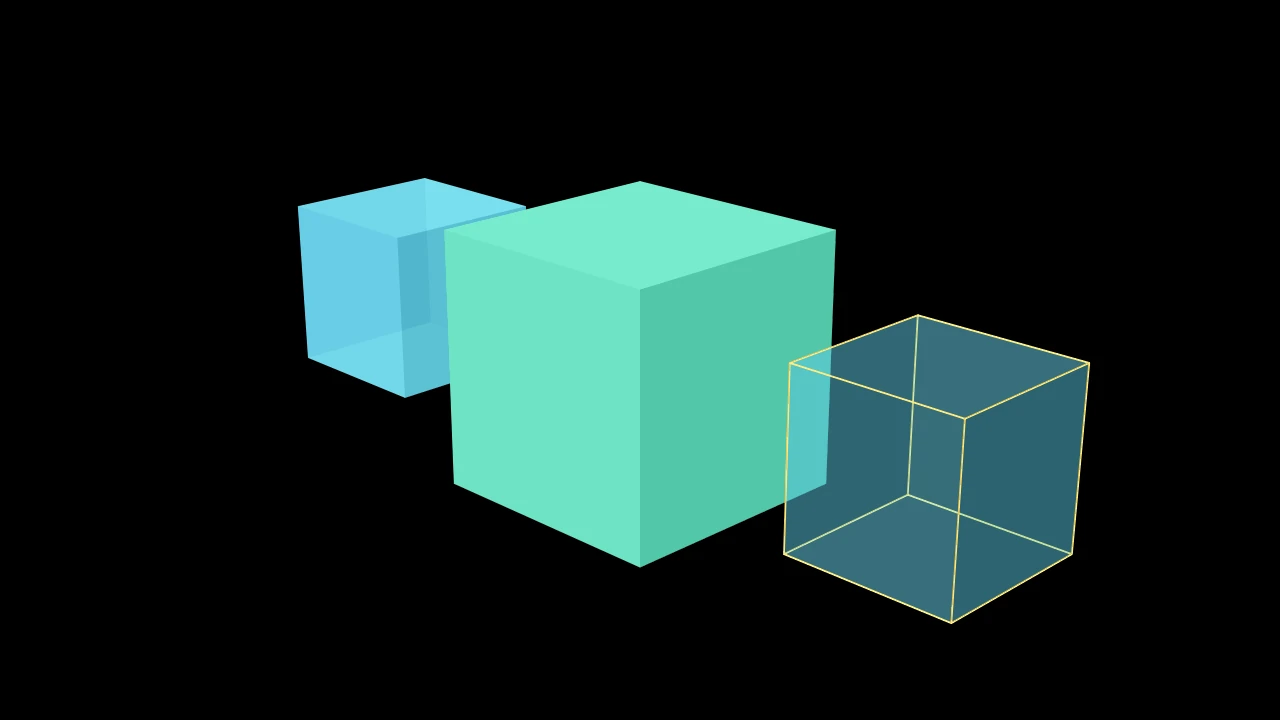
Code
import manimgx as m


class CubeExample(m.ThreeDScene):
    def construct(self) -> None:
        self.set_camera_orientation(phi=70 * m.DEGREES, theta=-45 * m.DEGREES)
        cubes = m.Group(
            m.Cube(),
            m.Cube(side_length=3, fill_color=m.TEAL, fill_opacity=1),
            m.Cube(fill_opacity=0.3, stroke_width=2, stroke_color=m.YELLOW),
        ).arrange(buff=1.5)
        self.add(cubes)
A cube: six square faces, centered at the origin with its edges along the axes; blue, three-quarters opaque, without edges and shaded by a three-dimensional scene's light, unless styled.
side_lengthThe length of its edges, in scene units.
colorThe color of both fill and stroke (default white); None for the class's default.
fill_colorThe fill's color;
colorif not given. Several colors make a gradient alongsheen_direction.fill_opacityThe fill's opacity, from 0 to 1 (default 0: no fill).
stroke_colorThe stroke's color;
colorif not given. Several colors make a gradient.stroke_opacityThe stroke's opacity, from 0 to 1 (default 1).
stroke_widthThe stroke's width, in hundredths of a scene unit (default 4; 0: no stroke).
background_stroke_colorThe color of an outline drawn behind the fill (default black).
background_stroke_opacityThe outline's opacity, from 0 to 1 (default 1).
background_stroke_widthThe outline's width, in hundredths of a scene unit (default 0: none).
sheen_factorHow much the colors lighten toward
sheen_direction, from -1 to 1 (default 0); a negative factor darkens.sheen_directionThe direction the colors lighten toward (default
UL).joint_typeHow the stroke is joined where its path turns: round, beveled or mitered, as a two-dimensional scene draws it (see LineJointType; default AUTO: mitered).
cap_styleHow the stroke ends, at each end it shows (an open path's, a dash's): round, butt or square, as a two-dimensional scene draws it (see CapStyleType; default AUTO: butt).
shade_in_3dWhether a three-dimensional scene's light shades the mobject.
materialHow its surface reflects the scene's lights in a three-dimensional scene (see Material); None: Manim's shading (default).
nameA name for the mobject; its class's name if not given.
z_indexIts place in the drawing order: a higher index is drawn over a lower one (default 0).
targetThe state
MoveToTargetmoves the mobject to.
It also takes the style keywords.
Source
src/manimgx/mobjects/three_d.py
Prism 
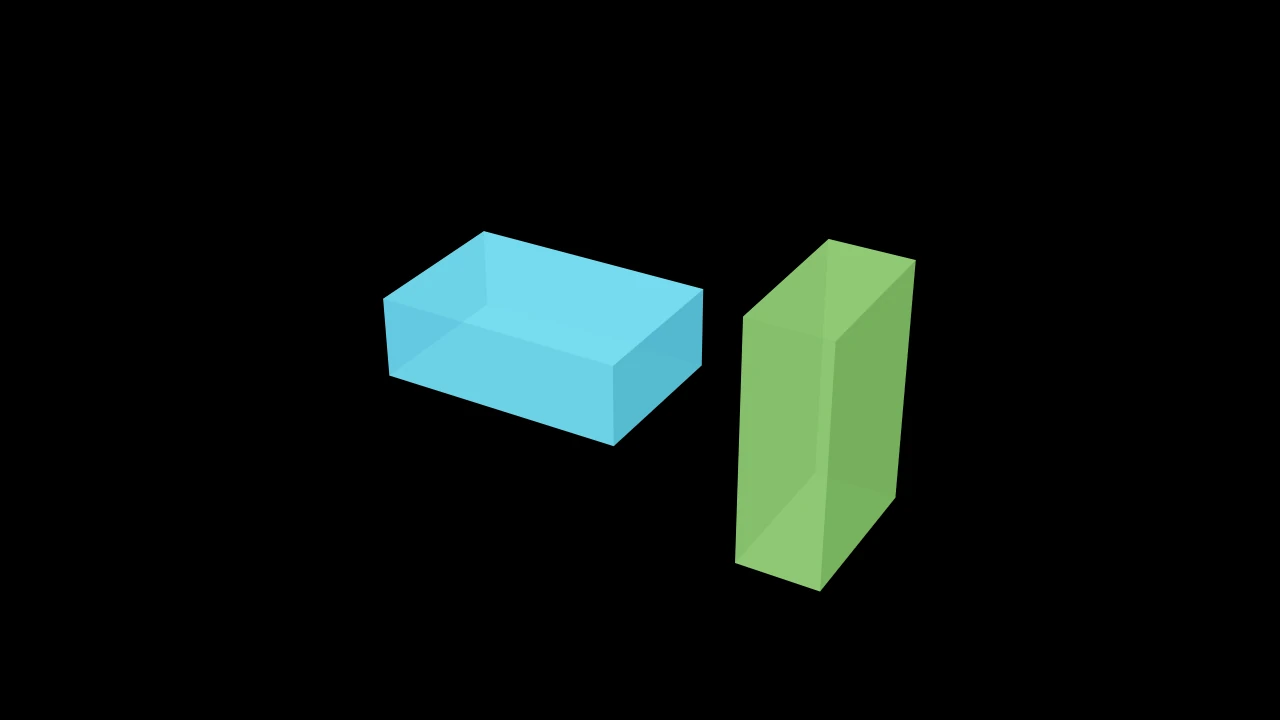
A box: a Cube stretched to its width, height and depth; blue, three-quarters opaque, without edges and shaded by a three-dimensional scene's light, unless styled.
dimensionsIts size along x, y and z, in scene units; None for (3, 2, 1).
colorThe color of both fill and stroke (default white); None for the class's default.
fill_colorThe fill's color;
colorif not given. Several colors make a gradient alongsheen_direction.fill_opacityThe fill's opacity, from 0 to 1 (default 0: no fill).
stroke_colorThe stroke's color;
colorif not given. Several colors make a gradient.stroke_opacityThe stroke's opacity, from 0 to 1 (default 1).
stroke_widthThe stroke's width, in hundredths of a scene unit (default 4; 0: no stroke).
background_stroke_colorThe color of an outline drawn behind the fill (default black).
background_stroke_opacityThe outline's opacity, from 0 to 1 (default 1).
background_stroke_widthThe outline's width, in hundredths of a scene unit (default 0: none).
sheen_factorHow much the colors lighten toward
sheen_direction, from -1 to 1 (default 0); a negative factor darkens.sheen_directionThe direction the colors lighten toward (default
UL).joint_typeHow the stroke is joined where its path turns: round, beveled or mitered, as a two-dimensional scene draws it (see LineJointType; default AUTO: mitered).
cap_styleHow the stroke ends, at each end it shows (an open path's, a dash's): round, butt or square, as a two-dimensional scene draws it (see CapStyleType; default AUTO: butt).
shade_in_3dWhether a three-dimensional scene's light shades the mobject.
materialHow its surface reflects the scene's lights in a three-dimensional scene (see Material); None: Manim's shading (default).
nameA name for the mobject; its class's name if not given.
z_indexIts place in the drawing order: a higher index is drawn over a lower one (default 0).
targetThe state
MoveToTargetmoves the mobject to.
It also takes the style keywords.
Source
src/manimgx/mobjects/three_d.py
Polyhedron 
Code
import manimgx as m


class PolyhedronExample(m.ThreeDScene):
    def construct(self) -> None:
        self.set_camera_orientation(phi=70 * m.DEGREES, theta=30 * m.DEGREES)
        corners = [[1, 1, 0], [1, -1, 0], [-1, -1, 0], [-1, 1, 0], [0, 0, 2]]
        faces = [[0, 1, 4], [1, 2, 4], [2, 3, 4], [3, 0, 4], [0, 1, 2, 3]]
        pyramid = m.Polyhedron(corners, faces).scale(1.5).shift(m.IN)
        self.add(pyramid)
        self.play(pyramid.graph[4].animate.move_to([1, 1, 2]), run_time=2)
A polyhedron: its faces, polygons through its vertices, and the graph of its vertices and edges; blue half-opaque faces with white dots at the vertices, shaded by a three-dimensional scene's light, unless styled.
The faces are its faces, a group of
Polygons, whose outlines draw the edges; its
graph is a Graph whose vertices are
Dot3Ds, graph[i] the vertex of index i, and whose own edges are
invisible unless configured. The faces follow the vertices: move a vertex, and an
updater keeps the faces through it. Initial coordinates and graph options are
construction inputs; later positions belong to the graph, and faces_list
defines the faces.
vertex_coordsThe vertices' points, in scene coordinates.
faces_listThe faces, each a list of the indices of its vertices, in order around it.
faces_configStyle keywords for the faces, over their defaults (half opaque, shaded in 3D); None for none.
graph_configGraph keywords for the vertices and edges, over their defaults (Dot3D vertices, invisible edges); None for none.
Source
src/manimgx/mobjects/three_d.py
Tetrahedron 
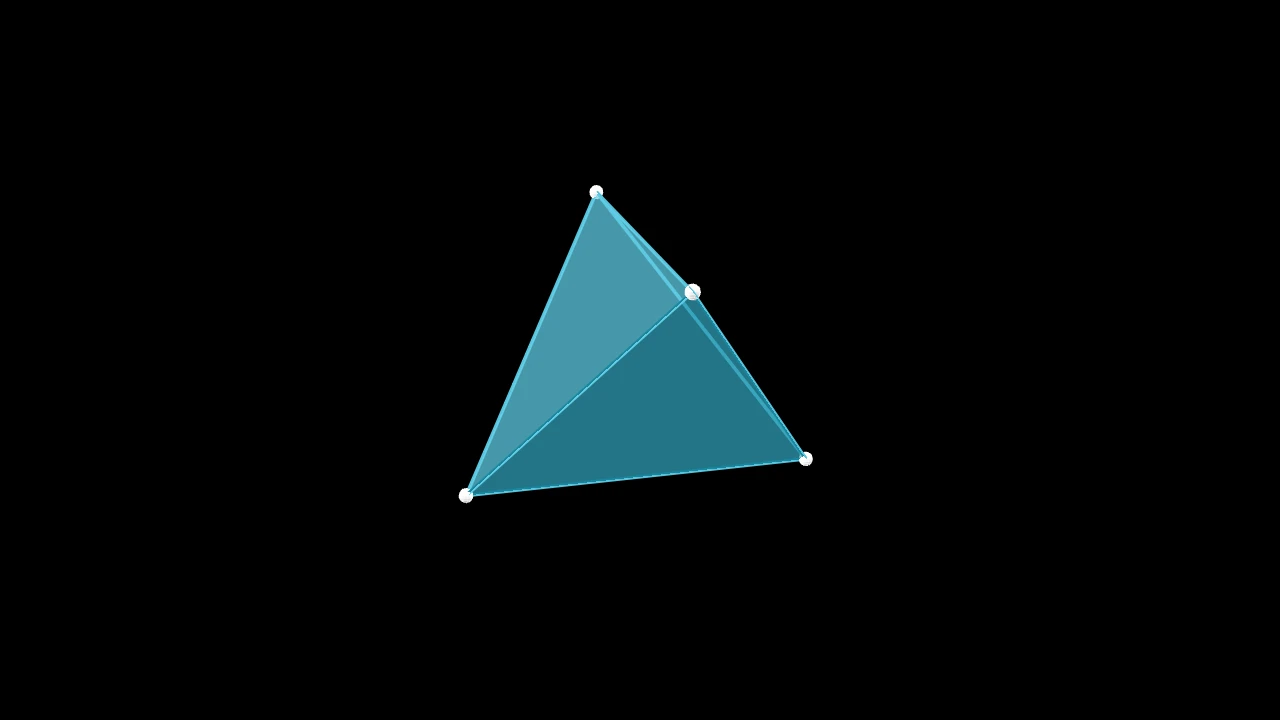
A regular tetrahedron: four triangular faces, centered at the origin; a Polyhedron, blue half-opaque faces with white dots at the vertices unless styled.
edge_lengthThe length of its edges, in scene units.
faces_configStyle keywords for the faces, over their defaults: half opaque, shaded by a three-dimensional scene's light (default None: none).
graph_configGraph keywords for the vertices and edges, over their defaults: Dot3D vertices, invisible edges (default None: none).
Source
src/manimgx/mobjects/three_d.py
Octahedron 
Code
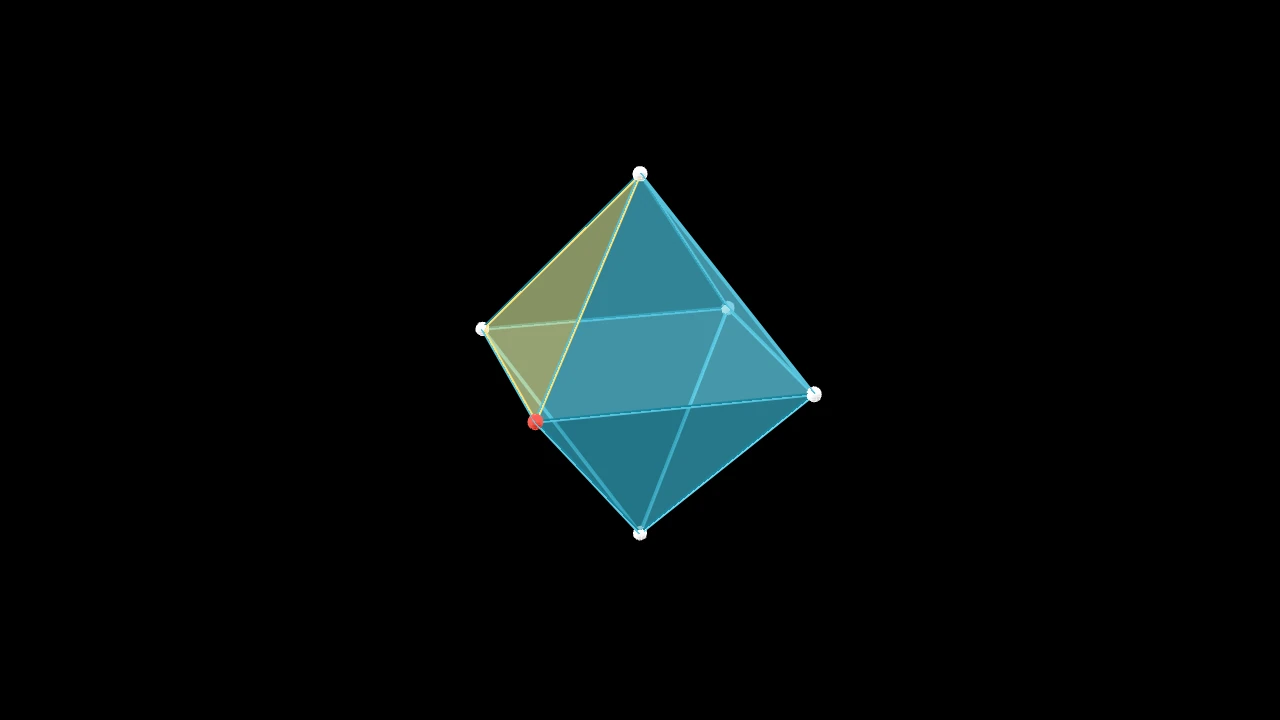
A regular octahedron: eight triangular faces, its vertices on the axes, centered at the origin; a Polyhedron, blue half-opaque faces with white dots at the vertices unless styled.
edge_lengthThe length of its edges, in scene units.
faces_configStyle keywords for the faces, over their defaults: half opaque, shaded by a three-dimensional scene's light (default None: none).
graph_configGraph keywords for the vertices and edges, over their defaults: Dot3D vertices, invisible edges (default None: none).
Source
src/manimgx/mobjects/three_d.py
Dodecahedron 
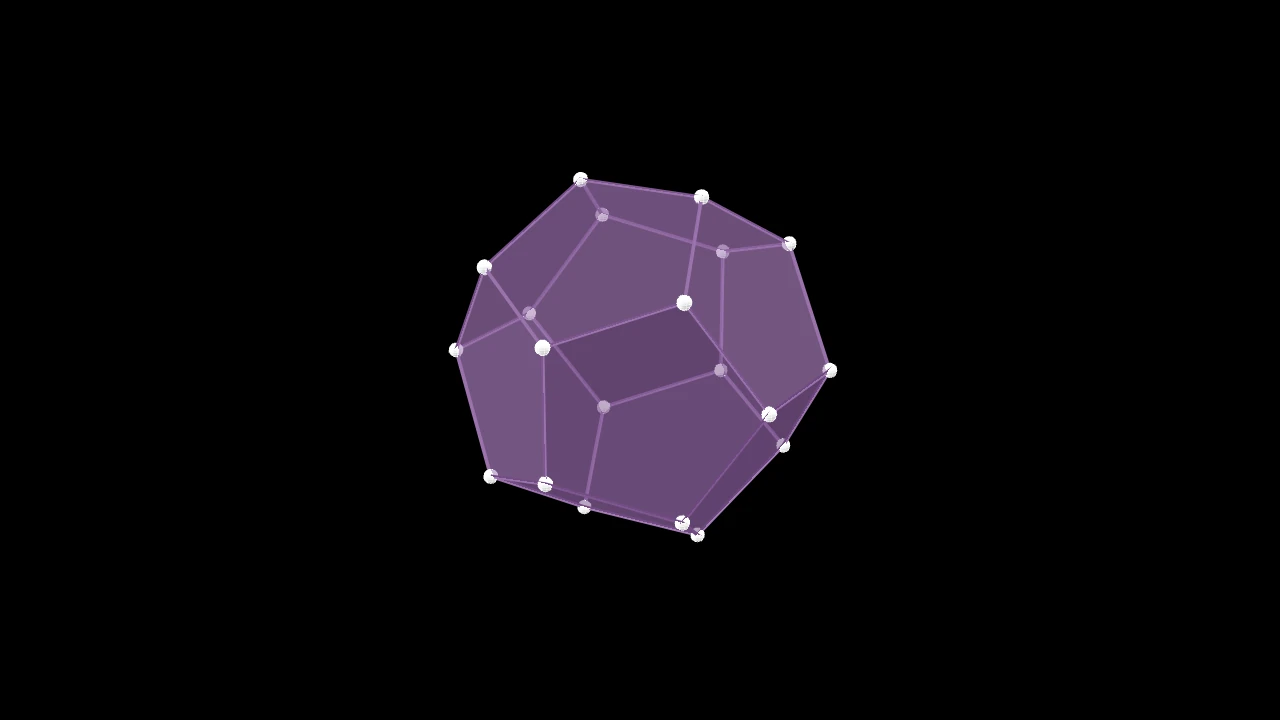
A regular dodecahedron: twelve pentagonal faces, centered at the origin; a Polyhedron, blue half-opaque faces with white dots at the vertices unless styled.
edge_lengthThe length of its edges, in scene units.
faces_configStyle keywords for the faces, over their defaults: half opaque, shaded by a three-dimensional scene's light (default None: none).
graph_configGraph keywords for the vertices and edges, over their defaults: Dot3D vertices, invisible edges (default None: none).
Source
src/manimgx/mobjects/three_d.py
Icosahedron 
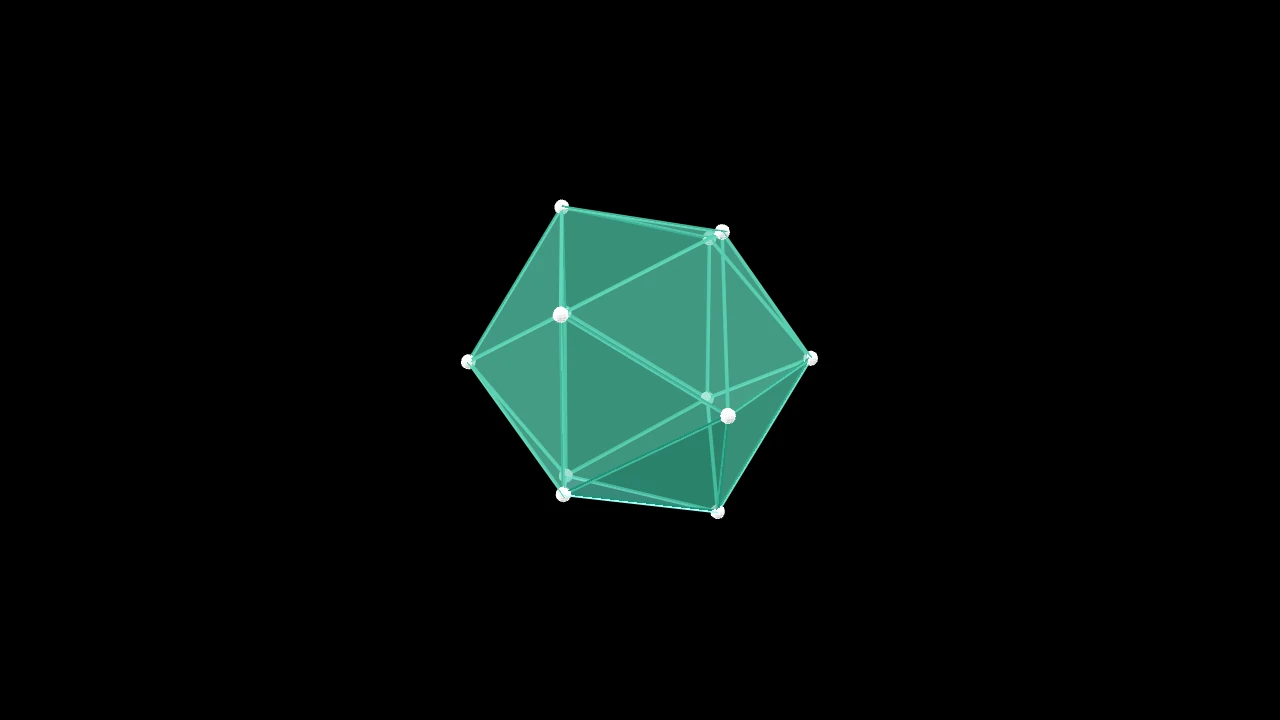
A regular icosahedron: twenty triangular faces, centered at the origin; a Polyhedron, blue half-opaque faces with white dots at the vertices unless styled.
edge_lengthThe length of its edges, in scene units.
faces_configStyle keywords for the faces, over their defaults: half opaque, shaded by a three-dimensional scene's light (default None: none).
graph_configGraph keywords for the vertices and edges, over their defaults: Dot3D vertices, invisible edges (default None: none).
Source
src/manimgx/mobjects/three_d.py
ConvexHull3D 
Code
import numpy as np

import manimgx as m


class ConvexHull3DExample(m.ThreeDScene):
    def construct(self) -> None:
        self.set_camera_orientation(phi=70 * m.DEGREES, theta=30 * m.DEGREES)
        points = np.random.default_rng(1).uniform(-2, 2, size=(30, 3))
        hull = m.ConvexHull3D(*points, faces_config={"color": m.GREEN})
        self.add(hull, *(m.Dot3D(p, color=m.YELLOW) for p in points))
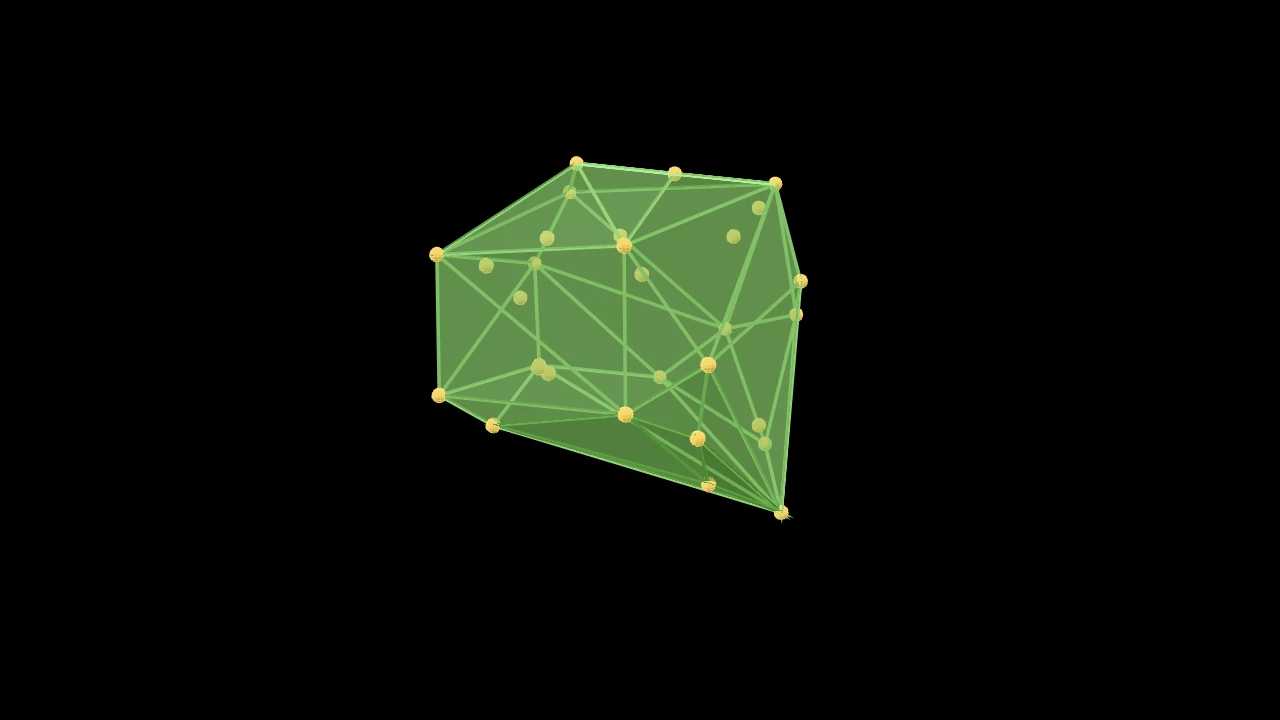
The convex hull of points in three dimensions: the smallest convex polyhedron around them, its faces triangles; a Polyhedron, blue half-opaque faces with white dots at the vertices unless styled.
Its vertices are the points on the hull (those inside are left out), and its faces are wound counterclockwise, seen from outside. Fewer than four points raise a ValueError.
*pointsThe points, in scene coordinates.
toleranceHow far outside a face a point must be to count as beyond it, in scene units.
faces_configStyle keywords for the faces, over their defaults: half opaque, shaded by a three-dimensional scene's light (default None: none).
graph_configGraph keywords for the vertices and edges, over their defaults: Dot3D vertices, invisible edges (default None: none).
Source
src/manimgx/mobjects/three_d.py
Lines and points in space
Line3D 
Code
import manimgx as m


class Line3DExample(m.ThreeDScene):
    def construct(self) -> None:
        self.set_camera_orientation(phi=65 * m.DEGREES, theta=-45 * m.DEGREES)
        axes = m.ThreeDAxes(x_range=(-3, 3), y_range=(-3, 3), z_range=(-2, 2))
        line = m.Line3D(axes.c2p(-2, 0, 0), axes.c2p(1, 2, 1.5), thickness=0.05)
        self.add(axes, line.set_color(m.YELLOW))
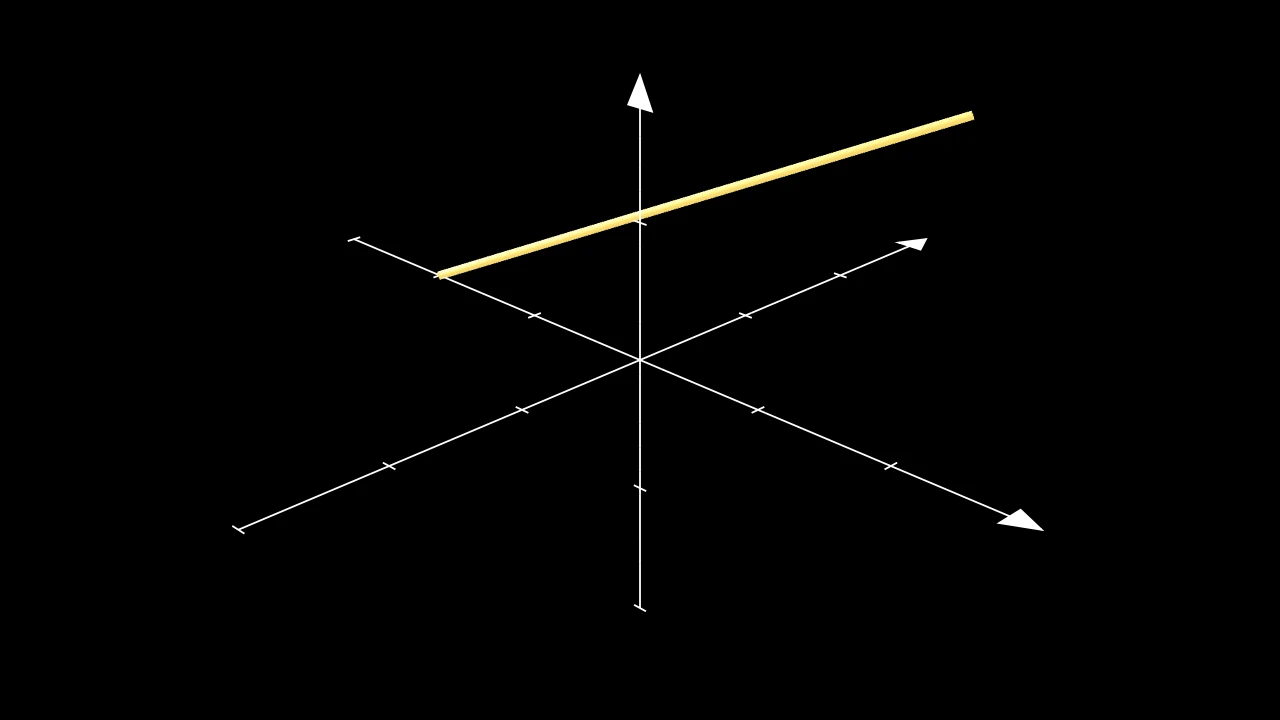
A line in three dimensions: a thin cylinder from one point to another; checkered in two blues, and shaded by a three-dimensional scene's light, unless styled.
An end may be a mobject: the line then starts (or ends) at its point farthest toward the other end (see get_boundary_point).
startWhere the line starts: a point, or a mobject.
endWhere it ends: a point, or a mobject.
thicknessIts radius, in scene units.
resolutionHow many faces it has around it (2 along it), or
(along, around).
It also takes
the Surface keywords.
Source
src/manimgx/mobjects/three_d.py
parallel_to 
Code
import manimgx as m


class Line3DParallelToExample(m.ThreeDScene):
    def construct(self) -> None:
        self.set_camera_orientation(
            phi=60 * m.DEGREES, theta=-45 * m.DEGREES
        )
        line = m.Line3D(2 * m.RIGHT, m.UP + m.OUT, color=m.RED)
        parallel = m.Line3D.parallel_to(line, color=m.YELLOW)
        self.add(m.ThreeDAxes(), line, parallel)
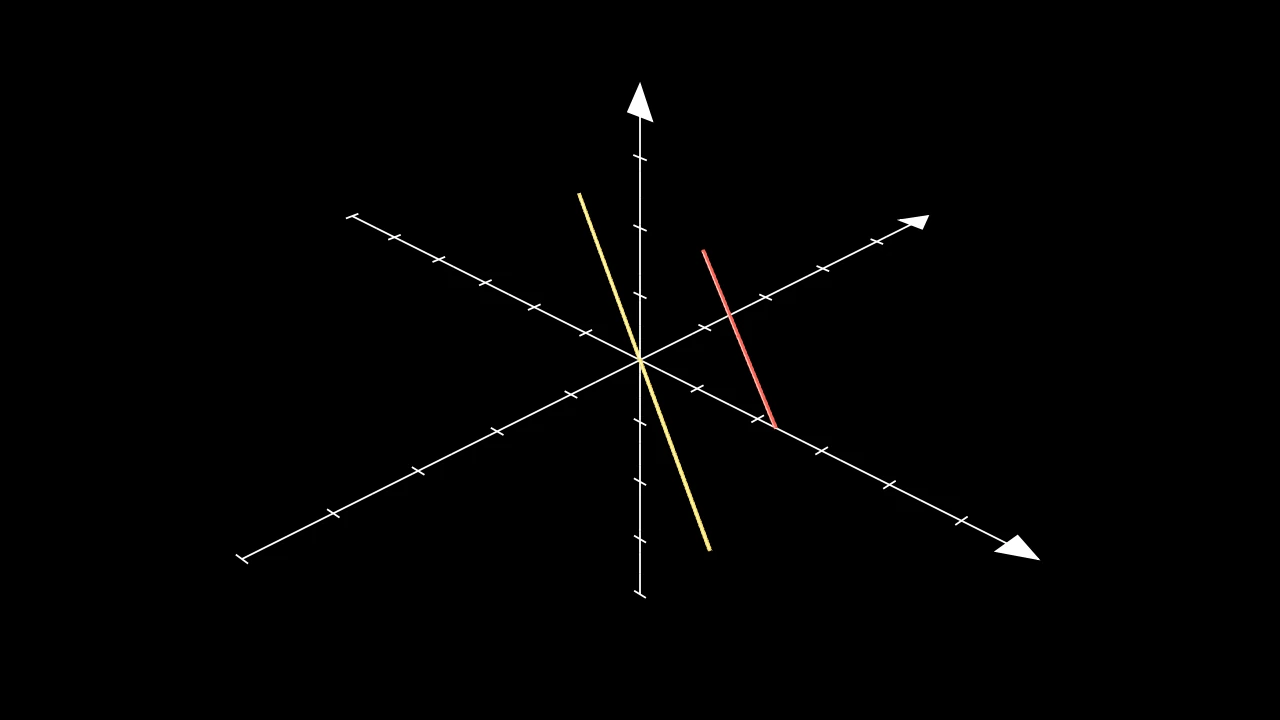
Make a line parallel to another, through a point: length long, centered on
the point.
Line3D.parallel_to(line, point=ORIGIN, length=5, **kwargs)
lineThe line to be parallel to.
pointThe point the new line is centered on.
lengthThe new line's length, in scene units.
It also takes
the Line3D keywords.
Returns A new line.
Source
src/manimgx/mobjects/three_d.py
perpendicular_to 
Code
import manimgx as m


class Line3DPerpendicularToExample(m.ThreeDScene):
    def construct(self) -> None:
        self.set_camera_orientation(
            phi=60 * m.DEGREES, theta=-45 * m.DEGREES
        )
        line = m.Line3D(2 * m.RIGHT, m.UP + m.OUT, color=m.RED)
        perpendicular = m.Line3D.perpendicular_to(line, color=m.BLUE)
        self.add(m.ThreeDAxes(), line, perpendicular)
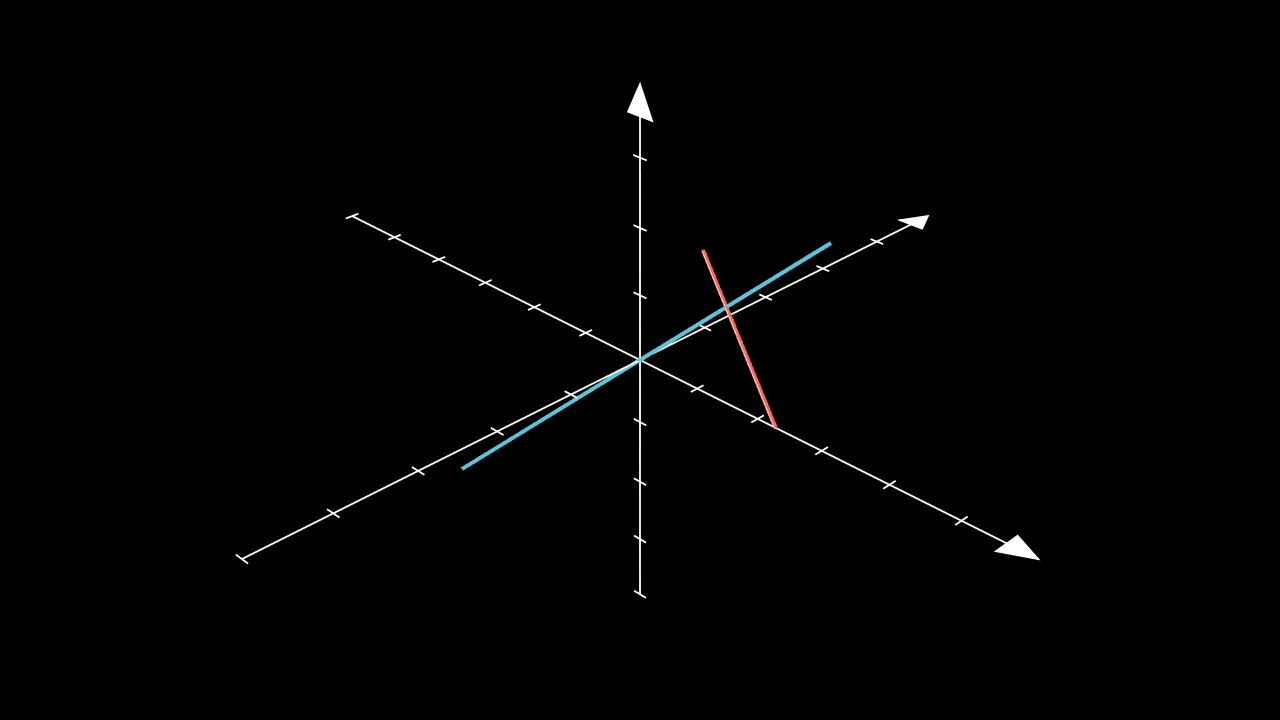
Make a line perpendicular to another, through a point: in the plane of the
line and the point, length long, centered on the point.
A point on the line (which makes no plane with it) raises a ValueError.
Line3D.perpendicular_to(line, point=ORIGIN, length=5, **kwargs)
lineThe line to be perpendicular to.
pointThe point the new line is centered on, off the line.
lengthThe new line's length, in scene units.
It also takes
the Line3D keywords.
Returns A new line.
Source
src/manimgx/mobjects/three_d.py
Arrow3D 
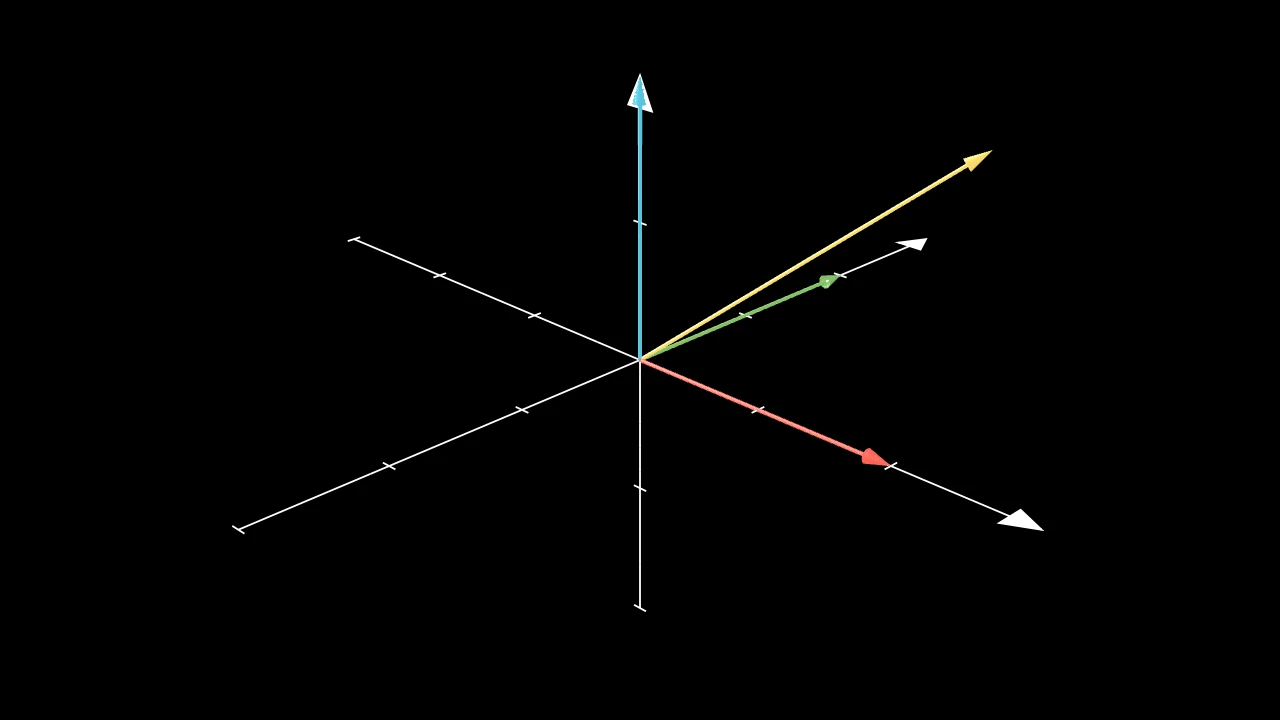
Code
import manimgx as m


class Arrow3DExample(m.ThreeDScene):
    def construct(self) -> None:
        self.set_camera_orientation(phi=65 * m.DEGREES, theta=-45 * m.DEGREES)
        axes = m.ThreeDAxes(x_range=(-3, 3), y_range=(-3, 3), z_range=(-2, 2))
        arrows = [
            m.Arrow3D(axes.c2p(0, 0, 0), axes.c2p(*end), color=color)
            for end, color in (
                ((2, 0, 0), m.RED),
                ((0, 2, 0), m.GREEN),
                ((0, 0, 2), m.BLUE),
                ((1.5, 1.5, 1.5), m.YELLOW),
            )
        ]
        self.add(axes, *arrows)
An arrow in three dimensions: a thin cylinder from start, ending in a cone
whose apex is at end; white unless given a color, shaded by a three-dimensional
scene's light.
startWhere the arrow starts.
endWhere its tip's apex is.
thicknessThe radius of its shaft, in scene units.
heightThe length of its tip, a Cone, in scene units.
base_radiusThe radius of its tip's base, in scene units.
resolutionHow many faces its shaft has around it (2 along it), or
(along, around).
It also takes
the Surface keywords.
Source
src/manimgx/mobjects/three_d.py
Dot3D 
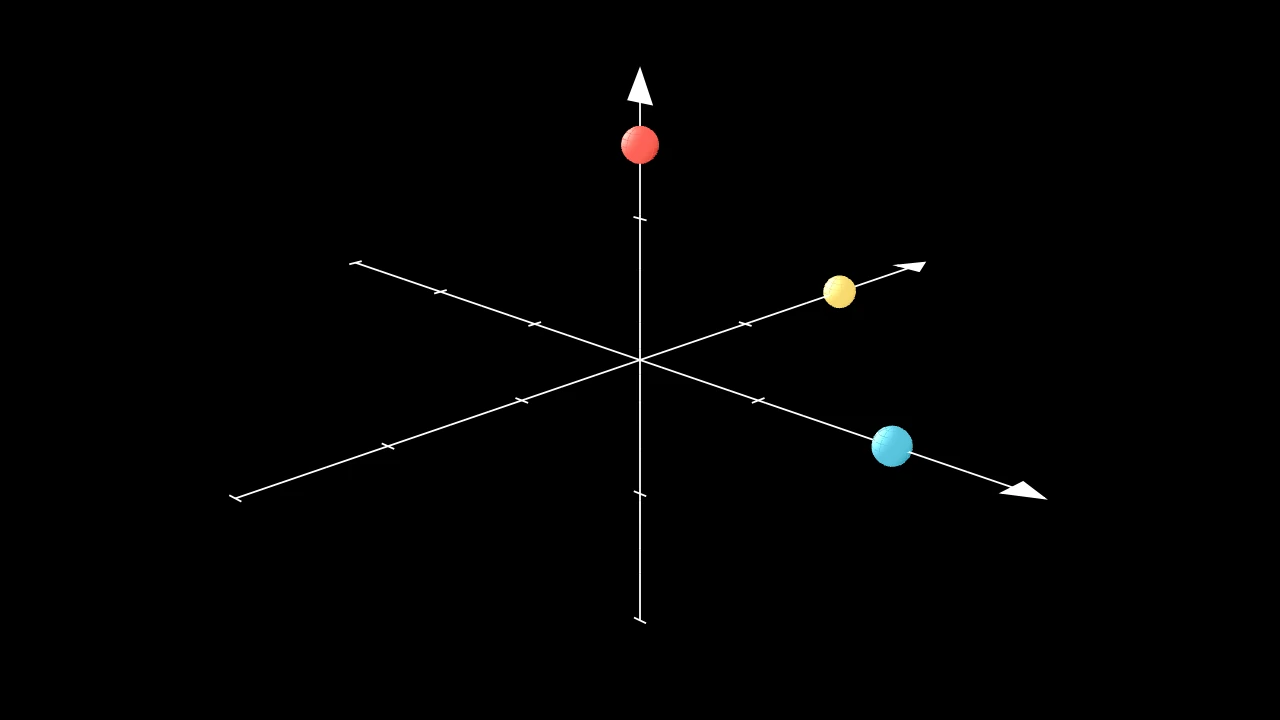
Code
import manimgx as m


class Dot3DExample(m.ThreeDScene):
    def construct(self) -> None:
        self.set_camera_orientation(phi=70 * m.DEGREES, theta=-45 * m.DEGREES)
        axes = m.ThreeDAxes(x_range=(-3, 3), y_range=(-3, 3), z_range=(-2, 2))
        self.add(
            axes,
            m.Dot3D(axes.c2p(0, 0, 1.5), radius=0.2, color=m.RED),
            m.Dot3D(axes.c2p(2, 0, 0), radius=0.2, color=m.BLUE),
            m.Dot3D(axes.c2p(0, 2, 0), radius=0.2, color=m.YELLOW),
        )
A dot in three dimensions: a small sphere, white unless given a color.
m.Dot3D(point=ORIGIN, radius=DEFAULT_DOT_RADIUS, resolution=(8, 8), **kwargs)
pointWhere its center goes.
radiusIts radius, in scene units.
resolutionHow many faces it has around and from pole to pole: one number for both, or
(u, v); None for (24, 12).
It also takes
the Surface keywords.
Source
src/manimgx/mobjects/three_d.py
Meshes
MeshMobject 
Code
import numpy as np

import manimgx as m


class MeshMobjectExample(m.Scene):
    def construct(self) -> None:
        vertices = np.array([[-3, -2.5, 0], [3, -2.5, 0], [0, 3, 0]])
        colors = np.array([[1, 0, 0, 1], [0, 1, 0, 1], [0, 0, 1, 1]])
        triangle = m.MeshMobject(
            vertices, np.array([[0, 1, 2]]), vertex_colors=colors
        )
        self.play(m.FadeIn(triangle))
A mesh: triangles between vertices, filled with one color, a color per vertex, or a picture; white and opaque unless styled.
Any two meshes can morph into each other, whatever their triangles: the one with
fewer gains some, collapsed to points. Drawn in (Create), a mesh
appears triangle by triangle, in their order. A three-dimensional scene's light
shades it only with shade_in_3d=True.
verticesThe vertices, in scene coordinates: an (n, 3) array; None for an empty mesh.
trianglesThe triangles: an (m, 3) array of indices into
vertices.vertex_colorsA color for each vertex, blended across each triangle: an (n, 4) array of red, green, blue and opacity, from 0 to 1; None for the style's color.
uvsWhere each vertex is in the picture: an (n, 2) array of coordinates from 0 to 1, (0, 0) the picture's top left.
textureThe picture: an (h, w, 4) array of RGBA values from 0 to 255, or a Camera, whose view is drawn anew every frame.
colorThe color of both fill and stroke (default white); None for the class's default.
fill_colorThe fill's color;
colorif not given. Several colors make a gradient alongsheen_direction.fill_opacityThe fill's opacity, from 0 to 1 (default 0: no fill).
stroke_colorThe stroke's color;
colorif not given. Several colors make a gradient.stroke_opacityThe stroke's opacity, from 0 to 1 (default 1).
stroke_widthThe stroke's width, in hundredths of a scene unit (default 4; 0: no stroke).
background_stroke_colorThe color of an outline drawn behind the fill (default black).
background_stroke_opacityThe outline's opacity, from 0 to 1 (default 1).
background_stroke_widthThe outline's width, in hundredths of a scene unit (default 0: none).
sheen_factorHow much the colors lighten toward
sheen_direction, from -1 to 1 (default 0); a negative factor darkens.sheen_directionThe direction the colors lighten toward (default
UL).joint_typeHow the stroke is joined where its path turns: round, beveled or mitered, as a two-dimensional scene draws it (see LineJointType; default AUTO: mitered).
cap_styleHow the stroke ends, at each end it shows (an open path's, a dash's): round, butt or square, as a two-dimensional scene draws it (see CapStyleType; default AUTO: butt).
shade_in_3dWhether a three-dimensional scene's light shades the mobject.
materialHow its surface reflects the scene's lights in a three-dimensional scene (see Material); None: Manim's shading (default).
nameA name for the mobject; its class's name if not given.
z_indexIts place in the drawing order: a higher index is drawn over a lower one (default 0).
targetThe state
MoveToTargetmoves the mobject to.
It also takes the style keywords.
Source
src/manimgx/mobject.py
triangles 
The mesh's readonly (m, 3) triangle indices; for a lattice these are the coarse triangles of the faces it draws, two each.
Equal assignment is a no-op. Ordinary meshes snapshot replacement indices; a sampled lattice requires constructing an explicit MeshMobject instead.
Source
src/manimgx/mobject.py
uvs 
Where each vertex is in the mesh's picture: an (n, 2) array of coordinates from 0 to 1, read-only; None for a mesh without them. Assignments snapshot the supplied coordinates; equal values keep the current array.
Source
src/manimgx/mobject.py
grid 
The numbers of lattice cells along u and v, or None for explicit triangles.
A (u, v) lattice has (u + 1) * (v + 1) samples. Its fill rows belong to cells and UVs to samples; ordinary mesh fill rows belong to vertices. match_points adopts this domain while retaining its recipient's style. A part of a surface has its whole lattice, and draws some of its faces.
Source
src/manimgx/mobject.py
Spherical coordinates
spherical_to_cartesian 
The vector of spherical coordinates (see cartesian_to_spherical).
sphericalThe length r, the azimuth θ and the polar angle φ, in radians.
Returns The vector (r cos θ sin φ, r sin θ sin φ, r cos φ).
Source
src/manimgx/drawing/geometry.py
cartesian_to_spherical 
A vector's spherical coordinates.
vecThe vector.
Returns Its length r, its azimuth θ (the angle of its xy part from the x axis, from −π to π) and its polar angle φ (from the z axis, from 0 to π); zeros for the zero vector.
Source
src/manimgx/drawing/geometry.py