Every mobject has a place in the frame. A place is a point, three numbers [x, y, z],
measured in units from the frame's center. x grows to the right, y grows upward, and z
grows out of the screen, toward the viewer. The frame's short side is 8 units: a wide
video shows y from −4 to 4, and x from about −7.1 to 7.1.
A mobject's place is its bounding box: the smallest box, along the axes, around what it
draws. Its center, its edges and its corners are points of that box. The methods below read
those points, and move the mobject so that one of them goes where you say. Each method
moves the mobject's parts with it, and gives the mobject back, so that calls chain:
m.Text("Title").scale(1.5).to_edge(m.UP).
A direction is a point one unit from the origin. Multiply it by a number, and add
directions together, to make other points: 3 * m.RIGHT + 2 * m.UP is [3, 2, 0].
defget_center(self)->Point3D:"""The center of the mobject's bounding box. Returns: The point, in scene coordinates. """returnself.get_critical_point(np.zeros(self.dim))
defget_top(self)->Point3D:"""The middle of the top edge of the mobject's bounding box. Returns: The point, in scene coordinates. """returnself.get_critical_point(UP)
defget_bottom(self)->Point3D:"""The middle of the bottom edge of the mobject's bounding box. Returns: The point, in scene coordinates. """returnself.get_critical_point(DOWN)
defget_left(self)->Point3D:"""The middle of the left edge of the mobject's bounding box. Returns: The point, in scene coordinates. """returnself.get_critical_point(LEFT)
defget_right(self)->Point3D:"""The middle of the right edge of the mobject's bounding box. Returns: The point, in scene coordinates. """returnself.get_critical_point(RIGHT)
A point of the mobject's bounding box, named by a direction: its center, the
middle of an edge, or a corner.
Each coordinate is the box's lowest where the direction's is negative, its
highest where it is positive, and its middle where it is 0: UR names the top
right corner, UP the middle of the top edge, ORIGIN the center. The box is
boundary_box, around what the mobject draws: a
path's curves themselves, not their control points.
mobject.get_critical_point(direction)
direction
The direction, such as UP, UR or ORIGIN.
Returns
The point, in scene coordinates; the origin if the mobject has no points.
defget_critical_point(self,direction:Vector3DLike)->Point3D:"""A point of the mobject's bounding box, named by a direction: its center, the middle of an edge, or a corner. Each coordinate is the box's lowest where the direction's is negative, its highest where it is positive, and its middle where it is 0: UR names the top right corner, UP the middle of the top edge, ORIGIN the center. The box is [boundary_box][manimgx.Mobject.boundary_box], around what the mobject draws: a path's curves themselves, not their control points. Args: direction: The direction, such as UP, UR or ORIGIN. Returns: The point, in scene coordinates; the origin if the mobject has no points. """box=self.boundary_box()ifboxisNone:returnnp.zeros(self.dim)lo,hi=box.tolist()returnnp.array([lo[k]ifd<0elsehi[k]ifd>0else(lo[k]+hi[k])/2fork,dinenumerate(np.asarray(direction).tolist()[:self.dim])])
defget_boundary_point(self,direction:Vector3DLike)->Point3D:"""The point of the mobject farthest in a direction: of the points it is drawn through, the one farthest along `direction`. Unlike [get_critical_point][manimgx.Mobject.get_critical_point], it is one of those points (for a path, an end of one of its curves), not a point of the mobject's bounding box. Returns: The point, in scene coordinates. """points=self.get_points_defining_boundary()returnpoints[np.argmax(points@np.asarray(direction))]
defget_x(self,direction:Vector3DLike=ORIGIN)->float:"""The x coordinate of the mobject's center, or of an edge of its bounding box. Args: direction: LEFT for its left edge, RIGHT for its right edge; ORIGIN (default) for its center. """returnself.get_coord(0,direction)
defget_y(self,direction:Vector3DLike=ORIGIN)->float:"""The y coordinate of the mobject's center, or of an edge of its bounding box. Args: direction: DOWN for its bottom edge, UP for its top edge; ORIGIN (default) for its center. """returnself.get_coord(1,direction)
defget_z(self,direction:Vector3DLike=ORIGIN)->float:"""The z coordinate of the mobject's center, or of a face of its bounding box. Args: direction: IN for its lowest z, OUT for its highest; ORIGIN (default) for its center. """returnself.get_coord(2,direction)
The mobject's bounding box: the smallest box, aligned with the axes, around
what its family draws.
A path is measured by its curves themselves, not by their control points (a
curve bulges past its anchors where it turns, and its handles reach past the
curve); any other kind by its points. A stroke's width is not counted. It is
the one box every measure reads: width and
height, the corners, edges and center
(get_critical_point), get_x and get_y,
alignment and layout, and the extent of a color gradient. It joins the boxes of
the family's members, so a member spans the same in whatever group holds it.
mobject.boundary_box()
Returns
A 2 × 3 array, the lowest (x, y, z) then the highest; None if the family has
no points.
defboundary_box(self)->np.ndarray|None:"""The mobject's bounding box: the smallest box, aligned with the axes, around what its family draws. A path is measured by its curves themselves, not by their control points (a curve bulges past its anchors where it turns, and its handles reach past the curve); any other kind by its points. A stroke's width is not counted. It is the one box every measure reads: [width][manimgx.Mobject.width] and [height][manimgx.Mobject.height], the corners, edges and center ([get_critical_point][manimgx.Mobject.get_critical_point]), `get_x` and `get_y`, alignment and layout, and the extent of a color gradient. It joins the boxes of the family's members, so a member spans the same in whatever group holds it. Returns: A 2 × 3 array, the lowest (x, y, z) then the highest; None if the family has no points. """return_family_box(self.get_family())
defmove_to(self,point_or_mobject:"Point3DLike | Mobject",aligned_edge:Vector3DLike=ORIGIN,coor_mask:Vector3DLike=(1,1,1),)->Self:"""Move the mobject to a point, or onto another mobject: its center, or the point of its bounding box `aligned_edge` names, goes there. Args: point_or_mobject: A point, in scene coordinates, or a mobject: then the point of its bounding box `aligned_edge` names (its center, by default). aligned_edge: The point of the mobject that goes there, named by a direction: ORIGIN (default) for its center, DL for its bottom left corner. coor_mask: Which coordinates change: 1 for each axis the mobject moves along, 0 for one it keeps (`(1, 0, 0)` moves it horizontally only). Examples: ```python import manimgx as m class MobjectMoveToExample(m.Scene): def construct(self) -> None: dot = m.Dot([3, 1.5, 0], radius=0.15, color=m.YELLOW) origin = m.Dot(radius=0.15, color=m.RED) square = m.Square(color=m.BLUE, fill_opacity=0.5).shift(4 * m.LEFT) self.add(dot, origin, square) self.play(square.animate.move_to(dot)) self.play(square.animate.move_to(m.ORIGIN, aligned_edge=m.DL)) ``` """ifisinstance(point_or_mobject,Mobject):target=point_or_mobject.get_critical_point(aligned_edge)else:target=np.asarray(point_or_mobject,dtype=float)returnself.shift((target-self.get_critical_point(aligned_edge))*np.asarray(coor_mask))
defshift(self,*vectors:Vector3DLike)->Self:"""Move the mobject and its whole family by a vector. Args: *vectors: The vector, in scene units (`2 * RIGHT` moves it two units right); several are added into one. Examples: ```python import manimgx as m class MobjectShiftExample(m.Scene): def construct(self) -> None: square = m.Square(color=m.BLUE, fill_opacity=0.5) self.add(square) self.play(square.animate.shift(4 * m.LEFT)) self.play(square.animate.shift(2 * m.UP, 8 * m.RIGHT)) ``` """# one vector (a (1, 3) array too, as CE takes it)vector=vectors[0]iflen(vectors)==1elsereduce(np.add,vectors)total=np.asarray(vector,dtype=float).reshape(-1)formobinself.family_members_with_points():mob._geometry=mob._geometry.translated(total)returnself
defset_x(self,x:float,direction:Vector3DLike=ORIGIN)->Self:"""Move the mobject left or right so its center, or an edge of its bounding box, is at `x`. Args: x: The x coordinate, in scene units. direction: LEFT to place its left edge, RIGHT its right edge; ORIGIN (default) its center. """returnself.set_coord(x,0,direction)
defset_y(self,y:float,direction:Vector3DLike=ORIGIN)->Self:"""Move the mobject up or down so its center, or an edge of its bounding box, is at `y`. Args: y: The y coordinate, in scene units. direction: DOWN to place its bottom edge, UP its top edge; ORIGIN (default) its center. """returnself.set_coord(y,1,direction)
defset_z(self,z:float,direction:Vector3DLike=ORIGIN)->Self:"""Move the mobject in or out so its center, or a face of its bounding box, is at `z`. Args: z: The z coordinate, in scene units. direction: IN to place its lowest z, OUT its highest; ORIGIN (default) its center. """returnself.set_coord(z,2,direction)
Put the mobject beside another, or beside a point, buff away in a
direction.
The side of the mobject facing back along direction goes to the other's side
facing along it, buff farther on: with RIGHT, the middle of its left edge goes
buff to the right of the middle of the other's right edge. A diagonal
direction (UR) puts corner to corner.
The mobject (its bounding box) or the point to put it
beside.
direction
The side: RIGHT (default), UP, DL, …
buff
The gap, in scene units, along direction (default 0.25).
aligned_edge
The edge along which the two line up besides the side they
meet at, named by a direction: with the direction RIGHT and UP here,
their tops line up (default ORIGIN: centered).
submobject_to_align
A part of the mobject to put beside the other in its
place; the rest moves with it.
index_of_submobject_to_align
The index of the part of each mobject to line
up: this one's part goes beside the other's.
coor_mask
Which coordinates change: 1 for each axis the mobject moves
along, 0 for one it keeps.
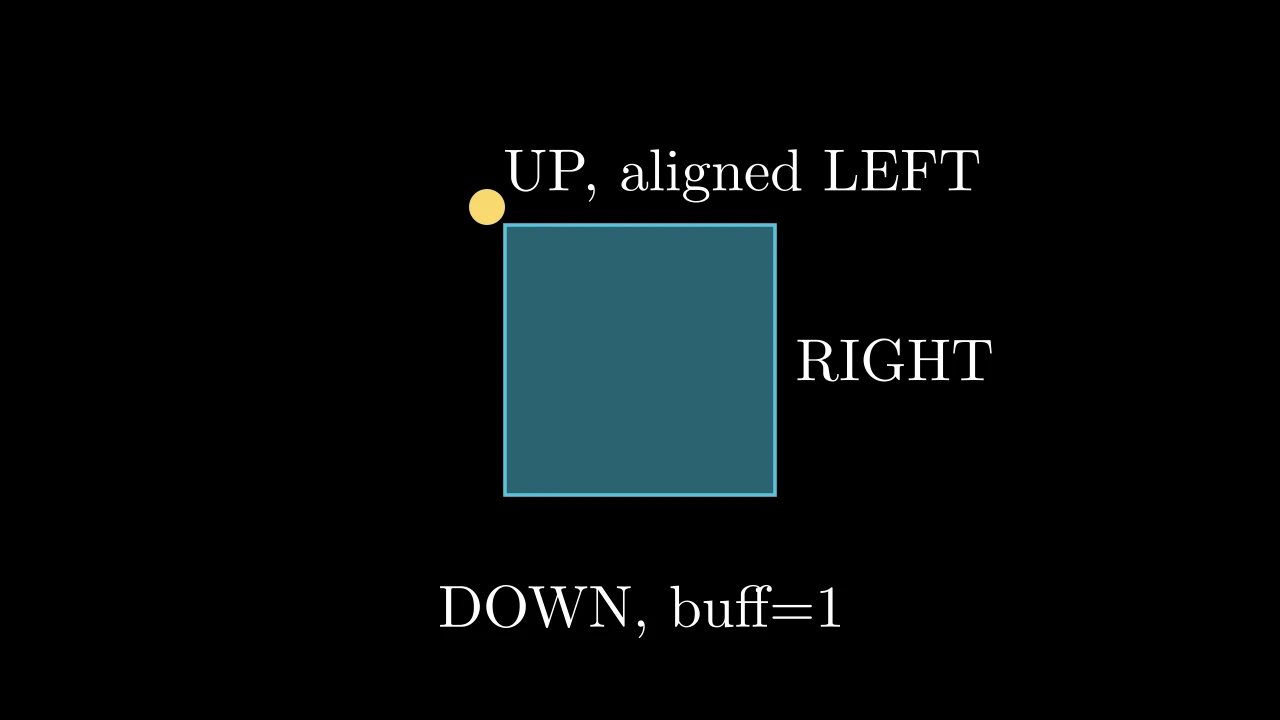
defnext_to(self,mobject_or_point:"Mobject | Point3DLike",direction:Vector3DLike=RIGHT,buff:float=DEFAULT_MOBJECT_TO_MOBJECT_BUFFER,aligned_edge:Vector3DLike=ORIGIN,submobject_to_align:"Mobject | None"=None,index_of_submobject_to_align:int|None=None,coor_mask:Vector3DLike=(1,1,1),)->Self:"""Put the mobject beside another, or beside a point, `buff` away in a direction. The side of the mobject facing back along `direction` goes to the other's side facing along it, `buff` farther on: with RIGHT, the middle of its left edge goes `buff` to the right of the middle of the other's right edge. A diagonal direction (UR) puts corner to corner. Args: mobject_or_point: The mobject (its bounding box) or the point to put it beside. direction: The side: RIGHT (default), UP, DL, … buff: The gap, in scene units, along `direction` (default 0.25). aligned_edge: The edge along which the two line up besides the side they meet at, named by a direction: with the direction RIGHT and UP here, their tops line up (default ORIGIN: centered). submobject_to_align: A part of the mobject to put beside the other in its place; the rest moves with it. index_of_submobject_to_align: The index of the part of each mobject to line up: this one's part goes beside the other's. coor_mask: Which coordinates change: 1 for each axis the mobject moves along, 0 for one it keeps. Examples: ```python import manimgx as m class MobjectNextToExample(m.Scene): def construct(self) -> None: square = m.Square(side_length=3, color=m.BLUE, fill_opacity=0.5) right = m.Text("RIGHT").next_to(square, m.RIGHT) up = m.Text("UP, aligned LEFT").next_to( square, m.UP, aligned_edge=m.LEFT ) down = m.Text("DOWN, buff=1").next_to(square, m.DOWN, buff=1) dot = m.Dot(radius=0.2, color=m.YELLOW) dot.next_to(square, m.UL, buff=0) self.add(square, right, up, down, dot) ``` """d,edge=(np.asarray(direction,dtype=float),np.asarray(aligned_edge,dtype=float),)ifisinstance(mobject_or_point,Mobject):target_aligner=(mobject_or_pointifindex_of_submobject_to_alignisNoneelsemobject_or_point[index_of_submobject_to_align])target=target_aligner.get_critical_point(edge+d)else:target=np.asarray(mobject_or_point,dtype=float)ifsubmobject_to_alignisnotNone:aligner:Mobject=submobject_to_alignelifindex_of_submobject_to_alignisnotNone:aligner=self[index_of_submobject_to_align]else:aligner=selfpoint_to_align=aligner.get_critical_point(edge-d)returnself.shift((target-point_to_align+buff*d)*np.asarray(coor_mask))
Move the mobject so a side of it lines up with another's: along each axis on
which direction is not 0, the side of its bounding box in that direction goes
where the other's is.
align_to(other, UP) puts its top at the height of the other's top, moving it
up or down only; align_to(other, UL) lines up both tops and both left sides.
With the default ORIGIN, nothing moves.
defalign_to(self,mobject_or_point:"Mobject | Point3DLike",direction:Vector3DLike=ORIGIN,)->Self:"""Move the mobject so a side of it lines up with another's: along each axis on which `direction` is not 0, the side of its bounding box in that direction goes where the other's is. `align_to(other, UP)` puts its top at the height of the other's top, moving it up or down only; `align_to(other, UL)` lines up both tops and both left sides. With the default ORIGIN, nothing moves. Args: mobject_or_point: The mobject to line up with (the side of its bounding box `direction` names), or a point. direction: The side, named by a direction: UP, DL, … Examples: ```python import manimgx as m class MobjectAlignToExample(m.Scene): def construct(self) -> None: floor = m.Line(6 * m.LEFT, 6 * m.RIGHT).shift(3 * m.DOWN) shapes = m.VGroup( m.Circle(color=m.BLUE), m.Square(side_length=3, color=m.GREEN), m.Triangle(color=m.YELLOW), m.Star(color=m.RED), ).arrange(buff=1) self.add(floor, shapes) self.play(*(s.animate.align_to(floor, m.DOWN) for s in shapes)) ``` """point=(mobject_or_point.get_critical_point(direction)ifisinstance(mobject_or_point,Mobject)elsenp.asarray(mobject_or_point))fordiminrange(self.dim):ifdirection[dim]!=0:self.set_coord(point[dim],dim,direction)returnself
defmatch_x(self,mobject:"Mobject",direction:Vector3DLike=ORIGIN)->Self:"""Move the mobject left or right to another's x: centers, or left or right edges, lined up. Args: mobject: The mobject to match. direction: LEFT to line up the left edges, RIGHT the right ones; ORIGIN (default) the centers. """returnself.match_coord(mobject,0,direction)
defmatch_y(self,mobject:"Mobject",direction:Vector3DLike=ORIGIN)->Self:"""Move the mobject up or down to another's y: centers, or top or bottom edges, lined up. Args: mobject: The mobject to match. direction: DOWN to line up the bottom edges, UP the top ones; ORIGIN (default) the centers. """returnself.match_coord(mobject,1,direction)
defmatch_z(self,mobject:"Mobject",direction:Vector3DLike=ORIGIN)->Self:"""Move the mobject in or out to another's z: centers, or faces, lined up. Args: mobject: The mobject to match. direction: IN to line up the lowest z, OUT the highest; ORIGIN (default) the centers. """returnself.match_coord(mobject,2,direction)
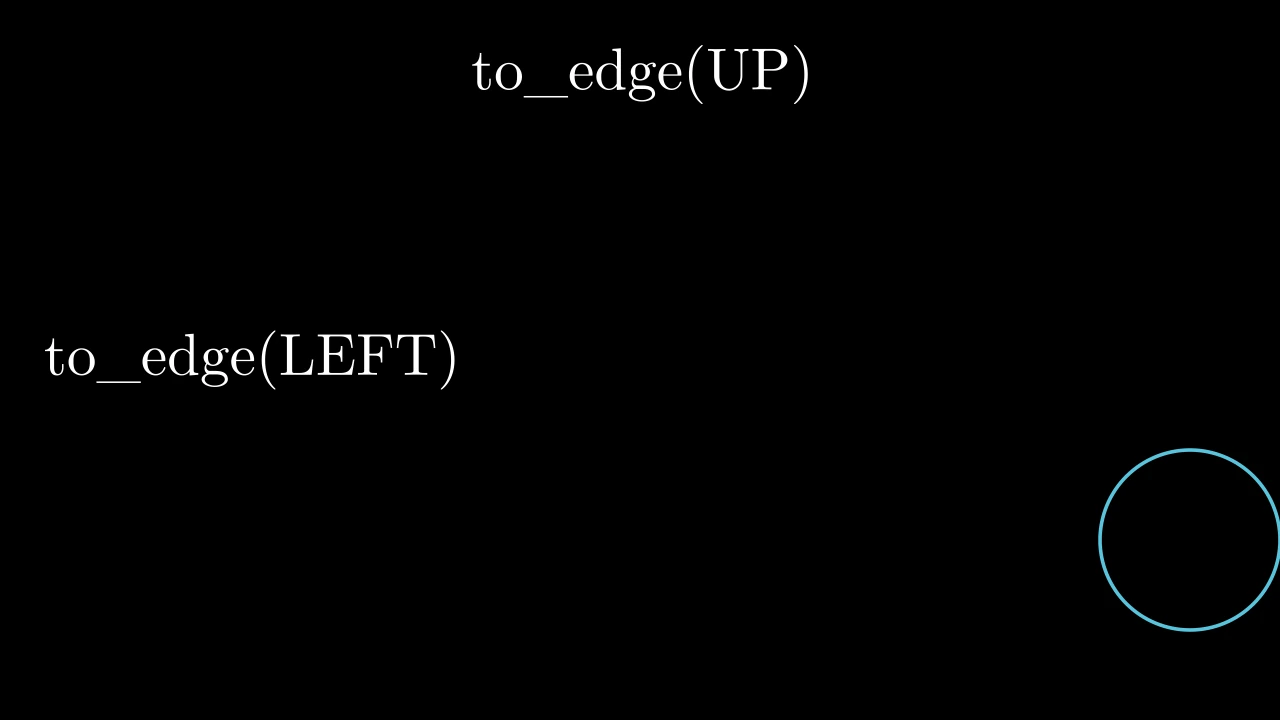
defto_edge(self,edge:Vector3DLike=LEFT,buff:float=DEFAULT_MOBJECT_TO_EDGE_BUFFER)->Self:"""Move the mobject to an edge of the frame, `buff` in from it; along the edge, it stays where it is. The frame is the configured one, centered on the origin, wherever the camera looks. Args: edge: The edge: UP, DOWN, LEFT (default) or RIGHT. buff: The margin between the mobject and the edge, in scene units (default 0.5). Examples: ```python import manimgx as m class MobjectToEdgeExample(m.Scene): def construct(self) -> None: top = m.Text("to_edge(UP)").to_edge(m.UP) left = m.Text("to_edge(LEFT)").to_edge(m.LEFT) circle = m.Circle(color=m.BLUE).shift(2 * m.DOWN) circle.to_edge(m.RIGHT, buff=0) self.add(top, left, circle) ``` """returnself.align_on_border(edge,buff)
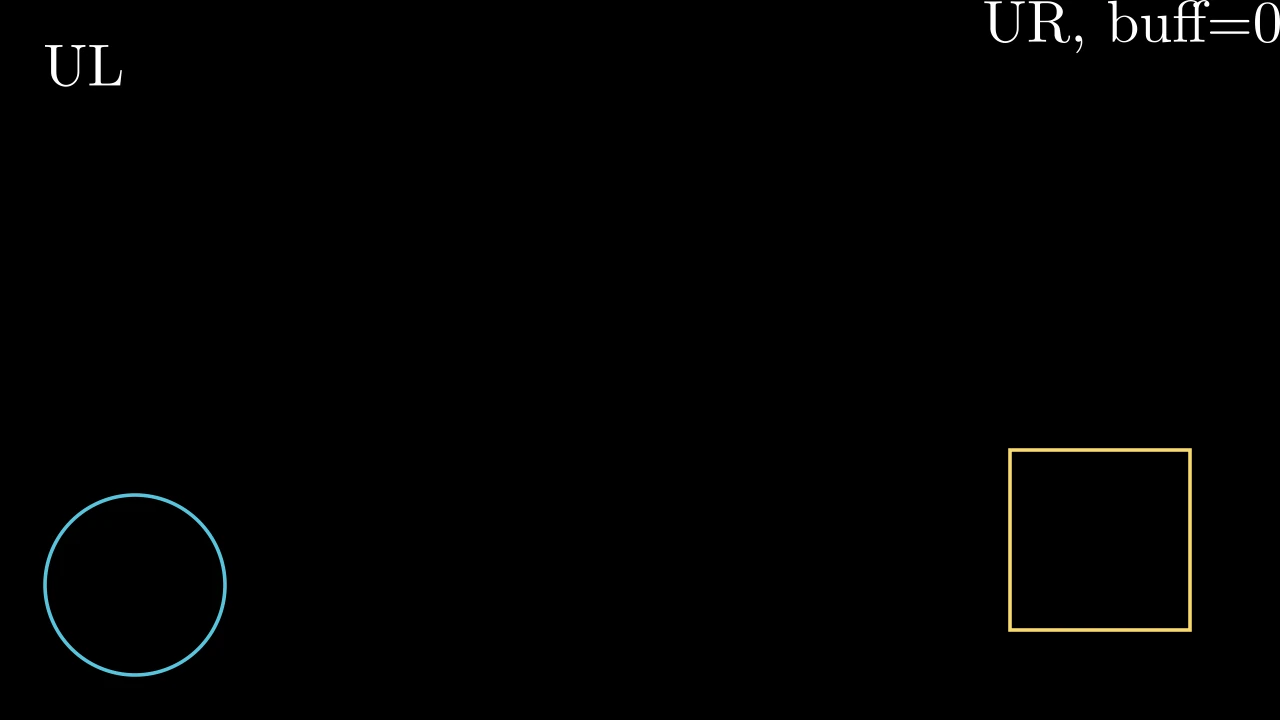
defto_corner(self,corner:Vector3DLike=DL,buff:float=DEFAULT_MOBJECT_TO_EDGE_BUFFER)->Self:"""Move the mobject into a corner of the frame, `buff` in from both its edges. The frame is the configured one, centered on the origin, wherever the camera looks. Args: corner: The corner: UL, UR, DL (default) or DR. buff: The margin between the mobject and each edge of the frame, in scene units (default 0.5). Examples: ```python import manimgx as m class MobjectToCornerExample(m.Scene): def construct(self) -> None: self.add(m.Text("UL").to_corner(m.UL)) self.add(m.Text("UR, buff=0").to_corner(m.UR, buff=0)) self.add(m.Circle(color=m.BLUE).to_corner(m.DL)) self.add(m.Square(color=m.YELLOW).to_corner(m.DR, buff=1)) ``` """returnself.align_on_border(corner,buff)
defshift_onto_screen(self,buff:float=DEFAULT_MOBJECT_TO_EDGE_BUFFER)->Self:"""Move the mobject back into the frame where it reaches past an edge, or nearer to it than `buff`: to that edge, `buff` in (see [to_edge][manimgx.Mobject.to_edge]). Args: buff: The margin to keep from the frame's edges, in scene units (default 0.5). """radii=(config.frame_x_radius,config.frame_y_radius)forvectin(UP,DOWN,LEFT,RIGHT):dim=int(np.argmax(np.abs(vect)))ifnp.dot(self.get_critical_point(vect),vect)>radii[dim]-buff:self.to_edge(vect,buff=buff)returnself
defis_off_screen(self)->bool:"""Whether the mobject is wholly outside the frame: the configured one, centered on the origin. Returns: True if its bounding box lies wholly past an edge of the frame. """x,y=config.frame_x_radius,config.frame_y_radiusreturnbool(self.get_left()[0]>xorself.get_right()[0]<-xorself.get_bottom()[1]>yorself.get_top()[1]<-y)
definterpolate[T](start:T,end:T,alpha:float|np.ndarray)->T:"""The value a fraction of the way from one value to another: (1 − alpha)·start + alpha·end. Args: start: The value at 0: a number or an array. end: The value at 1, of the same kind. alpha: How far from `start` to `end`: 0 gives `start`, 1 `end`, and beyond them it goes on along the line; an array gives one value per entry. Returns: The value between. """return(1-alpha)*start+alpha*end# pyright: ignore[reportOperatorIssue] # ty: ignore[unsupported-operator] # T: numbers, arrays
defmidpoint(p1:Point3D,p2:Point3D)->Point3D:"""The point halfway between two points. Args: p1: A point. p2: Another point. Returns: The point between them. """return(np.asarray(p1)+np.asarray(p2))/2
defnormalize(vect:Vector3DLike)->Vector3D:"""The unit vector in a vector's direction. Args: vect: The vector. Returns: The vector divided by its length; the zero vector stays zero. """v=np.asarray(vect,dtype=float)norm=np.linalg.norm(v)returnv/normifnorm>0elsenp.zeros(len(v))
defrotate_vector(vector:Vector3DLike,angle:float,axis:Vector3DLike=_OUT)->Vector3D:"""A vector rotated about an axis through the origin. Args: vector: The vector; a two-dimensional one gets a z of 0. angle: The angle, in radians, counterclockwise as seen from the tip of `axis`. axis: The axis's direction. Returns: The rotated vector. """v=np.asarray(vector,dtype=float)iflen(v)==2:v=np.append(v,0)returnrotation_matrix(angle,axis)@v
defangle_of_vector(vector:Vector3DLike)->float:"""The angle of a vector in the xy plane, counterclockwise from the x axis (its z is ignored). Returns: The angle, in radians, from −π to π. """v=np.asarray(vector)returnfloat(np.angle(complex(v[0],v[1])))
defangle_between_vectors(v1:Vector3DLike,v2:Vector3DLike)->float:"""The angle between two vectors. Args: v1: A vector. v2: Another vector. Returns: The angle, in radians, from 0 to π. """a,b=normalize(v1),normalize(v2)returnfloat(2*np.arctan2(np.linalg.norm(a-b),np.linalg.norm(a+b)))
defline_intersection(line1:Point3DLike_Array,line2:Point3DLike_Array)->Point3D:"""Where two lines in the xy plane cross, each line through two points (their z is ignored). Raises an exception if the lines are parallel. Args: line1: Two points on the first line. line2: Two points on the second line. Returns: The point, with a z of 0. """padded=[np.pad(np.array(line)[:,:2],((0,0),(0,1)),constant_values=1)forlinein(line1,line2)]l1,l2=(np.cross(*p)forpinpadded)x,y,z=np.cross(l1,l2)ifz==0:raiseValueError("The lines are parallel, there is no unique intersection point.")returnnp.array([x/z,y/z,0])
defperpendicular_bisector(line:Point3DLike_Array,norm_vector:Vector3DLike=_OUT)->Point3D_Array:"""Two points on the perpendicular bisector of a segment, in the plane perpendicular to a vector. Args: line: The segment's two ends. norm_vector: The normal of the plane the bisector lies in. Returns: The segment's midpoint plus and minus its direction crossed with `norm_vector`; for a unit normal, each a segment's length from the midpoint. """p1,p2=np.asarray(line[0]),np.asarray(line[1])direction=np.cross(p1-p2,np.asarray(norm_vector))m=midpoint(p1,p2)returnnp.array([m+direction,m-direction])
defpolylabel(rings:Sequence[Point3DLike_Array],precision:float=0.01)->Cell:"""The pole of inaccessibility of a polygon: the point inside it farthest from its edges, where a label fits best. Args: rings: The polygon's rings, each closed (its first vertex repeated at its end): the outline, then any holes. Their x and y count. precision: How far, at most, the point found may be from the best, in its distance from the edges, in scene units. Returns: The cell found, whose `c` is the point (x and y) and `d` its distance from the nearest edge. """np_rings:list[Point2D_Array]=[np.asarray(ring)[:,:2]forringinrings]polygon=Polygon(np_rings)mins=np.min(polygon.array,axis=0)maxs=np.max(polygon.array,axis=0)dims=maxs-minss=np.min(dims)h=s/2.0queue:list[Cell]=[]xv,yv=np.meshgrid(np.arange(mins[0],maxs[0],s),np.arange(mins[1],maxs[1],s))forcornerinnp.vstack([xv.ravel(),yv.ravel()]).T:heapq.heappush(queue,Cell(corner+h,h,polygon))best=Cell(polygon.centroid,0,polygon)bbox=Cell(mins+dims/2,0,polygon)ifbbox.d>best.d:best=bbox# No inscribed circle is wider than the bounding box.ifbest.d>=h:returnbestdirections=np.array([[-1,-1],[1,-1],[-1,1],[1,1]])whilequeue:cell=heapq.heappop(queue)ifcell.d>best.d:best=cellifcell.p-best.d>precision:h=cell.h/2.0offsets=cell.c+directions*hforoffsetinoffsets:heapq.heappush(queue,Cell(offset,h,polygon))returnbest
definverse_interpolate(start:float,end:float,value:float)->float:"""How far a value is from one value to another: the inverse of [interpolate][manimgx.interpolate]. Args: start: The value at 0. end: The value at 1. Returns: The fraction, (value − start) / (end − start). """returnfloat(np.true_divide(value-start,end-start))