Skip to content

Matrices and tables

The film's code
import manimgx as m


class MatricesAndTablesHero(m.Scene):
    def construct(self) -> None:
        matrix = m.Matrix([[2, 0], [1, 3]])
        matrix.set_column_colors(m.YELLOW, m.BLUE)
        table = m.Table(
            [["1", "2"], ["4", "8"]],
            row_labels=[m.Text("x"), m.Text("2ˣ")],
            col_labels=[m.Text("a"), m.Text("b")],
        ).scale(0.7)
        m.VGroup(matrix, table).arrange(buff=1.5)
        self.play(m.Write(matrix))
        self.play(table.create())
        self.wait()

A matrix and a table hold entries in rows and columns: a matrix between brackets, a table between lines, with labels for its rows and columns if you give them. Give the entries as values, and each kind of matrix or table makes their mobjects: numbers, integers, math, text, or the mobjects themselves. Each row, each column and each entry is a mobject, to color and animate.

Matrix

MatrixExample
Code
import manimgx as m


class MatrixExample(m.Scene):
    def construct(self) -> None:
        matrices = m.VGroup(
            m.Matrix([[2, 0], [-1, 1]]),
            m.Matrix(
                [[r"\cos t", r"-\sin t"], [r"\sin t", r"\cos t"]],
                h_buff=2,
                left_bracket="(",
                right_bracket=")",
            ),
            m.Matrix(
                [[10, 2, 300], [4, 50, 6]],
                element_alignment_corner=m.UL,
                bracket_config={"color": m.BLUE},
            ),
        ).arrange(buff=1)
        self.add(matrices)

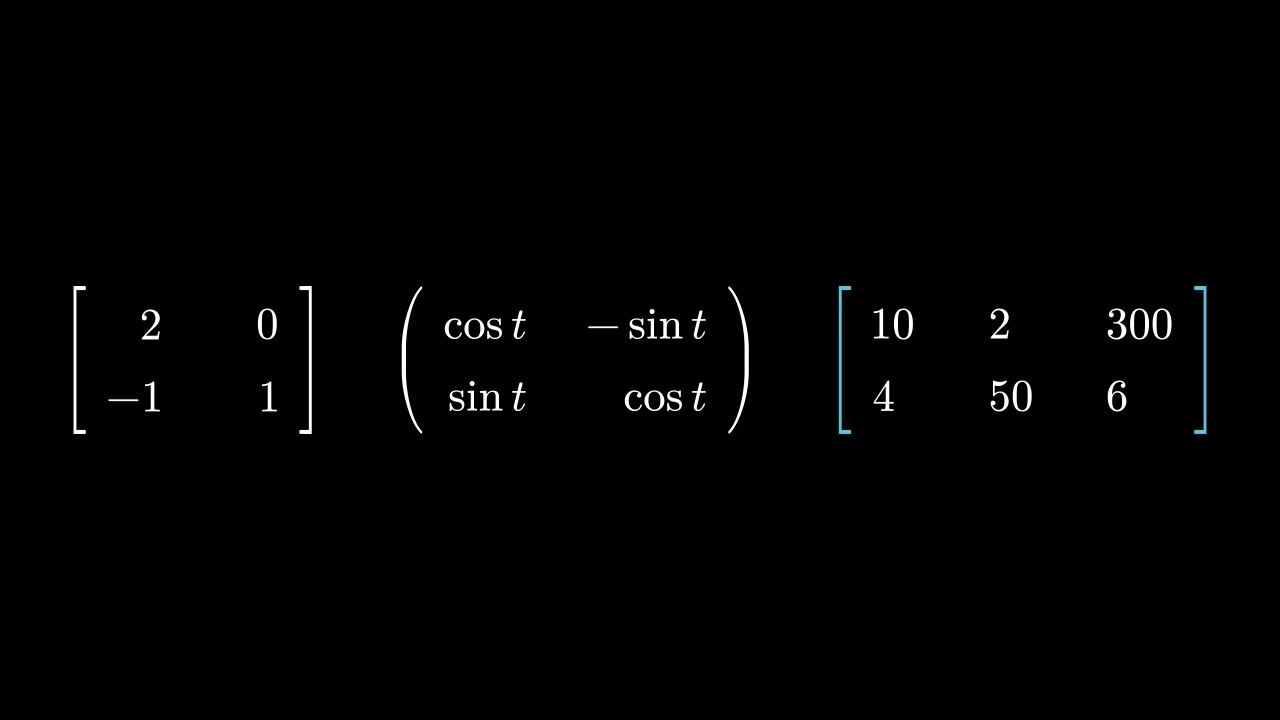
A matrix: entries in rows and columns between brackets; white unless styled.

Each entry is made into a mobject by element_to_mobject — by default typeset as math, with MathTex — and put on a grid, rows v_buff apart and columns h_buff apart, by its bottom right corner (element_alignment_corner): the entries of a column are aligned on their right. Brackets, typeset as LaTeX delimiters, stand on either side, stretched to the entries' height; the matrix is centered on the scene's origin. Its entries and brackets can be reached, colored and animated, and so can its rows and columns: get_rows() and get_columns() give them as groups, set_row_colors(...) and set_column_colors(...) color them.

Layout and bracket options are used during construction; the resulting cells and brackets hold the matrix's state.

m.Matrix(matrix, v_buff=0.8, h_buff=1.3, bracket_h_buff=MED_SMALL_BUFF, bracket_v_buff=MED_SMALL_BUFF, add_background_rectangles_to_entries=False, include_background_rectangle=False, element_to_mobject=None, element_to_mobject_config=None, element_alignment_corner=DR, left_bracket='[', right_bracket=']', stretch_brackets=True, bracket_config=None, **kwargs)
matrix

The entries, row by row: numbers, strings of math or mobjects, as element_to_mobject takes them.

v_buff

The distance between rows, in scene units, from one row's entries' alignment corners to the next's.

h_buff

The distance between columns, in scene units, likewise.

bracket_h_buff

The gap between the entries and each bracket, in scene units.

bracket_v_buff

How far the brackets reach above and below the entries, in scene units, when stretched.

add_background_rectangles_to_entries

Whether each entry gets a background rectangle, in the scene's background color (see add_background_rectangle).

include_background_rectangle

Whether the matrix gets a background rectangle (see add_background_rectangle).

element_to_mobject

The function that makes each entry's mobject, called with the entry and the keywords of element_to_mobject_config: a class, as DecimalNumber, or any function; None for the class's own (MathTex, for a Matrix).

element_to_mobject_config

Keywords for element_to_mobject; None for the class's own (none, for a Matrix).

element_alignment_corner

The corner of each entry put on the grid, named by a direction: DR aligns the entries of a column on their right, UL on their left.

left_bracket

The left bracket, as a LaTeX delimiter: "[", "(", "\{", "\langle", "|", ….

right_bracket

The right bracket, as a LaTeX delimiter.

stretch_brackets

Whether the brackets are stretched to the entries' height, and bracket_v_buff beyond.

bracket_config

Math keywords for the brackets: their color, …; None for none.

color

The color of both fill and stroke (default white); None for the class's default.

fill_color

The fill's color; color if not given. Several colors make a gradient along sheen_direction.

fill_opacity

The fill's opacity, from 0 to 1 (default 0: no fill).

stroke_color

The stroke's color; color if not given. Several colors make a gradient.

stroke_opacity

The stroke's opacity, from 0 to 1 (default 1).

stroke_width

The stroke's width, in hundredths of a scene unit (default 4; 0: no stroke).

background_stroke_color

The color of an outline drawn behind the fill (default black).

background_stroke_opacity

The outline's opacity, from 0 to 1 (default 1).

background_stroke_width

The outline's width, in hundredths of a scene unit (default 0: none).

sheen_factor

How much the colors lighten toward sheen_direction, from -1 to 1 (default 0); a negative factor darkens.

sheen_direction

The direction the colors lighten toward (default UL).

joint_type

How the stroke is joined where its path turns: round, beveled or mitered, as a two-dimensional scene draws it (see LineJointType; default AUTO: mitered).

cap_style

How the stroke ends, at each end it shows (an open path's, a dash's): round, butt or square, as a two-dimensional scene draws it (see CapStyleType; default AUTO: butt).

shade_in_3d

Whether a three-dimensional scene's light shades the mobject.

material

How its surface reflects the scene's lights in a three-dimensional scene (see Material); None: Manim's shading (default).

name

A name for the mobject; its class's name if not given.

z_index

Its place in the drawing order: a higher index is drawn over a lower one (default 0).

target

The state MoveToTarget moves the mobject to.

It also takes the style keywords.

Source

src/manimgx/mobjects/grid.py

def __init__(
    self,
    matrix: Entries,
    v_buff: float = 0.8,
    h_buff: float = 1.3,
    bracket_h_buff: float = MED_SMALL_BUFF,
    bracket_v_buff: float = MED_SMALL_BUFF,
    add_background_rectangles_to_entries: bool = False,
    include_background_rectangle: bool = False,
    element_to_mobject: ElementFactory | None = None,
    element_to_mobject_config: Mapping[str, object] | None = None,
    element_alignment_corner: Vector3DLike = DR,
    left_bracket: str = "[",
    right_bracket: str = "]",
    stretch_brackets: bool = True,
    bracket_config: MathTexOptions | None = None,
    **kwargs: Unpack[Style],
):
    if bracket_config is None:
        bracket_config = {}
    super().__init__(**kwargs)
    self.cells = self._make_cells(
        matrix, element_to_mobject, element_to_mobject_config
    )
    cells = self.cells
    for i, row in enumerate(cells):
        for j, _ in enumerate(row):
            mob = cells[i][j]
            mob.move_to(
                i * v_buff * DOWN + j * h_buff * RIGHT,
                element_alignment_corner,
            )
    self.elements = VGroup(*it.chain(*self.cells))
    """The entries, row by row: a group, added to the matrix."""
    self.add(self.elements)
    bracket_config = {**bracket_config}
    BRACKET_HEIGHT = 0.5977
    n = int(self.height / BRACKET_HEIGHT) + 1
    empty_tex_array = "".join(
        ["\\begin{array}{c}", *n * ["\\quad \\\\"], "\\end{array}"]
    )
    tex_left = "".join(["\\left" + left_bracket, empty_tex_array, "\\right."])
    tex_right = "".join(["\\left.", empty_tex_array, "\\right" + right_bracket])
    l_bracket = MathTex(tex_left, **bracket_config)
    r_bracket = MathTex(tex_right, **bracket_config)
    bracket_pair = VGroup(l_bracket, r_bracket)
    if stretch_brackets:
        bracket_pair.stretch_to_fit_height(self.height + 2 * bracket_v_buff)
    l_bracket.next_to(self, LEFT, bracket_h_buff)
    r_bracket.next_to(self, RIGHT, bracket_h_buff)
    self.brackets = bracket_pair
    self.add(l_bracket, r_bracket)
    self.center()
    if add_background_rectangles_to_entries:
        for mob in self.elements:
            mob.add_background_rectangle()
    if include_background_rectangle:
        self.add_background_rectangle()

entry

The function that makes each entry's mobject when the constructor is given no element_to_mobject: a class, as MathTex, or any function. A subclass sets its own (IntegerMatrix's is Integer).

entry_config

The keywords entry is called with when the constructor is given no element_to_mobject_config (none, unless a subclass sets them).

elements

The entries, row by row: a group, added to the matrix.

get_rows

Code
import manimgx as m


class MatrixGetRowsExample(m.Scene):
    def construct(self) -> None:
        matrix = m.Matrix([[1, 2, 3], [4, 5, 6], [7, 8, 9]]).scale(1.5)
        row = m.SurroundingRectangle(matrix.get_rows()[1])
        self.add(matrix)
        self.play(m.Create(row))

The rows, from the top down, each a group of its entries from left to right (a table's labels included).

matrix.get_rows()

Returns A new group of the rows.

Source

src/manimgx/mobjects/grid.py

def get_rows(self) -> VGroup:
    """The rows, from the top down, each a group of its entries from left to right
    (a table's labels included).

    Returns:
        A new group of the rows.

    Examples:
        ```python
        import manimgx as m


        class MatrixGetRowsExample(m.Scene):
            def construct(self) -> None:
                matrix = m.Matrix([[1, 2, 3], [4, 5, 6], [7, 8, 9]]).scale(1.5)
                row = m.SurroundingRectangle(matrix.get_rows()[1])
                self.add(matrix)
                self.play(m.Create(row))
        ```
    """
    return VGroup(*(VGroup(*row) for row in self.cells))

get_columns

Code
import manimgx as m


class TableGetColumnsExample(m.Scene):
    def construct(self) -> None:
        table = m.Table(
            [["First", "Second"], ["Third", "Fourth"]],
            row_labels=[m.Text("R1"), m.Text("R2")],
            col_labels=[m.Text("C1"), m.Text("C2")],
        )
        column = m.SurroundingRectangle(table.get_columns()[1])
        self.add(table)
        self.play(m.Create(column))

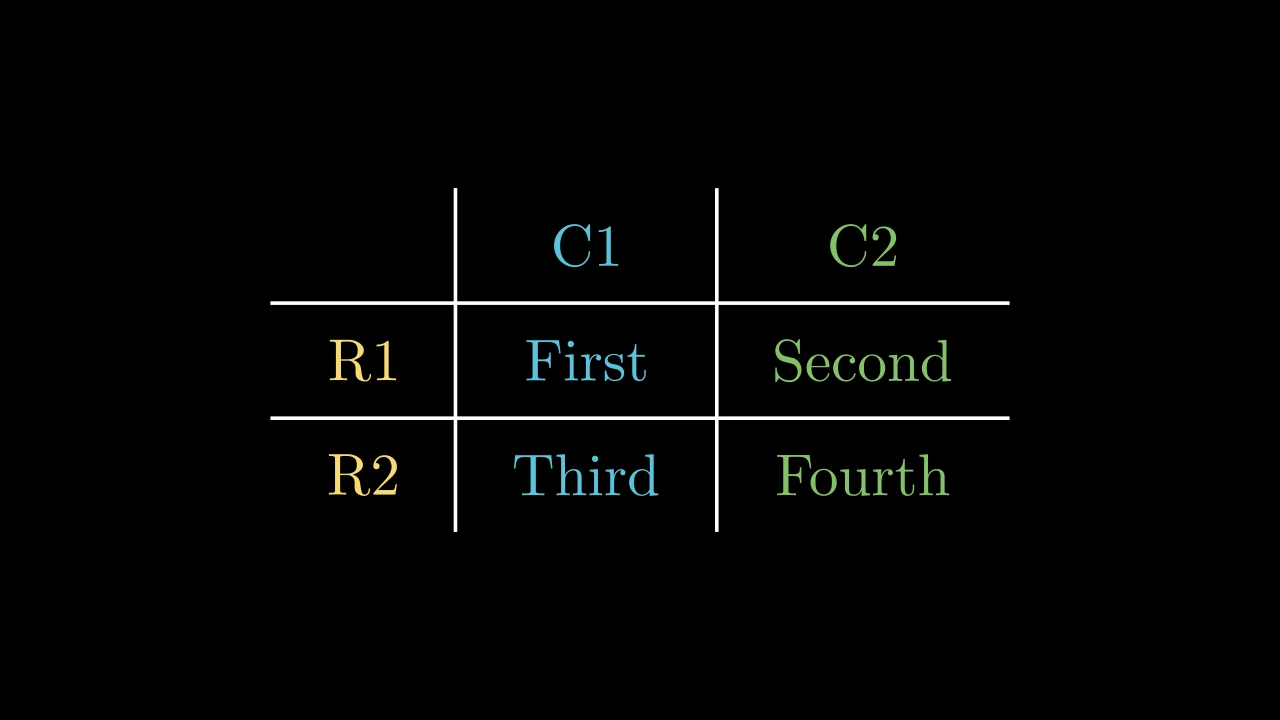
The columns, from left to right, each a group of its entries from the top down (a table's labels included).

matrix.get_columns()

Returns A new group of the columns.

Source

src/manimgx/mobjects/grid.py

def get_columns(self) -> VGroup:
    """The columns, from left to right, each a group of its entries from the top
    down (a table's labels included).

    Returns:
        A new group of the columns.

    Examples:
        ```python
        import manimgx as m


        class TableGetColumnsExample(m.Scene):
            def construct(self) -> None:
                table = m.Table(
                    [["First", "Second"], ["Third", "Fourth"]],
                    row_labels=[m.Text("R1"), m.Text("R2")],
                    col_labels=[m.Text("C1"), m.Text("C2")],
                )
                column = m.SurroundingRectangle(table.get_columns()[1])
                self.add(table)
                self.play(m.Create(column))
        ```
    """
    return VGroup(*(VGroup(*column) for column in zip(*self.cells, strict=False)))

set_row_colors

MatrixSetRowColorsExample
Code
import manimgx as m


class MatrixSetRowColorsExample(m.Scene):
    def construct(self) -> None:
        matrix = m.Matrix([[1, 2, 3], [4, 5, 6], [7, 8, 9]]).scale(1.5)
        self.add(matrix.set_row_colors(m.RED, [m.YELLOW, m.GREEN]))

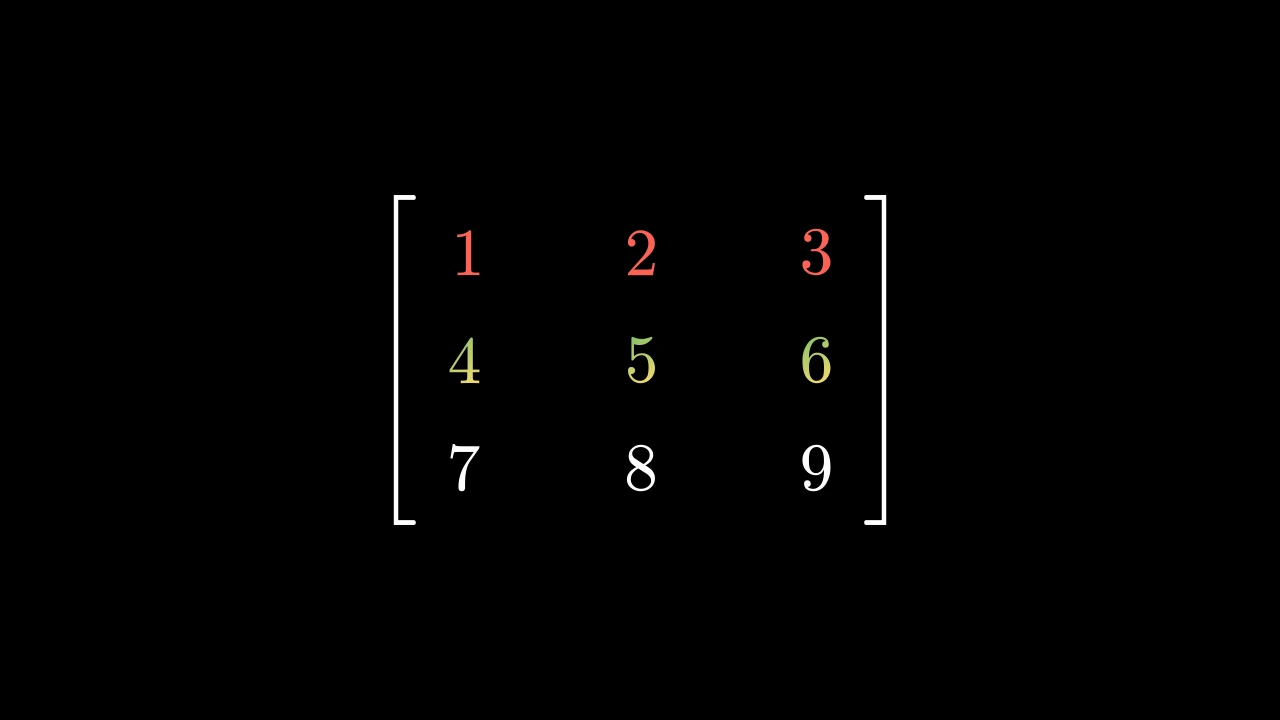
Color the rows, from the top down: each one color, or several for a gradient (as set_color makes one); rows past the last color keep theirs.

matrix.set_row_colors(*colors)
*colors

The rows' colors, in order: a color each, or a list of colors.

Source

src/manimgx/mobjects/grid.py

def set_row_colors(self, *colors: Colors) -> Self:
    """Color the rows, from the top down: each one color, or several for a gradient
    (as [set_color][manimgx.Mobject.set_color] makes one); rows past the last
    color keep theirs.

    Args:
        *colors: The rows' colors, in order: a color each, or a list of colors.

    Examples:
        ```python
        import manimgx as m


        class MatrixSetRowColorsExample(m.Scene):
            def construct(self) -> None:
                matrix = m.Matrix([[1, 2, 3], [4, 5, 6], [7, 8, 9]]).scale(1.5)
                self.add(matrix.set_row_colors(m.RED, [m.YELLOW, m.GREEN]))
        ```
    """
    for color, row in zip(colors, self.get_rows(), strict=False):
        row.set_color(color)
    return self

set_column_colors

TableSetColumnColorsExample
Code
import manimgx as m


class TableSetColumnColorsExample(m.Scene):
    def construct(self) -> None:
        table = m.Table(
            [["First", "Second"], ["Third", "Fourth"]],
            row_labels=[m.Text("R1"), m.Text("R2")],
            col_labels=[m.Text("C1"), m.Text("C2")],
        )
        self.add(table.set_column_colors(m.YELLOW, m.BLUE, m.GREEN))

Color the columns, from left to right: each one color, or several for a gradient (as set_color makes one); columns past the last color keep theirs.

matrix.set_column_colors(*colors)
*colors

The columns' colors, in order: a color each, or a list of colors.

Source

src/manimgx/mobjects/grid.py

def set_column_colors(self, *colors: Colors) -> Self:
    """Color the columns, from left to right: each one color, or several for a
    gradient (as [set_color][manimgx.Mobject.set_color] makes one); columns past
    the last color keep theirs.

    Args:
        *colors: The columns' colors, in order: a color each, or a list of colors.

    Examples:
        ```python
        import manimgx as m


        class TableSetColumnColorsExample(m.Scene):
            def construct(self) -> None:
                table = m.Table(
                    [["First", "Second"], ["Third", "Fourth"]],
                    row_labels=[m.Text("R1"), m.Text("R2")],
                    col_labels=[m.Text("C1"), m.Text("C2")],
                )
                self.add(table.set_column_colors(m.YELLOW, m.BLUE, m.GREEN))
        ```
    """
    for color, column in zip(colors, self.get_columns(), strict=False):
        column.set_color(color)
    return self

get_entries

Code
import manimgx as m


class MatrixGetEntriesExample(m.Scene):
    def construct(self) -> None:
        matrix = m.Matrix([[2, 3], [1, 5]]).scale(1.5)
        entries = matrix.get_entries()
        self.add(matrix)
        self.play(entries[0].animate.set_color(m.YELLOW))
        self.play(m.Swap(entries[1], entries[2]))

The matrix's entries, row by row.

matrix.get_entries()

Returns The group of the entries; get_entries()[1] is the second entry of the first row.

Source

src/manimgx/mobjects/grid.py

def get_entries(self) -> VGroup:
    """The matrix's entries, row by row.

    Returns:
        The group of the entries; `get_entries()[1]` is the second entry of the
        first row.

    Examples:
        ```python
        import manimgx as m


        class MatrixGetEntriesExample(m.Scene):
            def construct(self) -> None:
                matrix = m.Matrix([[2, 3], [1, 5]]).scale(1.5)
                entries = matrix.get_entries()
                self.add(matrix)
                self.play(entries[0].animate.set_color(m.YELLOW))
                self.play(m.Swap(entries[1], entries[2]))
        ```
    """
    return self.elements

get_brackets

Code
import manimgx as m


class MatrixGetBracketsExample(m.Scene):
    def construct(self) -> None:
        matrix = m.Matrix([[r"\pi", 3], [1, 5]]).scale(1.5)
        left, right = matrix.get_brackets()
        self.add(matrix)
        self.play(
            left.animate.set_color(m.BLUE), right.animate.set_color(m.GREEN)
        )

The matrix's brackets, the left one first.

matrix.get_brackets()

Returns The group of the two brackets.

Source

src/manimgx/mobjects/grid.py

def get_brackets(self) -> VGroup:
    r"""The matrix's brackets, the left one first.

    Returns:
        The group of the two brackets.

    Examples:
        ```python
        import manimgx as m


        class MatrixGetBracketsExample(m.Scene):
            def construct(self) -> None:
                matrix = m.Matrix([[r"\pi", 3], [1, 5]]).scale(1.5)
                left, right = matrix.get_brackets()
                self.add(matrix)
                self.play(
                    left.animate.set_color(m.BLUE), right.animate.set_color(m.GREEN)
                )
        ```
    """
    return self.brackets

DecimalMatrix

DecimalMatrixExample
Code
import manimgx as m


class DecimalMatrixExample(m.Scene):
    def construct(self) -> None:
        matrix = m.DecimalMatrix(
            [[3.456, 2.122], [33.2244, 12]],
            h_buff=2,
            element_to_mobject_config={"num_decimal_places": 2},
            left_bracket=r"\{",
            right_bracket=r"\}",
        )
        self.add(matrix.scale(1.5))

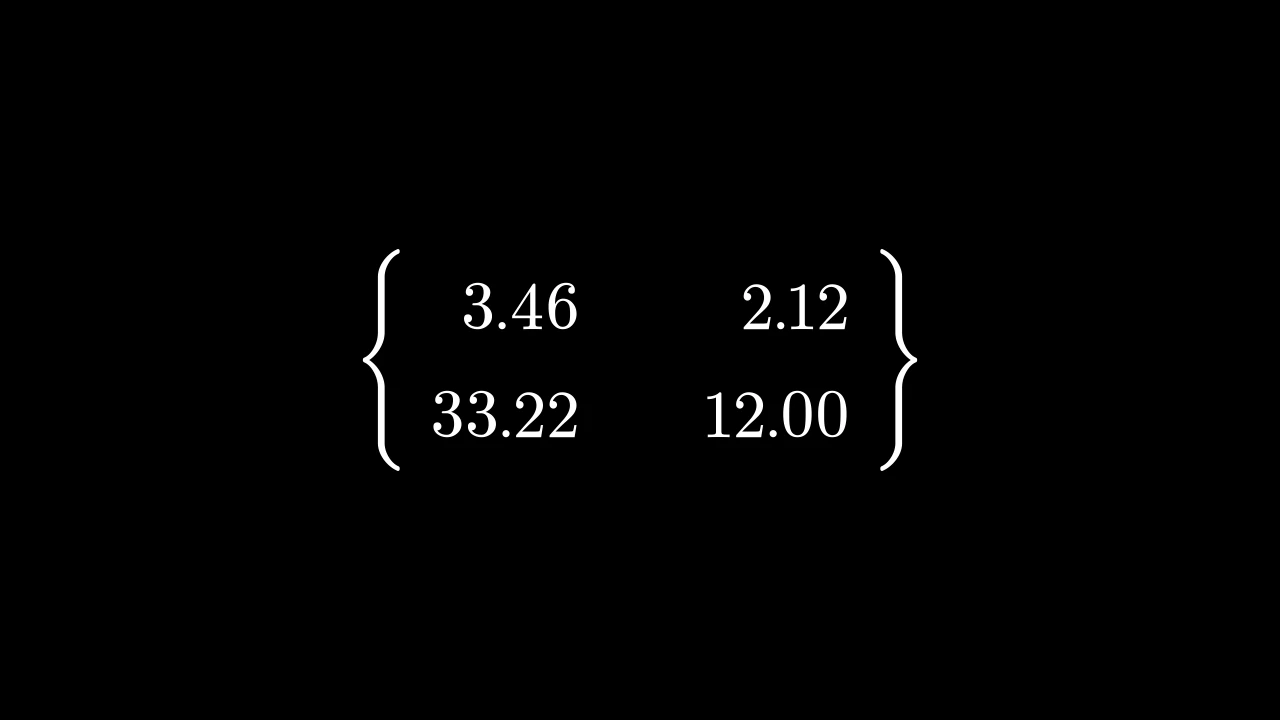
A matrix of decimal numbers: each entry written as a DecimalNumber, with one decimal place unless configured.

It takes a Matrix's arguments; its entries are numbers, and its element_to_mobject_config gives the numbers' keywords, in place of {"num_decimal_places": 1}.

m.DecimalMatrix(matrix, v_buff=0.8, h_buff=1.3, bracket_h_buff=MED_SMALL_BUFF, bracket_v_buff=MED_SMALL_BUFF, add_background_rectangles_to_entries=False, include_background_rectangle=False, element_to_mobject=None, element_to_mobject_config=None, element_alignment_corner=DR, left_bracket='[', right_bracket=']', stretch_brackets=True, bracket_config=None, **kwargs)
color

The color of both fill and stroke (default white); None for the class's default.

fill_color

The fill's color; color if not given. Several colors make a gradient along sheen_direction.

fill_opacity

The fill's opacity, from 0 to 1 (default 0: no fill).

stroke_color

The stroke's color; color if not given. Several colors make a gradient.

stroke_opacity

The stroke's opacity, from 0 to 1 (default 1).

stroke_width

The stroke's width, in hundredths of a scene unit (default 4; 0: no stroke).

background_stroke_color

The color of an outline drawn behind the fill (default black).

background_stroke_opacity

The outline's opacity, from 0 to 1 (default 1).

background_stroke_width

The outline's width, in hundredths of a scene unit (default 0: none).

sheen_factor

How much the colors lighten toward sheen_direction, from -1 to 1 (default 0); a negative factor darkens.

sheen_direction

The direction the colors lighten toward (default UL).

joint_type

How the stroke is joined where its path turns: round, beveled or mitered, as a two-dimensional scene draws it (see LineJointType; default AUTO: mitered).

cap_style

How the stroke ends, at each end it shows (an open path's, a dash's): round, butt or square, as a two-dimensional scene draws it (see CapStyleType; default AUTO: butt).

shade_in_3d

Whether a three-dimensional scene's light shades the mobject.

material

How its surface reflects the scene's lights in a three-dimensional scene (see Material); None: Manim's shading (default).

name

A name for the mobject; its class's name if not given.

z_index

Its place in the drawing order: a higher index is drawn over a lower one (default 0).

target

The state MoveToTarget moves the mobject to.

It also takes the style keywords.

Source

src/manimgx/mobjects/grid.py

def __init__(
    self,
    matrix: Entries,
    v_buff: float = 0.8,
    h_buff: float = 1.3,
    bracket_h_buff: float = MED_SMALL_BUFF,
    bracket_v_buff: float = MED_SMALL_BUFF,
    add_background_rectangles_to_entries: bool = False,
    include_background_rectangle: bool = False,
    element_to_mobject: ElementFactory | None = None,
    element_to_mobject_config: Mapping[str, object] | None = None,
    element_alignment_corner: Vector3DLike = DR,
    left_bracket: str = "[",
    right_bracket: str = "]",
    stretch_brackets: bool = True,
    bracket_config: MathTexOptions | None = None,
    **kwargs: Unpack[Style],
):
    if bracket_config is None:
        bracket_config = {}
    super().__init__(**kwargs)
    self.cells = self._make_cells(
        matrix, element_to_mobject, element_to_mobject_config
    )
    cells = self.cells
    for i, row in enumerate(cells):
        for j, _ in enumerate(row):
            mob = cells[i][j]
            mob.move_to(
                i * v_buff * DOWN + j * h_buff * RIGHT,
                element_alignment_corner,
            )
    self.elements = VGroup(*it.chain(*self.cells))
    """The entries, row by row: a group, added to the matrix."""
    self.add(self.elements)
    bracket_config = {**bracket_config}
    BRACKET_HEIGHT = 0.5977
    n = int(self.height / BRACKET_HEIGHT) + 1
    empty_tex_array = "".join(
        ["\\begin{array}{c}", *n * ["\\quad \\\\"], "\\end{array}"]
    )
    tex_left = "".join(["\\left" + left_bracket, empty_tex_array, "\\right."])
    tex_right = "".join(["\\left.", empty_tex_array, "\\right" + right_bracket])
    l_bracket = MathTex(tex_left, **bracket_config)
    r_bracket = MathTex(tex_right, **bracket_config)
    bracket_pair = VGroup(l_bracket, r_bracket)
    if stretch_brackets:
        bracket_pair.stretch_to_fit_height(self.height + 2 * bracket_v_buff)
    l_bracket.next_to(self, LEFT, bracket_h_buff)
    r_bracket.next_to(self, RIGHT, bracket_h_buff)
    self.brackets = bracket_pair
    self.add(l_bracket, r_bracket)
    self.center()
    if add_background_rectangles_to_entries:
        for mob in self.elements:
            mob.add_background_rectangle()
    if include_background_rectangle:
        self.add_background_rectangle()

IntegerMatrix

IntegerMatrixExample
Code
import manimgx as m


class IntegerMatrixExample(m.Scene):
    def construct(self) -> None:
        matrix = m.IntegerMatrix(
            [[3.7, 2], [42.2, 12]], left_bracket="(", right_bracket=")"
        )
        self.add(matrix.scale(1.5))

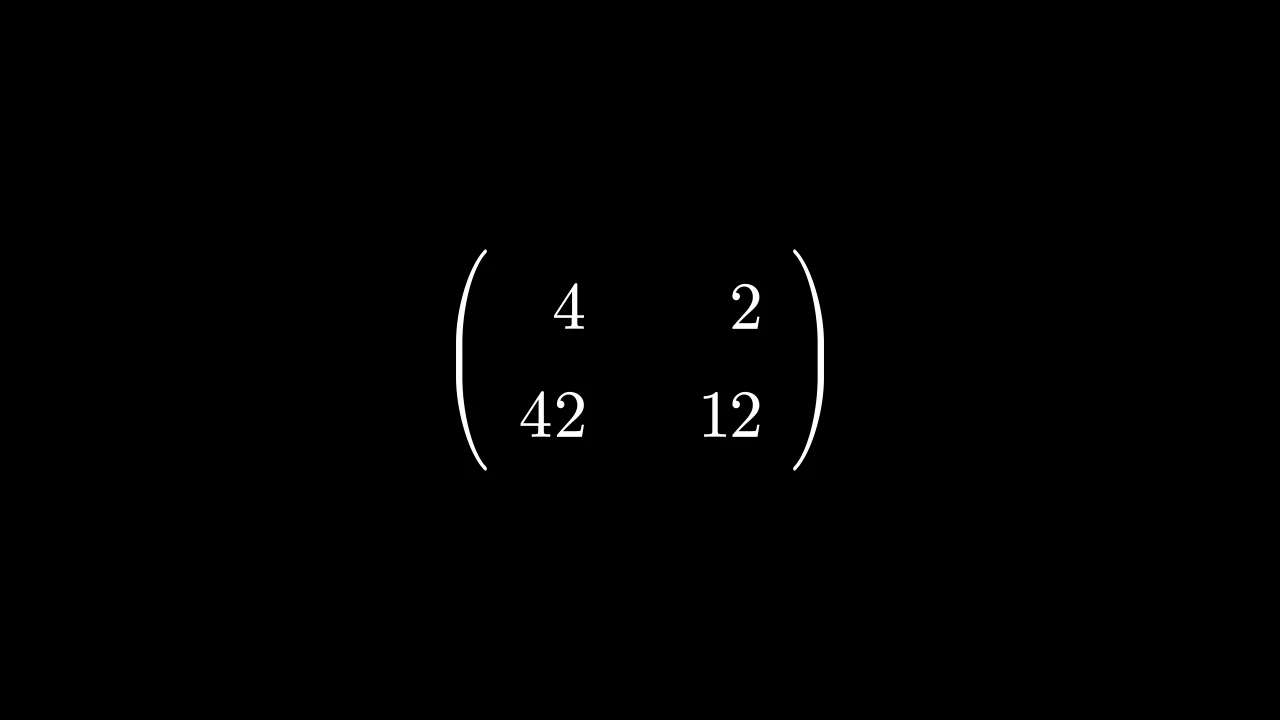
A matrix of integers: each entry written as an Integer, its number rounded to a whole number.

It takes a Matrix's arguments; its entries are numbers, and its element_to_mobject_config gives the numbers' keywords.

m.IntegerMatrix(matrix, v_buff=0.8, h_buff=1.3, bracket_h_buff=MED_SMALL_BUFF, bracket_v_buff=MED_SMALL_BUFF, add_background_rectangles_to_entries=False, include_background_rectangle=False, element_to_mobject=None, element_to_mobject_config=None, element_alignment_corner=DR, left_bracket='[', right_bracket=']', stretch_brackets=True, bracket_config=None, **kwargs)
color

The color of both fill and stroke (default white); None for the class's default.

fill_color

The fill's color; color if not given. Several colors make a gradient along sheen_direction.

fill_opacity

The fill's opacity, from 0 to 1 (default 0: no fill).

stroke_color

The stroke's color; color if not given. Several colors make a gradient.

stroke_opacity

The stroke's opacity, from 0 to 1 (default 1).

stroke_width

The stroke's width, in hundredths of a scene unit (default 4; 0: no stroke).

background_stroke_color

The color of an outline drawn behind the fill (default black).

background_stroke_opacity

The outline's opacity, from 0 to 1 (default 1).

background_stroke_width

The outline's width, in hundredths of a scene unit (default 0: none).

sheen_factor

How much the colors lighten toward sheen_direction, from -1 to 1 (default 0); a negative factor darkens.

sheen_direction

The direction the colors lighten toward (default UL).

joint_type

How the stroke is joined where its path turns: round, beveled or mitered, as a two-dimensional scene draws it (see LineJointType; default AUTO: mitered).

cap_style

How the stroke ends, at each end it shows (an open path's, a dash's): round, butt or square, as a two-dimensional scene draws it (see CapStyleType; default AUTO: butt).

shade_in_3d

Whether a three-dimensional scene's light shades the mobject.

material

How its surface reflects the scene's lights in a three-dimensional scene (see Material); None: Manim's shading (default).

name

A name for the mobject; its class's name if not given.

z_index

Its place in the drawing order: a higher index is drawn over a lower one (default 0).

target

The state MoveToTarget moves the mobject to.

It also takes the style keywords.

Source

src/manimgx/mobjects/grid.py

def __init__(
    self,
    matrix: Entries,
    v_buff: float = 0.8,
    h_buff: float = 1.3,
    bracket_h_buff: float = MED_SMALL_BUFF,
    bracket_v_buff: float = MED_SMALL_BUFF,
    add_background_rectangles_to_entries: bool = False,
    include_background_rectangle: bool = False,
    element_to_mobject: ElementFactory | None = None,
    element_to_mobject_config: Mapping[str, object] | None = None,
    element_alignment_corner: Vector3DLike = DR,
    left_bracket: str = "[",
    right_bracket: str = "]",
    stretch_brackets: bool = True,
    bracket_config: MathTexOptions | None = None,
    **kwargs: Unpack[Style],
):
    if bracket_config is None:
        bracket_config = {}
    super().__init__(**kwargs)
    self.cells = self._make_cells(
        matrix, element_to_mobject, element_to_mobject_config
    )
    cells = self.cells
    for i, row in enumerate(cells):
        for j, _ in enumerate(row):
            mob = cells[i][j]
            mob.move_to(
                i * v_buff * DOWN + j * h_buff * RIGHT,
                element_alignment_corner,
            )
    self.elements = VGroup(*it.chain(*self.cells))
    """The entries, row by row: a group, added to the matrix."""
    self.add(self.elements)
    bracket_config = {**bracket_config}
    BRACKET_HEIGHT = 0.5977
    n = int(self.height / BRACKET_HEIGHT) + 1
    empty_tex_array = "".join(
        ["\\begin{array}{c}", *n * ["\\quad \\\\"], "\\end{array}"]
    )
    tex_left = "".join(["\\left" + left_bracket, empty_tex_array, "\\right."])
    tex_right = "".join(["\\left.", empty_tex_array, "\\right" + right_bracket])
    l_bracket = MathTex(tex_left, **bracket_config)
    r_bracket = MathTex(tex_right, **bracket_config)
    bracket_pair = VGroup(l_bracket, r_bracket)
    if stretch_brackets:
        bracket_pair.stretch_to_fit_height(self.height + 2 * bracket_v_buff)
    l_bracket.next_to(self, LEFT, bracket_h_buff)
    r_bracket.next_to(self, RIGHT, bracket_h_buff)
    self.brackets = bracket_pair
    self.add(l_bracket, r_bracket)
    self.center()
    if add_background_rectangles_to_entries:
        for mob in self.elements:
            mob.add_background_rectangle()
    if include_background_rectangle:
        self.add_background_rectangle()

MobjectMatrix

MobjectMatrixExample
Code
import manimgx as m


class MobjectMatrixExample(m.Scene):
    def construct(self) -> None:
        circle = m.Circle(radius=0.3, color=m.BLUE)
        triangle = m.Triangle(radius=0.35, color=m.GREEN)
        matrix = m.MobjectMatrix(
            [[circle, m.Square(0.6)], [triangle, m.Star(outer_radius=0.35)]],
            left_bracket=r"\langle",
            right_bracket=r"\rangle",
        )
        self.add(matrix.scale(1.5))

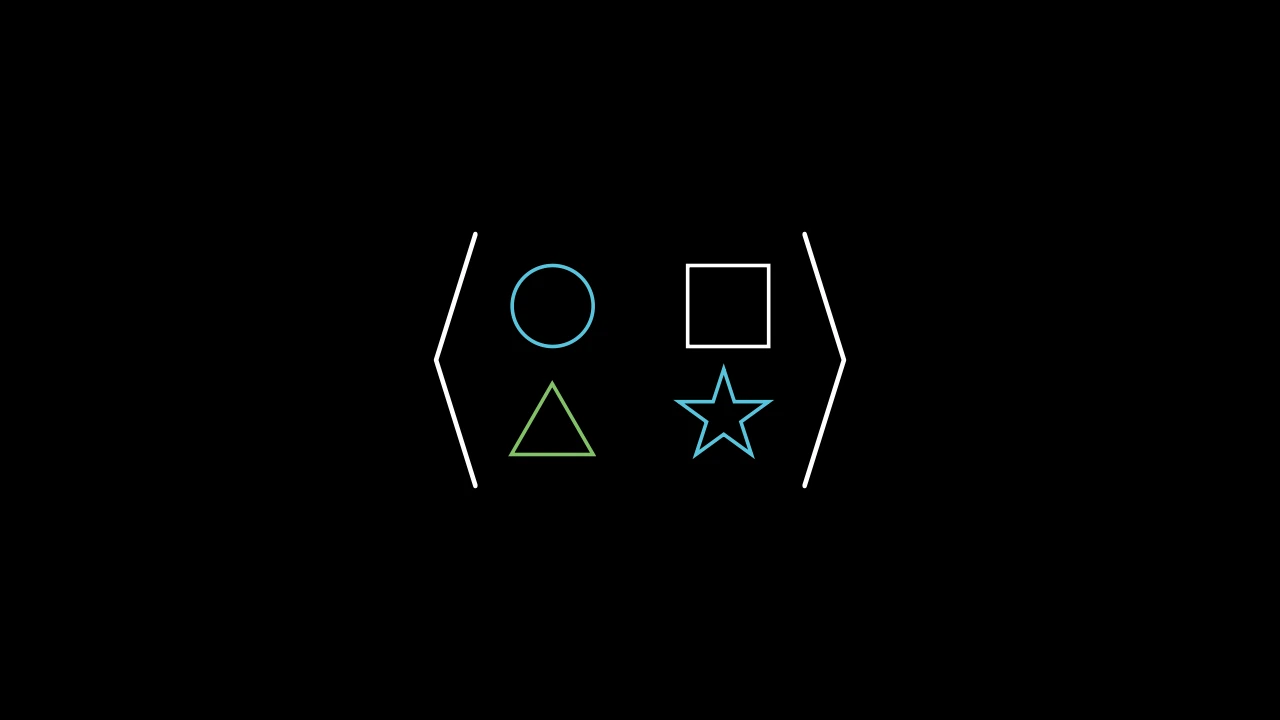
A matrix of mobjects: each entry a mobject, placed as it is.

It takes a Matrix's arguments; its entries are mobjects, used themselves (not copied).

m.MobjectMatrix(matrix, v_buff=0.8, h_buff=1.3, bracket_h_buff=MED_SMALL_BUFF, bracket_v_buff=MED_SMALL_BUFF, add_background_rectangles_to_entries=False, include_background_rectangle=False, element_to_mobject=None, element_to_mobject_config=None, element_alignment_corner=DR, left_bracket='[', right_bracket=']', stretch_brackets=True, bracket_config=None, **kwargs)
color

The color of both fill and stroke (default white); None for the class's default.

fill_color

The fill's color; color if not given. Several colors make a gradient along sheen_direction.

fill_opacity

The fill's opacity, from 0 to 1 (default 0: no fill).

stroke_color

The stroke's color; color if not given. Several colors make a gradient.

stroke_opacity

The stroke's opacity, from 0 to 1 (default 1).

stroke_width

The stroke's width, in hundredths of a scene unit (default 4; 0: no stroke).

background_stroke_color

The color of an outline drawn behind the fill (default black).

background_stroke_opacity

The outline's opacity, from 0 to 1 (default 1).

background_stroke_width

The outline's width, in hundredths of a scene unit (default 0: none).

sheen_factor

How much the colors lighten toward sheen_direction, from -1 to 1 (default 0); a negative factor darkens.

sheen_direction

The direction the colors lighten toward (default UL).

joint_type

How the stroke is joined where its path turns: round, beveled or mitered, as a two-dimensional scene draws it (see LineJointType; default AUTO: mitered).

cap_style

How the stroke ends, at each end it shows (an open path's, a dash's): round, butt or square, as a two-dimensional scene draws it (see CapStyleType; default AUTO: butt).

shade_in_3d

Whether a three-dimensional scene's light shades the mobject.

material

How its surface reflects the scene's lights in a three-dimensional scene (see Material); None: Manim's shading (default).

name

A name for the mobject; its class's name if not given.

z_index

Its place in the drawing order: a higher index is drawn over a lower one (default 0).

target

The state MoveToTarget moves the mobject to.

It also takes the style keywords.

Source

src/manimgx/mobjects/grid.py

def __init__(
    self,
    matrix: Entries,
    v_buff: float = 0.8,
    h_buff: float = 1.3,
    bracket_h_buff: float = MED_SMALL_BUFF,
    bracket_v_buff: float = MED_SMALL_BUFF,
    add_background_rectangles_to_entries: bool = False,
    include_background_rectangle: bool = False,
    element_to_mobject: ElementFactory | None = None,
    element_to_mobject_config: Mapping[str, object] | None = None,
    element_alignment_corner: Vector3DLike = DR,
    left_bracket: str = "[",
    right_bracket: str = "]",
    stretch_brackets: bool = True,
    bracket_config: MathTexOptions | None = None,
    **kwargs: Unpack[Style],
):
    if bracket_config is None:
        bracket_config = {}
    super().__init__(**kwargs)
    self.cells = self._make_cells(
        matrix, element_to_mobject, element_to_mobject_config
    )
    cells = self.cells
    for i, row in enumerate(cells):
        for j, _ in enumerate(row):
            mob = cells[i][j]
            mob.move_to(
                i * v_buff * DOWN + j * h_buff * RIGHT,
                element_alignment_corner,
            )
    self.elements = VGroup(*it.chain(*self.cells))
    """The entries, row by row: a group, added to the matrix."""
    self.add(self.elements)
    bracket_config = {**bracket_config}
    BRACKET_HEIGHT = 0.5977
    n = int(self.height / BRACKET_HEIGHT) + 1
    empty_tex_array = "".join(
        ["\\begin{array}{c}", *n * ["\\quad \\\\"], "\\end{array}"]
    )
    tex_left = "".join(["\\left" + left_bracket, empty_tex_array, "\\right."])
    tex_right = "".join(["\\left.", empty_tex_array, "\\right" + right_bracket])
    l_bracket = MathTex(tex_left, **bracket_config)
    r_bracket = MathTex(tex_right, **bracket_config)
    bracket_pair = VGroup(l_bracket, r_bracket)
    if stretch_brackets:
        bracket_pair.stretch_to_fit_height(self.height + 2 * bracket_v_buff)
    l_bracket.next_to(self, LEFT, bracket_h_buff)
    r_bracket.next_to(self, RIGHT, bracket_h_buff)
    self.brackets = bracket_pair
    self.add(l_bracket, r_bracket)
    self.center()
    if add_background_rectangles_to_entries:
        for mob in self.elements:
            mob.add_background_rectangle()
    if include_background_rectangle:
        self.add_background_rectangle()

Table

TableExample
Code
import manimgx as m


class TableExample(m.Scene):
    def construct(self) -> None:
        table = m.Table(
            [["1", "2", "3"], ["2", "4", "6"], ["3", "6", "9"]],
            row_labels=[m.Text("1"), m.Text("2"), m.Text("3")],
            col_labels=[m.Text("1"), m.Text("2"), m.Text("3")],
            top_left_entry=m.Text("×"),
            include_outer_lines=True,
            line_config={"color": m.BLUE},
        )
        self.add(table)

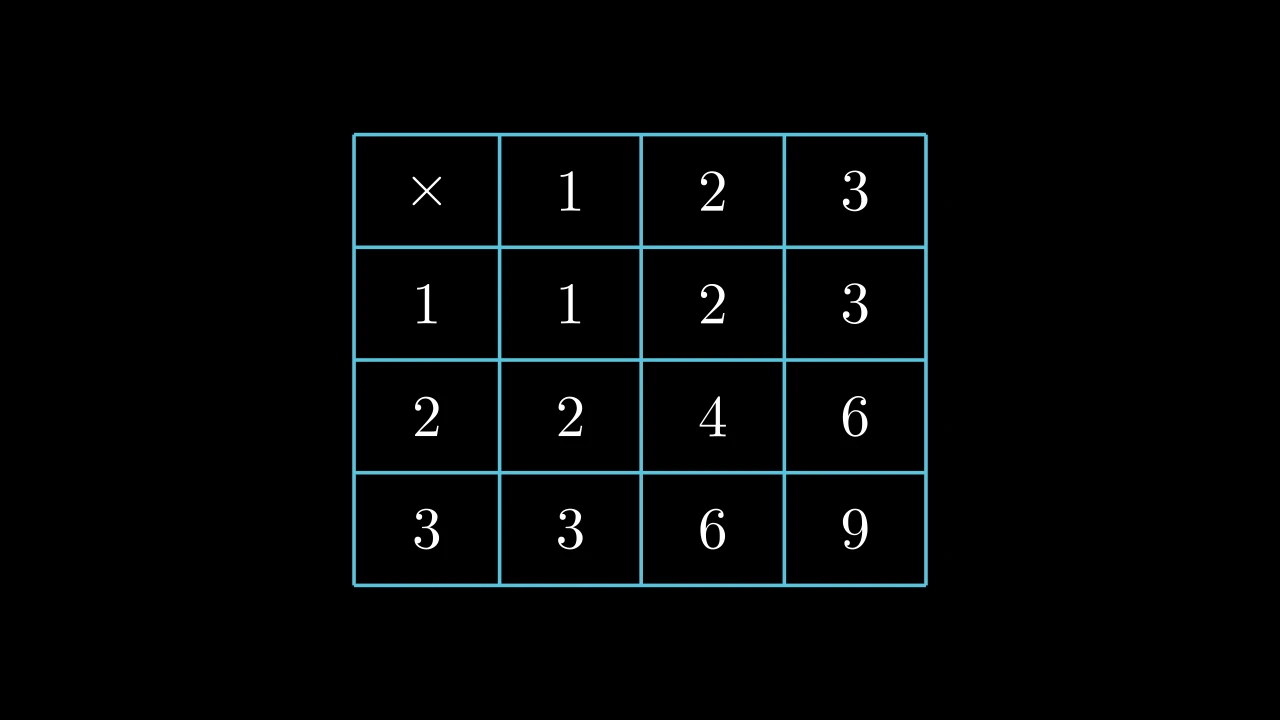
A table: entries in rows and columns, with lines between them, and labels for the rows and the columns if given; white unless styled.

Each entry is made into a mobject by element_to_mobject — by default a Paragraph of its text — and the cells are laid out in a grid, each entry centered in its cell (see arrange_in_grid); the table is centered on the scene's origin. Row labels make a first column, column labels a first row, and top_left_entry fills the corner between them. The lines run through the middle of the gaps between rows and between columns, and half a gap beyond the entries. Its rows and columns can be reached as groups, get_rows() and get_columns(), and colored, set_row_colors(...) and set_column_colors(...), labels included.

A cell is addressed by its position, (row, column), counted from 1 at the top left, labels included: in a table with row and column labels, (1, 1) is the corner and the first entry is at (2, 2).

Grid, line and background options are consumed during construction; cells, labels, line groups and gaps hold the table's state.

m.Table(table, row_labels=None, col_labels=None, top_left_entry=None, v_buff=0.8, h_buff=1.3, include_outer_lines=False, include_inner_lines=True, add_background_rectangles_to_entries=False, entries_background_color=BLACK, include_background_rectangle=False, background_rectangle_color=BLACK, element_to_mobject=None, element_to_mobject_config=None, arrange_in_grid_config=None, line_config=None, **kwargs)
table

The entries, row by row, every row as long: strings, for the default Paragraph; numbers or mobjects, as another element_to_mobject takes them.

row_labels

A label for each row, left of it; None for none.

col_labels

A label for each column, above it; None for none.

top_left_entry

A mobject for the corner above the row labels and left of the column labels, when there are both; None to leave it empty.

v_buff

The gap between rows, in scene units.

h_buff

The gap between columns, in scene units.

include_outer_lines

Whether lines frame the table.

include_inner_lines

Whether lines separate its rows and its columns.

add_background_rectangles_to_entries

Whether each entry, labels included, gets a background rectangle (see add_background_to_entries).

entries_background_color

The color of the entries' background rectangles.

include_background_rectangle

Whether the table gets a background rectangle (see add_background_rectangle).

background_rectangle_color

The color of the table's background rectangle.

element_to_mobject

The function that makes each entry's mobject, called with the entry and the keywords of element_to_mobject_config: a class, as MathTex, or any function; None for the class's own (Paragraph, for a Table).

element_to_mobject_config

Keywords for element_to_mobject; None for the class's own (none, for a Table).

arrange_in_grid_config

Grid keywords for laying out the cells, over the table's own rows, columns and gaps: cell_alignment, col_alignments, …; None for none.

line_config

Line keywords for the lines: their color, stroke_width, …; None for none.

color

The color of both fill and stroke (default white); None for the class's default.

fill_color

The fill's color; color if not given. Several colors make a gradient along sheen_direction.

fill_opacity

The fill's opacity, from 0 to 1 (default 0: no fill).

stroke_color

The stroke's color; color if not given. Several colors make a gradient.

stroke_opacity

The stroke's opacity, from 0 to 1 (default 1).

stroke_width

The stroke's width, in hundredths of a scene unit (default 4; 0: no stroke).

background_stroke_color

The color of an outline drawn behind the fill (default black).

background_stroke_opacity

The outline's opacity, from 0 to 1 (default 1).

background_stroke_width

The outline's width, in hundredths of a scene unit (default 0: none).

sheen_factor

How much the colors lighten toward sheen_direction, from -1 to 1 (default 0); a negative factor darkens.

sheen_direction

The direction the colors lighten toward (default UL).

joint_type

How the stroke is joined where its path turns: round, beveled or mitered, as a two-dimensional scene draws it (see LineJointType; default AUTO: mitered).

cap_style

How the stroke ends, at each end it shows (an open path's, a dash's): round, butt or square, as a two-dimensional scene draws it (see CapStyleType; default AUTO: butt).

shade_in_3d

Whether a three-dimensional scene's light shades the mobject.

material

How its surface reflects the scene's lights in a three-dimensional scene (see Material); None: Manim's shading (default).

name

A name for the mobject; its class's name if not given.

z_index

Its place in the drawing order: a higher index is drawn over a lower one (default 0).

target

The state MoveToTarget moves the mobject to.

It also takes the style keywords.

Source

src/manimgx/mobjects/grid.py

def __init__(
    self,
    table: Iterable[Iterable[float | str | Mobject]],
    row_labels: Iterable[Mobject] | None = None,
    col_labels: Iterable[Mobject] | None = None,
    top_left_entry: Mobject | None = None,
    v_buff: float = 0.8,
    h_buff: float = 1.3,
    include_outer_lines: bool = False,
    include_inner_lines: bool = True,
    add_background_rectangles_to_entries: bool = False,
    entries_background_color: ParsableManimColor = BLACK,
    include_background_rectangle: bool = False,
    background_rectangle_color: ParsableManimColor = BLACK,
    element_to_mobject: ElementFactory | None = None,
    element_to_mobject_config: Mapping[str, object] | None = None,
    arrange_in_grid_config: GridArrangement | None = None,
    line_config: LineOptions | None = None,
    **kwargs: Unpack[Style],
):
    if line_config is None:
        line_config = {}
    if arrange_in_grid_config is None:
        arrange_in_grid_config = {}
    table_data = [list(row) for row in table]
    row_label_data = list(row_labels) if row_labels is not None else []
    col_label_data = list(col_labels) if col_labels is not None else []
    self.row_labels = row_label_data or None
    """The row labels, top to bottom; None if there are none."""
    self.col_labels = col_label_data or None
    """The column labels, left to right; None if there are none."""
    self.top_left_entry = top_left_entry
    """The mobject in the corner between the labels; None if there is none."""
    self.row_dim = len(table_data)
    """How many rows of entries the table has, labels not counted."""
    self.col_dim = len(table_data[0])
    """How many columns of entries the table has, labels not counted."""
    self.v_buff = v_buff
    """The gap between rows, in scene units, as the table was made: scaling the
    table leaves it as it is."""
    self.h_buff = h_buff
    """The gap between columns, in scene units, as the table was made: scaling the
    table leaves it as it is."""
    entries_background_color = ManimColor(entries_background_color)
    background_rectangle_color = ManimColor(background_rectangle_color)
    if any(len(row) != len(table_data[0]) for row in table_data):
        raise ValueError("Not all rows in table have the same length.")
    super().__init__(**kwargs)
    cells = self._make_cells(
        table_data, element_to_mobject, element_to_mobject_config
    )
    self.elements_without_labels = VGroup(*it.chain(*cells))
    """The entries but the labels, row by row."""
    if self.row_labels is not None:
        for k in range(len(self.row_labels)):
            cells[k] = [self.row_labels[k]] + cells[k]
    if self.col_labels is not None:
        if self.row_labels is not None:
            if self.top_left_entry is not None:
                col_labels = [self.top_left_entry] + self.col_labels
                cells.insert(0, col_labels)
            else:
                dummy_mobject = VMobject()
                col_labels = [dummy_mobject] + self.col_labels
                cells.insert(0, col_labels)
        else:
            cells.insert(0, self.col_labels)
    self.cells = cells
    self.elements = VGroup(*it.chain(*self.cells))
    """Every entry of the table, labels included, row by row: a group, added to the
    table."""
    layout = GridArrangement(
        rows=len(self.cells), cols=len(self.cells[0]), buff=(h_buff, v_buff)
    )
    self.elements.arrange_in_grid(**(layout | arrange_in_grid_config))
    if len(self.elements[0].get_all_points()) == 0:
        self.elements.remove(self.elements[0])
    self.add(self.elements)
    self.center()
    for axis in (0, 1):
        divisions = self.get_rows() if axis == 0 else self.get_columns()
        along, across = (RIGHT, UP) if axis == 0 else (DOWN, LEFT)
        near = [float(part.get_corner(across) @ across) for part in divisions]
        far = [float(part.get_corner(-across) @ across) for part in divisions]
        gap = (self.v_buff, self.h_buff)[axis] / 2
        pad = (self.h_buff, self.v_buff)[axis] / 2
        start = float(self.elements.get_corner(-along) @ along) - pad
        end = float(self.elements.get_corner(along) @ along) + pad
        anchors: list[tuple[float, bool]] = []
        if include_outer_lines:
            anchors.extend(((near[0] + gap, False), (far[-1] - gap, False)))
        if include_inner_lines:
            anchors.extend(
                (b + 0.5 * (a - b), axis == 1) for a, b in zip(far[:-1], near[1:])
            )
        lines = VGroup()
        parts: list[Line] = []
        for anchor, reverse in anchors:
            offset = anchor * across
            ends = (start * along + offset, end * along + offset)
            parts.append(Line(*(ends[::-1] if reverse else ends), **line_config))
        lines.add(*parts)
        self.add(*lines)
        if axis == 0:
            self.horizontal_lines = lines
        else:
            self.vertical_lines = lines
    if add_background_rectangles_to_entries:
        self.add_background_to_entries(color=entries_background_color)
    if include_background_rectangle:
        self.add_background_rectangle(color=background_rectangle_color)

entry_config

The keywords entry is called with when the constructor is given no element_to_mobject_config (none, unless a subclass sets them).

row_labels

The row labels, top to bottom; None if there are none.

col_labels

The column labels, left to right; None if there are none.

top_left_entry

The mobject in the corner between the labels; None if there is none.

row_dim

How many rows of entries the table has, labels not counted.

col_dim

How many columns of entries the table has, labels not counted.

v_buff

The gap between rows, in scene units, as the table was made: scaling the table leaves it as it is.

h_buff

The gap between columns, in scene units, as the table was made: scaling the table leaves it as it is.

elements_without_labels

The entries but the labels, row by row.

elements

Every entry of the table, labels included, row by row: a group, added to the table.

get_rows

Code
import manimgx as m


class MatrixGetRowsExample(m.Scene):
    def construct(self) -> None:
        matrix = m.Matrix([[1, 2, 3], [4, 5, 6], [7, 8, 9]]).scale(1.5)
        row = m.SurroundingRectangle(matrix.get_rows()[1])
        self.add(matrix)
        self.play(m.Create(row))

The rows, from the top down, each a group of its entries from left to right (a table's labels included).

table.get_rows()

Returns A new group of the rows.

Source

src/manimgx/mobjects/grid.py

def get_rows(self) -> VGroup:
    """The rows, from the top down, each a group of its entries from left to right
    (a table's labels included).

    Returns:
        A new group of the rows.

    Examples:
        ```python
        import manimgx as m


        class MatrixGetRowsExample(m.Scene):
            def construct(self) -> None:
                matrix = m.Matrix([[1, 2, 3], [4, 5, 6], [7, 8, 9]]).scale(1.5)
                row = m.SurroundingRectangle(matrix.get_rows()[1])
                self.add(matrix)
                self.play(m.Create(row))
        ```
    """
    return VGroup(*(VGroup(*row) for row in self.cells))

get_columns

Code
import manimgx as m


class TableGetColumnsExample(m.Scene):
    def construct(self) -> None:
        table = m.Table(
            [["First", "Second"], ["Third", "Fourth"]],
            row_labels=[m.Text("R1"), m.Text("R2")],
            col_labels=[m.Text("C1"), m.Text("C2")],
        )
        column = m.SurroundingRectangle(table.get_columns()[1])
        self.add(table)
        self.play(m.Create(column))

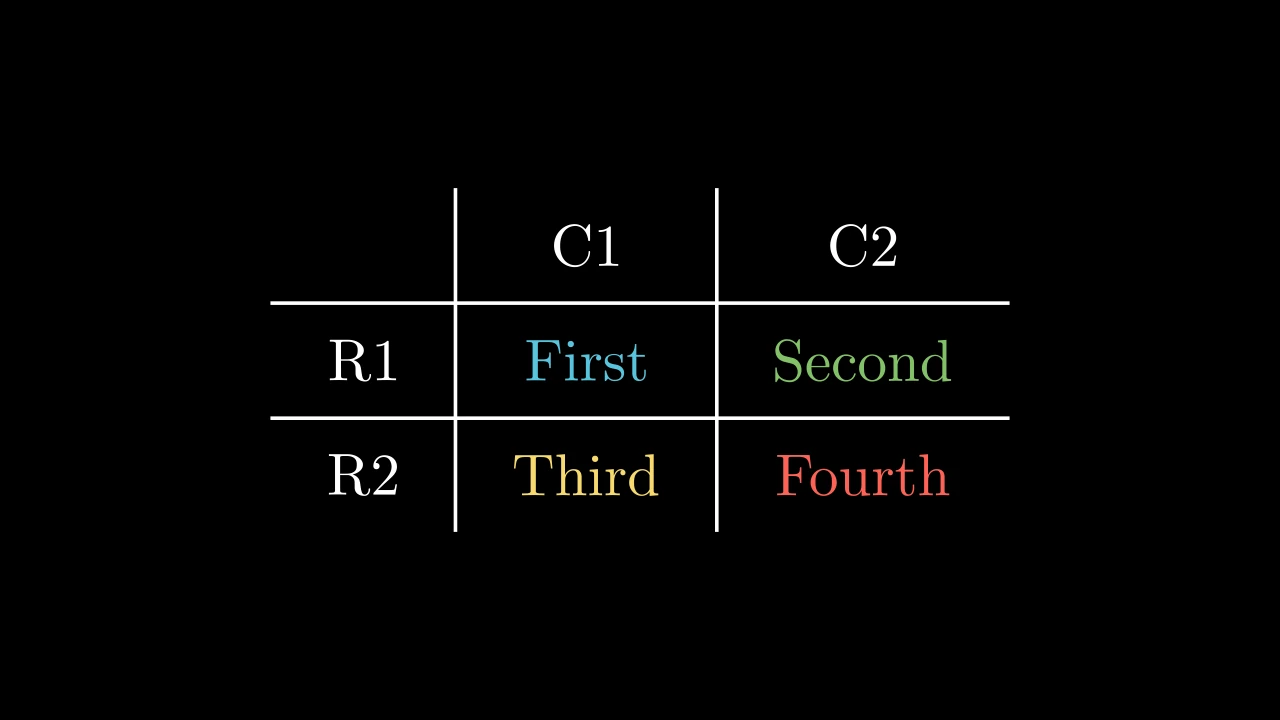
The columns, from left to right, each a group of its entries from the top down (a table's labels included).

table.get_columns()

Returns A new group of the columns.

Source

src/manimgx/mobjects/grid.py

def get_columns(self) -> VGroup:
    """The columns, from left to right, each a group of its entries from the top
    down (a table's labels included).

    Returns:
        A new group of the columns.

    Examples:
        ```python
        import manimgx as m


        class TableGetColumnsExample(m.Scene):
            def construct(self) -> None:
                table = m.Table(
                    [["First", "Second"], ["Third", "Fourth"]],
                    row_labels=[m.Text("R1"), m.Text("R2")],
                    col_labels=[m.Text("C1"), m.Text("C2")],
                )
                column = m.SurroundingRectangle(table.get_columns()[1])
                self.add(table)
                self.play(m.Create(column))
        ```
    """
    return VGroup(*(VGroup(*column) for column in zip(*self.cells, strict=False)))

set_row_colors

MatrixSetRowColorsExample
Code
import manimgx as m


class MatrixSetRowColorsExample(m.Scene):
    def construct(self) -> None:
        matrix = m.Matrix([[1, 2, 3], [4, 5, 6], [7, 8, 9]]).scale(1.5)
        self.add(matrix.set_row_colors(m.RED, [m.YELLOW, m.GREEN]))

Color the rows, from the top down: each one color, or several for a gradient (as set_color makes one); rows past the last color keep theirs.

table.set_row_colors(*colors)
*colors

The rows' colors, in order: a color each, or a list of colors.

Source

src/manimgx/mobjects/grid.py

def set_row_colors(self, *colors: Colors) -> Self:
    """Color the rows, from the top down: each one color, or several for a gradient
    (as [set_color][manimgx.Mobject.set_color] makes one); rows past the last
    color keep theirs.

    Args:
        *colors: The rows' colors, in order: a color each, or a list of colors.

    Examples:
        ```python
        import manimgx as m


        class MatrixSetRowColorsExample(m.Scene):
            def construct(self) -> None:
                matrix = m.Matrix([[1, 2, 3], [4, 5, 6], [7, 8, 9]]).scale(1.5)
                self.add(matrix.set_row_colors(m.RED, [m.YELLOW, m.GREEN]))
        ```
    """
    for color, row in zip(colors, self.get_rows(), strict=False):
        row.set_color(color)
    return self

set_column_colors

TableSetColumnColorsExample
Code
import manimgx as m


class TableSetColumnColorsExample(m.Scene):
    def construct(self) -> None:
        table = m.Table(
            [["First", "Second"], ["Third", "Fourth"]],
            row_labels=[m.Text("R1"), m.Text("R2")],
            col_labels=[m.Text("C1"), m.Text("C2")],
        )
        self.add(table.set_column_colors(m.YELLOW, m.BLUE, m.GREEN))

Color the columns, from left to right: each one color, or several for a gradient (as set_color makes one); columns past the last color keep theirs.

table.set_column_colors(*colors)
*colors

The columns' colors, in order: a color each, or a list of colors.

Source

src/manimgx/mobjects/grid.py

def set_column_colors(self, *colors: Colors) -> Self:
    """Color the columns, from left to right: each one color, or several for a
    gradient (as [set_color][manimgx.Mobject.set_color] makes one); columns past
    the last color keep theirs.

    Args:
        *colors: The columns' colors, in order: a color each, or a list of colors.

    Examples:
        ```python
        import manimgx as m


        class TableSetColumnColorsExample(m.Scene):
            def construct(self) -> None:
                table = m.Table(
                    [["First", "Second"], ["Third", "Fourth"]],
                    row_labels=[m.Text("R1"), m.Text("R2")],
                    col_labels=[m.Text("C1"), m.Text("C2")],
                )
                self.add(table.set_column_colors(m.YELLOW, m.BLUE, m.GREEN))
        ```
    """
    for color, column in zip(colors, self.get_columns(), strict=False):
        column.set_color(color)
    return self

get_horizontal_lines

Code
import manimgx as m


class TableGetHorizontalLinesExample(m.Scene):
    def construct(self) -> None:
        table = m.Table(
            [["First", "Second"], ["Third", "Fourth"]],
            row_labels=[m.Text("R1"), m.Text("R2")],
            col_labels=[m.Text("C1"), m.Text("C2")],
            include_outer_lines=True,
        )
        self.add(table)
        self.play(table.get_horizontal_lines().animate.set_color(m.RED))

The table's horizontal lines: the outer ones first, top then bottom, if it has them, then those between its rows, from the top down.

table.get_horizontal_lines()

Returns The group of the lines.

Source

src/manimgx/mobjects/grid.py

def get_horizontal_lines(self) -> VGroup:
    """The table's horizontal lines: the outer ones first, top then bottom, if it
    has them, then those between its rows, from the top down.

    Returns:
        The group of the lines.

    Examples:
        ```python
        import manimgx as m


        class TableGetHorizontalLinesExample(m.Scene):
            def construct(self) -> None:
                table = m.Table(
                    [["First", "Second"], ["Third", "Fourth"]],
                    row_labels=[m.Text("R1"), m.Text("R2")],
                    col_labels=[m.Text("C1"), m.Text("C2")],
                    include_outer_lines=True,
                )
                self.add(table)
                self.play(table.get_horizontal_lines().animate.set_color(m.RED))
        ```
    """
    return self.horizontal_lines

get_vertical_lines

The table's vertical lines: the outer ones first, left then right, if it has them, then those between its columns, from left to right.

table.get_vertical_lines()

Returns The group of the lines.

Source

src/manimgx/mobjects/grid.py

def get_vertical_lines(self) -> VGroup:
    """The table's vertical lines: the outer ones first, left then right, if it has
    them, then those between its columns, from left to right.

    Returns:
        The group of the lines.
    """
    return self.vertical_lines

get_entries

Code
import manimgx as m


class TableGetEntriesExample(m.Scene):
    def construct(self) -> None:
        table = m.Table(
            [["First", "Second"], ["Third", "Fourth"]],
            row_labels=[m.Text("R1"), m.Text("R2")],
            col_labels=[m.Text("C1"), m.Text("C2")],
        )
        self.add(table)
        self.play(table.get_entries((2, 3)).animate.set_color(m.YELLOW))
        self.play(m.Rotate(table.get_entries((3, 2)), m.PI))

The table's entries, labels included, or the one at a position.

table.get_entries(pos=None)
pos

The position, (row, column), counted from 1 at the top left, labels included; None for every entry.

Returns The entry; or every entry, row by row, in a group.

Source

src/manimgx/mobjects/grid.py

def get_entries(self, pos: Sequence[int] | None = None) -> Mobject:
    """The table's entries, labels included, or the one at a position.

    Args:
        pos: The position, `(row, column)`, counted from 1 at the top left, labels
            included; None for every entry.

    Returns:
        The entry; or every entry, row by row, in a group.

    Examples:
        ```python
        import manimgx as m


        class TableGetEntriesExample(m.Scene):
            def construct(self) -> None:
                table = m.Table(
                    [["First", "Second"], ["Third", "Fourth"]],
                    row_labels=[m.Text("R1"), m.Text("R2")],
                    col_labels=[m.Text("C1"), m.Text("C2")],
                )
                self.add(table)
                self.play(table.get_entries((2, 3)).animate.set_color(m.YELLOW))
                self.play(m.Rotate(table.get_entries((3, 2)), m.PI))
        ```
    """
    if pos is not None:
        if (
            self.row_labels is not None
            and self.col_labels is not None
            and (self.top_left_entry is None)
        ):
            index = len(self.cells[0]) * (pos[0] - 1) + pos[1] - 2
            return self.elements[index]
        else:
            index = len(self.cells[0]) * (pos[0] - 1) + pos[1] - 1
            return self.elements[index]
    else:
        return self.elements

get_entries_without_labels

TableGetEntriesWithoutLabelsExample
Code
import manimgx as m


class TableGetEntriesWithoutLabelsExample(m.Scene):
    def construct(self) -> None:
        table = m.Table(
            [["First", "Second"], ["Third", "Fourth"]],
            row_labels=[m.Text("R1"), m.Text("R2")],
            col_labels=[m.Text("C1"), m.Text("C2")],
        )
        entries = table.get_entries_without_labels()
        colors = [m.BLUE, m.GREEN, m.YELLOW, m.RED]
        for entry, color in zip(entries, colors):
            entry.set_color(color)
        self.add(table)

The table's entries but its labels, or the one at a position among them.

table.get_entries_without_labels(pos=None)
pos

The position, (row, column), counted from 1 at the top left entry that is not a label; None for every such entry.

Returns The entry; or every entry but the labels, row by row, in a group.

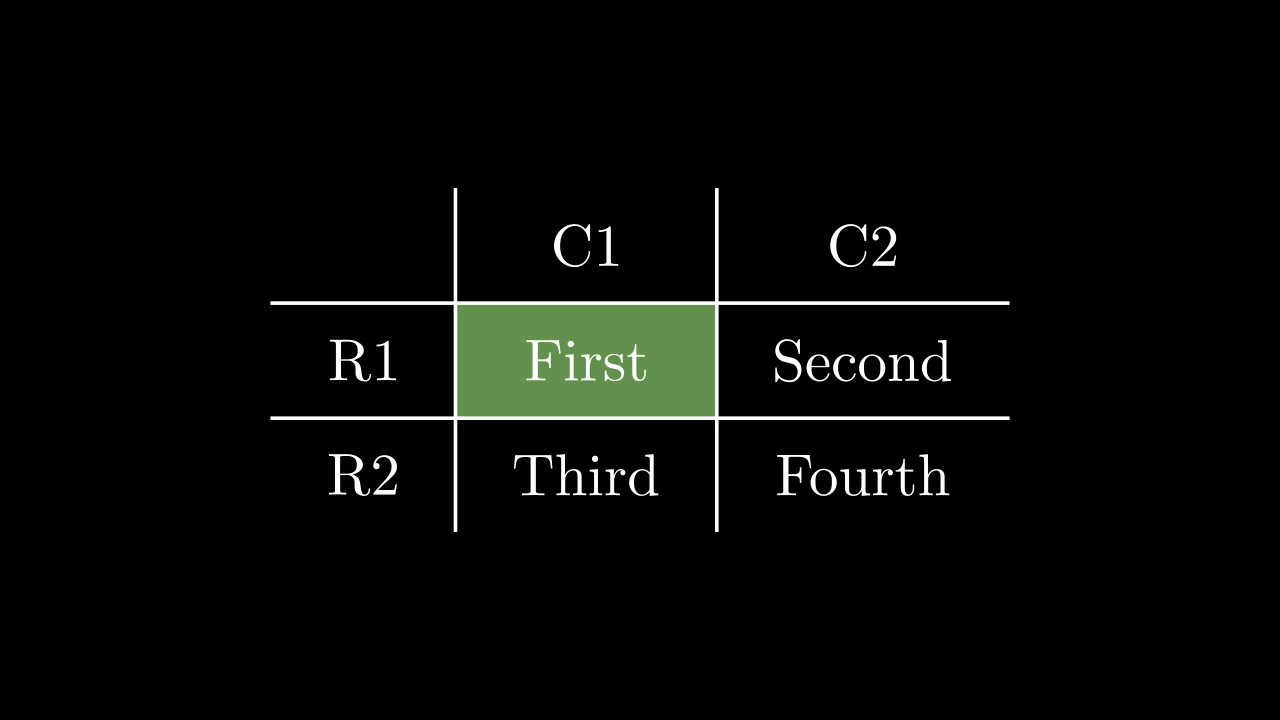
Source

src/manimgx/mobjects/grid.py

def get_entries_without_labels(self, pos: Sequence[int] | None = None) -> Mobject:
    """The table's entries but its labels, or the one at a position among them.

    Args:
        pos: The position, `(row, column)`, counted from 1 at the top left entry
            that is not a label; None for every such entry.

    Returns:
        The entry; or every entry but the labels, row by row, in a group.

    Examples:
        ```python
        import manimgx as m


        class TableGetEntriesWithoutLabelsExample(m.Scene):
            def construct(self) -> None:
                table = m.Table(
                    [["First", "Second"], ["Third", "Fourth"]],
                    row_labels=[m.Text("R1"), m.Text("R2")],
                    col_labels=[m.Text("C1"), m.Text("C2")],
                )
                entries = table.get_entries_without_labels()
                colors = [m.BLUE, m.GREEN, m.YELLOW, m.RED]
                for entry, color in zip(entries, colors):
                    entry.set_color(color)
                self.add(table)
        ```
    """
    if pos is not None:
        index = self.col_dim * (pos[0] - 1) + pos[1] - 1
        return self.elements_without_labels[index]
    else:
        return self.elements_without_labels

get_row_labels

The table's row labels, from the top down.

table.get_row_labels()

Returns A new group of the labels; empty if there are none.

Source

src/manimgx/mobjects/grid.py

def get_row_labels(self) -> VGroup:
    """The table's row labels, from the top down.

    Returns:
        A new group of the labels; empty if there are none.
    """
    if self.row_labels is not None:
        return VGroup(*self.row_labels)
    return VGroup()

get_col_labels

The table's column labels, from left to right.

table.get_col_labels()

Returns A new group of the labels; empty if there are none.

Source

src/manimgx/mobjects/grid.py

def get_col_labels(self) -> VGroup:
    """The table's column labels, from left to right.

    Returns:
        A new group of the labels; empty if there are none.
    """
    if self.col_labels is not None:
        return VGroup(*self.col_labels)
    return VGroup()

get_labels

Code
import manimgx as m


class TableGetLabelsExample(m.Scene):
    def construct(self) -> None:
        table = m.Table(
            [["First", "Second"], ["Third", "Fourth"]],
            row_labels=[m.Text("R1"), m.Text("R2")],
            col_labels=[m.Text("C1"), m.Text("C2")],
        )
        self.add(table)
        self.play(table.get_labels().animate.set_color(m.YELLOW))

The table's labels: its top left entry, if it has one, then its column labels, then its row labels.

table.get_labels()

Returns A new group of the labels; empty if there are none.

Source

src/manimgx/mobjects/grid.py

def get_labels(self) -> VGroup:
    """The table's labels: its top left entry, if it has one, then its column
    labels, then its row labels.

    Returns:
        A new group of the labels; empty if there are none.

    Examples:
        ```python
        import manimgx as m


        class TableGetLabelsExample(m.Scene):
            def construct(self) -> None:
                table = m.Table(
                    [["First", "Second"], ["Third", "Fourth"]],
                    row_labels=[m.Text("R1"), m.Text("R2")],
                    col_labels=[m.Text("C1"), m.Text("C2")],
                )
                self.add(table)
                self.play(table.get_labels().animate.set_color(m.YELLOW))
        ```
    """
    label_group = VGroup()
    if self.top_left_entry is not None:
        label_group.add(self.top_left_entry)
    for label in (self.col_labels, self.row_labels):
        if label is not None:
            label_group.add(*label)
    return label_group

add_background_to_entries

Put a background rectangle behind each entry, labels included (see add_background_rectangle).

The rectangles are the entries' background_rectangles: create fades in those of the entries but the labels.

table.add_background_to_entries(color=BLACK)
color

The rectangles' color.

Source

src/manimgx/mobjects/grid.py

def add_background_to_entries(self, color: ParsableManimColor = BLACK) -> Self:
    """Put a background rectangle behind each entry, labels included (see
    [add_background_rectangle][manimgx.Mobject.add_background_rectangle]).

    The rectangles are the entries' `background_rectangle`s:
    [create][manimgx.Table.create] fades in those of the entries but the labels.

    Args:
        color: The rectangles' color.
    """
    for mob in self.get_entries():
        mob.add_background_rectangle(color=ManimColor(color))
    return self

get_cell

Code
import manimgx as m


class TableGetCellExample(m.Scene):
    def construct(self) -> None:
        table = m.Table(
            [["First", "Second"], ["Third", "Fourth"]],
            row_labels=[m.Text("R1"), m.Text("R2")],
            col_labels=[m.Text("C1"), m.Text("C2")],
        )
        self.add(table)
        self.play(m.Create(table.get_cell((2, 2), color=m.RED)))

Make the rectangle of a cell: its row's height and its column's width, reaching half a gap beyond them on every side, so that it meets the lines; blue unless styled.

The gaps are v_buff and h_buff, as the table was made: on a table scaled since, the rectangle reaches as far beyond the entries as before.

table.get_cell(pos=(1, 1), **kwargs)
pos

The cell's position, (row, column), counted from 1 at the top left, labels included.

color

The color of both fill and stroke (default white); None for the class's default.

fill_color

The fill's color; color if not given. Several colors make a gradient along sheen_direction.

fill_opacity

The fill's opacity, from 0 to 1 (default 0: no fill).

stroke_color

The stroke's color; color if not given. Several colors make a gradient.

stroke_opacity

The stroke's opacity, from 0 to 1 (default 1).

stroke_width

The stroke's width, in hundredths of a scene unit (default 4; 0: no stroke).

background_stroke_color

The color of an outline drawn behind the fill (default black).

background_stroke_opacity

The outline's opacity, from 0 to 1 (default 1).

background_stroke_width

The outline's width, in hundredths of a scene unit (default 0: none).

sheen_factor

How much the colors lighten toward sheen_direction, from -1 to 1 (default 0); a negative factor darkens.

sheen_direction

The direction the colors lighten toward (default UL).

joint_type

How the stroke is joined where its path turns: round, beveled or mitered, as a two-dimensional scene draws it (see LineJointType; default AUTO: mitered).

cap_style

How the stroke ends, at each end it shows (an open path's, a dash's): round, butt or square, as a two-dimensional scene draws it (see CapStyleType; default AUTO: butt).

shade_in_3d

Whether a three-dimensional scene's light shades the mobject.

material

How its surface reflects the scene's lights in a three-dimensional scene (see Material); None: Manim's shading (default).

name

A name for the mobject; its class's name if not given.

z_index

Its place in the drawing order: a higher index is drawn over a lower one (default 0).

target

The state MoveToTarget moves the mobject to.

It also takes the style keywords.

Returns A new Polygon, not added to the table.

Source

src/manimgx/mobjects/grid.py

def get_cell(self, pos: Sequence[int] = (1, 1), **kwargs: Unpack[Style]) -> Polygon:
    """Make the rectangle of a cell: its row's height and its column's width,
    reaching half a gap beyond them on every side, so that it meets the lines;
    blue unless styled.

    The gaps are `v_buff` and `h_buff`, as the table was made: on a table scaled
    since, the rectangle reaches as far beyond the entries as before.

    Args:
        pos: The cell's position, `(row, column)`, counted from 1 at the top left,
            labels included.
        **kwargs: [Style keywords][manimgx.drawing.paint.Style].

    Returns:
        A new [Polygon][manimgx.Polygon], not added to the table.

    Examples:
        ```python
        import manimgx as m


        class TableGetCellExample(m.Scene):
            def construct(self) -> None:
                table = m.Table(
                    [["First", "Second"], ["Third", "Fourth"]],
                    row_labels=[m.Text("R1"), m.Text("R2")],
                    col_labels=[m.Text("C1"), m.Text("C2")],
                )
                self.add(table)
                self.play(m.Create(table.get_cell((2, 2), color=m.RED)))
        ```
    """
    row = list(self.cells[pos[0] - 1])
    col = [row[pos[1] - 1] for row in self.cells]
    across = _family_box(_family(col))  # (the column's box: the cell's sides)
    down = _family_box(_family(row))  # (the row's box: its top and bottom)
    if across is None:
        across = np.zeros((2, 3))
    if down is None:
        down = np.zeros((2, 3))
    left = across[0, 0] - self.h_buff / 2
    right = across[1, 0] + self.h_buff / 2
    bottom = down[0, 1] - self.v_buff / 2
    top = down[1, 1] + self.v_buff / 2
    return Polygon(
        [left, top, 0],
        [right, top, 0],
        [right, bottom, 0],
        [left, bottom, 0],
        **kwargs,
    )

get_highlighted_cell

Make a highlight for a cell: a BackgroundRectangle over the cell's rectangle, bright yellow (PURE_YELLOW) unless given a color.

It is not added to the table: put it behind the entries, as add_highlighted_cell does.

table.get_highlighted_cell(pos=(1, 1), **kwargs)
pos

The cell's position, (row, column), counted from 1 at the top left, labels included.

buff

The margin around the mobject, in scene units: one for all sides, or (horizontal, vertical) (default 0.1 around a surrounding rectangle, 0 behind a background rectangle).

corner_radius

The radius of the rectangle's corners, in scene units (default 0: square corners).

color

The color of both fill and stroke (default white); None for the class's default.

fill_color

The fill's color; color if not given. Several colors make a gradient along sheen_direction.

fill_opacity

The fill's opacity, from 0 to 1 (default 0: no fill).

stroke_color

The stroke's color; color if not given. Several colors make a gradient.

stroke_opacity

The stroke's opacity, from 0 to 1 (default 1).

stroke_width

The stroke's width, in hundredths of a scene unit (default 4; 0: no stroke).

background_stroke_color

The color of an outline drawn behind the fill (default black).

background_stroke_opacity

The outline's opacity, from 0 to 1 (default 1).

background_stroke_width

The outline's width, in hundredths of a scene unit (default 0: none).

sheen_factor

How much the colors lighten toward sheen_direction, from -1 to 1 (default 0); a negative factor darkens.

sheen_direction

The direction the colors lighten toward (default UL).

joint_type

How the stroke is joined where its path turns: round, beveled or mitered, as a two-dimensional scene draws it (see LineJointType; default AUTO: mitered).

cap_style

How the stroke ends, at each end it shows (an open path's, a dash's): round, butt or square, as a two-dimensional scene draws it (see CapStyleType; default AUTO: butt).

shade_in_3d

Whether a three-dimensional scene's light shades the mobject.

material

How its surface reflects the scene's lights in a three-dimensional scene (see Material); None: Manim's shading (default).

name

A name for the mobject; its class's name if not given.

z_index

Its place in the drawing order: a higher index is drawn over a lower one (default 0).

target

The state MoveToTarget moves the mobject to.

Returns A new background rectangle.

Source

src/manimgx/mobjects/grid.py

def get_highlighted_cell(
    self,
    pos: Sequence[int] = (1, 1),
    **kwargs: Unpack[FrameOptions],
) -> BackgroundRectangle:
    """Make a highlight for a cell: a
    [BackgroundRectangle][manimgx.BackgroundRectangle] over the
    [cell's rectangle][manimgx.Table.get_cell], bright yellow (`PURE_YELLOW`) unless
    given a color.

    It is not added to the table: put it behind the entries, as
    [add_highlighted_cell][manimgx.Table.add_highlighted_cell] does.

    Args:
        pos: The cell's position, `(row, column)`, counted from 1 at the top left,
            labels included.
        **kwargs: [Frame keywords][manimgx.mobjects.annotations.FrameOptions]:
            its `color`, `buff`, `fill_opacity`, ….

    Returns:
        A new background rectangle.
    """
    if kwargs.get("color") is None:  # not given, None too
        kwargs["color"] = PURE_YELLOW
    bg_cell = BackgroundRectangle(self.get_cell(pos), **kwargs)
    return bg_cell

add_highlighted_cell

TableAddHighlightedCellExample
Code
import manimgx as m


class TableAddHighlightedCellExample(m.Scene):
    def construct(self) -> None:
        table = m.Table(
            [["First", "Second"], ["Third", "Fourth"]],
            row_labels=[m.Text("R1"), m.Text("R2")],
            col_labels=[m.Text("C1"), m.Text("C2")],
        )
        table.add_highlighted_cell((2, 2), color=m.GREEN)
        self.add(table)

Highlight a cell: put a highlight behind everything in the table.

The highlight is the background_rectangle of the entry at pos: create fades it in, unless the entry is a label.

table.add_highlighted_cell(pos=(1, 1), **kwargs)
pos

The cell's position, (row, column), counted from 1 at the top left, labels included.

buff

The margin around the mobject, in scene units: one for all sides, or (horizontal, vertical) (default 0.1 around a surrounding rectangle, 0 behind a background rectangle).

corner_radius

The radius of the rectangle's corners, in scene units (default 0: square corners).

color

The color of both fill and stroke (default white); None for the class's default.

fill_color

The fill's color; color if not given. Several colors make a gradient along sheen_direction.

fill_opacity

The fill's opacity, from 0 to 1 (default 0: no fill).

stroke_color

The stroke's color; color if not given. Several colors make a gradient.

stroke_opacity

The stroke's opacity, from 0 to 1 (default 1).

stroke_width

The stroke's width, in hundredths of a scene unit (default 4; 0: no stroke).

background_stroke_color

The color of an outline drawn behind the fill (default black).

background_stroke_opacity

The outline's opacity, from 0 to 1 (default 1).

background_stroke_width

The outline's width, in hundredths of a scene unit (default 0: none).

sheen_factor

How much the colors lighten toward sheen_direction, from -1 to 1 (default 0); a negative factor darkens.

sheen_direction

The direction the colors lighten toward (default UL).

joint_type

How the stroke is joined where its path turns: round, beveled or mitered, as a two-dimensional scene draws it (see LineJointType; default AUTO: mitered).

cap_style

How the stroke ends, at each end it shows (an open path's, a dash's): round, butt or square, as a two-dimensional scene draws it (see CapStyleType; default AUTO: butt).

shade_in_3d

Whether a three-dimensional scene's light shades the mobject.

material

How its surface reflects the scene's lights in a three-dimensional scene (see Material); None: Manim's shading (default).

name

A name for the mobject; its class's name if not given.

z_index

Its place in the drawing order: a higher index is drawn over a lower one (default 0).

target

The state MoveToTarget moves the mobject to.

Source

src/manimgx/mobjects/grid.py

def add_highlighted_cell(
    self,
    pos: Sequence[int] = (1, 1),
    **kwargs: Unpack[FrameOptions],
) -> Self:
    """Highlight a cell: put a [highlight][manimgx.Table.get_highlighted_cell]
    behind everything in the table.

    The highlight is the `background_rectangle` of the entry at `pos`:
    [create][manimgx.Table.create] fades it in, unless the entry is a label.

    Args:
        pos: The cell's position, `(row, column)`, counted from 1 at the top left,
            labels included.
        **kwargs: [Frame keywords][manimgx.mobjects.annotations.FrameOptions]:
            its `color`, `buff`, `fill_opacity`, ….

    Examples:
        ```python
        import manimgx as m


        class TableAddHighlightedCellExample(m.Scene):
            def construct(self) -> None:
                table = m.Table(
                    [["First", "Second"], ["Third", "Fourth"]],
                    row_labels=[m.Text("R1"), m.Text("R2")],
                    col_labels=[m.Text("C1"), m.Text("C2")],
                )
                table.add_highlighted_cell((2, 2), color=m.GREEN)
                self.add(table)
        ```
    """
    bg_cell = self.get_highlighted_cell(pos, **kwargs)
    self.add_to_back(bg_cell)
    entry = self.get_entries(pos)
    entry.background_rectangle = bg_cell
    return self

create

Code
import manimgx as m


class TableCreateExample(m.Scene):
    def construct(self) -> None:
        table = m.Table(
            [["First", "Second"], ["Third", "Fourth"]],
            row_labels=[m.Text("R1"), m.Text("R2")],
            col_labels=[m.Text("C1"), m.Text("C2")],
            include_outer_lines=True,
        )
        table.add_highlighted_cell((2, 2), color=m.GREEN)
        self.play(table.create())

Make an animation that builds the table: its lines, then its entries, then its labels, then each entry's background rectangle, one after another.

Each part is its own animation, made with the options given; the parts follow one another by lag_ratio, 1 unless given. The entries but the labels are moved to a z-index of 2, over backgrounds and highlights.

table.create(line_animation=Create, label_animation=Write, element_animation=Create, entry_animation=FadeIn, **kwargs)
line_animation

The animation that draws the lines.

label_animation

The animation that draws the labels.

element_animation

The animation that draws the entries but the labels.

entry_animation

The animation that brings in each entry's background rectangle (the highlights of add_highlighted_cell).

run_time

How long the animation plays, in seconds (default 1).

lag_ratio

How the parts of the mobject are staggered: each begins this fraction of its run after the one before it begins (default 0: all together; 1: one after another).

rate_func

How the animation's progress runs with time: a function from [0, 1] to [0, 1] (default smooth; see rate functions).

reverse_rate_function

Whether to run the animation backward (default False).

name

A name for the animation.

remover

Whether the mobject leaves the scene when the animation finishes (default False).

suspend_mobject_updating

Whether the mobject's updaters run beneath the animation (default True): they keep acting on the mobject, and each frame shows the animation applied to the result. If False, they act on the animated mobject itself.

introducer

Whether the mobject joins the scene when the animation begins (default False); otherwise the play brings it in when the play begins, if the scene lacks it.

use_override

Whether a mobject whose class plays another animation in place of this one does so (default True).

It also takes the animation keywords.

Returns A new animation group.

Source

src/manimgx/mobjects/grid.py

def create(
    self,
    line_animation: Callable[..., Animation] = Create,
    label_animation: Callable[..., Animation] = Write,
    element_animation: Callable[..., Animation] = Create,
    entry_animation: Callable[..., Animation] = FadeIn,
    **kwargs: Unpack[AnimationOptions],
) -> AnimationGroup:
    """Make an animation that builds the table: its lines, then its entries, then
    its labels, then each entry's background rectangle, one after another.

    Each part is its own animation, made with the options given; the parts follow
    one another by `lag_ratio`, 1 unless given. The entries but the labels are
    moved to a z-index of 2, over backgrounds and highlights.

    Args:
        line_animation: The animation that draws the lines.
        label_animation: The animation that draws the labels.
        element_animation: The animation that draws the entries but the labels.
        entry_animation: The animation that brings in each entry's background
            rectangle (the highlights of
            [add_highlighted_cell][manimgx.Table.add_highlighted_cell]).
        **kwargs: [Animation options][manimgx.animation.timeline.AnimationOptions]
            for each part (`run_time` is each part's), and `lag_ratio` for the
            whole: 1 plays the parts one after another, 0 all at once.

    Returns:
        A new animation group.

    Examples:
        ```python
        import manimgx as m


        class TableCreateExample(m.Scene):
            def construct(self) -> None:
                table = m.Table(
                    [["First", "Second"], ["Third", "Fourth"]],
                    row_labels=[m.Text("R1"), m.Text("R2")],
                    col_labels=[m.Text("C1"), m.Text("C2")],
                    include_outer_lines=True,
                )
                table.add_highlighted_cell((2, 2), color=m.GREEN)
                self.play(table.create())
        ```
    """
    # the parts: lines, entries, labels (if any), then the entries' backgrounds;
    # the other options go to each part
    lag_ratio = kwargs.pop("lag_ratio", 1)
    animations: list[Animation] = [
        line_animation(
            VGroup(self.vertical_lines, self.horizontal_lines), **kwargs
        ),
        element_animation(self.elements_without_labels.set_z_index(2), **kwargs),
    ]
    if self.get_labels():
        animations += [label_animation(self.get_labels(), **kwargs)]
    if self.get_entries():
        for entry in self.elements_without_labels:
            if entry.background_rectangle is not None:
                animations.append(
                    entry_animation(entry.background_rectangle, **kwargs)
                )
    return AnimationGroup(*animations, lag_ratio=lag_ratio)

DecimalTable

DecimalTableExample
Code
import numpy as np

import manimgx as m


class DecimalTableExample(m.Scene):
    def construct(self) -> None:
        xs = [-2, -1, 0, 1, 2]
        table = m.DecimalTable(
            [xs, np.exp(xs)],
            row_labels=[m.MathTex("x"), m.MathTex("e^x")],
            h_buff=1,
            element_to_mobject_config={"num_decimal_places": 2},
        )
        self.add(table)

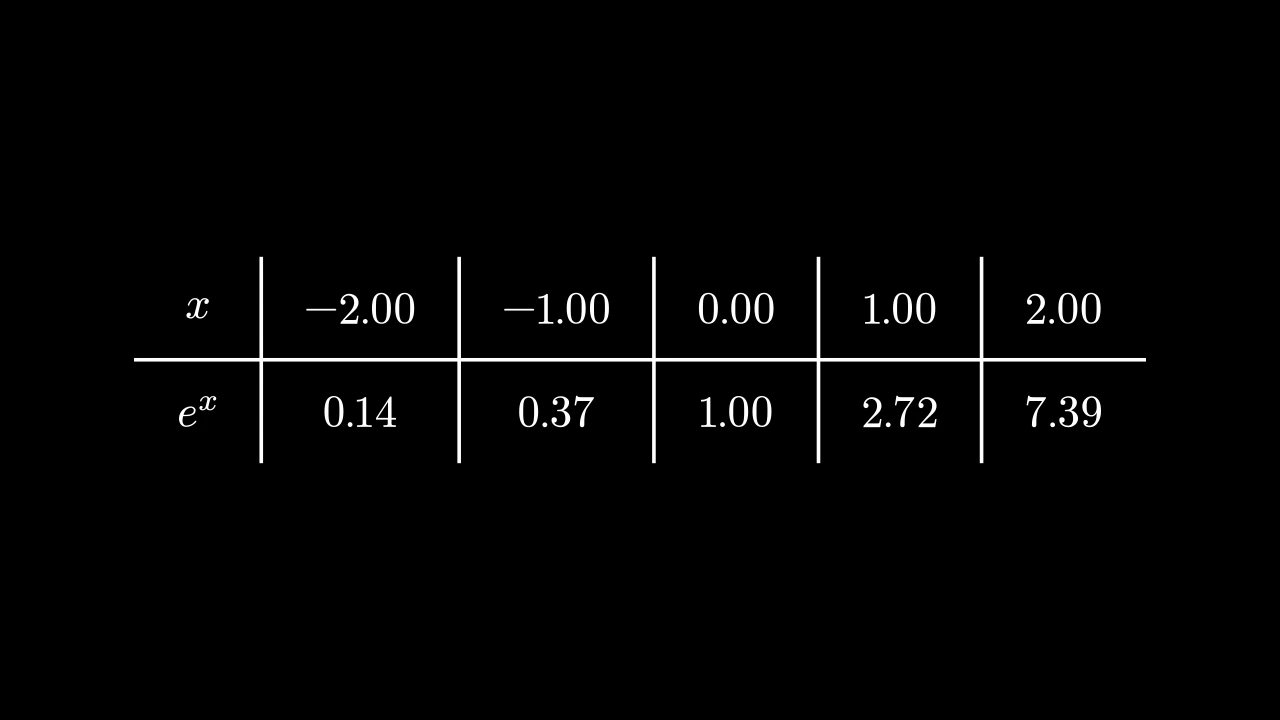
A table of decimal numbers: each entry written as a DecimalNumber, with one decimal place unless configured.

It takes a Table's arguments; its entries are numbers, and its element_to_mobject_config gives their number keywords, in place of {"num_decimal_places": 1}.

m.DecimalTable(table, row_labels=None, col_labels=None, top_left_entry=None, v_buff=0.8, h_buff=1.3, include_outer_lines=False, include_inner_lines=True, add_background_rectangles_to_entries=False, entries_background_color=BLACK, include_background_rectangle=False, background_rectangle_color=BLACK, element_to_mobject=None, element_to_mobject_config=None, arrange_in_grid_config=None, line_config=None, **kwargs)
color

The color of both fill and stroke (default white); None for the class's default.

fill_color

The fill's color; color if not given. Several colors make a gradient along sheen_direction.

fill_opacity

The fill's opacity, from 0 to 1 (default 0: no fill).

stroke_color

The stroke's color; color if not given. Several colors make a gradient.

stroke_opacity

The stroke's opacity, from 0 to 1 (default 1).

stroke_width

The stroke's width, in hundredths of a scene unit (default 4; 0: no stroke).

background_stroke_color

The color of an outline drawn behind the fill (default black).

background_stroke_opacity

The outline's opacity, from 0 to 1 (default 1).

background_stroke_width

The outline's width, in hundredths of a scene unit (default 0: none).

sheen_factor

How much the colors lighten toward sheen_direction, from -1 to 1 (default 0); a negative factor darkens.

sheen_direction

The direction the colors lighten toward (default UL).

joint_type

How the stroke is joined where its path turns: round, beveled or mitered, as a two-dimensional scene draws it (see LineJointType; default AUTO: mitered).

cap_style

How the stroke ends, at each end it shows (an open path's, a dash's): round, butt or square, as a two-dimensional scene draws it (see CapStyleType; default AUTO: butt).

shade_in_3d

Whether a three-dimensional scene's light shades the mobject.

material

How its surface reflects the scene's lights in a three-dimensional scene (see Material); None: Manim's shading (default).

name

A name for the mobject; its class's name if not given.

z_index

Its place in the drawing order: a higher index is drawn over a lower one (default 0).

target

The state MoveToTarget moves the mobject to.

It also takes the style keywords.

Source

src/manimgx/mobjects/grid.py

def __init__(
    self,
    table: Iterable[Iterable[float | str | Mobject]],
    row_labels: Iterable[Mobject] | None = None,
    col_labels: Iterable[Mobject] | None = None,
    top_left_entry: Mobject | None = None,
    v_buff: float = 0.8,
    h_buff: float = 1.3,
    include_outer_lines: bool = False,
    include_inner_lines: bool = True,
    add_background_rectangles_to_entries: bool = False,
    entries_background_color: ParsableManimColor = BLACK,
    include_background_rectangle: bool = False,
    background_rectangle_color: ParsableManimColor = BLACK,
    element_to_mobject: ElementFactory | None = None,
    element_to_mobject_config: Mapping[str, object] | None = None,
    arrange_in_grid_config: GridArrangement | None = None,
    line_config: LineOptions | None = None,
    **kwargs: Unpack[Style],
):
    if line_config is None:
        line_config = {}
    if arrange_in_grid_config is None:
        arrange_in_grid_config = {}
    table_data = [list(row) for row in table]
    row_label_data = list(row_labels) if row_labels is not None else []
    col_label_data = list(col_labels) if col_labels is not None else []
    self.row_labels = row_label_data or None
    """The row labels, top to bottom; None if there are none."""
    self.col_labels = col_label_data or None
    """The column labels, left to right; None if there are none."""
    self.top_left_entry = top_left_entry
    """The mobject in the corner between the labels; None if there is none."""
    self.row_dim = len(table_data)
    """How many rows of entries the table has, labels not counted."""
    self.col_dim = len(table_data[0])
    """How many columns of entries the table has, labels not counted."""
    self.v_buff = v_buff
    """The gap between rows, in scene units, as the table was made: scaling the
    table leaves it as it is."""
    self.h_buff = h_buff
    """The gap between columns, in scene units, as the table was made: scaling the
    table leaves it as it is."""
    entries_background_color = ManimColor(entries_background_color)
    background_rectangle_color = ManimColor(background_rectangle_color)
    if any(len(row) != len(table_data[0]) for row in table_data):
        raise ValueError("Not all rows in table have the same length.")
    super().__init__(**kwargs)
    cells = self._make_cells(
        table_data, element_to_mobject, element_to_mobject_config
    )
    self.elements_without_labels = VGroup(*it.chain(*cells))
    """The entries but the labels, row by row."""
    if self.row_labels is not None:
        for k in range(len(self.row_labels)):
            cells[k] = [self.row_labels[k]] + cells[k]
    if self.col_labels is not None:
        if self.row_labels is not None:
            if self.top_left_entry is not None:
                col_labels = [self.top_left_entry] + self.col_labels
                cells.insert(0, col_labels)
            else:
                dummy_mobject = VMobject()
                col_labels = [dummy_mobject] + self.col_labels
                cells.insert(0, col_labels)
        else:
            cells.insert(0, self.col_labels)
    self.cells = cells
    self.elements = VGroup(*it.chain(*self.cells))
    """Every entry of the table, labels included, row by row: a group, added to the
    table."""
    layout = GridArrangement(
        rows=len(self.cells), cols=len(self.cells[0]), buff=(h_buff, v_buff)
    )
    self.elements.arrange_in_grid(**(layout | arrange_in_grid_config))
    if len(self.elements[0].get_all_points()) == 0:
        self.elements.remove(self.elements[0])
    self.add(self.elements)
    self.center()
    for axis in (0, 1):
        divisions = self.get_rows() if axis == 0 else self.get_columns()
        along, across = (RIGHT, UP) if axis == 0 else (DOWN, LEFT)
        near = [float(part.get_corner(across) @ across) for part in divisions]
        far = [float(part.get_corner(-across) @ across) for part in divisions]
        gap = (self.v_buff, self.h_buff)[axis] / 2
        pad = (self.h_buff, self.v_buff)[axis] / 2
        start = float(self.elements.get_corner(-along) @ along) - pad
        end = float(self.elements.get_corner(along) @ along) + pad
        anchors: list[tuple[float, bool]] = []
        if include_outer_lines:
            anchors.extend(((near[0] + gap, False), (far[-1] - gap, False)))
        if include_inner_lines:
            anchors.extend(
                (b + 0.5 * (a - b), axis == 1) for a, b in zip(far[:-1], near[1:])
            )
        lines = VGroup()
        parts: list[Line] = []
        for anchor, reverse in anchors:
            offset = anchor * across
            ends = (start * along + offset, end * along + offset)
            parts.append(Line(*(ends[::-1] if reverse else ends), **line_config))
        lines.add(*parts)
        self.add(*lines)
        if axis == 0:
            self.horizontal_lines = lines
        else:
            self.vertical_lines = lines
    if add_background_rectangles_to_entries:
        self.add_background_to_entries(color=entries_background_color)
    if include_background_rectangle:
        self.add_background_rectangle(color=background_rectangle_color)

IntegerTable

IntegerTableExample
Code
import manimgx as m


class IntegerTableExample(m.Scene):
    def construct(self) -> None:
        table = m.IntegerTable(
            [[0, 30, 45, 60, 90], [90, 60, 45, 30, 0]],
            row_labels=[m.MathTex(r"\alpha"), m.MathTex(r"90^\circ - \alpha")],
            h_buff=1,
            element_to_mobject_config={"unit": r"^\circ"},
        )
        self.add(table)

A table of integers: each entry written as an Integer, its number rounded to a whole number.

It takes a Table's arguments; its entries are numbers, and its element_to_mobject_config gives their number keywords.

m.IntegerTable(table, row_labels=None, col_labels=None, top_left_entry=None, v_buff=0.8, h_buff=1.3, include_outer_lines=False, include_inner_lines=True, add_background_rectangles_to_entries=False, entries_background_color=BLACK, include_background_rectangle=False, background_rectangle_color=BLACK, element_to_mobject=None, element_to_mobject_config=None, arrange_in_grid_config=None, line_config=None, **kwargs)
color

The color of both fill and stroke (default white); None for the class's default.

fill_color

The fill's color; color if not given. Several colors make a gradient along sheen_direction.

fill_opacity

The fill's opacity, from 0 to 1 (default 0: no fill).

stroke_color

The stroke's color; color if not given. Several colors make a gradient.

stroke_opacity

The stroke's opacity, from 0 to 1 (default 1).

stroke_width

The stroke's width, in hundredths of a scene unit (default 4; 0: no stroke).

background_stroke_color

The color of an outline drawn behind the fill (default black).

background_stroke_opacity

The outline's opacity, from 0 to 1 (default 1).

background_stroke_width

The outline's width, in hundredths of a scene unit (default 0: none).

sheen_factor

How much the colors lighten toward sheen_direction, from -1 to 1 (default 0); a negative factor darkens.

sheen_direction

The direction the colors lighten toward (default UL).

joint_type

How the stroke is joined where its path turns: round, beveled or mitered, as a two-dimensional scene draws it (see LineJointType; default AUTO: mitered).

cap_style

How the stroke ends, at each end it shows (an open path's, a dash's): round, butt or square, as a two-dimensional scene draws it (see CapStyleType; default AUTO: butt).

shade_in_3d

Whether a three-dimensional scene's light shades the mobject.

material

How its surface reflects the scene's lights in a three-dimensional scene (see Material); None: Manim's shading (default).

name

A name for the mobject; its class's name if not given.

z_index

Its place in the drawing order: a higher index is drawn over a lower one (default 0).

target

The state MoveToTarget moves the mobject to.

It also takes the style keywords.

Source

src/manimgx/mobjects/grid.py

def __init__(
    self,
    table: Iterable[Iterable[float | str | Mobject]],
    row_labels: Iterable[Mobject] | None = None,
    col_labels: Iterable[Mobject] | None = None,
    top_left_entry: Mobject | None = None,
    v_buff: float = 0.8,
    h_buff: float = 1.3,
    include_outer_lines: bool = False,
    include_inner_lines: bool = True,
    add_background_rectangles_to_entries: bool = False,
    entries_background_color: ParsableManimColor = BLACK,
    include_background_rectangle: bool = False,
    background_rectangle_color: ParsableManimColor = BLACK,
    element_to_mobject: ElementFactory | None = None,
    element_to_mobject_config: Mapping[str, object] | None = None,
    arrange_in_grid_config: GridArrangement | None = None,
    line_config: LineOptions | None = None,
    **kwargs: Unpack[Style],
):
    if line_config is None:
        line_config = {}
    if arrange_in_grid_config is None:
        arrange_in_grid_config = {}
    table_data = [list(row) for row in table]
    row_label_data = list(row_labels) if row_labels is not None else []
    col_label_data = list(col_labels) if col_labels is not None else []
    self.row_labels = row_label_data or None
    """The row labels, top to bottom; None if there are none."""
    self.col_labels = col_label_data or None
    """The column labels, left to right; None if there are none."""
    self.top_left_entry = top_left_entry
    """The mobject in the corner between the labels; None if there is none."""
    self.row_dim = len(table_data)
    """How many rows of entries the table has, labels not counted."""
    self.col_dim = len(table_data[0])
    """How many columns of entries the table has, labels not counted."""
    self.v_buff = v_buff
    """The gap between rows, in scene units, as the table was made: scaling the
    table leaves it as it is."""
    self.h_buff = h_buff
    """The gap between columns, in scene units, as the table was made: scaling the
    table leaves it as it is."""
    entries_background_color = ManimColor(entries_background_color)
    background_rectangle_color = ManimColor(background_rectangle_color)
    if any(len(row) != len(table_data[0]) for row in table_data):
        raise ValueError("Not all rows in table have the same length.")
    super().__init__(**kwargs)
    cells = self._make_cells(
        table_data, element_to_mobject, element_to_mobject_config
    )
    self.elements_without_labels = VGroup(*it.chain(*cells))
    """The entries but the labels, row by row."""
    if self.row_labels is not None:
        for k in range(len(self.row_labels)):
            cells[k] = [self.row_labels[k]] + cells[k]
    if self.col_labels is not None:
        if self.row_labels is not None:
            if self.top_left_entry is not None:
                col_labels = [self.top_left_entry] + self.col_labels
                cells.insert(0, col_labels)
            else:
                dummy_mobject = VMobject()
                col_labels = [dummy_mobject] + self.col_labels
                cells.insert(0, col_labels)
        else:
            cells.insert(0, self.col_labels)
    self.cells = cells
    self.elements = VGroup(*it.chain(*self.cells))
    """Every entry of the table, labels included, row by row: a group, added to the
    table."""
    layout = GridArrangement(
        rows=len(self.cells), cols=len(self.cells[0]), buff=(h_buff, v_buff)
    )
    self.elements.arrange_in_grid(**(layout | arrange_in_grid_config))
    if len(self.elements[0].get_all_points()) == 0:
        self.elements.remove(self.elements[0])
    self.add(self.elements)
    self.center()
    for axis in (0, 1):
        divisions = self.get_rows() if axis == 0 else self.get_columns()
        along, across = (RIGHT, UP) if axis == 0 else (DOWN, LEFT)
        near = [float(part.get_corner(across) @ across) for part in divisions]
        far = [float(part.get_corner(-across) @ across) for part in divisions]
        gap = (self.v_buff, self.h_buff)[axis] / 2
        pad = (self.h_buff, self.v_buff)[axis] / 2
        start = float(self.elements.get_corner(-along) @ along) - pad
        end = float(self.elements.get_corner(along) @ along) + pad
        anchors: list[tuple[float, bool]] = []
        if include_outer_lines:
            anchors.extend(((near[0] + gap, False), (far[-1] - gap, False)))
        if include_inner_lines:
            anchors.extend(
                (b + 0.5 * (a - b), axis == 1) for a, b in zip(far[:-1], near[1:])
            )
        lines = VGroup()
        parts: list[Line] = []
        for anchor, reverse in anchors:
            offset = anchor * across
            ends = (start * along + offset, end * along + offset)
            parts.append(Line(*(ends[::-1] if reverse else ends), **line_config))
        lines.add(*parts)
        self.add(*lines)
        if axis == 0:
            self.horizontal_lines = lines
        else:
            self.vertical_lines = lines
    if add_background_rectangles_to_entries:
        self.add_background_to_entries(color=entries_background_color)
    if include_background_rectangle:
        self.add_background_rectangle(color=background_rectangle_color)

MathTable

MathTableExample
Code
import manimgx as m


class MathTableExample(m.Scene):
    def construct(self) -> None:
        table = m.MathTable(
            [["+", 0, 5, 10], [0, 0, 5, 10], [2, 2, 7, 12], [4, 4, 9, 14]],
            include_outer_lines=True,
        )
        self.add(table)

A table of math: each entry typeset as math, with MathTex.

It takes a Table's arguments; its entries are strings of math, or numbers, and its element_to_mobject_config gives their math keywords.

m.MathTable(table, row_labels=None, col_labels=None, top_left_entry=None, v_buff=0.8, h_buff=1.3, include_outer_lines=False, include_inner_lines=True, add_background_rectangles_to_entries=False, entries_background_color=BLACK, include_background_rectangle=False, background_rectangle_color=BLACK, element_to_mobject=None, element_to_mobject_config=None, arrange_in_grid_config=None, line_config=None, **kwargs)
color

The color of both fill and stroke (default white); None for the class's default.

fill_color

The fill's color; color if not given. Several colors make a gradient along sheen_direction.

fill_opacity

The fill's opacity, from 0 to 1 (default 0: no fill).

stroke_color

The stroke's color; color if not given. Several colors make a gradient.

stroke_opacity

The stroke's opacity, from 0 to 1 (default 1).

stroke_width

The stroke's width, in hundredths of a scene unit (default 4; 0: no stroke).

background_stroke_color

The color of an outline drawn behind the fill (default black).

background_stroke_opacity

The outline's opacity, from 0 to 1 (default 1).

background_stroke_width

The outline's width, in hundredths of a scene unit (default 0: none).

sheen_factor

How much the colors lighten toward sheen_direction, from -1 to 1 (default 0); a negative factor darkens.

sheen_direction

The direction the colors lighten toward (default UL).

joint_type

How the stroke is joined where its path turns: round, beveled or mitered, as a two-dimensional scene draws it (see LineJointType; default AUTO: mitered).

cap_style

How the stroke ends, at each end it shows (an open path's, a dash's): round, butt or square, as a two-dimensional scene draws it (see CapStyleType; default AUTO: butt).

shade_in_3d

Whether a three-dimensional scene's light shades the mobject.

material

How its surface reflects the scene's lights in a three-dimensional scene (see Material); None: Manim's shading (default).

name

A name for the mobject; its class's name if not given.

z_index

Its place in the drawing order: a higher index is drawn over a lower one (default 0).

target

The state MoveToTarget moves the mobject to.

It also takes the style keywords.

Source

src/manimgx/mobjects/grid.py

def __init__(
    self,
    table: Iterable[Iterable[float | str | Mobject]],
    row_labels: Iterable[Mobject] | None = None,
    col_labels: Iterable[Mobject] | None = None,
    top_left_entry: Mobject | None = None,
    v_buff: float = 0.8,
    h_buff: float = 1.3,
    include_outer_lines: bool = False,
    include_inner_lines: bool = True,
    add_background_rectangles_to_entries: bool = False,
    entries_background_color: ParsableManimColor = BLACK,
    include_background_rectangle: bool = False,
    background_rectangle_color: ParsableManimColor = BLACK,
    element_to_mobject: ElementFactory | None = None,
    element_to_mobject_config: Mapping[str, object] | None = None,
    arrange_in_grid_config: GridArrangement | None = None,
    line_config: LineOptions | None = None,
    **kwargs: Unpack[Style],
):
    if line_config is None:
        line_config = {}
    if arrange_in_grid_config is None:
        arrange_in_grid_config = {}
    table_data = [list(row) for row in table]
    row_label_data = list(row_labels) if row_labels is not None else []
    col_label_data = list(col_labels) if col_labels is not None else []
    self.row_labels = row_label_data or None
    """The row labels, top to bottom; None if there are none."""
    self.col_labels = col_label_data or None
    """The column labels, left to right; None if there are none."""
    self.top_left_entry = top_left_entry
    """The mobject in the corner between the labels; None if there is none."""
    self.row_dim = len(table_data)
    """How many rows of entries the table has, labels not counted."""
    self.col_dim = len(table_data[0])
    """How many columns of entries the table has, labels not counted."""
    self.v_buff = v_buff
    """The gap between rows, in scene units, as the table was made: scaling the
    table leaves it as it is."""
    self.h_buff = h_buff
    """The gap between columns, in scene units, as the table was made: scaling the
    table leaves it as it is."""
    entries_background_color = ManimColor(entries_background_color)
    background_rectangle_color = ManimColor(background_rectangle_color)
    if any(len(row) != len(table_data[0]) for row in table_data):
        raise ValueError("Not all rows in table have the same length.")
    super().__init__(**kwargs)
    cells = self._make_cells(
        table_data, element_to_mobject, element_to_mobject_config
    )
    self.elements_without_labels = VGroup(*it.chain(*cells))
    """The entries but the labels, row by row."""
    if self.row_labels is not None:
        for k in range(len(self.row_labels)):
            cells[k] = [self.row_labels[k]] + cells[k]
    if self.col_labels is not None:
        if self.row_labels is not None:
            if self.top_left_entry is not None:
                col_labels = [self.top_left_entry] + self.col_labels
                cells.insert(0, col_labels)
            else:
                dummy_mobject = VMobject()
                col_labels = [dummy_mobject] + self.col_labels
                cells.insert(0, col_labels)
        else:
            cells.insert(0, self.col_labels)
    self.cells = cells
    self.elements = VGroup(*it.chain(*self.cells))
    """Every entry of the table, labels included, row by row: a group, added to the
    table."""
    layout = GridArrangement(
        rows=len(self.cells), cols=len(self.cells[0]), buff=(h_buff, v_buff)
    )
    self.elements.arrange_in_grid(**(layout | arrange_in_grid_config))
    if len(self.elements[0].get_all_points()) == 0:
        self.elements.remove(self.elements[0])
    self.add(self.elements)
    self.center()
    for axis in (0, 1):
        divisions = self.get_rows() if axis == 0 else self.get_columns()
        along, across = (RIGHT, UP) if axis == 0 else (DOWN, LEFT)
        near = [float(part.get_corner(across) @ across) for part in divisions]
        far = [float(part.get_corner(-across) @ across) for part in divisions]
        gap = (self.v_buff, self.h_buff)[axis] / 2
        pad = (self.h_buff, self.v_buff)[axis] / 2
        start = float(self.elements.get_corner(-along) @ along) - pad
        end = float(self.elements.get_corner(along) @ along) + pad
        anchors: list[tuple[float, bool]] = []
        if include_outer_lines:
            anchors.extend(((near[0] + gap, False), (far[-1] - gap, False)))
        if include_inner_lines:
            anchors.extend(
                (b + 0.5 * (a - b), axis == 1) for a, b in zip(far[:-1], near[1:])
            )
        lines = VGroup()
        parts: list[Line] = []
        for anchor, reverse in anchors:
            offset = anchor * across
            ends = (start * along + offset, end * along + offset)
            parts.append(Line(*(ends[::-1] if reverse else ends), **line_config))
        lines.add(*parts)
        self.add(*lines)
        if axis == 0:
            self.horizontal_lines = lines
        else:
            self.vertical_lines = lines
    if add_background_rectangles_to_entries:
        self.add_background_to_entries(color=entries_background_color)
    if include_background_rectangle:
        self.add_background_rectangle(color=background_rectangle_color)

MobjectTable

MobjectTableExample
Code
import manimgx as m


class MobjectTableExample(m.Scene):
    def construct(self) -> None:
        def o() -> m.Circle:
            return m.Circle(radius=0.45, color=m.RED)

        def x() -> m.VGroup:
            cross = m.VGroup(m.Line(m.UL, m.DR), m.Line(m.UR, m.DL))
            return cross.scale(0.45).set_color(m.BLUE)

        table = m.MobjectTable(
            [[o(), x(), o()], [x(), o(), o()], [o(), x(), x()]]
        )
        self.add(table)

A table of mobjects: each entry a mobject, placed as it is.

It takes a Table's arguments; its entries are mobjects, used themselves (not copied).

m.MobjectTable(table, row_labels=None, col_labels=None, top_left_entry=None, v_buff=0.8, h_buff=1.3, include_outer_lines=False, include_inner_lines=True, add_background_rectangles_to_entries=False, entries_background_color=BLACK, include_background_rectangle=False, background_rectangle_color=BLACK, element_to_mobject=None, element_to_mobject_config=None, arrange_in_grid_config=None, line_config=None, **kwargs)
color

The color of both fill and stroke (default white); None for the class's default.

fill_color

The fill's color; color if not given. Several colors make a gradient along sheen_direction.

fill_opacity

The fill's opacity, from 0 to 1 (default 0: no fill).

stroke_color

The stroke's color; color if not given. Several colors make a gradient.

stroke_opacity

The stroke's opacity, from 0 to 1 (default 1).

stroke_width

The stroke's width, in hundredths of a scene unit (default 4; 0: no stroke).

background_stroke_color

The color of an outline drawn behind the fill (default black).

background_stroke_opacity

The outline's opacity, from 0 to 1 (default 1).

background_stroke_width

The outline's width, in hundredths of a scene unit (default 0: none).

sheen_factor

How much the colors lighten toward sheen_direction, from -1 to 1 (default 0); a negative factor darkens.

sheen_direction

The direction the colors lighten toward (default UL).

joint_type

How the stroke is joined where its path turns: round, beveled or mitered, as a two-dimensional scene draws it (see LineJointType; default AUTO: mitered).

cap_style

How the stroke ends, at each end it shows (an open path's, a dash's): round, butt or square, as a two-dimensional scene draws it (see CapStyleType; default AUTO: butt).

shade_in_3d

Whether a three-dimensional scene's light shades the mobject.

material

How its surface reflects the scene's lights in a three-dimensional scene (see Material); None: Manim's shading (default).

name

A name for the mobject; its class's name if not given.

z_index

Its place in the drawing order: a higher index is drawn over a lower one (default 0).

target

The state MoveToTarget moves the mobject to.

It also takes the style keywords.

Source

src/manimgx/mobjects/grid.py

def __init__(
    self,
    table: Iterable[Iterable[float | str | Mobject]],
    row_labels: Iterable[Mobject] | None = None,
    col_labels: Iterable[Mobject] | None = None,
    top_left_entry: Mobject | None = None,
    v_buff: float = 0.8,
    h_buff: float = 1.3,
    include_outer_lines: bool = False,
    include_inner_lines: bool = True,
    add_background_rectangles_to_entries: bool = False,
    entries_background_color: ParsableManimColor = BLACK,
    include_background_rectangle: bool = False,
    background_rectangle_color: ParsableManimColor = BLACK,
    element_to_mobject: ElementFactory | None = None,
    element_to_mobject_config: Mapping[str, object] | None = None,
    arrange_in_grid_config: GridArrangement | None = None,
    line_config: LineOptions | None = None,
    **kwargs: Unpack[Style],
):
    if line_config is None:
        line_config = {}
    if arrange_in_grid_config is None:
        arrange_in_grid_config = {}
    table_data = [list(row) for row in table]
    row_label_data = list(row_labels) if row_labels is not None else []
    col_label_data = list(col_labels) if col_labels is not None else []
    self.row_labels = row_label_data or None
    """The row labels, top to bottom; None if there are none."""
    self.col_labels = col_label_data or None
    """The column labels, left to right; None if there are none."""
    self.top_left_entry = top_left_entry
    """The mobject in the corner between the labels; None if there is none."""
    self.row_dim = len(table_data)
    """How many rows of entries the table has, labels not counted."""
    self.col_dim = len(table_data[0])
    """How many columns of entries the table has, labels not counted."""
    self.v_buff = v_buff
    """The gap between rows, in scene units, as the table was made: scaling the
    table leaves it as it is."""
    self.h_buff = h_buff
    """The gap between columns, in scene units, as the table was made: scaling the
    table leaves it as it is."""
    entries_background_color = ManimColor(entries_background_color)
    background_rectangle_color = ManimColor(background_rectangle_color)
    if any(len(row) != len(table_data[0]) for row in table_data):
        raise ValueError("Not all rows in table have the same length.")
    super().__init__(**kwargs)
    cells = self._make_cells(
        table_data, element_to_mobject, element_to_mobject_config
    )
    self.elements_without_labels = VGroup(*it.chain(*cells))
    """The entries but the labels, row by row."""
    if self.row_labels is not None:
        for k in range(len(self.row_labels)):
            cells[k] = [self.row_labels[k]] + cells[k]
    if self.col_labels is not None:
        if self.row_labels is not None:
            if self.top_left_entry is not None:
                col_labels = [self.top_left_entry] + self.col_labels
                cells.insert(0, col_labels)
            else:
                dummy_mobject = VMobject()
                col_labels = [dummy_mobject] + self.col_labels
                cells.insert(0, col_labels)
        else:
            cells.insert(0, self.col_labels)
    self.cells = cells
    self.elements = VGroup(*it.chain(*self.cells))
    """Every entry of the table, labels included, row by row: a group, added to the
    table."""
    layout = GridArrangement(
        rows=len(self.cells), cols=len(self.cells[0]), buff=(h_buff, v_buff)
    )
    self.elements.arrange_in_grid(**(layout | arrange_in_grid_config))
    if len(self.elements[0].get_all_points()) == 0:
        self.elements.remove(self.elements[0])
    self.add(self.elements)
    self.center()
    for axis in (0, 1):
        divisions = self.get_rows() if axis == 0 else self.get_columns()
        along, across = (RIGHT, UP) if axis == 0 else (DOWN, LEFT)
        near = [float(part.get_corner(across) @ across) for part in divisions]
        far = [float(part.get_corner(-across) @ across) for part in divisions]
        gap = (self.v_buff, self.h_buff)[axis] / 2
        pad = (self.h_buff, self.v_buff)[axis] / 2
        start = float(self.elements.get_corner(-along) @ along) - pad
        end = float(self.elements.get_corner(along) @ along) + pad
        anchors: list[tuple[float, bool]] = []
        if include_outer_lines:
            anchors.extend(((near[0] + gap, False), (far[-1] - gap, False)))
        if include_inner_lines:
            anchors.extend(
                (b + 0.5 * (a - b), axis == 1) for a, b in zip(far[:-1], near[1:])
            )
        lines = VGroup()
        parts: list[Line] = []
        for anchor, reverse in anchors:
            offset = anchor * across
            ends = (start * along + offset, end * along + offset)
            parts.append(Line(*(ends[::-1] if reverse else ends), **line_config))
        lines.add(*parts)
        self.add(*lines)
        if axis == 0:
            self.horizontal_lines = lines
        else:
            self.vertical_lines = lines
    if add_background_rectangles_to_entries:
        self.add_background_to_entries(color=entries_background_color)
    if include_background_rectangle:
        self.add_background_rectangle(color=background_rectangle_color)