Lines and arrows
The film's code
import manimgx as m


class LinesAndArrows(m.Scene):
    def construct(self) -> None:
        line = m.Line(m.LEFT, m.RIGHT)
        dashed = m.DashedLine(m.LEFT, m.RIGHT, color=m.BLUE)
        arrow = m.Arrow(m.LEFT, m.RIGHT, buff=0, color=m.YELLOW)
        double = m.DoubleArrow(m.LEFT, m.RIGHT, buff=0, color=m.GREEN)
        curved = m.CurvedArrow(m.LEFT, m.RIGHT, color=m.PINK)
        stealth = m.Line(m.LEFT, m.RIGHT, color=m.ORANGE).add_tip(
            tip_shape=m.StealthTip
        )
        shapes = m.VGroup(line, dashed, arrow, double, curved, stealth)
        names = m.VGroup(
            m.Text("Line", font="monospace", font_size=26),
            m.Text("DashedLine", font="monospace", font_size=26),
            m.Text("Arrow", font="monospace", font_size=26),
            m.Text("DoubleArrow", font="monospace", font_size=26),
            m.Text("CurvedArrow", font="monospace", font_size=26),
            m.Text("StealthTip", font="monospace", font_size=26),
        )
        cells = m.VGroup()
        for shape, name in zip(shapes, names, strict=True):
            name.next_to(shape, m.DOWN, buff=0.4)
            cells.add(m.VGroup(shape, name))
        cells.arrange_in_grid(rows=2, buff=(1.4, 1))
        self.play(m.LaggedStart(*[m.Create(shape) for shape in shapes], lag_ratio=0.2))
        self.play(m.FadeIn(names))
        self.wait()
A line joins two points. An arrow is a line with a tip at its end, which shows a direction; a vector is an arrow from the origin. Lines, arrows and arcs can end in a tip, at either end, in any of the shapes at the end of this page.
An end of a line can also be a mobject: the line then runs from that mobject's edge, so that it joins two shapes without crossing them.
Line 
Code
import manimgx as m


class LineExample(m.Scene):
    def construct(self) -> None:
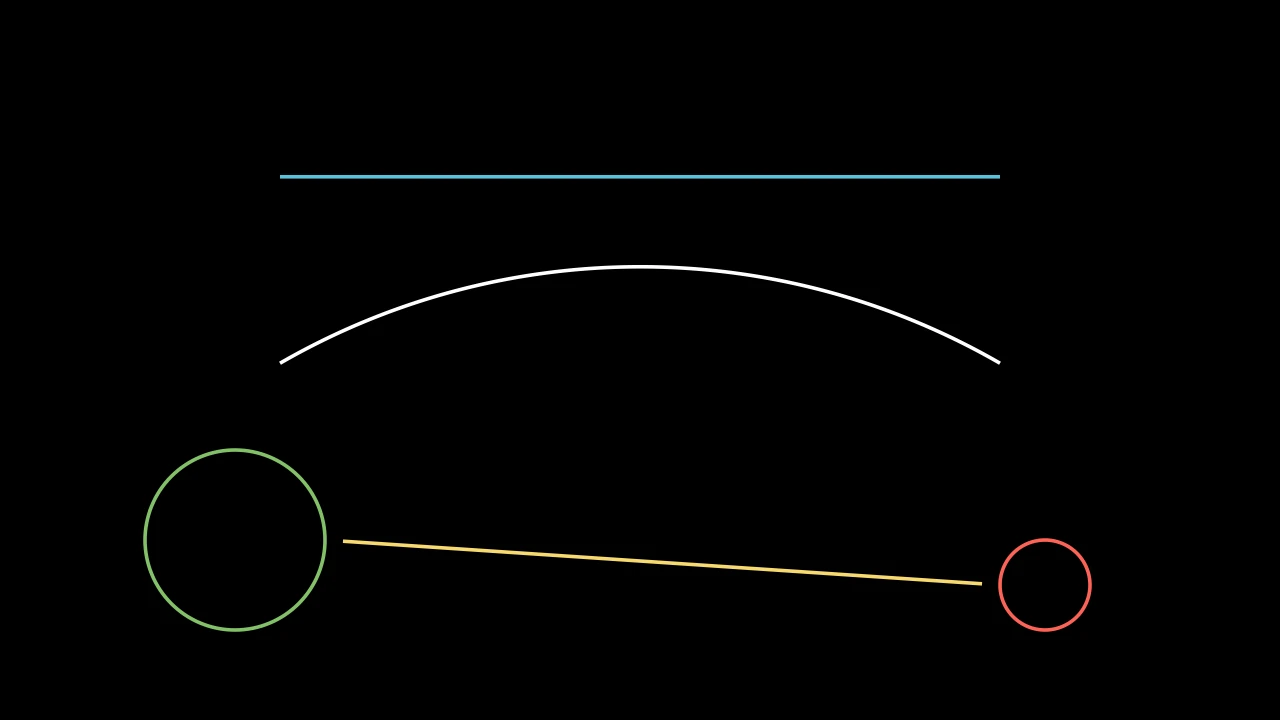
        straight = m.Line(4 * m.LEFT, 4 * m.RIGHT, color=m.BLUE)
        bent = m.Line(4 * m.LEFT, 4 * m.RIGHT, path_arc=-m.PI / 3)
        m.VGroup(straight, bent).arrange(m.DOWN, buff=1).shift(m.UP)
        left = m.Circle(radius=1, color=m.GREEN).move_to([-4.5, -2, 0])
        right = m.Circle(radius=0.5, color=m.RED).move_to([4.5, -2.5, 0])
        link = m.Line(left, right, buff=0.2, color=m.YELLOW)
        self.add(straight, bent, left, right, link)
A straight line from one point to another, white unless styled; or an arc
between them, bent through path_arc.
An end may be a mobject: the line then starts (or ends) at its point farthest toward the other end (see get_boundary_point), so a line between two shapes runs from outline to outline. The line is placed when it is made, and does not follow the mobjects afterwards.
startWhere the line starts: a point, or a mobject.
endWhere it ends: a point, or a mobject.
buffHow far it stops short of each end, in scene units (along it, if bent); a line shorter than twice it keeps its ends.
path_arcThe angle it bends through, in radians: 0 for straight; otherwise it is an arc, turning counterclockwise if positive, bending right on its way (see ArcBetweenPoints).
colorThe color of both fill and stroke (default white; a Circle's is red); None for the class's default.
tip_lengthThe length of the tips add_tip makes, in scene units (default 0.35; an Arrow's may be shorter).
normal_vectorThe normal of the plane the path lies in (default OUT). Accepted for Manim compatibility; ignored and not retained.
tip_styleStyle keywords for the tips the path makes (default None: none). A tip's
fill_colorandstroke_colorare the path's color unless given here.fill_colorThe fill's color;
colorif not given. Several colors make a gradient alongsheen_direction.fill_opacityThe fill's opacity, from 0 to 1 (default 0: no fill).
stroke_colorThe stroke's color;
colorif not given. Several colors make a gradient.stroke_opacityThe stroke's opacity, from 0 to 1 (default 1).
stroke_widthThe stroke's width, in hundredths of a scene unit (default 4; 0: no stroke).
background_stroke_colorThe color of an outline drawn behind the fill (default black).
background_stroke_opacityThe outline's opacity, from 0 to 1 (default 1).
background_stroke_widthThe outline's width, in hundredths of a scene unit (default 0: none).
sheen_factorHow much the colors lighten toward
sheen_direction, from -1 to 1 (default 0); a negative factor darkens.sheen_directionThe direction the colors lighten toward (default
UL).joint_typeHow the stroke is joined where its path turns: round, beveled or mitered, as a two-dimensional scene draws it (see LineJointType; default AUTO: mitered).
cap_styleHow the stroke ends, at each end it shows (an open path's, a dash's): round, butt or square, as a two-dimensional scene draws it (see CapStyleType; default AUTO: butt).
shade_in_3dWhether a three-dimensional scene's light shades the mobject.
materialHow its surface reflects the scene's lights in a three-dimensional scene (see Material); None: Manim's shading (default).
nameA name for the mobject; its class's name if not given.
z_indexIts place in the drawing order: a higher index is drawn over a lower one (default 0).
targetThe state
MoveToTargetmoves the mobject to.
It also takes the tip keywords.
Source
src/manimgx/mobjects/shapes.py
set_path_arc 
Bend the line through a new angle: rebuild it, straight or as an arc, between the ends it was made with.
It is rebuilt where it was made (or last rebuilt), wherever it has moved since, and keeps its buffer.
new_valueThe angle, in radians: 0 for straight; otherwise an arc, turning counterclockwise if positive.
Source
src/manimgx/mobjects/shapes.py
put_start_and_end_on 
Code
import manimgx as m


class LinePutStartAndEndOnExample(m.Scene):
    def construct(self) -> None:
        a, b, c = [-4, -2, 0], [0, 2.5, 0], [4, -2, 0]
        dots = m.VGroup(*(m.Dot(p, radius=0.12) for p in (a, b, c)))
        line = m.Line(a, b, color=m.BLUE)
        self.add(dots, line)
        self.play(line.animate.put_start_and_end_on(b, c))
        self.play(line.animate.put_start_and_end_on(c, a))
Move, turn and scale the line so it runs from start to end, tips
included; its shape stays, scaled in proportion (an arrow's tips keep their
size).
A line whose ends coincide is rebuilt between the new ends.
startWhere its start goes: its start tip's point, if it has one.
endWhere its end goes: its end tip's point, if it has one.
Source
src/manimgx/mobjects/shapes.py
get_vector 
The vector from the line's start to its end, tips included.
Returns The vector, in scene units.
get_unit_vector 
The line's direction: the unit vector from its start toward its end.
Returns A vector of length 1; zero for a line of no length.
get_angle 
The line's angle: the direction from its start to its end, counterclockwise from the positive x-axis.
Returns The angle, in radians, from -PI to PI.
Source
src/manimgx/mobjects/shapes.py
get_projection 
The point of the line nearest a point: the point's orthogonal projection onto the line, extended past its ends.
pointThe point to project.
Returns The point on the line, in scene coordinates.
Source
src/manimgx/mobjects/shapes.py
get_slope 
The line's slope: how far it rises for each unit it runs to the right, the tangent of its angle.
Returns The slope; very large for a line nearly upright.
Source
src/manimgx/mobjects/shapes.py
set_angle 
Turn the line so its angle is angle: about its
start, unless given another point.
angleThe new angle, in radians, counterclockwise from the positive x-axis.
about_pointThe point it turns about; None for its start.
Source
src/manimgx/mobjects/shapes.py
set_length 
Code
import manimgx as m


class LineSetLengthExample(m.Scene):
    def construct(self) -> None:
        line = m.Line(m.LEFT, m.RIGHT, color=m.BLUE).shift(m.UP)
        arrow = m.Arrow(m.LEFT, m.RIGHT, color=m.YELLOW).shift(m.DOWN)
        self.add(line, arrow)
        self.play(line.animate.set_length(10), arrow.animate.set_length(10))
        self.play(line.animate.set_length(4), arrow.animate.set_length(4))
Scale the line about its center to a length, tips included (an arrow's tips keep their size).
lengthThe new length, from its start to its end, in scene units.
Source
src/manimgx/mobjects/shapes.py
DashedLine 
Code
import manimgx as m


class DashedLineExample(m.Scene):
    def construct(self) -> None:
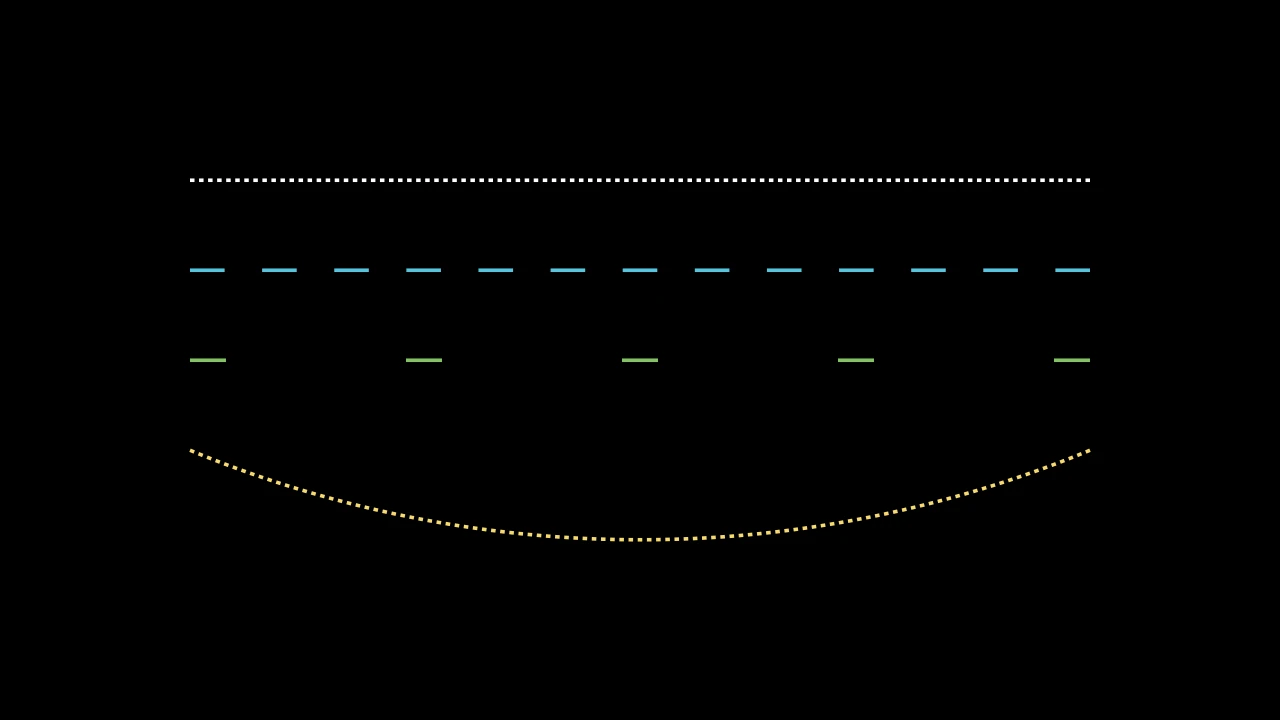
        start, end = 5 * m.LEFT, 5 * m.RIGHT
        lines = m.VGroup(
            m.DashedLine(start, end),
            m.DashedLine(start, end, dash_length=0.4, color=m.BLUE),
            m.DashedLine(start, end, dash_length=0.4, dashed_ratio=0.2),
            m.DashedLine(start, end, path_arc=m.PI / 4, color=m.YELLOW),
        ).arrange(m.DOWN, buff=1)
        lines[2].set_color(m.GREEN)
        self.add(lines)
A line drawn in dashes, white unless styled.
The dashes are the line's stroke drawn in pieces: a whole number of them, at least
two, spread evenly from end to end, each about dash_length long, each ended as
the line's cap_style says. It stays one path, placed, bent and tipped as a
Line is, and starts and ends where the line does; its handles are
its dashes', the first dash's and the last's. Its dashes are counted when it is
made, and scale with it.
startWhere the line starts: a point, or a mobject (see Line).
endWhere it ends: a point, or a mobject.
buffHow far it stops short of each end, in scene units.
path_arcThe angle it bends through, in radians: 0 for straight.
dash_lengthThe length of each dash, in scene units (default 0.05): about it, as a whole number of dashes spans the line.
dashed_ratioThe fraction of the line the dashes cover, from 0 to 1; the rest is gaps.
colorThe color of both fill and stroke (default white; a Circle's is red); None for the class's default.
tip_lengthThe length of the tips add_tip makes, in scene units (default 0.35; an Arrow's may be shorter).
normal_vectorThe normal of the plane the path lies in (default OUT). Accepted for Manim compatibility; ignored and not retained.
tip_styleStyle keywords for the tips the path makes (default None: none). A tip's
fill_colorandstroke_colorare the path's color unless given here.fill_colorThe fill's color;
colorif not given. Several colors make a gradient alongsheen_direction.fill_opacityThe fill's opacity, from 0 to 1 (default 0: no fill).
stroke_colorThe stroke's color;
colorif not given. Several colors make a gradient.stroke_opacityThe stroke's opacity, from 0 to 1 (default 1).
stroke_widthThe stroke's width, in hundredths of a scene unit (default 4; 0: no stroke).
background_stroke_colorThe color of an outline drawn behind the fill (default black).
background_stroke_opacityThe outline's opacity, from 0 to 1 (default 1).
background_stroke_widthThe outline's width, in hundredths of a scene unit (default 0: none).
sheen_factorHow much the colors lighten toward
sheen_direction, from -1 to 1 (default 0); a negative factor darkens.sheen_directionThe direction the colors lighten toward (default
UL).joint_typeHow the stroke is joined where its path turns: round, beveled or mitered, as a two-dimensional scene draws it (see LineJointType; default AUTO: mitered).
cap_styleHow the stroke ends, at each end it shows (an open path's, a dash's): round, butt or square, as a two-dimensional scene draws it (see CapStyleType; default AUTO: butt).
shade_in_3dWhether a three-dimensional scene's light shades the mobject.
materialHow its surface reflects the scene's lights in a three-dimensional scene (see Material); None: Manim's shading (default).
nameA name for the mobject; its class's name if not given.
z_indexIts place in the drawing order: a higher index is drawn over a lower one (default 0).
targetThe state
MoveToTargetmoves the mobject to.
It also takes the tip keywords.
Source
src/manimgx/mobjects/shapes.py
Arrow 
Code
import manimgx as m


class ArrowExample(m.Scene):
    def construct(self) -> None:
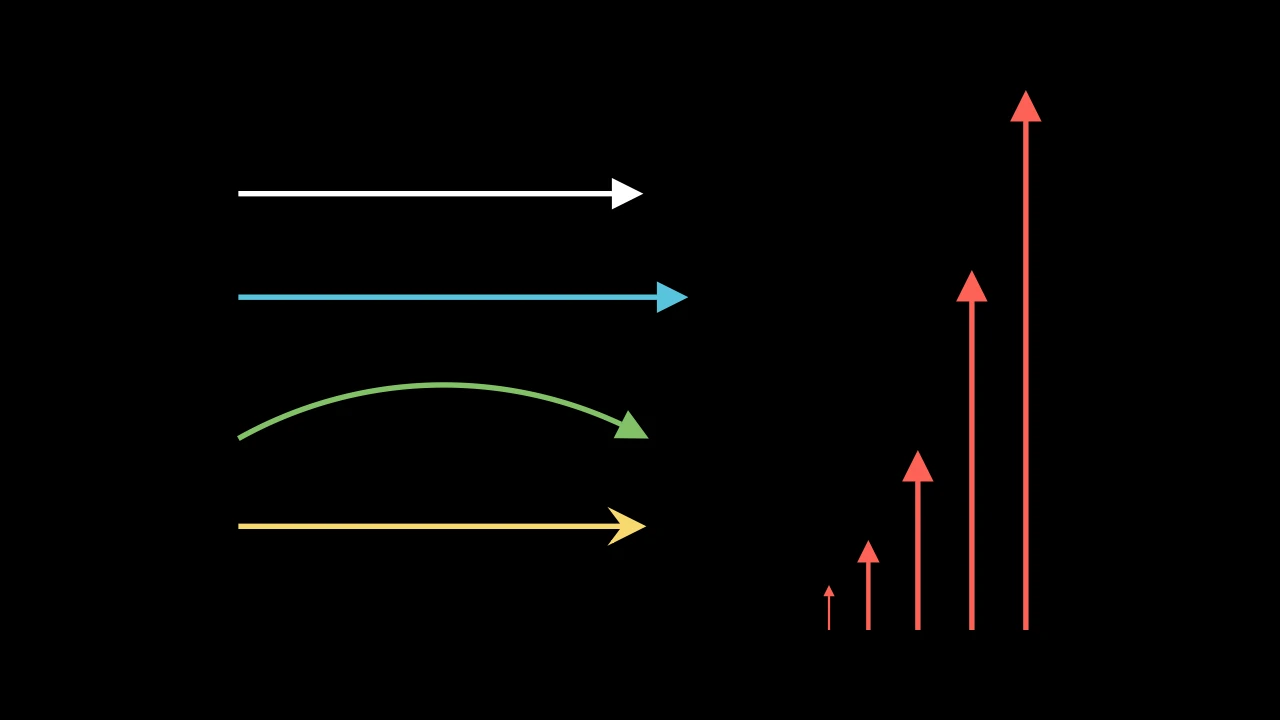
        a, b = 2.5 * m.LEFT, 2.5 * m.RIGHT
        arrows = m.VGroup(
            m.Arrow(a, b),
            m.Arrow(a, b, buff=0, color=m.BLUE),
            m.Arrow(a, b, path_arc=-m.PI / 3, color=m.GREEN),
            m.Arrow(a, b, tip_shape=m.StealthTip, color=m.YELLOW),
        ).arrange(m.DOWN, buff=0.8, aligned_edge=m.LEFT)
        shorts = m.VGroup()
        for length in (0.5, 1, 2, 4, 6):
            shorts.add(m.Arrow(m.ORIGIN, length * m.UP, buff=0, color=m.RED))
        shorts.arrange(aligned_edge=m.DOWN)
        self.add(m.VGroup(arrows, shorts).arrange(buff=1.5))
An arrow: a line with a tip at its end, stopping buff short of the two points
it joins; white, with a stroke 6 wide, unless styled.
A short arrow is drawn in proportion: its tip is at most
max_tip_length_to_length_ratio of its length, and its stroke at most
max_stroke_width_to_length_ratio wide per unit of its length. Scaled, it keeps
its tip's size (see scale).
m.Arrow(start=LEFT, end=RIGHT, *, buff=MED_SMALL_BUFF, max_tip_length_to_length_ratio=0.25, max_stroke_width_to_length_ratio=5, tip_shape=ArrowTriangleFilledTip, **kwargs)
startWhere the arrow starts: a point, or a mobject (see Line).
endWhere it points to: a point, or a mobject.
buffHow far it stops short of each end, in scene units (default 0.25): an arrow between two mobjects leaves a gap at each.
max_tip_length_to_length_ratioThe longest its tip may be, as a fraction of its length.
max_stroke_width_to_length_ratioThe widest its stroke may be, in hundredths of a scene unit, per scene unit of its length.
tip_shapeThe class of its tip.
path_arcThe angle the line bends through, in radians: 0 for straight; otherwise it is an arc from its start to its end, turning counterclockwise if positive (bending right on its way), clockwise if negative (default 0).
colorThe color of both fill and stroke (default white; a Circle's is red); None for the class's default.
tip_lengthThe length of the tips add_tip makes, in scene units (default 0.35; an Arrow's may be shorter).
normal_vectorThe normal of the plane the path lies in (default OUT). Accepted for Manim compatibility; ignored and not retained.
tip_styleStyle keywords for the tips the path makes (default None: none). A tip's
fill_colorandstroke_colorare the path's color unless given here.fill_colorThe fill's color;
colorif not given. Several colors make a gradient alongsheen_direction.fill_opacityThe fill's opacity, from 0 to 1 (default 0: no fill).
stroke_colorThe stroke's color;
colorif not given. Several colors make a gradient.stroke_opacityThe stroke's opacity, from 0 to 1 (default 1).
stroke_widthThe stroke's width, in hundredths of a scene unit (default 4; 0: no stroke).
background_stroke_colorThe color of an outline drawn behind the fill (default black).
background_stroke_opacityThe outline's opacity, from 0 to 1 (default 1).
background_stroke_widthThe outline's width, in hundredths of a scene unit (default 0: none).
sheen_factorHow much the colors lighten toward
sheen_direction, from -1 to 1 (default 0); a negative factor darkens.sheen_directionThe direction the colors lighten toward (default
UL).joint_typeHow the stroke is joined where its path turns: round, beveled or mitered, as a two-dimensional scene draws it (see LineJointType; default AUTO: mitered).
cap_styleHow the stroke ends, at each end it shows (an open path's, a dash's): round, butt or square, as a two-dimensional scene draws it (see CapStyleType; default AUTO: butt).
shade_in_3dWhether a three-dimensional scene's light shades the mobject.
materialHow its surface reflects the scene's lights in a three-dimensional scene (see Material); None: Manim's shading (default).
nameA name for the mobject; its class's name if not given.
z_indexIts place in the drawing order: a higher index is drawn over a lower one (default 0).
targetThe state
MoveToTargetmoves the mobject to.
Source
src/manimgx/mobjects/shapes.py
scale 
Code
import manimgx as m


class ArrowScaleExample(m.Scene):
    def construct(self) -> None:
        kept = m.Arrow(m.LEFT, m.RIGHT, color=m.BLUE).shift(1.5 * m.UP)
        scaled = m.Arrow(m.LEFT, m.RIGHT, color=m.YELLOW).shift(m.DOWN)
        top = m.Text("scale(3)").move_to(2.8 * m.UP)
        bottom = m.Text("scale(3, scale_tips=True)").move_to(2.5 * m.DOWN)
        self.add(top, bottom, kept, scaled)
        self.play(
            kept.animate.scale(3), scaled.animate.scale(3, scale_tips=True)
        )
Scale the arrow, keeping its tips' size unless scale_tips.
The shaft is scaled, and the tips are put back on its ends. Then the shaft's
stroke width is set from its new length, as when the arrow was made: the smaller
of the width it was made with and max_stroke_width_to_length_ratio times its
length. An arrow of no length stays as it is.
scale_factorThe factor: one, or one per axis (see Mobject.scale).
scale_strokeWhether stroke widths scale too; the shaft's is then set from its length all the same.
scale_tipsWhether the tips scale with the shaft.
about_pointThe point that stays fixed, in scene coordinates; it takes precedence over
about_edge.about_edgeThe point of the mobject's bounding box that stays fixed, named by a direction: UP for the middle of its top edge, UR for its top right corner, ORIGIN for its center.
Source
src/manimgx/mobjects/shapes.py
DoubleArrow 
Code
import manimgx as m


class DoubleArrowExample(m.Scene):
    def construct(self) -> None:
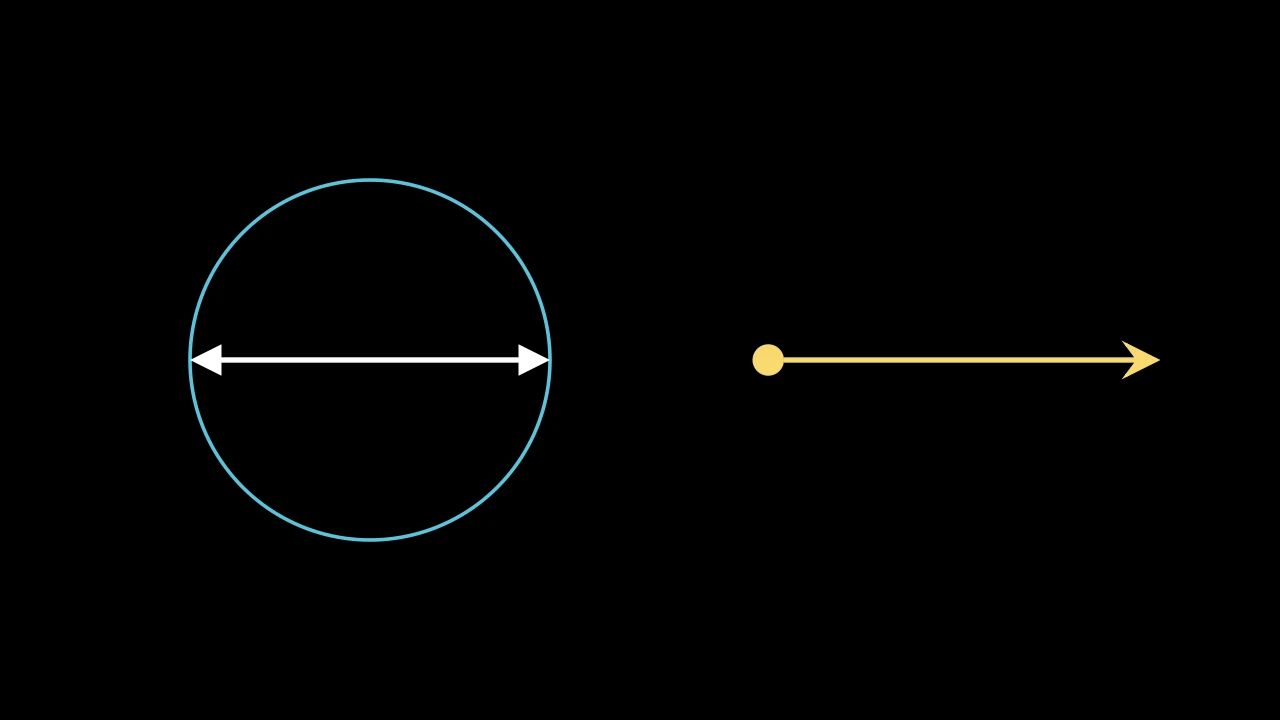
        circle = m.Circle(radius=2, color=m.BLUE).shift(3 * m.LEFT)
        diameter = m.DoubleArrow(circle.get_left(), circle.get_right(), buff=0)
        mixed = m.DoubleArrow(
            m.RIGHT,
            6 * m.RIGHT,
            tip_shape_start=m.ArrowCircleFilledTip,
            tip_shape_end=m.StealthTip,
            color=m.YELLOW,
        )
        self.add(circle, diameter, mixed)
An arrow with a tip at each end; white, with a stroke 6 wide, unless styled.
Its tips and its stroke are sized from its length, tip to tip, as an Arrow's are.
m.DoubleArrow(start=LEFT, end=RIGHT, *, tip_shape_start=ArrowTriangleFilledTip, tip_shape_end=None, **kwargs)
startWhere it starts: a point, or a mobject (see Line).
endWhere it ends: a point, or a mobject.
tip_shape_startThe class of the tip at its start.
tip_shape_endThe class of the tip at its end; None for the
tip_shapekeyword's, or else ArrowTriangleFilledTip.
It also takes
the Arrow keywords.
Source
src/manimgx/mobjects/shapes.py
Vector 
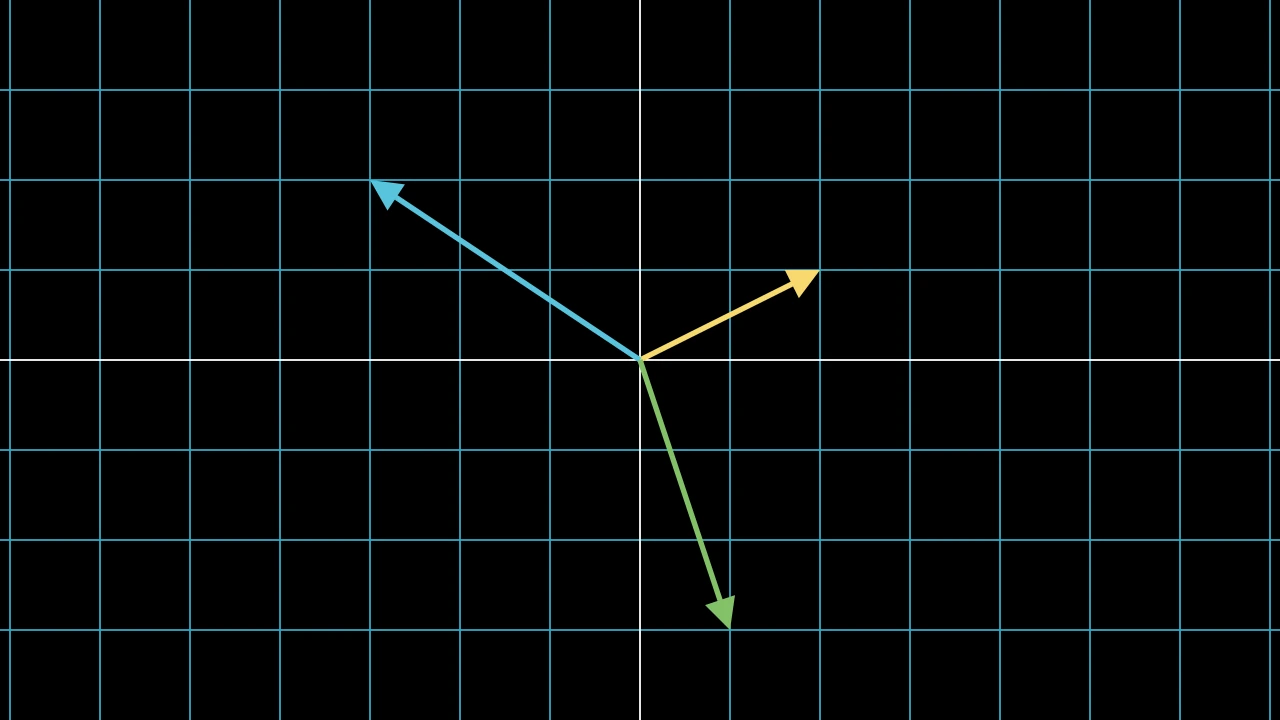
A vector: an arrow from the origin to a point; white unless styled.
m.Vector(direction=RIGHT, buff=0, **kwargs)
directionWhere it points to, from the origin: two coordinates, or three.
buffHow far it stops short of the origin and of its end, in scene units.
It also takes
the Arrow keywords.
Source
src/manimgx/mobjects/shapes.py
coordinate_label 
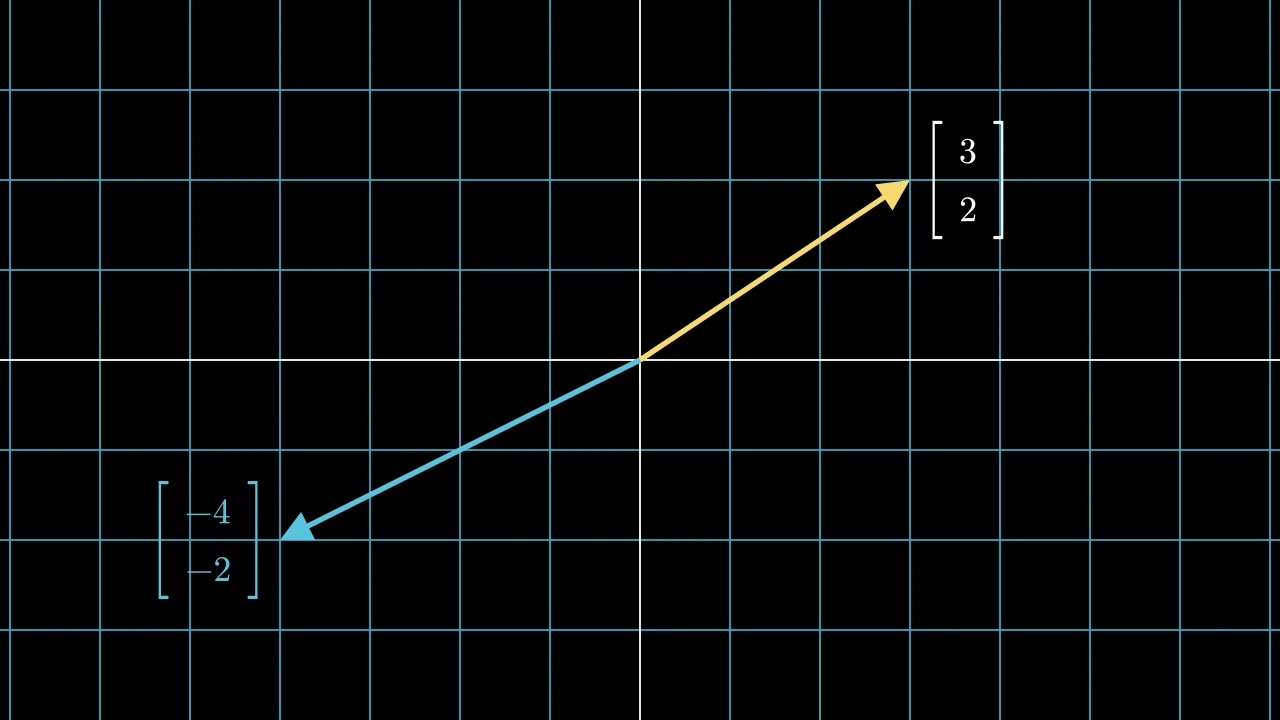
Make a label of the vector's coordinates: a column matrix beside its tip.
The label, at 0.8 of a matrix's size, is placed 0.25 beyond the vector's end, centered on it vertically: to its right if the vector points right (or straight up or down), to its left otherwise. It is not added to the vector.
integer_labelsWhether to round the coordinates to integers.
n_dimHow many coordinates to show: 2 for x and y, 3 for z too.
It also takes
the Matrix keywords.
Returns A new matrix.
Source
src/manimgx/mobjects/shapes.py
CurvedArrow 
Code
import manimgx as m


class CurvedArrowExample(m.Scene):
    def construct(self) -> None:
        start, end = 3 * m.LEFT + 0.5 * m.UP, 3 * m.RIGHT + 0.5 * m.UP
        arrows = m.VGroup(
            m.CurvedArrow(start, end, color=m.BLUE),
            m.CurvedArrow(start, end, angle=m.PI, color=m.YELLOW),
            m.CurvedArrow(end, start, color=m.GREEN),
            m.CurvedArrow(end, start, radius=3.2, tip_shape=m.StealthTip),
        )
        self.add(m.Dot(start, radius=0.12), m.Dot(end, radius=0.12))
        self.play(m.Create(arrows, run_time=4))
An arrow along an arc: an ArcBetweenPoints with a tip at its end, bending right on its way by default; white unless styled.
start_pointWhere the arrow starts.
end_pointWhere it points to: its tip's point.
tip_shapeThe class of its tip; None for ArrowTriangleFilledTip.
It also takes
the ArcBetweenPoints keywords.
Source
src/manimgx/mobjects/shapes.py
CurvedDoubleArrow 
Code
import manimgx as m


class CurvedDoubleArrowExample(m.Scene):
    def construct(self) -> None:
        left = m.Circle(radius=1, color=m.BLUE).shift(4 * m.LEFT)
        right = m.Square(side_length=2, color=m.GREEN).shift(4 * m.RIGHT)
        top = left.get_top(), right.get_top()
        arrows = m.VGroup(
            m.CurvedDoubleArrow(*top, angle=-m.PI / 3),
            m.CurvedDoubleArrow(
                left.get_bottom(),
                right.get_bottom(),
                tip_shape_start=m.ArrowCircleFilledTip,
                tip_shape_end=m.StealthTip,
                color=m.YELLOW,
            ),
        )
        self.add(left, right)
        self.play(m.Create(arrows, run_time=2))
An arrow along an arc with a tip at each end: an ArcBetweenPoints with two tips, bending right on its way by default; white unless styled.
start_pointWhere the arrow starts: its start tip's point.
end_pointWhere it ends: its end tip's point.
tip_shape_startThe class of the tip at its start; None for ArrowTriangleFilledTip.
tip_shape_endThe class of the tip at its end; None for ArrowTriangleFilledTip.
It also takes
the ArcBetweenPoints keywords.
Source
src/manimgx/mobjects/shapes.py
TangentLine 
Code
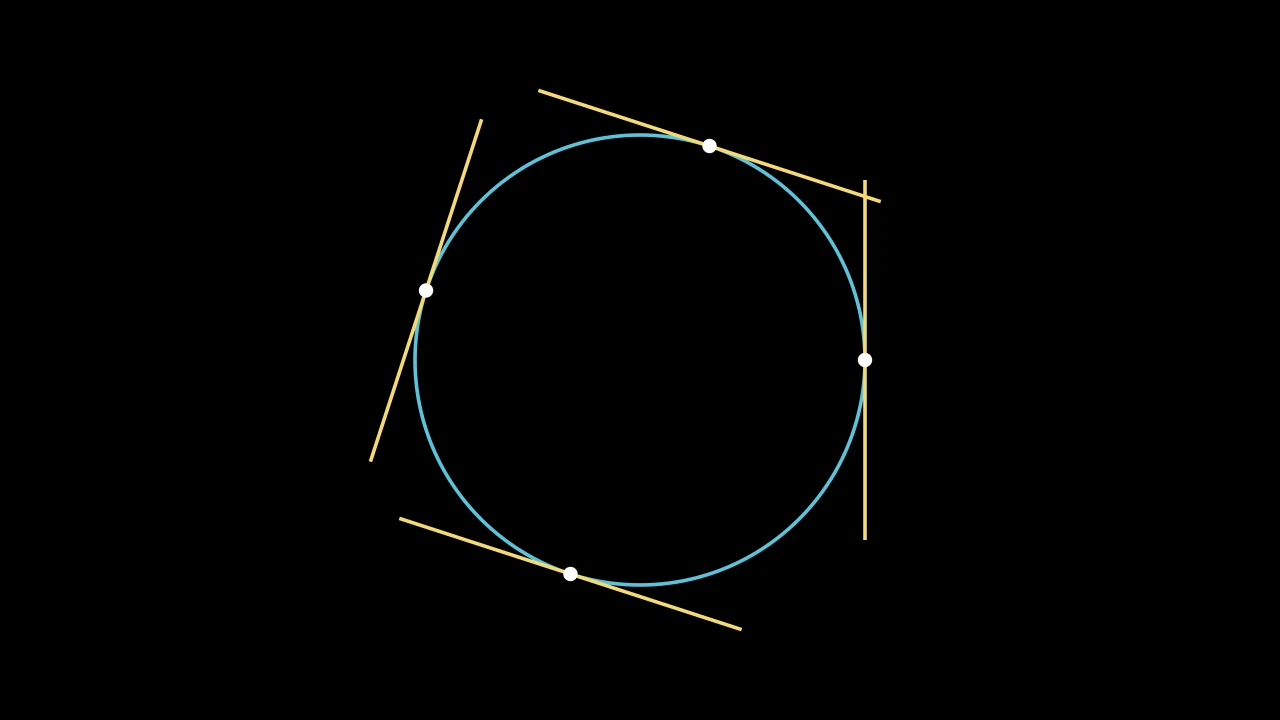
A line tangent to a path at a point along it, length long and centered on the
point; white unless styled.
Its direction is that of the chord between the points d_alpha before and after
the point.
vmobThe path.
alphaWhere along the path, as a proportion of its length: 0 at its start, 1 at its end.
lengthThe line's length, in scene units.
d_alphaThe proportion of the path's length before and after the point whose chord sets the direction.
It also takes
the Line keywords.
Source
src/manimgx/mobjects/shapes.py
Tips
A tip is a small shape at the end of a line, an arc or an arrow. Arrows make theirs; any
other line or arc takes one with add_tip. tip_shape chooses its shape, and tip_style
its style.
TipableVMobject 
A path that can end in arrow tips: what lines, arcs and arrows have in common.
A tip is a small shape (an ArrowTip) added to the path as a submobject, at its end or its start, pointing along it. The tip's point goes where the path ended, and the path is fitted to stop at the tip's base. With tips, the path's start and end are the tips' points.
m.TipableVMobject(tip_length=DEFAULT_ARROW_TIP_LENGTH, normal_vector=OUT, tip_style=None, **kwargs)
tip_lengthThe length of the tips add_tip makes, in scene units (default 0.35).
normal_vectorThe normal of the plane the path lies in. Accepted for Manim compatibility; ignored.
tip_styleStyle keywords for the tips the path makes; a tip's
fill_colorandstroke_colorare the path's color unless given here.colorThe color of both fill and stroke (default white); None for the class's default.
fill_colorThe fill's color;
colorif not given. Several colors make a gradient alongsheen_direction.fill_opacityThe fill's opacity, from 0 to 1 (default 0: no fill).
stroke_colorThe stroke's color;
colorif not given. Several colors make a gradient.stroke_opacityThe stroke's opacity, from 0 to 1 (default 1).
stroke_widthThe stroke's width, in hundredths of a scene unit (default 4; 0: no stroke).
background_stroke_colorThe color of an outline drawn behind the fill (default black).
background_stroke_opacityThe outline's opacity, from 0 to 1 (default 1).
background_stroke_widthThe outline's width, in hundredths of a scene unit (default 0: none).
sheen_factorHow much the colors lighten toward
sheen_direction, from -1 to 1 (default 0); a negative factor darkens.sheen_directionThe direction the colors lighten toward (default
UL).joint_typeHow the stroke is joined where its path turns: round, beveled or mitered, as a two-dimensional scene draws it (see LineJointType; default AUTO: mitered).
cap_styleHow the stroke ends, at each end it shows (an open path's, a dash's): round, butt or square, as a two-dimensional scene draws it (see CapStyleType; default AUTO: butt).
shade_in_3dWhether a three-dimensional scene's light shades the mobject.
materialHow its surface reflects the scene's lights in a three-dimensional scene (see Material); None: Manim's shading (default).
nameA name for the mobject; its class's name if not given.
z_indexIts place in the drawing order: a higher index is drawn over a lower one (default 0).
targetThe state
MoveToTargetmoves the mobject to.
It also takes the style keywords.
Source
src/manimgx/mobjects/shapes.py
start_tip 
The tip at the path's start, once add_tip(at_start=True) has made one.
add_tip 
Code
import manimgx as m


class TipableVMobjectAddTipExample(m.Scene):
    def construct(self) -> None:
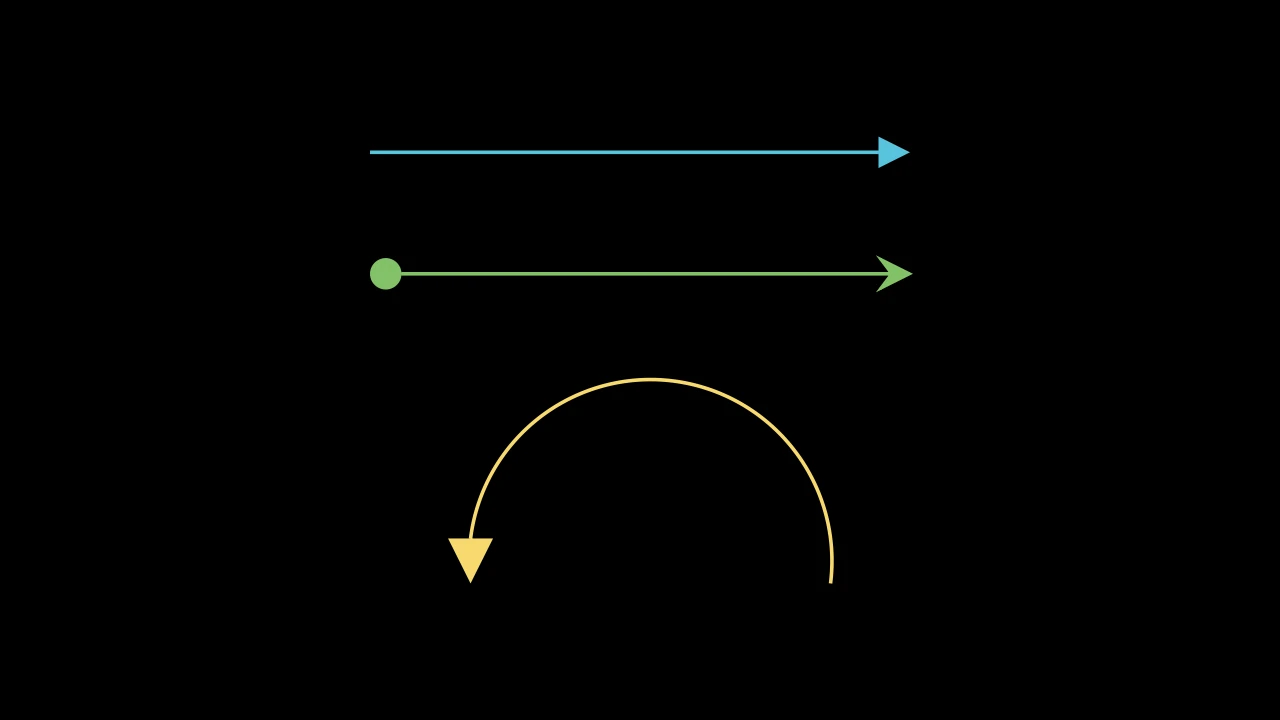
        line = m.Line(3 * m.LEFT, 3 * m.RIGHT, color=m.BLUE).add_tip()
        both = m.Line(3 * m.LEFT, 3 * m.RIGHT, color=m.GREEN)
        both.add_tip(tip_shape=m.StealthTip)
        both.add_tip(tip_shape=m.ArrowCircleFilledTip, at_start=True)
        arc = m.Arc(radius=2, angle=m.PI, color=m.YELLOW)
        arc.add_tip(tip_length=0.5, tip_width=0.5)
        self.add(m.VGroup(line, both, arc).arrange(m.DOWN, buff=1))
Add an arrow tip at the path's end, or its start, pointing along the path there.
The tip's point goes where the path ended, and the path is scaled and turned
about its other end to stop at the tip's base. The tip is a submobject, named
tip (or start_tip), in the path's color unless
tip_style gives it another.
tipA tip made beforehand, to turn and move into place; None to make one.
tip_shapeThe class of the tip to make, an ArrowTip subclass; None for ArrowTriangleFilledTip.
tip_lengthThe length of the tip to make, in scene units; None for the path's
tip_length.tip_widthThe width of the tip to make, if it is the default filled triangle, in scene units; None for the default length. Other shapes take no width: they are made at
tip_lengthalone.at_startWhether the tip goes at the path's start, pointing back along it.
Source
src/manimgx/mobjects/shapes.py
pop_tips 
Remove the path's tips, and fit the path back between its start and its end as they were: the tips' points.
Returns The tips removed, the end tip first, in a new group (empty if there were none).
Source
src/manimgx/mobjects/shapes.py
get_tip 
The path's tip: the one at its end, or the one at its start if it has none there.
It is the first of get_tips; a path never given a tip raises an exception.
Source
src/manimgx/mobjects/shapes.py
get_tips 
The tips the path has been given: its tip and its start_tip, those it has had.
A tip pop_tips removed is still named, and listed here; has_tip tells whether it is on the path.
Returns The tips, the end tip first, in a new group.
Source
src/manimgx/mobjects/shapes.py
has_start_tip 
Whether the path has a tip at its start: its start_tip, among its submobjects.
Source
src/manimgx/mobjects/shapes.py
get_start 
Where the path starts: its start tip's point, if it has a start tip, and otherwise its first point.
Returns The point, in scene coordinates.
Source
src/manimgx/mobjects/shapes.py
get_end 
Where the path ends: its end tip's point, if it has an end tip, and otherwise its last point.
Returns The point, in scene coordinates.
Source
src/manimgx/mobjects/shapes.py
get_length 
The distance from the path's start to its end, tips included: straight across, so an arc's chord, not the length along it.
Returns The distance, in scene units.
Source
src/manimgx/mobjects/shapes.py
TippedBase 
Every style keyword but color, and those of a path that can end in arrow tips
(see TipableVMobject).
A class that takes color by position declares it itself, and the rest with this.
tip_lengthThe length of the tips add_tip makes, in scene units (default 0.35; an Arrow's may be shorter).
normal_vectorThe normal of the plane the path lies in (default OUT). Accepted for Manim compatibility; ignored and not retained.
tip_styleStyle keywords for the tips the path makes (default None: none). A tip's
fill_colorandstroke_colorare the path's color unless given here.fill_colorThe fill's color;
colorif not given. Several colors make a gradient alongsheen_direction.fill_opacityThe fill's opacity, from 0 to 1 (default 0: no fill).
stroke_colorThe stroke's color;
colorif not given. Several colors make a gradient.stroke_opacityThe stroke's opacity, from 0 to 1 (default 1).
stroke_widthThe stroke's width, in hundredths of a scene unit (default 4; 0: no stroke).
background_stroke_colorThe color of an outline drawn behind the fill (default black).
background_stroke_opacityThe outline's opacity, from 0 to 1 (default 1).
background_stroke_widthThe outline's width, in hundredths of a scene unit (default 0: none).
sheen_factorHow much the colors lighten toward
sheen_direction, from -1 to 1 (default 0); a negative factor darkens.sheen_directionThe direction the colors lighten toward (default
UL).joint_typeHow the stroke is joined where its path turns: round, beveled or mitered, as a two-dimensional scene draws it (see LineJointType; default AUTO: mitered).
cap_styleHow the stroke ends, at each end it shows (an open path's, a dash's): round, butt or square, as a two-dimensional scene draws it (see CapStyleType; default AUTO: butt).
shade_in_3dWhether a three-dimensional scene's light shades the mobject.
materialHow its surface reflects the scene's lights in a three-dimensional scene (see Material); None: Manim's shading (default).
nameA name for the mobject; its class's name if not given.
z_indexIts place in the drawing order: a higher index is drawn over a lower one (default 0).
targetThe state
MoveToTargetmoves the mobject to.
Tip shapes
ArrowTriangleFilledTip 
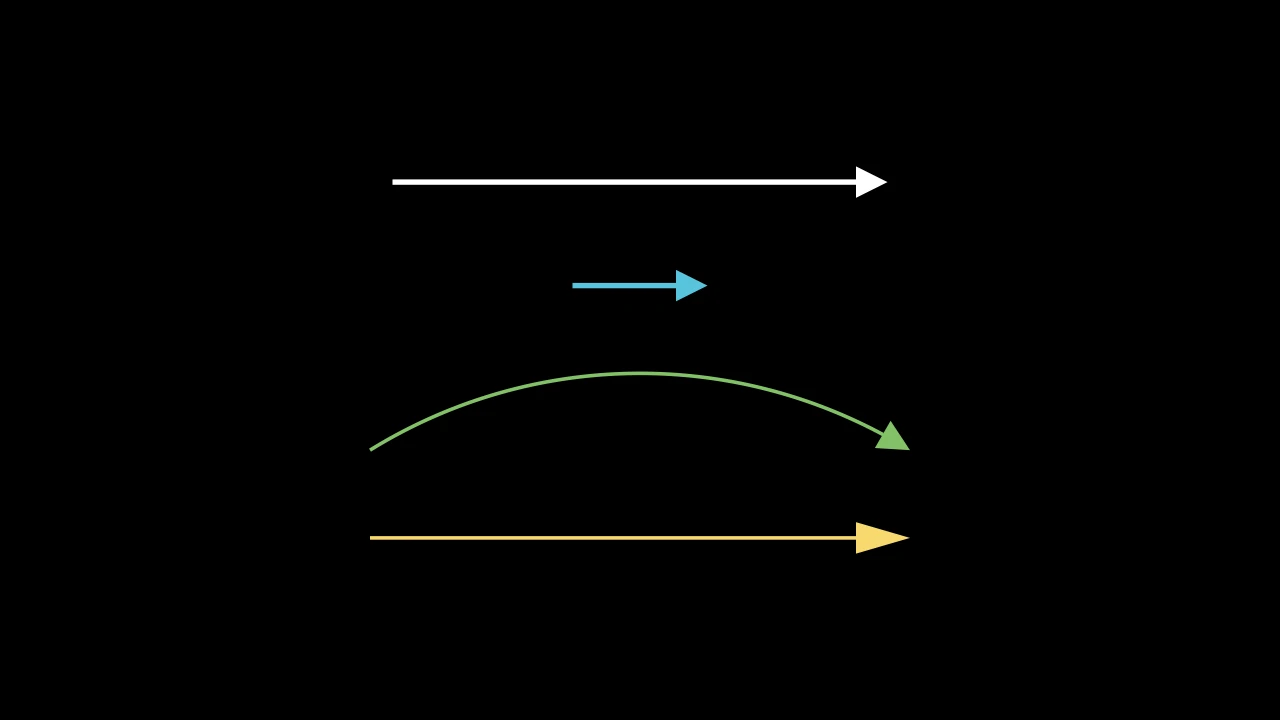
Code
import manimgx as m


class ArrowTriangleFilledTipExample(m.Scene):
    def construct(self) -> None:
        tip = m.ArrowTriangleFilledTip
        a, b = 3 * m.LEFT, 3 * m.RIGHT
        arrows = m.VGroup(
            m.Arrow(a, b, tip_shape=tip),
            m.Arrow(a / 3, b / 3, tip_shape=tip, color=m.BLUE),
            m.CurvedArrow(a, b, angle=-m.PI / 3, tip_shape=tip, color=m.GREEN),
            m.Line(a, b, color=m.YELLOW).add_tip(tip_shape=tip, tip_length=0.6),
        ).arrange(m.DOWN, buff=0.8)
        self.add(arrows)
A triangular tip, filled and without an outline: the default tip of lines, arcs and arrows.
m.ArrowTriangleFilledTip(length=DEFAULT_ARROW_TIP_LENGTH, width=DEFAULT_ARROW_TIP_LENGTH, start_angle=PI, **kwargs)
lengthIts length, from its base to its point, in scene units.
widthIts width, across its base, in scene units.
start_angleThe direction its point faces as made, in radians (default PI: left); a path turns the tip to point along itself.
colorThe color of both fill and stroke (default white); None for the class's default.
fill_colorThe fill's color;
colorif not given. Several colors make a gradient alongsheen_direction.fill_opacityThe fill's opacity, from 0 to 1 (default 0: no fill).
stroke_colorThe stroke's color;
colorif not given. Several colors make a gradient.stroke_opacityThe stroke's opacity, from 0 to 1 (default 1).
stroke_widthThe stroke's width, in hundredths of a scene unit (default 4; 0: no stroke).
background_stroke_colorThe color of an outline drawn behind the fill (default black).
background_stroke_opacityThe outline's opacity, from 0 to 1 (default 1).
background_stroke_widthThe outline's width, in hundredths of a scene unit (default 0: none).
sheen_factorHow much the colors lighten toward
sheen_direction, from -1 to 1 (default 0); a negative factor darkens.sheen_directionThe direction the colors lighten toward (default
UL).joint_typeHow the stroke is joined where its path turns: round, beveled or mitered, as a two-dimensional scene draws it (see LineJointType; default AUTO: mitered).
cap_styleHow the stroke ends, at each end it shows (an open path's, a dash's): round, butt or square, as a two-dimensional scene draws it (see CapStyleType; default AUTO: butt).
shade_in_3dWhether a three-dimensional scene's light shades the mobject.
materialHow its surface reflects the scene's lights in a three-dimensional scene (see Material); None: Manim's shading (default).
nameA name for the mobject; its class's name if not given.
z_indexIts place in the drawing order: a higher index is drawn over a lower one (default 0).
targetThe state
MoveToTargetmoves the mobject to.
It also takes the style keywords.
Source
src/manimgx/mobjects/shapes.py
ArrowTriangleTip 
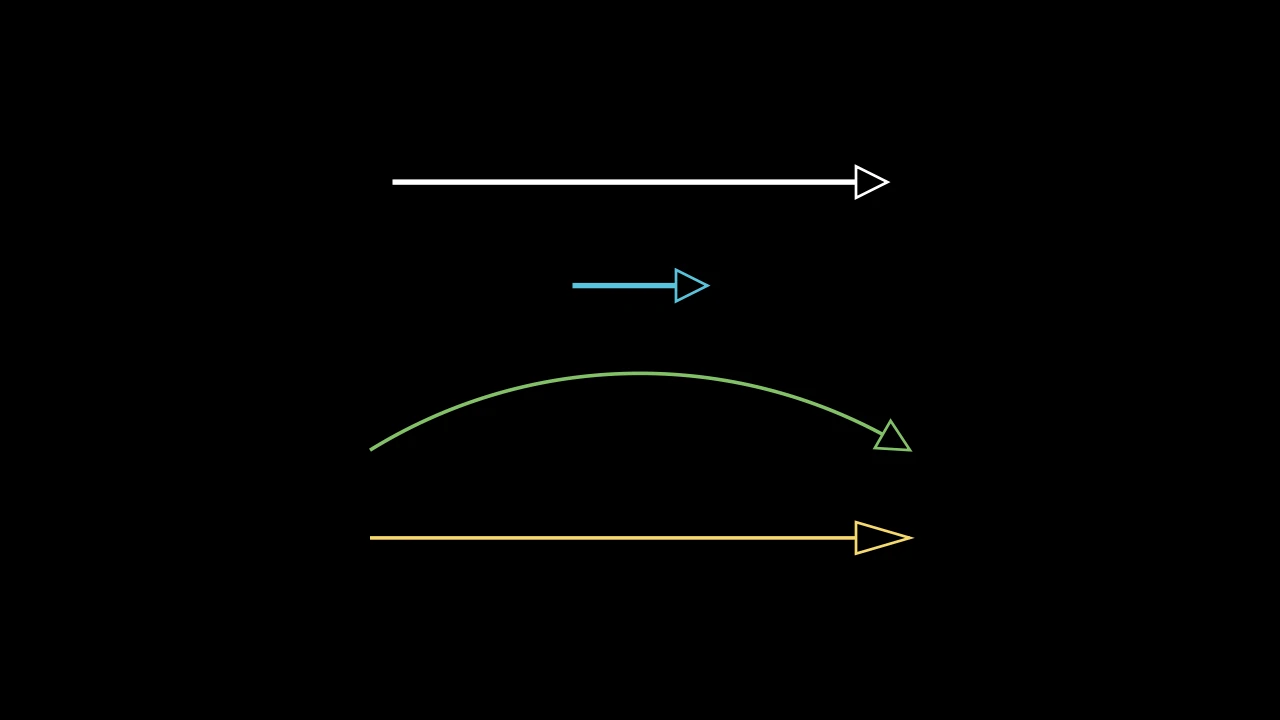
Code
import manimgx as m


class ArrowTriangleTipExample(m.Scene):
    def construct(self) -> None:
        tip = m.ArrowTriangleTip
        a, b = 3 * m.LEFT, 3 * m.RIGHT
        arrows = m.VGroup(
            m.Arrow(a, b, tip_shape=tip),
            m.Arrow(a / 3, b / 3, tip_shape=tip, color=m.BLUE),
            m.CurvedArrow(a, b, angle=-m.PI / 3, tip_shape=tip, color=m.GREEN),
            m.Line(a, b, color=m.YELLOW).add_tip(tip_shape=tip, tip_length=0.6),
        ).arrange(m.DOWN, buff=0.8)
        self.add(arrows)
A triangular tip, outlined: an isosceles triangle length long and width wide,
its outline 3 wide and not filled.
m.ArrowTriangleTip(length=DEFAULT_ARROW_TIP_LENGTH, width=DEFAULT_ARROW_TIP_LENGTH, start_angle=PI, **kwargs)
lengthIts length, from its base to its point, in scene units.
widthIts width, across its base, in scene units.
start_angleThe direction its point faces as made, in radians (default PI: left); a path turns the tip to point along itself.
colorThe color of both fill and stroke (default white); None for the class's default.
fill_colorThe fill's color;
colorif not given. Several colors make a gradient alongsheen_direction.fill_opacityThe fill's opacity, from 0 to 1 (default 0: no fill).
stroke_colorThe stroke's color;
colorif not given. Several colors make a gradient.stroke_opacityThe stroke's opacity, from 0 to 1 (default 1).
stroke_widthThe stroke's width, in hundredths of a scene unit (default 4; 0: no stroke).
background_stroke_colorThe color of an outline drawn behind the fill (default black).
background_stroke_opacityThe outline's opacity, from 0 to 1 (default 1).
background_stroke_widthThe outline's width, in hundredths of a scene unit (default 0: none).
sheen_factorHow much the colors lighten toward
sheen_direction, from -1 to 1 (default 0); a negative factor darkens.sheen_directionThe direction the colors lighten toward (default
UL).joint_typeHow the stroke is joined where its path turns: round, beveled or mitered, as a two-dimensional scene draws it (see LineJointType; default AUTO: mitered).
cap_styleHow the stroke ends, at each end it shows (an open path's, a dash's): round, butt or square, as a two-dimensional scene draws it (see CapStyleType; default AUTO: butt).
shade_in_3dWhether a three-dimensional scene's light shades the mobject.
materialHow its surface reflects the scene's lights in a three-dimensional scene (see Material); None: Manim's shading (default).
nameA name for the mobject; its class's name if not given.
z_indexIts place in the drawing order: a higher index is drawn over a lower one (default 0).
targetThe state
MoveToTargetmoves the mobject to.
It also takes the style keywords.
Source
src/manimgx/mobjects/shapes.py
StealthTip 
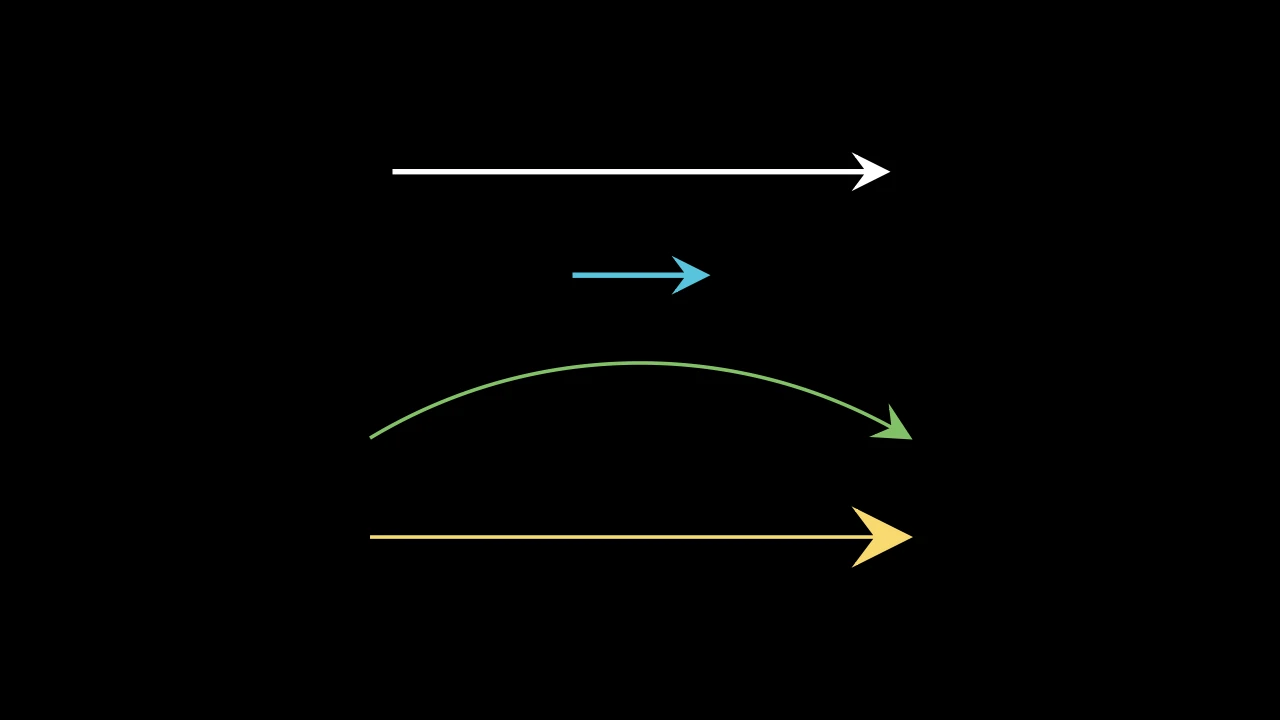
Code
import manimgx as m


class StealthTipExample(m.Scene):
    def construct(self) -> None:
        tip = m.StealthTip
        a, b = 3 * m.LEFT, 3 * m.RIGHT
        arrows = m.VGroup(
            m.Arrow(a, b, tip_shape=tip),
            m.Arrow(a / 3, b / 3, tip_shape=tip, color=m.BLUE),
            m.CurvedArrow(a, b, angle=-m.PI / 3, tip_shape=tip, color=m.GREEN),
            m.Line(a, b, color=m.YELLOW).add_tip(tip_shape=tip, tip_length=0.6),
        ).arrange(m.DOWN, buff=0.8)
        self.add(arrows)
A dart-shaped tip: a sharp point with two barbs swept back from it and a notch between them, where the path stops; filled, with a stroke 3 wide.
Its length runs from its barbs to its point; the notch is ⅝ of the way back from the point. It is half as long as the other tips unless given a length.
m.StealthTip(length=DEFAULT_ARROW_TIP_LENGTH / 2, start_angle=PI, **kwargs)
lengthIts length, from its barbs to its point, in scene units (default 0.175).
start_angleAccepted for Manim compatibility; ignored.
colorThe color of both fill and stroke (default white); None for the class's default.
fill_colorThe fill's color;
colorif not given. Several colors make a gradient alongsheen_direction.fill_opacityThe fill's opacity, from 0 to 1 (default 0: no fill).
stroke_colorThe stroke's color;
colorif not given. Several colors make a gradient.stroke_opacityThe stroke's opacity, from 0 to 1 (default 1).
stroke_widthThe stroke's width, in hundredths of a scene unit (default 4; 0: no stroke).
background_stroke_colorThe color of an outline drawn behind the fill (default black).
background_stroke_opacityThe outline's opacity, from 0 to 1 (default 1).
background_stroke_widthThe outline's width, in hundredths of a scene unit (default 0: none).
sheen_factorHow much the colors lighten toward
sheen_direction, from -1 to 1 (default 0); a negative factor darkens.sheen_directionThe direction the colors lighten toward (default
UL).joint_typeHow the stroke is joined where its path turns: round, beveled or mitered, as a two-dimensional scene draws it (see LineJointType; default AUTO: mitered).
cap_styleHow the stroke ends, at each end it shows (an open path's, a dash's): round, butt or square, as a two-dimensional scene draws it (see CapStyleType; default AUTO: butt).
shade_in_3dWhether a three-dimensional scene's light shades the mobject.
materialHow its surface reflects the scene's lights in a three-dimensional scene (see Material); None: Manim's shading (default).
nameA name for the mobject; its class's name if not given.
z_indexIts place in the drawing order: a higher index is drawn over a lower one (default 0).
targetThe state
MoveToTargetmoves the mobject to.
It also takes the style keywords.
Source
src/manimgx/mobjects/shapes.py
length 
The tip's whole length, in scene units: from its barbs to its point, 1.6 times the distance from its notch to its point.
ArrowCircleFilledTip 
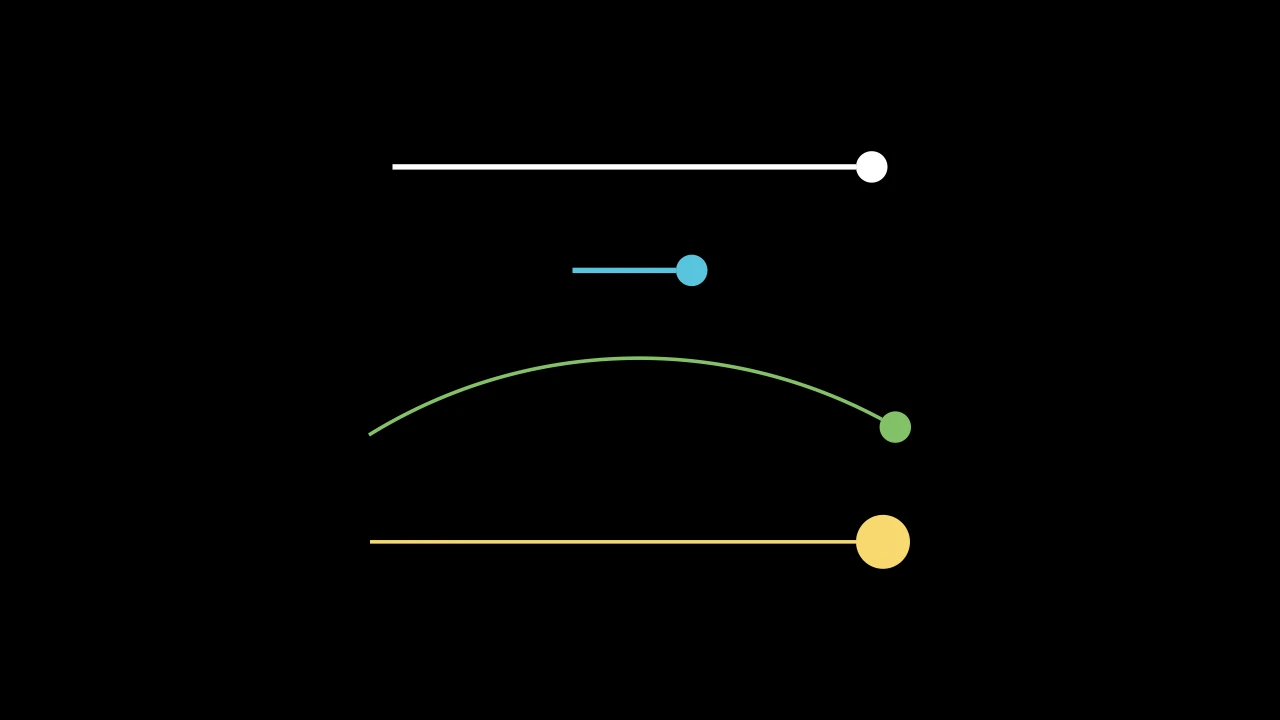
Code
import manimgx as m


class ArrowCircleFilledTipExample(m.Scene):
    def construct(self) -> None:
        tip = m.ArrowCircleFilledTip
        a, b = 3 * m.LEFT, 3 * m.RIGHT
        arrows = m.VGroup(
            m.Arrow(a, b, tip_shape=tip),
            m.Arrow(a / 3, b / 3, tip_shape=tip, color=m.BLUE),
            m.CurvedArrow(a, b, angle=-m.PI / 3, tip_shape=tip, color=m.GREEN),
            m.Line(a, b, color=m.YELLOW).add_tip(tip_shape=tip, tip_length=0.6),
        ).arrange(m.DOWN, buff=0.8)
        self.add(arrows)
A round tip, filled and without an outline: a disc length across, from where
the path stops to where it ended.
m.ArrowCircleFilledTip(length=DEFAULT_ARROW_TIP_LENGTH, start_angle=PI, **kwargs)
lengthIts diameter, in scene units.
start_angleAccepted for Manim compatibility; ignored.
colorThe color of both fill and stroke (default white); None for the class's default.
fill_colorThe fill's color;
colorif not given. Several colors make a gradient alongsheen_direction.fill_opacityThe fill's opacity, from 0 to 1 (default 0: no fill).
stroke_colorThe stroke's color;
colorif not given. Several colors make a gradient.stroke_opacityThe stroke's opacity, from 0 to 1 (default 1).
stroke_widthThe stroke's width, in hundredths of a scene unit (default 4; 0: no stroke).
background_stroke_colorThe color of an outline drawn behind the fill (default black).
background_stroke_opacityThe outline's opacity, from 0 to 1 (default 1).
background_stroke_widthThe outline's width, in hundredths of a scene unit (default 0: none).
sheen_factorHow much the colors lighten toward
sheen_direction, from -1 to 1 (default 0); a negative factor darkens.sheen_directionThe direction the colors lighten toward (default
UL).joint_typeHow the stroke is joined where its path turns: round, beveled or mitered, as a two-dimensional scene draws it (see LineJointType; default AUTO: mitered).
cap_styleHow the stroke ends, at each end it shows (an open path's, a dash's): round, butt or square, as a two-dimensional scene draws it (see CapStyleType; default AUTO: butt).
shade_in_3dWhether a three-dimensional scene's light shades the mobject.
materialHow its surface reflects the scene's lights in a three-dimensional scene (see Material); None: Manim's shading (default).
nameA name for the mobject; its class's name if not given.
z_indexIts place in the drawing order: a higher index is drawn over a lower one (default 0).
targetThe state
MoveToTargetmoves the mobject to.
It also takes the style keywords.
Source
src/manimgx/mobjects/shapes.py
ArrowCircleTip 
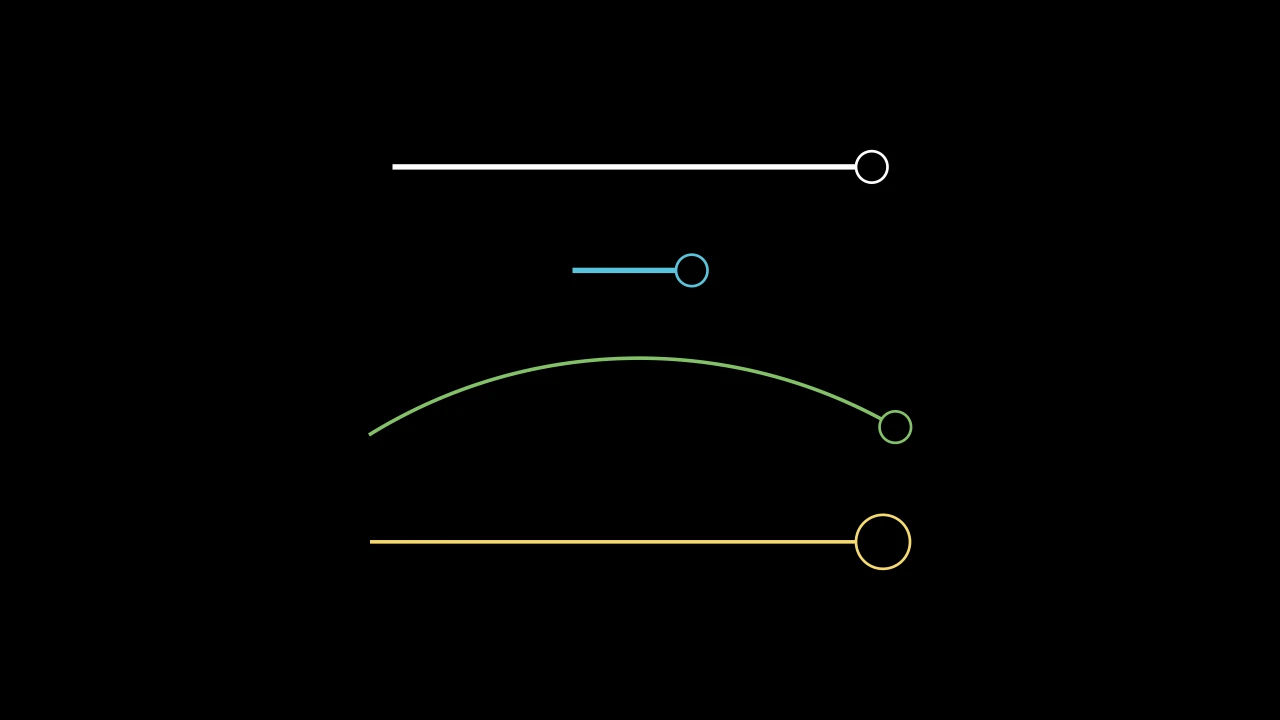
Code
import manimgx as m


class ArrowCircleTipExample(m.Scene):
    def construct(self) -> None:
        tip = m.ArrowCircleTip
        a, b = 3 * m.LEFT, 3 * m.RIGHT
        arrows = m.VGroup(
            m.Arrow(a, b, tip_shape=tip),
            m.Arrow(a / 3, b / 3, tip_shape=tip, color=m.BLUE),
            m.CurvedArrow(a, b, angle=-m.PI / 3, tip_shape=tip, color=m.GREEN),
            m.Line(a, b, color=m.YELLOW).add_tip(tip_shape=tip, tip_length=0.6),
        ).arrange(m.DOWN, buff=0.8)
        self.add(arrows)
A round tip, outlined: a circle length across, from where the path stops to
where it ended; its outline 3 wide and not filled.
m.ArrowCircleTip(length=DEFAULT_ARROW_TIP_LENGTH, start_angle=PI, **kwargs)
lengthIts diameter, in scene units.
start_angleAccepted for Manim compatibility; ignored.
colorThe color of both fill and stroke (default white); None for the class's default.
fill_colorThe fill's color;
colorif not given. Several colors make a gradient alongsheen_direction.fill_opacityThe fill's opacity, from 0 to 1 (default 0: no fill).
stroke_colorThe stroke's color;
colorif not given. Several colors make a gradient.stroke_opacityThe stroke's opacity, from 0 to 1 (default 1).
stroke_widthThe stroke's width, in hundredths of a scene unit (default 4; 0: no stroke).
background_stroke_colorThe color of an outline drawn behind the fill (default black).
background_stroke_opacityThe outline's opacity, from 0 to 1 (default 1).
background_stroke_widthThe outline's width, in hundredths of a scene unit (default 0: none).
sheen_factorHow much the colors lighten toward
sheen_direction, from -1 to 1 (default 0); a negative factor darkens.sheen_directionThe direction the colors lighten toward (default
UL).joint_typeHow the stroke is joined where its path turns: round, beveled or mitered, as a two-dimensional scene draws it (see LineJointType; default AUTO: mitered).
cap_styleHow the stroke ends, at each end it shows (an open path's, a dash's): round, butt or square, as a two-dimensional scene draws it (see CapStyleType; default AUTO: butt).
shade_in_3dWhether a three-dimensional scene's light shades the mobject.
materialHow its surface reflects the scene's lights in a three-dimensional scene (see Material); None: Manim's shading (default).
nameA name for the mobject; its class's name if not given.
z_indexIts place in the drawing order: a higher index is drawn over a lower one (default 0).
targetThe state
MoveToTargetmoves the mobject to.
It also takes the style keywords.
Source
src/manimgx/mobjects/shapes.py
ArrowSquareFilledTip 
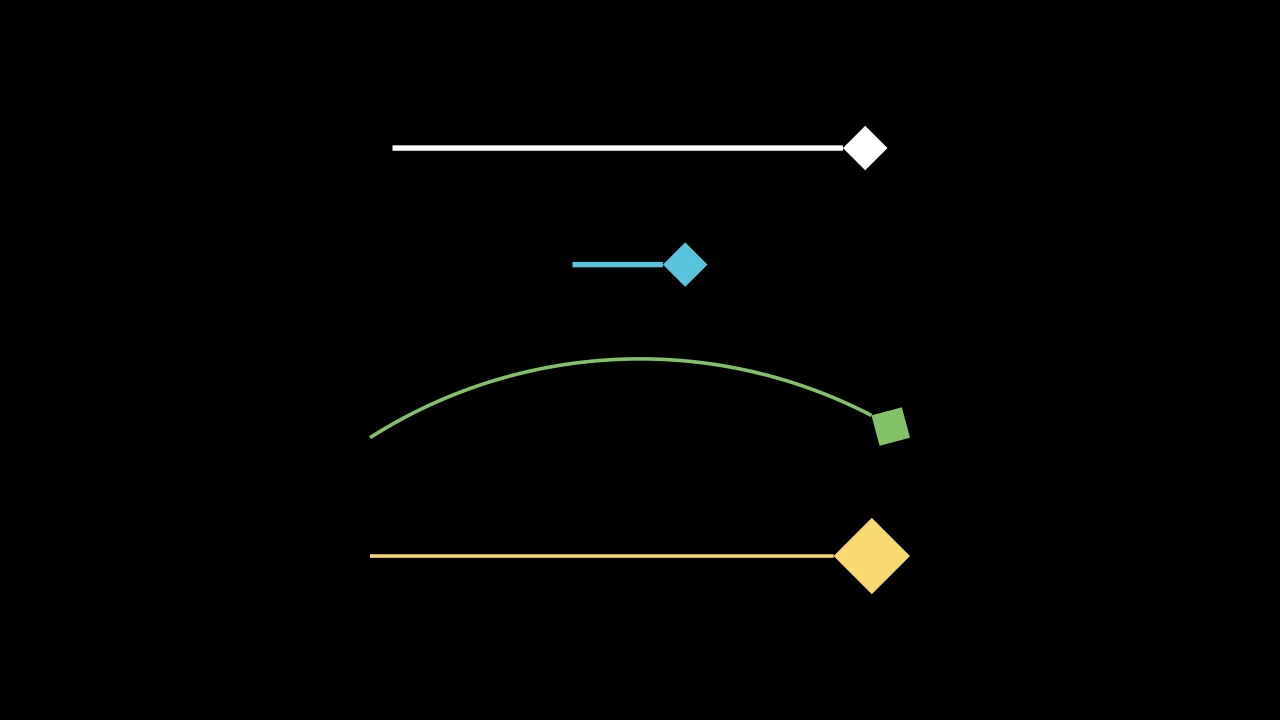
Code
import manimgx as m


class ArrowSquareFilledTipExample(m.Scene):
    def construct(self) -> None:
        tip = m.ArrowSquareFilledTip
        a, b = 3 * m.LEFT, 3 * m.RIGHT
        arrows = m.VGroup(
            m.Arrow(a, b, tip_shape=tip),
            m.Arrow(a / 3, b / 3, tip_shape=tip, color=m.BLUE),
            m.CurvedArrow(a, b, angle=-m.PI / 3, tip_shape=tip, color=m.GREEN),
            m.Line(a, b, color=m.YELLOW).add_tip(tip_shape=tip, tip_length=0.6),
        ).arrange(m.DOWN, buff=0.8)
        self.add(arrows)
A square tip, filled and without an outline: a square length on a side, set on
a corner, its diagonal along the path from where the path stops to where it ended.
Its length is that diagonal's.
m.ArrowSquareFilledTip(length=DEFAULT_ARROW_TIP_LENGTH, start_angle=PI, **kwargs)
lengthThe length of its sides, in scene units.
start_angleAccepted for Manim compatibility; ignored.
colorThe color of both fill and stroke (default white); None for the class's default.
fill_colorThe fill's color;
colorif not given. Several colors make a gradient alongsheen_direction.fill_opacityThe fill's opacity, from 0 to 1 (default 0: no fill).
stroke_colorThe stroke's color;
colorif not given. Several colors make a gradient.stroke_opacityThe stroke's opacity, from 0 to 1 (default 1).
stroke_widthThe stroke's width, in hundredths of a scene unit (default 4; 0: no stroke).
background_stroke_colorThe color of an outline drawn behind the fill (default black).
background_stroke_opacityThe outline's opacity, from 0 to 1 (default 1).
background_stroke_widthThe outline's width, in hundredths of a scene unit (default 0: none).
sheen_factorHow much the colors lighten toward
sheen_direction, from -1 to 1 (default 0); a negative factor darkens.sheen_directionThe direction the colors lighten toward (default
UL).joint_typeHow the stroke is joined where its path turns: round, beveled or mitered, as a two-dimensional scene draws it (see LineJointType; default AUTO: mitered).
cap_styleHow the stroke ends, at each end it shows (an open path's, a dash's): round, butt or square, as a two-dimensional scene draws it (see CapStyleType; default AUTO: butt).
shade_in_3dWhether a three-dimensional scene's light shades the mobject.
materialHow its surface reflects the scene's lights in a three-dimensional scene (see Material); None: Manim's shading (default).
nameA name for the mobject; its class's name if not given.
z_indexIts place in the drawing order: a higher index is drawn over a lower one (default 0).
targetThe state
MoveToTargetmoves the mobject to.
It also takes the style keywords.
Source
src/manimgx/mobjects/shapes.py
ArrowSquareTip 
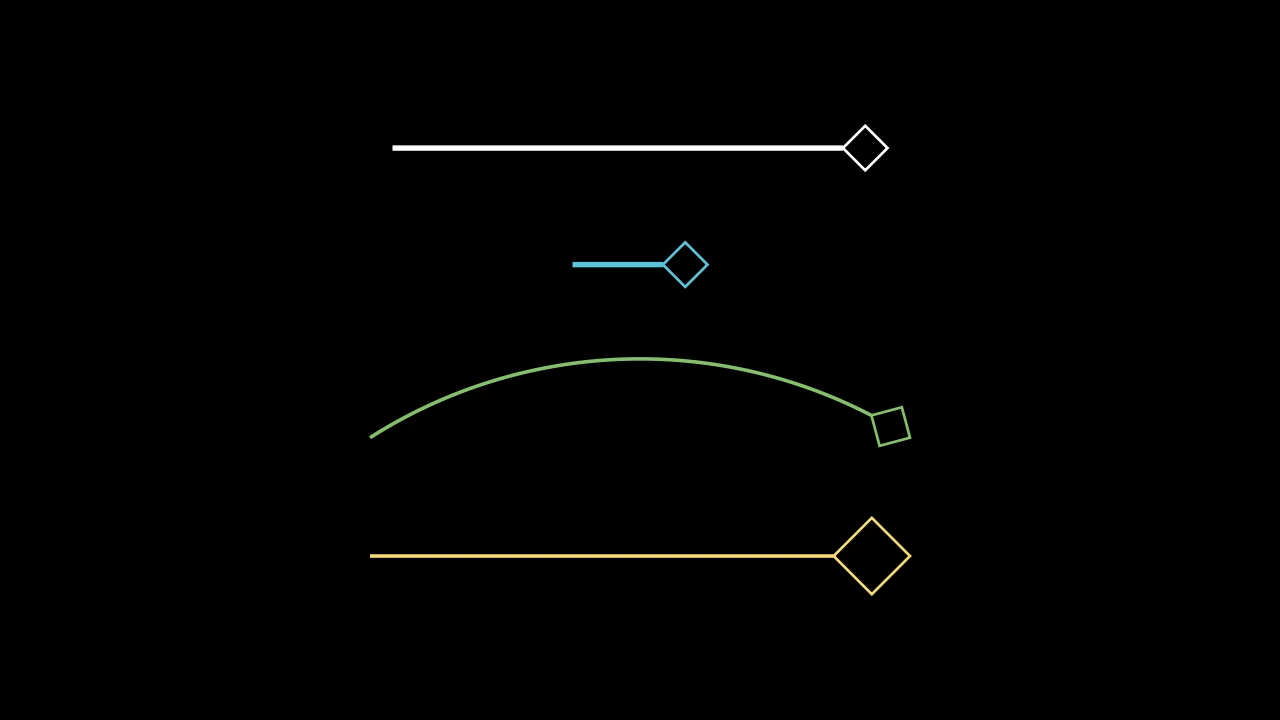
Code
import manimgx as m


class ArrowSquareTipExample(m.Scene):
    def construct(self) -> None:
        tip = m.ArrowSquareTip
        a, b = 3 * m.LEFT, 3 * m.RIGHT
        arrows = m.VGroup(
            m.Arrow(a, b, tip_shape=tip),
            m.Arrow(a / 3, b / 3, tip_shape=tip, color=m.BLUE),
            m.CurvedArrow(a, b, angle=-m.PI / 3, tip_shape=tip, color=m.GREEN),
            m.Line(a, b, color=m.YELLOW).add_tip(tip_shape=tip, tip_length=0.6),
        ).arrange(m.DOWN, buff=0.8)
        self.add(arrows)
A square tip, outlined: a square length on a side, set on a corner, its
diagonal along the path from where the path stops to where it ended; its outline 3
wide and not filled.
Its length is that diagonal's.
m.ArrowSquareTip(length=DEFAULT_ARROW_TIP_LENGTH, start_angle=PI, **kwargs)
lengthThe length of its sides, in scene units.
start_angleAccepted for Manim compatibility; ignored.
colorThe color of both fill and stroke (default white); None for the class's default.
fill_colorThe fill's color;
colorif not given. Several colors make a gradient alongsheen_direction.fill_opacityThe fill's opacity, from 0 to 1 (default 0: no fill).
stroke_colorThe stroke's color;
colorif not given. Several colors make a gradient.stroke_opacityThe stroke's opacity, from 0 to 1 (default 1).
stroke_widthThe stroke's width, in hundredths of a scene unit (default 4; 0: no stroke).
background_stroke_colorThe color of an outline drawn behind the fill (default black).
background_stroke_opacityThe outline's opacity, from 0 to 1 (default 1).
background_stroke_widthThe outline's width, in hundredths of a scene unit (default 0: none).
sheen_factorHow much the colors lighten toward
sheen_direction, from -1 to 1 (default 0); a negative factor darkens.sheen_directionThe direction the colors lighten toward (default
UL).joint_typeHow the stroke is joined where its path turns: round, beveled or mitered, as a two-dimensional scene draws it (see LineJointType; default AUTO: mitered).
cap_styleHow the stroke ends, at each end it shows (an open path's, a dash's): round, butt or square, as a two-dimensional scene draws it (see CapStyleType; default AUTO: butt).
shade_in_3dWhether a three-dimensional scene's light shades the mobject.
materialHow its surface reflects the scene's lights in a three-dimensional scene (see Material); None: Manim's shading (default).
nameA name for the mobject; its class's name if not given.
z_indexIts place in the drawing order: a higher index is drawn over a lower one (default 0).
targetThe state
MoveToTargetmoves the mobject to.
It also takes the style keywords.
Source
src/manimgx/mobjects/shapes.py
ArrowTip 
The base of arrow tips: a small shape with two points of its own, its tip_point, where the path it ends points to, and its base, where the path stops.
A path makes its tip as tip_shape(length=…, **style) (see
add_tip), then turns and moves it into place: the
tip is what its class makes at that length. It is not made itself: its subclasses
are the tips. To make a tip of your own, subclass it and a shape, made at the length
given: the shape's first point is the tip point, and the point halfway around its
outline is the base. Both are read from its points, so they move with it; a
subclass that names other points of its shape does so as properties, never stored.
lengthThe tip's length, in scene units.
colorThe color of both fill and stroke (default white); None for the class's default.
fill_colorThe fill's color;
colorif not given. Several colors make a gradient alongsheen_direction.fill_opacityThe fill's opacity, from 0 to 1 (default 0: no fill).
stroke_colorThe stroke's color;
colorif not given. Several colors make a gradient.stroke_opacityThe stroke's opacity, from 0 to 1 (default 1).
stroke_widthThe stroke's width, in hundredths of a scene unit (default 4; 0: no stroke).
background_stroke_colorThe color of an outline drawn behind the fill (default black).
background_stroke_opacityThe outline's opacity, from 0 to 1 (default 1).
background_stroke_widthThe outline's width, in hundredths of a scene unit (default 0: none).
sheen_factorHow much the colors lighten toward
sheen_direction, from -1 to 1 (default 0); a negative factor darkens.sheen_directionThe direction the colors lighten toward (default
UL).joint_typeHow the stroke is joined where its path turns: round, beveled or mitered, as a two-dimensional scene draws it (see LineJointType; default AUTO: mitered).
cap_styleHow the stroke ends, at each end it shows (an open path's, a dash's): round, butt or square, as a two-dimensional scene draws it (see CapStyleType; default AUTO: butt).
shade_in_3dWhether a three-dimensional scene's light shades the mobject.
materialHow its surface reflects the scene's lights in a three-dimensional scene (see Material); None: Manim's shading (default).
nameA name for the mobject; its class's name if not given.
z_indexIts place in the drawing order: a higher index is drawn over a lower one (default 0).
targetThe state
MoveToTargetmoves the mobject to.
It also takes the style keywords.
Source
src/manimgx/mobjects/shapes.py
base 
The point where the path meets the tip, and stops: halfway around the tip's outline from its tip point.
tip_point 
The tip's point, where the path points to: the first point of its outline.
vector 
tip_angle 
The direction the tip points in: the angle of its vector, in radians, counterclockwise from the positive x-axis.
length 
The tip's length, in scene units: the distance from its base to its tip point.