Combining shapes
The film's code
import manimgx as m


class CombiningShapes(m.Scene):
    def construct(self) -> None:
        def pair() -> m.VGroup:
            return m.VGroup(
                m.Circle(radius=0.9).shift(0.45 * m.LEFT),
                m.Square(side_length=1.6).shift(0.45 * m.RIGHT),
            )

        made = m.VGroup()
        names = ["Union", "Intersection", "Difference", "Exclusion"]
        for kind, name in zip(
            [m.Union, m.Intersection, m.Difference, m.Exclusion], names, strict=True
        ):
            a, b = pair()
            shape = kind(a, b, color=m.BLUE, fill_opacity=0.7)
            outline = m.VGroup(a, b).set_stroke(m.GREY_B, width=2)
            label = m.Text(name, font="monospace", font_size=26).next_to(
                outline, m.DOWN, buff=0.4
            )
            made.add(m.VGroup(outline, shape, label))
        made.arrange(buff=0.6)
        self.play(m.LaggedStart(*[m.Create(cell[0]) for cell in made], lag_ratio=0.15))
        self.play(m.LaggedStart(*[m.FadeIn(cell[1:]) for cell in made], lag_ratio=0.15))
        self.wait()
Two shapes overlap in three regions: where only the first is, where only the second is, and where both are. Each of these classes makes a new path from some of those regions, styled as you say: the originals stay as they are. A cutout cuts holes in a shape, and a convex hull wraps points as a band would.
Union 
Code
import manimgx as m


class UnionExample(m.Scene):
    def construct(self) -> None:
        square = m.Square(3, color=m.RED, fill_opacity=0.5).shift(4.5 * m.LEFT)
        circle = m.Circle(1.5, color=m.BLUE, fill_opacity=0.5)
        circle.shift(3 * m.LEFT + m.UP)
        union = m.Union(square, circle, color=m.GREEN, fill_opacity=0.8)
        self.add(square, circle, union.shift(7 * m.RIGHT))
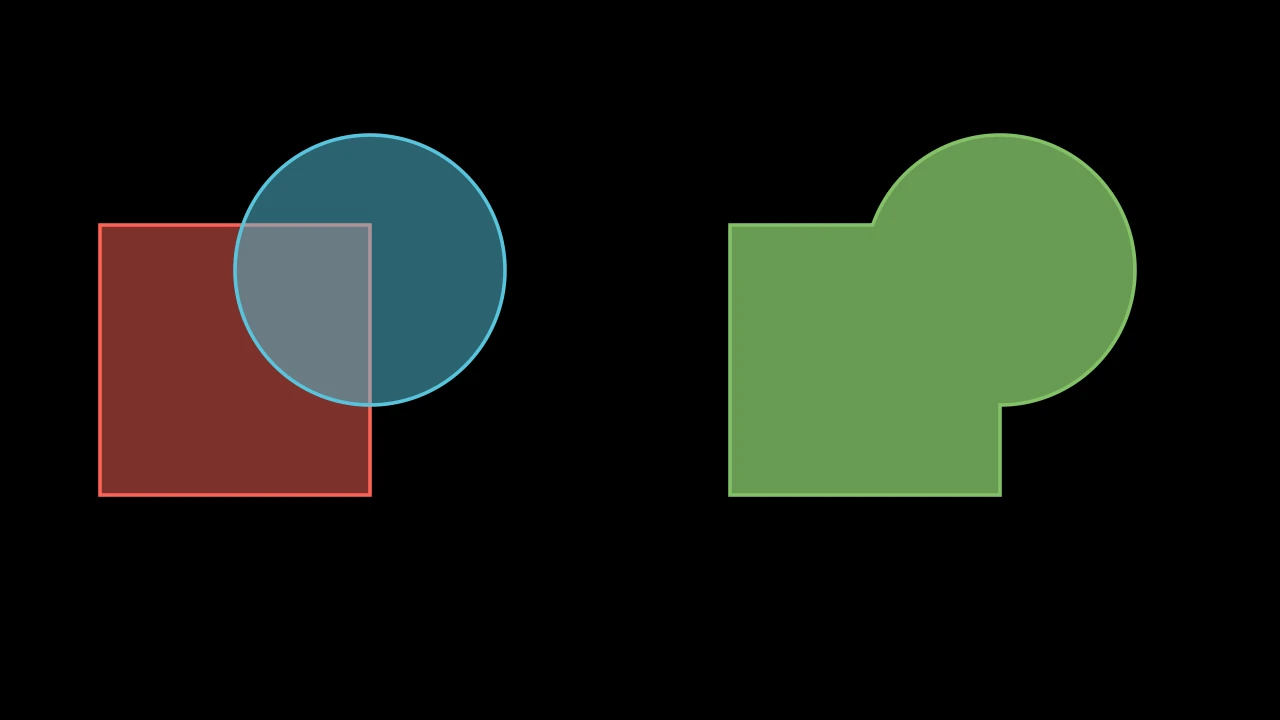
The union of shapes: the region any of them covers, as a new path; white unless styled.
It is found from the shapes' own paths (not their submobjects'), each the region its fill covers, in the plane of the screen: their z coordinates are dropped. The shapes stay as they are.
*vmobjectsThe shapes: at least two.
colorThe color of both fill and stroke (default white); None for the class's default.
fill_colorThe fill's color;
colorif not given. Several colors make a gradient alongsheen_direction.fill_opacityThe fill's opacity, from 0 to 1 (default 0: no fill).
stroke_colorThe stroke's color;
colorif not given. Several colors make a gradient.stroke_opacityThe stroke's opacity, from 0 to 1 (default 1).
stroke_widthThe stroke's width, in hundredths of a scene unit (default 4; 0: no stroke).
background_stroke_colorThe color of an outline drawn behind the fill (default black).
background_stroke_opacityThe outline's opacity, from 0 to 1 (default 1).
background_stroke_widthThe outline's width, in hundredths of a scene unit (default 0: none).
sheen_factorHow much the colors lighten toward
sheen_direction, from -1 to 1 (default 0); a negative factor darkens.sheen_directionThe direction the colors lighten toward (default
UL).joint_typeHow the stroke is joined where its path turns: round, beveled or mitered, as a two-dimensional scene draws it (see LineJointType; default AUTO: mitered).
cap_styleHow the stroke ends, at each end it shows (an open path's, a dash's): round, butt or square, as a two-dimensional scene draws it (see CapStyleType; default AUTO: butt).
shade_in_3dWhether a three-dimensional scene's light shades the mobject.
materialHow its surface reflects the scene's lights in a three-dimensional scene (see Material); None: Manim's shading (default).
nameA name for the mobject; its class's name if not given.
z_indexIts place in the drawing order: a higher index is drawn over a lower one (default 0).
targetThe state
MoveToTargetmoves the mobject to.
It also takes the style keywords.
Source
src/manimgx/mobjects/shapes.py
Intersection 
Code
import manimgx as m


class IntersectionExample(m.Scene):
    def construct(self) -> None:
        square = m.Square(3, color=m.RED, fill_opacity=0.5).shift(4.5 * m.LEFT)
        circle = m.Circle(1.5, color=m.BLUE, fill_opacity=0.5)
        circle.shift(3 * m.LEFT + m.UP)
        common = m.Intersection(square, circle, color=m.GREEN, fill_opacity=0.8)
        self.add(square, circle, common.shift(7 * m.RIGHT))
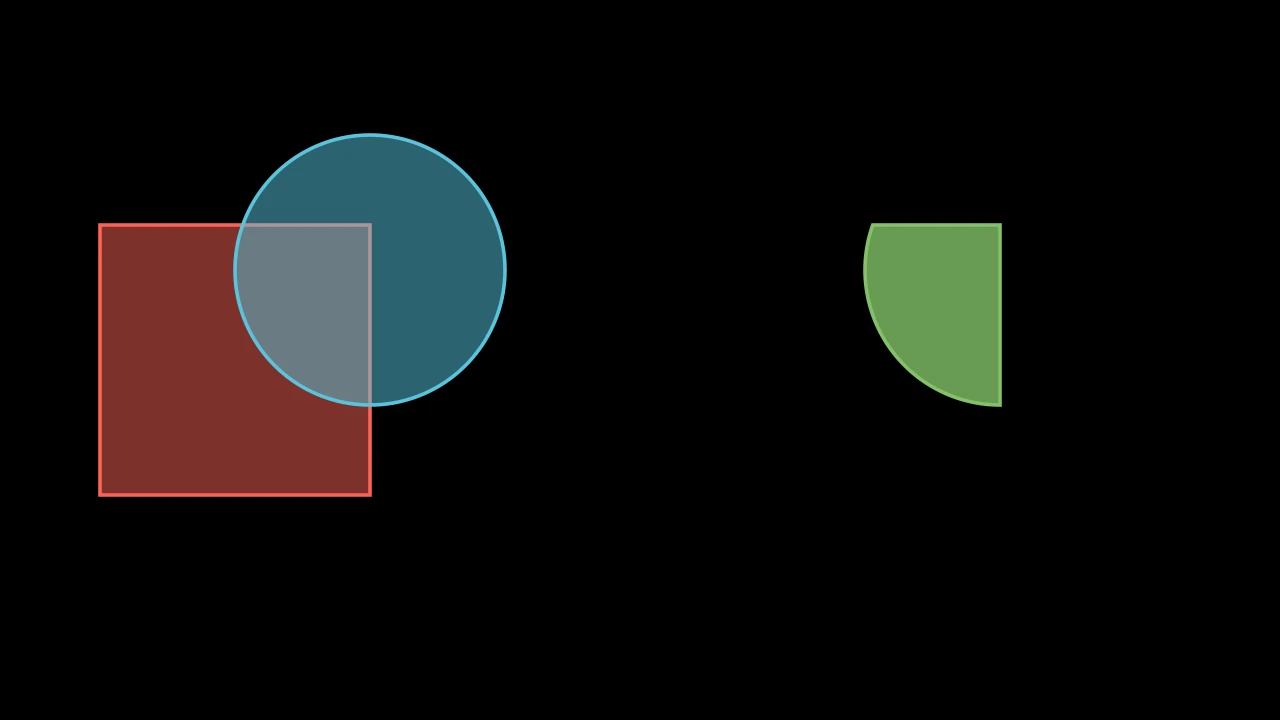
The intersection of shapes: the region all of them cover, as a new path; white unless styled.
It is found from the shapes' own paths (not their submobjects'), each the region its fill covers, in the plane of the screen: their z coordinates are dropped. The shapes stay as they are.
*vmobjectsThe shapes: at least two.
colorThe color of both fill and stroke (default white); None for the class's default.
fill_colorThe fill's color;
colorif not given. Several colors make a gradient alongsheen_direction.fill_opacityThe fill's opacity, from 0 to 1 (default 0: no fill).
stroke_colorThe stroke's color;
colorif not given. Several colors make a gradient.stroke_opacityThe stroke's opacity, from 0 to 1 (default 1).
stroke_widthThe stroke's width, in hundredths of a scene unit (default 4; 0: no stroke).
background_stroke_colorThe color of an outline drawn behind the fill (default black).
background_stroke_opacityThe outline's opacity, from 0 to 1 (default 1).
background_stroke_widthThe outline's width, in hundredths of a scene unit (default 0: none).
sheen_factorHow much the colors lighten toward
sheen_direction, from -1 to 1 (default 0); a negative factor darkens.sheen_directionThe direction the colors lighten toward (default
UL).joint_typeHow the stroke is joined where its path turns: round, beveled or mitered, as a two-dimensional scene draws it (see LineJointType; default AUTO: mitered).
cap_styleHow the stroke ends, at each end it shows (an open path's, a dash's): round, butt or square, as a two-dimensional scene draws it (see CapStyleType; default AUTO: butt).
shade_in_3dWhether a three-dimensional scene's light shades the mobject.
materialHow its surface reflects the scene's lights in a three-dimensional scene (see Material); None: Manim's shading (default).
nameA name for the mobject; its class's name if not given.
z_indexIts place in the drawing order: a higher index is drawn over a lower one (default 0).
targetThe state
MoveToTargetmoves the mobject to.
It also takes the style keywords.
Source
src/manimgx/mobjects/shapes.py
Difference 
Code
import manimgx as m


class DifferenceExample(m.Scene):
    def construct(self) -> None:
        square = m.Square(3, color=m.RED, fill_opacity=0.5).shift(4.5 * m.LEFT)
        circle = m.Circle(1.5, color=m.BLUE, fill_opacity=0.5)
        circle.shift(3 * m.LEFT + m.UP)
        cut = m.Difference(square, circle, color=m.GREEN, fill_opacity=0.8)
        self.add(square, circle, cut.shift(7 * m.RIGHT))
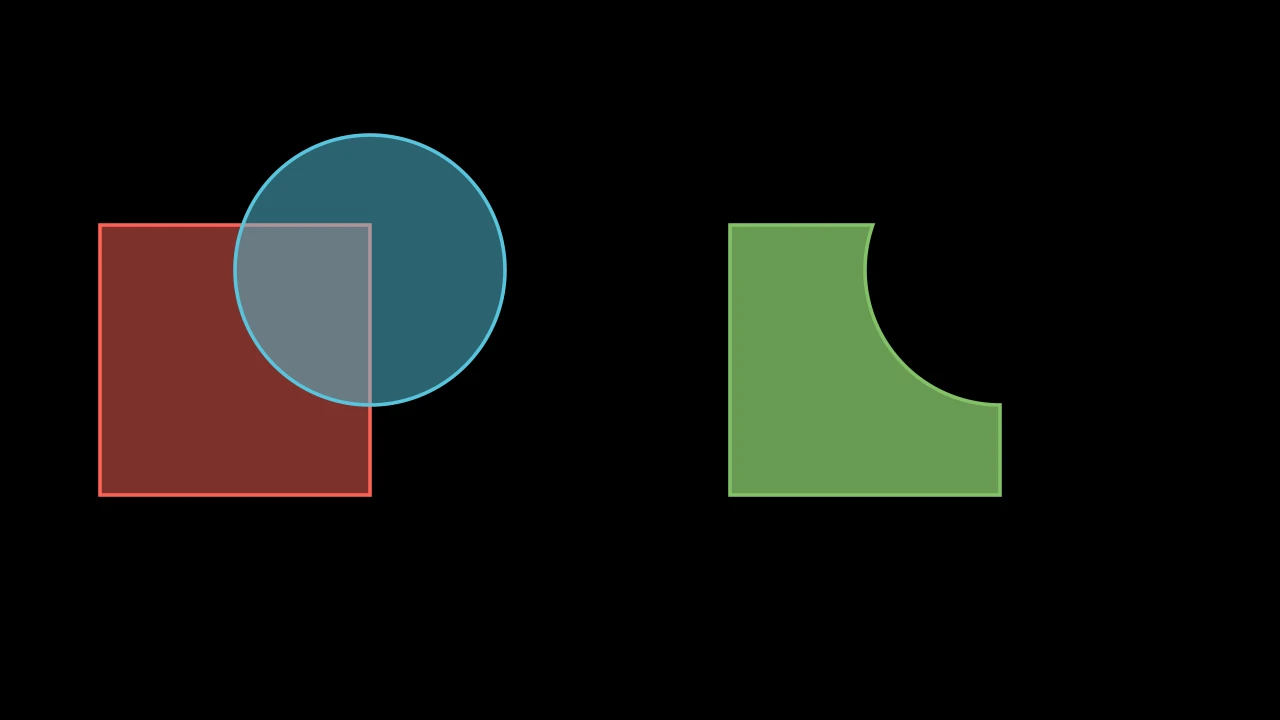
The difference of two shapes: the region the first covers and the second does not, as a new path; white unless styled.
It is found from the shapes' own paths (not their submobjects'), each the region its fill covers, in the plane of the screen: their z coordinates are dropped. The shapes stay as they are.
subjectThe shape to take a part of.
clipThe shape whose region is left out of it.
colorThe color of both fill and stroke (default white); None for the class's default.
fill_colorThe fill's color;
colorif not given. Several colors make a gradient alongsheen_direction.fill_opacityThe fill's opacity, from 0 to 1 (default 0: no fill).
stroke_colorThe stroke's color;
colorif not given. Several colors make a gradient.stroke_opacityThe stroke's opacity, from 0 to 1 (default 1).
stroke_widthThe stroke's width, in hundredths of a scene unit (default 4; 0: no stroke).
background_stroke_colorThe color of an outline drawn behind the fill (default black).
background_stroke_opacityThe outline's opacity, from 0 to 1 (default 1).
background_stroke_widthThe outline's width, in hundredths of a scene unit (default 0: none).
sheen_factorHow much the colors lighten toward
sheen_direction, from -1 to 1 (default 0); a negative factor darkens.sheen_directionThe direction the colors lighten toward (default
UL).joint_typeHow the stroke is joined where its path turns: round, beveled or mitered, as a two-dimensional scene draws it (see LineJointType; default AUTO: mitered).
cap_styleHow the stroke ends, at each end it shows (an open path's, a dash's): round, butt or square, as a two-dimensional scene draws it (see CapStyleType; default AUTO: butt).
shade_in_3dWhether a three-dimensional scene's light shades the mobject.
materialHow its surface reflects the scene's lights in a three-dimensional scene (see Material); None: Manim's shading (default).
nameA name for the mobject; its class's name if not given.
z_indexIts place in the drawing order: a higher index is drawn over a lower one (default 0).
targetThe state
MoveToTargetmoves the mobject to.
It also takes the style keywords.
Source
src/manimgx/mobjects/shapes.py
Exclusion 
Code
import manimgx as m


class ExclusionExample(m.Scene):
    def construct(self) -> None:
        square = m.Square(3, color=m.RED, fill_opacity=0.5).shift(4.5 * m.LEFT)
        circle = m.Circle(1.5, color=m.BLUE, fill_opacity=0.5)
        circle.shift(3 * m.LEFT + m.UP)
        either = m.Exclusion(square, circle, color=m.GREEN, fill_opacity=0.8)
        self.add(square, circle, either.shift(7 * m.RIGHT))
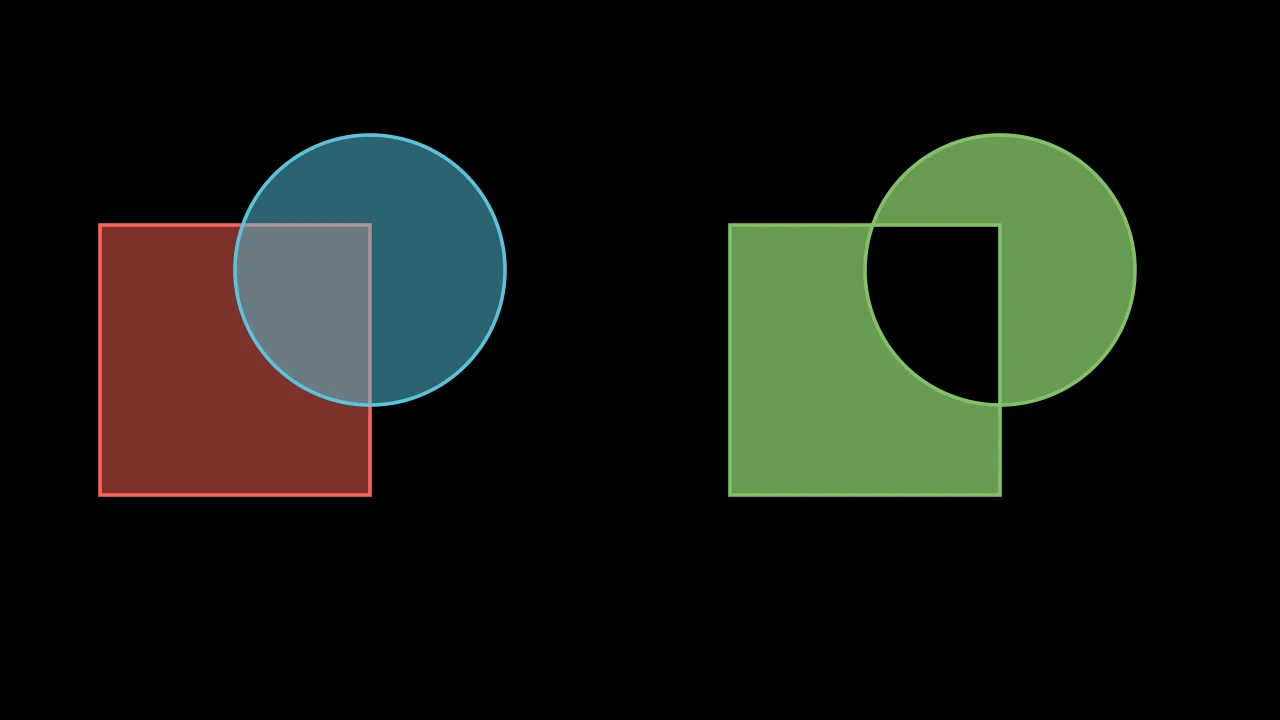
The exclusive or of two shapes: the region one of them covers but not both, as a new path; white unless styled.
It is found from the shapes' own paths (not their submobjects'), each the region its fill covers, in the plane of the screen: their z coordinates are dropped. The shapes stay as they are.
subjectThe first shape.
clipThe second shape.
colorThe color of both fill and stroke (default white); None for the class's default.
fill_colorThe fill's color;
colorif not given. Several colors make a gradient alongsheen_direction.fill_opacityThe fill's opacity, from 0 to 1 (default 0: no fill).
stroke_colorThe stroke's color;
colorif not given. Several colors make a gradient.stroke_opacityThe stroke's opacity, from 0 to 1 (default 1).
stroke_widthThe stroke's width, in hundredths of a scene unit (default 4; 0: no stroke).
background_stroke_colorThe color of an outline drawn behind the fill (default black).
background_stroke_opacityThe outline's opacity, from 0 to 1 (default 1).
background_stroke_widthThe outline's width, in hundredths of a scene unit (default 0: none).
sheen_factorHow much the colors lighten toward
sheen_direction, from -1 to 1 (default 0); a negative factor darkens.sheen_directionThe direction the colors lighten toward (default
UL).joint_typeHow the stroke is joined where its path turns: round, beveled or mitered, as a two-dimensional scene draws it (see LineJointType; default AUTO: mitered).
cap_styleHow the stroke ends, at each end it shows (an open path's, a dash's): round, butt or square, as a two-dimensional scene draws it (see CapStyleType; default AUTO: butt).
shade_in_3dWhether a three-dimensional scene's light shades the mobject.
materialHow its surface reflects the scene's lights in a three-dimensional scene (see Material); None: Manim's shading (default).
nameA name for the mobject; its class's name if not given.
z_indexIts place in the drawing order: a higher index is drawn over a lower one (default 0).
targetThe state
MoveToTargetmoves the mobject to.
It also takes the style keywords.
Source
src/manimgx/mobjects/shapes.py
Cutout 
Code
import manimgx as m


class CutoutExample(m.Scene):
    def construct(self) -> None:
        holes = [
            m.Circle(0.7).shift(1.3 * m.UL),
            m.Square(1.4).shift(1.3 * m.UR),
            m.Triangle(radius=0.8).shift(1.3 * m.DL),
            m.Star(outer_radius=0.8).shift(1.3 * m.DR),
        ]
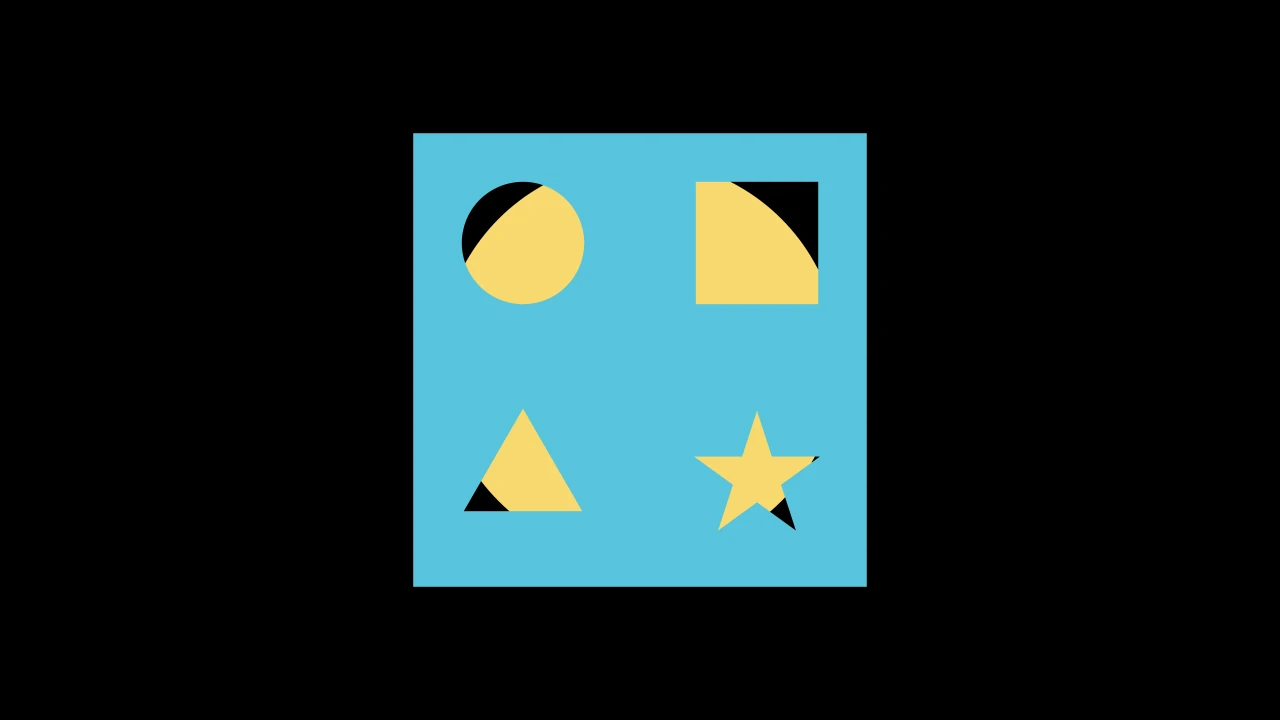
        card = m.Cutout(m.Square(5), *holes, color=m.BLUE, fill_opacity=1)
        behind = m.Circle(radius=2.2, color=m.YELLOW, fill_opacity=1)
        self.add(behind, card)
A shape with holes cut out of it: the main shape's outline, with the other shapes' outlines as holes; white unless styled.
Each hole's path runs the other way around from the main shape's, so the fill leaves it out: the shapes given as holes are turned to run that way, in place. Only the shapes' own paths are used, not their submobjects', and the cutout has a style of its own.
main_shapeThe shape to cut the holes out of.
*mobjectsThe shapes of the holes, inside it.
colorThe color of both fill and stroke (default white); None for the class's default.
fill_colorThe fill's color;
colorif not given. Several colors make a gradient alongsheen_direction.fill_opacityThe fill's opacity, from 0 to 1 (default 0: no fill).
stroke_colorThe stroke's color;
colorif not given. Several colors make a gradient.stroke_opacityThe stroke's opacity, from 0 to 1 (default 1).
stroke_widthThe stroke's width, in hundredths of a scene unit (default 4; 0: no stroke).
background_stroke_colorThe color of an outline drawn behind the fill (default black).
background_stroke_opacityThe outline's opacity, from 0 to 1 (default 1).
background_stroke_widthThe outline's width, in hundredths of a scene unit (default 0: none).
sheen_factorHow much the colors lighten toward
sheen_direction, from -1 to 1 (default 0); a negative factor darkens.sheen_directionThe direction the colors lighten toward (default
UL).joint_typeHow the stroke is joined where its path turns: round, beveled or mitered, as a two-dimensional scene draws it (see LineJointType; default AUTO: mitered).
cap_styleHow the stroke ends, at each end it shows (an open path's, a dash's): round, butt or square, as a two-dimensional scene draws it (see CapStyleType; default AUTO: butt).
shade_in_3dWhether a three-dimensional scene's light shades the mobject.
materialHow its surface reflects the scene's lights in a three-dimensional scene (see Material); None: Manim's shading (default).
nameA name for the mobject; its class's name if not given.
z_indexIts place in the drawing order: a higher index is drawn over a lower one (default 0).
targetThe state
MoveToTargetmoves the mobject to.
It also takes the style keywords.
Source
src/manimgx/mobjects/shapes.py
ConvexHull 
Code
import numpy as np

import manimgx as m


class ConvexHullExample(m.Scene):
    def construct(self) -> None:
        points = np.random.default_rng(7).uniform(-3, 3, (20, 3)) * [1.5, 1, 0]
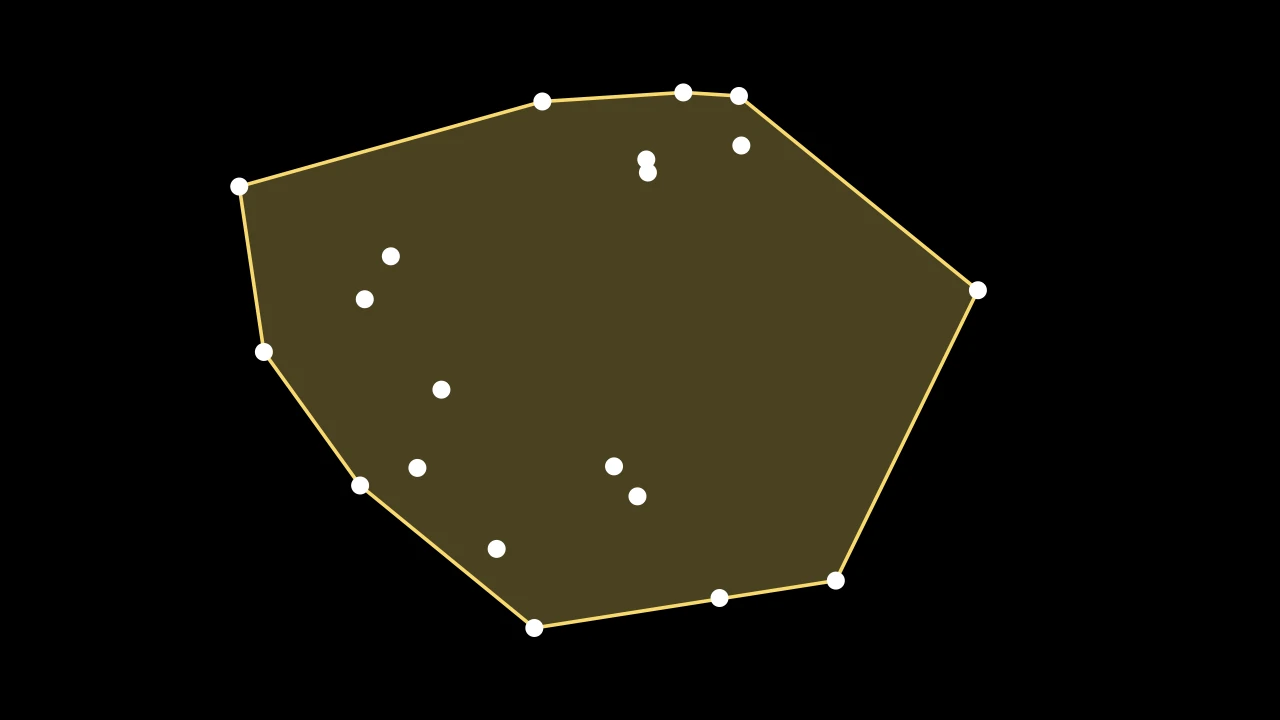
        hull = m.ConvexHull(*points, color=m.YELLOW, fill_opacity=0.3)
        self.add(hull, *(m.Dot(point, radius=0.1) for point in points))
The convex hull of points: the smallest convex polygon around them all, its vertices among them; blue unless styled.
It is found in the plane of the screen: the points' z coordinates are ignored.
*pointsThe points: at least three, not all on one line.
toleranceHow far outside the hull a point may be and still not be made a vertex of it, in scene units.
colorThe color of both fill and stroke (default white); None for the class's default.
fill_colorThe fill's color;
colorif not given. Several colors make a gradient alongsheen_direction.fill_opacityThe fill's opacity, from 0 to 1 (default 0: no fill).
stroke_colorThe stroke's color;
colorif not given. Several colors make a gradient.stroke_opacityThe stroke's opacity, from 0 to 1 (default 1).
stroke_widthThe stroke's width, in hundredths of a scene unit (default 4; 0: no stroke).
background_stroke_colorThe color of an outline drawn behind the fill (default black).
background_stroke_opacityThe outline's opacity, from 0 to 1 (default 1).
background_stroke_widthThe outline's width, in hundredths of a scene unit (default 0: none).
sheen_factorHow much the colors lighten toward
sheen_direction, from -1 to 1 (default 0); a negative factor darkens.sheen_directionThe direction the colors lighten toward (default
UL).joint_typeHow the stroke is joined where its path turns: round, beveled or mitered, as a two-dimensional scene draws it (see LineJointType; default AUTO: mitered).
cap_styleHow the stroke ends, at each end it shows (an open path's, a dash's): round, butt or square, as a two-dimensional scene draws it (see CapStyleType; default AUTO: butt).
shade_in_3dWhether a three-dimensional scene's light shades the mobject.
materialHow its surface reflects the scene's lights in a three-dimensional scene (see Material); None: Manim's shading (default).
nameA name for the mobject; its class's name if not given.
z_indexIts place in the drawing order: a higher index is drawn over a lower one (default 0).
targetThe state
MoveToTargetmoves the mobject to.
It also takes the style keywords.
Source
src/manimgx/mobjects/shapes.py