Annotations
The film's code
import manimgx as m


class AnnotationsHero(m.Scene):
    def construct(self) -> None:
        formula = m.MathTex(r"a^2 + b^2 = c^2", font_size=72).shift(1.5 * m.UP)
        brace = m.Brace(formula[0][:5], m.DOWN, color=m.YELLOW)
        note = brace.get_text("the legs")
        frame = m.SurroundingRectangle(formula[0][6:], color=m.BLUE)
        a, b, c = [-1.5, -3, 0], [1.5, -3, 0], [1.5, -0.8, 0]
        triangle = m.Polygon(a, b, c, color=m.WHITE)
        right = m.RightAngle(m.Line(b, a), m.Line(b, c), length=0.35, color=m.GREEN)
        angle = m.Angle(m.Line(a, b), m.Line(a, c), radius=0.8, color=m.RED)
        self.play(m.Write(formula))
        self.play(m.GrowFromCenter(brace), m.FadeIn(note), m.Create(frame))
        self.play(m.Create(triangle), m.Create(right), m.Create(angle))
        self.wait()
An annotation points at another mobject, frames it, labels it or measures it. Most take the mobject when you make them and fit it: a brace as long as its side, a frame around it, a line under it. They don't follow it afterward; to make one follow, redraw it at every frame with always_redraw.
Braces
Brace 
Code
import manimgx as m


class BraceExample(m.Scene):
    def construct(self) -> None:
        square = m.Square(side_length=3, color=m.BLUE, fill_opacity=0.5)
        self.add(square)
        self.play(
            m.GrowFromCenter(m.Brace(square)),
            m.GrowFromCenter(m.Brace(square, m.RIGHT, color=m.YELLOW)),
            m.GrowFromCenter(m.Brace(square, m.UP, buff=0.5, color=m.GREEN)),
        )
A curly brace along a side of a mobject, as long as the mobject is wide there: filled white, without an outline, unless styled.
The brace lies buff beyond the mobject's bounding box, on the side direction
points to, spanning the mobject across that direction, its tip pointing away; the
mobject is left as it is. get_text and
get_tex label its tip.
m.Brace(mobject, direction=DOWN, buff=0.2, sharpness=2, **kwargs)
mobjectThe mobject to brace.
directionThe side the brace is on, as a direction (DOWN: below).
buffThe gap between the mobject and the brace, in scene units.
sharpnessHow sharp the brace's tip and ends are: the higher, the narrower its curls.
colorThe color of both fill and stroke (default white); None for the class's default.
fill_colorThe fill's color;
colorif not given. Several colors make a gradient alongsheen_direction.fill_opacityThe fill's opacity, from 0 to 1 (default 0: no fill).
stroke_colorThe stroke's color;
colorif not given. Several colors make a gradient.stroke_opacityThe stroke's opacity, from 0 to 1 (default 1).
stroke_widthThe stroke's width, in hundredths of a scene unit (default 4; 0: no stroke).
background_stroke_colorThe color of an outline drawn behind the fill (default black).
background_stroke_opacityThe outline's opacity, from 0 to 1 (default 1).
background_stroke_widthThe outline's width, in hundredths of a scene unit (default 0: none).
sheen_factorHow much the colors lighten toward
sheen_direction, from -1 to 1 (default 0); a negative factor darkens.sheen_directionThe direction the colors lighten toward (default
UL).joint_typeHow the stroke is joined where its path turns: round, beveled or mitered, as a two-dimensional scene draws it (see LineJointType; default AUTO: mitered).
cap_styleHow the stroke ends, at each end it shows (an open path's, a dash's): round, butt or square, as a two-dimensional scene draws it (see CapStyleType; default AUTO: butt).
shade_in_3dWhether a three-dimensional scene's light shades the mobject.
materialHow its surface reflects the scene's lights in a three-dimensional scene (see Material); None: Manim's shading (default).
nameA name for the mobject; its class's name if not given.
z_indexIts place in the drawing order: a higher index is drawn over a lower one (default 0).
targetThe state
MoveToTargetmoves the mobject to.
It also takes the style keywords.
Source
src/manimgx/mobjects/annotations.py
put_at_tip 
Put a mobject at the brace's tip, beyond it.
mobThe mobject to put there.
use_next_toWhether it goes next to the tip, on the side the brace points to (its direction rounded to one of the eight compass directions); if not, its center goes from the tip along the brace's direction, by half its width and
buff.buffThe gap between the two, in scene units (default 0.25).
aligned_edgeThe edge, as a direction, along which the two line up besides the side they meet at: with the direction RIGHT and UP here, their tops line up (default ORIGIN: centered).
submobject_to_alignA part of the mobject to put beside the other in its place; the rest moves with it (default None: the whole mobject).
index_of_submobject_to_alignThe index of the part of each mobject to line up: this one's part goes beside the other's (default None: the whole of each).
coor_maskWhich coordinates may change: 1 for each axis the mobject moves along, 0 for one it keeps (default (1, 1, 1)).
Source
src/manimgx/mobjects/annotations.py
get_text 
Code
import manimgx as m


class BraceGetTextExample(m.Scene):
    def construct(self) -> None:
        line = m.Line([-3, -1.5, 0], [3, 1.5, 0], color=m.ORANGE)
        normal = line.copy().rotate(m.PI / 2).get_unit_vector()
        below, side = m.Brace(line), m.Brace(line, normal)
        self.add(line, below, side)
        self.play(
            m.Write(below.get_text("Horizontal distance")),
            m.Write(side.get_tex("x - x_1")),
        )
Make a label of LaTeX text at the brace's tip, as put_at_tip puts it.
*textThe label, in LaTeX: a string per part (see Tex).
buffThe gap between the two, in scene units (default 0.25).
aligned_edgeThe edge, as a direction, along which the two line up besides the side they meet at: with the direction RIGHT and UP here, their tops line up (default ORIGIN: centered).
submobject_to_alignA part of the mobject to put beside the other in its place; the rest moves with it (default None: the whole mobject).
index_of_submobject_to_alignThe index of the part of each mobject to line up: this one's part goes beside the other's (default None: the whole of each).
coor_maskWhich coordinates may change: 1 for each axis the mobject moves along, 0 for one it keeps (default (1, 1, 1)).
Returns A new Tex, at the tip; add it to the scene.
Source
src/manimgx/mobjects/annotations.py
get_tex 
Make a label of LaTeX math at the brace's tip, as put_at_tip puts it.
*texThe label, in LaTeX: a string per part (see MathTex).
buffThe gap between the two, in scene units (default 0.25).
aligned_edgeThe edge, as a direction, along which the two line up besides the side they meet at: with the direction RIGHT and UP here, their tops line up (default ORIGIN: centered).
submobject_to_alignA part of the mobject to put beside the other in its place; the rest moves with it (default None: the whole mobject).
index_of_submobject_to_alignThe index of the part of each mobject to line up: this one's part goes beside the other's (default None: the whole of each).
coor_maskWhich coordinates may change: 1 for each axis the mobject moves along, 0 for one it keeps (default (1, 1, 1)).
Returns A new MathTex, at the tip; add it to the scene.
Source
src/manimgx/mobjects/annotations.py
get_tip 
The brace's tip: the point of its middle cusp.
Returns The point, in scene coordinates.
get_direction 
The direction the brace points to: from its center to its tip.
Returns A unit vector.
Source
src/manimgx/mobjects/annotations.py
BraceBetweenPoints 
A brace spanning the segment between two points.
m.BraceBetweenPoints(point_1, point_2, direction=ORIGIN, **kwargs)
point_1One end.
point_2The other end.
directionThe side the brace is on, as a direction; ORIGIN (the default) for the right-hand side going from
point_1topoint_2(below, for points from left to right).
It also takes
the brace keywords.
Source
src/manimgx/mobjects/annotations.py
ArcBrace 
A brace bent along an arc, outside it or inside.
m.ArcBrace(arc=None, direction=RIGHT, **kwargs)
arcThe arc to brace; None for one of radius 1, from -1 to 1 radian.
directionRIGHT for the brace outside the arc, LEFT for inside.
It also takes
the brace keywords.
Source
src/manimgx/mobjects/annotations.py
BraceLabel 
Code
import manimgx as m


class BraceLabelExample(m.Scene):
    def construct(self) -> None:
        square = m.Square(side_length=3, color=m.BLUE, fill_opacity=0.5)
        side = m.BraceLabel(square, "a", font_size=72)
        diagonal = m.BraceLabel(square, r"a\sqrt{2}", m.UR, font_size=72)
        self.add(square)
        self.play(m.Write(side), m.Write(diagonal))
A brace along a side of a mobject, and a label at its tip: math unless another label class is given.
Its parts are its brace and its label.
objThe mobject to brace.
textThe label: a string, or several (as a MathTex's parts).
brace_directionThe side the brace is on, as a direction.
label_constructorThe label's class: MathTex, or another text class.
font_sizeThe label's font size.
buffThe gap between the mobject and the brace, in scene units.
brace_configBrace keywords, over
buff.colorThe color of both fill and stroke (default white); None for the class's default.
fill_colorThe fill's color;
colorif not given. Several colors make a gradient alongsheen_direction.fill_opacityThe fill's opacity, from 0 to 1 (default 0: no fill).
stroke_colorThe stroke's color;
colorif not given. Several colors make a gradient.stroke_opacityThe stroke's opacity, from 0 to 1 (default 1).
stroke_widthThe stroke's width, in hundredths of a scene unit (default 4; 0: no stroke).
background_stroke_colorThe color of an outline drawn behind the fill (default black).
background_stroke_opacityThe outline's opacity, from 0 to 1 (default 1).
background_stroke_widthThe outline's width, in hundredths of a scene unit (default 0: none).
sheen_factorHow much the colors lighten toward
sheen_direction, from -1 to 1 (default 0); a negative factor darkens.sheen_directionThe direction the colors lighten toward (default
UL).joint_typeHow the stroke is joined where its path turns: round, beveled or mitered, as a two-dimensional scene draws it (see LineJointType; default AUTO: mitered).
cap_styleHow the stroke ends, at each end it shows (an open path's, a dash's): round, butt or square, as a two-dimensional scene draws it (see CapStyleType; default AUTO: butt).
shade_in_3dWhether a three-dimensional scene's light shades the mobject.
materialHow its surface reflects the scene's lights in a three-dimensional scene (see Material); None: Manim's shading (default).
nameA name for the mobject; its class's name if not given.
z_indexIts place in the drawing order: a higher index is drawn over a lower one (default 0).
targetThe state
MoveToTargetmoves the mobject to.
It also takes the style keywords.
Source
src/manimgx/mobjects/annotations.py
brace 
The brace, a part.
label 
The label, at the brace's tip: a part.
change_label 
Replace the label with a new one, made of text by the label class, at the
brace's tip.
*textThe new label's strings.
It also takes
the Typst keywords and the style keywords.
Source
src/manimgx/mobjects/annotations.py
BraceText 
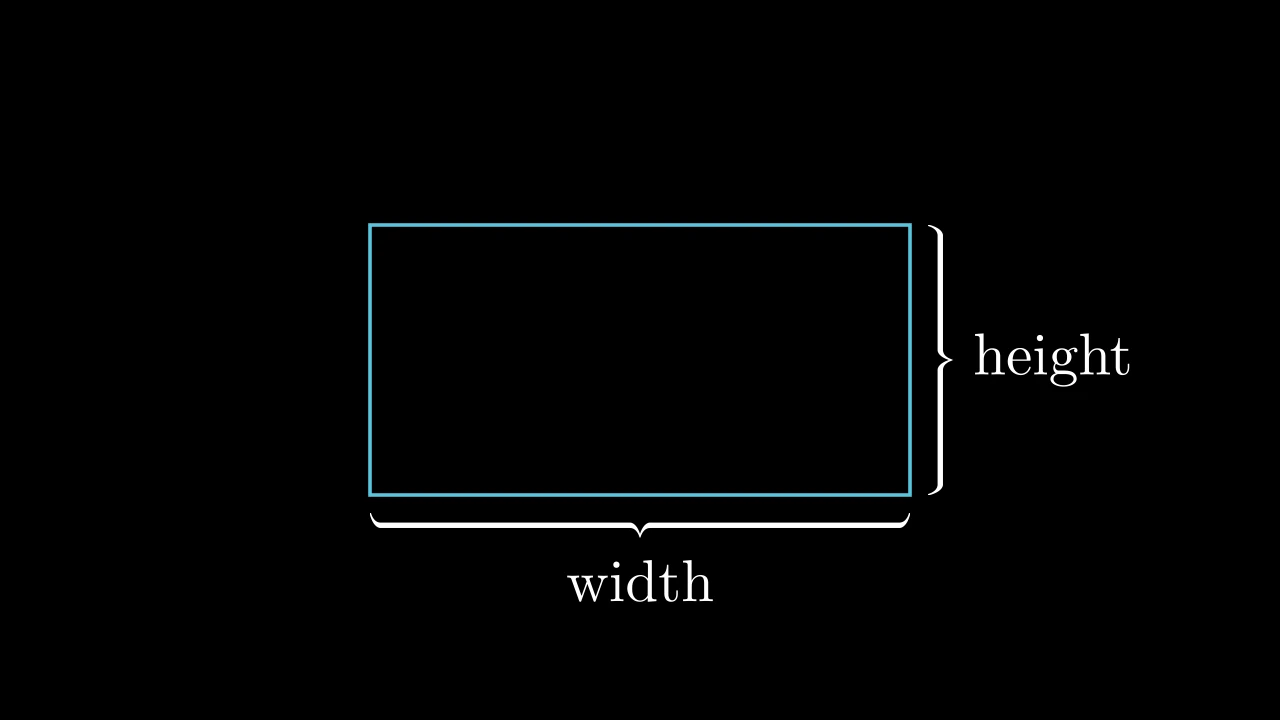
A brace along a side of a mobject, and a label of text at its tip: a BraceLabel whose label is a Text.
m.BraceText(obj, text, label_constructor=Text, **kwargs)
objThe mobject to brace.
textThe label's text.
label_constructorThe label's class.
It also takes
the brace label keywords.
Source
src/manimgx/mobjects/annotations.py
Frames and marks
SurroundingRectangle 
Code
import manimgx as m


class SurroundingRectangleExample(m.Scene):
    def construct(self) -> None:
        formula = m.MathTex(r"e^{i\pi} + 1 = 0", font_size=96)
        words = m.Text("Euler's identity").next_to(formula, m.DOWN, buff=1)
        self.add(formula, words)
        self.play(
            m.Create(m.SurroundingRectangle(formula, buff=0.3)),
            m.Create(
                m.SurroundingRectangle(words, corner_radius=0.2, color=m.BLUE)
            ),
        )
A rectangle around mobjects: around their bounding box, all of them together,
with a margin; bright yellow (PURE_YELLOW) unless styled.
It is sized and placed when it is made, and does not follow the mobjects afterwards.
m.SurroundingRectangle(*mobjects, buff=SMALL_BUFF, corner_radius=0.0, **kwargs)
*mobjectsThe mobjects to surround.
buffThe margin around them, in scene units: one for all sides, or (horizontal, vertical).
corner_radiusThe radius of its corners, in scene units: 0 for square corners.
colorThe color of both fill and stroke (default white); None for the class's default.
fill_colorThe fill's color;
colorif not given. Several colors make a gradient alongsheen_direction.fill_opacityThe fill's opacity, from 0 to 1 (default 0: no fill).
stroke_colorThe stroke's color;
colorif not given. Several colors make a gradient.stroke_opacityThe stroke's opacity, from 0 to 1 (default 1).
stroke_widthThe stroke's width, in hundredths of a scene unit (default 4; 0: no stroke).
background_stroke_colorThe color of an outline drawn behind the fill (default black).
background_stroke_opacityThe outline's opacity, from 0 to 1 (default 1).
background_stroke_widthThe outline's width, in hundredths of a scene unit (default 0: none).
sheen_factorHow much the colors lighten toward
sheen_direction, from -1 to 1 (default 0); a negative factor darkens.sheen_directionThe direction the colors lighten toward (default
UL).joint_typeHow the stroke is joined where its path turns: round, beveled or mitered, as a two-dimensional scene draws it (see LineJointType; default AUTO: mitered).
cap_styleHow the stroke ends, at each end it shows (an open path's, a dash's): round, butt or square, as a two-dimensional scene draws it (see CapStyleType; default AUTO: butt).
shade_in_3dWhether a three-dimensional scene's light shades the mobject.
materialHow its surface reflects the scene's lights in a three-dimensional scene (see Material); None: Manim's shading (default).
nameA name for the mobject; its class's name if not given.
z_indexIts place in the drawing order: a higher index is drawn over a lower one (default 0).
targetThe state
MoveToTargetmoves the mobject to.
It also takes the style keywords.
Source
src/manimgx/mobjects/annotations.py
BackgroundRectangle 
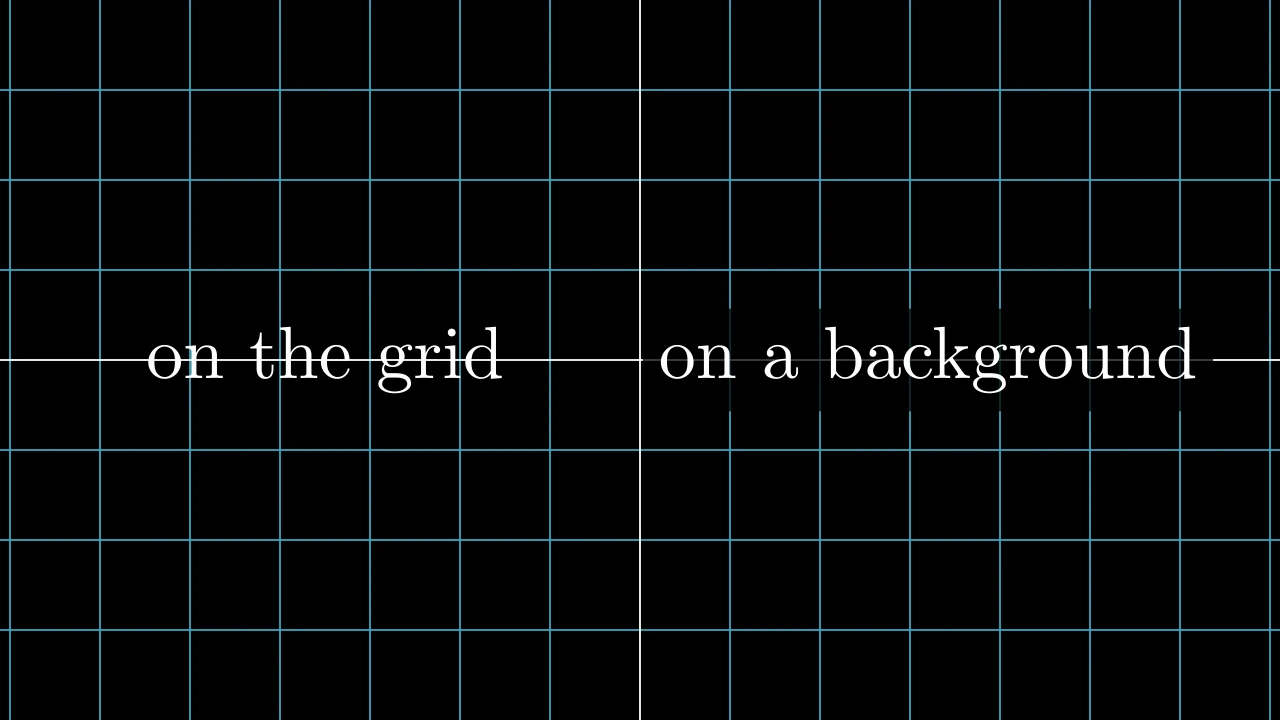
Code
import manimgx as m


class BackgroundRectangleExample(m.Scene):
    def construct(self) -> None:
        bare = m.Text("on the grid", font_size=60).shift(3.5 * m.LEFT)
        backed = m.Text("on a background", font_size=60).shift(3.2 * m.RIGHT)
        background = m.BackgroundRectangle(backed, buff=0.2)
        self.add(m.NumberPlane(), bare, background, backed)
A rectangle behind mobjects, in the background's color and three quarters opaque, so they stand out from what lies behind them; without an outline.
Its color is the scene's background color when it is made, unless given. It goes behind the mobjects: add it to the scene before them.
*mobjectsThe mobjects to go behind.
buffThe margin around them, in scene units: one for all sides, or (horizontal, vertical).
corner_radiusThe radius of its corners, in scene units: 0 for square corners.
colorThe color of both fill and stroke (default white); None for the class's default.
fill_colorThe fill's color;
colorif not given. Several colors make a gradient alongsheen_direction.fill_opacityThe fill's opacity, from 0 to 1 (default 0: no fill).
stroke_colorThe stroke's color;
colorif not given. Several colors make a gradient.stroke_opacityThe stroke's opacity, from 0 to 1 (default 1).
stroke_widthThe stroke's width, in hundredths of a scene unit (default 4; 0: no stroke).
background_stroke_colorThe color of an outline drawn behind the fill (default black).
background_stroke_opacityThe outline's opacity, from 0 to 1 (default 1).
background_stroke_widthThe outline's width, in hundredths of a scene unit (default 0: none).
sheen_factorHow much the colors lighten toward
sheen_direction, from -1 to 1 (default 0); a negative factor darkens.sheen_directionThe direction the colors lighten toward (default
UL).joint_typeHow the stroke is joined where its path turns: round, beveled or mitered, as a two-dimensional scene draws it (see LineJointType; default AUTO: mitered).
cap_styleHow the stroke ends, at each end it shows (an open path's, a dash's): round, butt or square, as a two-dimensional scene draws it (see CapStyleType; default AUTO: butt).
shade_in_3dWhether a three-dimensional scene's light shades the mobject.
materialHow its surface reflects the scene's lights in a three-dimensional scene (see Material); None: Manim's shading (default).
nameA name for the mobject; its class's name if not given.
z_indexIts place in the drawing order: a higher index is drawn over a lower one (default 0).
targetThe state
MoveToTargetmoves the mobject to.
It also takes the style keywords.
Source
src/manimgx/mobjects/annotations.py
FrameOptions 
The keywords of a rectangle made around a mobject, as a SurroundingRectangle or a BackgroundRectangle is: its margin and its corners, with the style keywords (for the classes that pass them on).
buffThe margin around the mobject, in scene units: one for all sides, or (horizontal, vertical) (default 0.1 around a surrounding rectangle, 0 behind a background rectangle).
corner_radiusThe radius of the rectangle's corners, in scene units (default 0: square corners).
colorThe color of both fill and stroke (default white); None for the class's default.
fill_colorThe fill's color;
colorif not given. Several colors make a gradient alongsheen_direction.fill_opacityThe fill's opacity, from 0 to 1 (default 0: no fill).
stroke_colorThe stroke's color;
colorif not given. Several colors make a gradient.stroke_opacityThe stroke's opacity, from 0 to 1 (default 1).
stroke_widthThe stroke's width, in hundredths of a scene unit (default 4; 0: no stroke).
background_stroke_colorThe color of an outline drawn behind the fill (default black).
background_stroke_opacityThe outline's opacity, from 0 to 1 (default 1).
background_stroke_widthThe outline's width, in hundredths of a scene unit (default 0: none).
sheen_factorHow much the colors lighten toward
sheen_direction, from -1 to 1 (default 0); a negative factor darkens.sheen_directionThe direction the colors lighten toward (default
UL).joint_typeHow the stroke is joined where its path turns: round, beveled or mitered, as a two-dimensional scene draws it (see LineJointType; default AUTO: mitered).
cap_styleHow the stroke ends, at each end it shows (an open path's, a dash's): round, butt or square, as a two-dimensional scene draws it (see CapStyleType; default AUTO: butt).
shade_in_3dWhether a three-dimensional scene's light shades the mobject.
materialHow its surface reflects the scene's lights in a three-dimensional scene (see Material); None: Manim's shading (default).
nameA name for the mobject; its class's name if not given.
z_indexIts place in the drawing order: a higher index is drawn over a lower one (default 0).
targetThe state
MoveToTargetmoves the mobject to.
Underline 
A line under a mobject: as wide as it, buff below it; white unless styled.
It is sized and placed when it is made, and does not follow the mobject afterwards.
m.Underline(mobject, buff=SMALL_BUFF, **kwargs)
mobjectThe mobject to underline.
buffThe gap between the mobject and the line, in scene units.
path_arcThe angle the line bends through, in radians: 0 for straight; otherwise it is an arc from its start to its end, turning counterclockwise if positive (bending right on its way), clockwise if negative (default 0).
colorThe color of both fill and stroke (default white; a Circle's is red); None for the class's default.
tip_lengthThe length of the tips add_tip makes, in scene units (default 0.35; an Arrow's may be shorter).
normal_vectorThe normal of the plane the path lies in (default OUT). Accepted for Manim compatibility; ignored and not retained.
tip_styleStyle keywords for the tips the path makes (default None: none). A tip's
fill_colorandstroke_colorare the path's color unless given here.fill_colorThe fill's color;
colorif not given. Several colors make a gradient alongsheen_direction.fill_opacityThe fill's opacity, from 0 to 1 (default 0: no fill).
stroke_colorThe stroke's color;
colorif not given. Several colors make a gradient.stroke_opacityThe stroke's opacity, from 0 to 1 (default 1).
stroke_widthThe stroke's width, in hundredths of a scene unit (default 4; 0: no stroke).
background_stroke_colorThe color of an outline drawn behind the fill (default black).
background_stroke_opacityThe outline's opacity, from 0 to 1 (default 1).
background_stroke_widthThe outline's width, in hundredths of a scene unit (default 0: none).
sheen_factorHow much the colors lighten toward
sheen_direction, from -1 to 1 (default 0); a negative factor darkens.sheen_directionThe direction the colors lighten toward (default
UL).joint_typeHow the stroke is joined where its path turns: round, beveled or mitered, as a two-dimensional scene draws it (see LineJointType; default AUTO: mitered).
cap_styleHow the stroke ends, at each end it shows (an open path's, a dash's): round, butt or square, as a two-dimensional scene draws it (see CapStyleType; default AUTO: butt).
shade_in_3dWhether a three-dimensional scene's light shades the mobject.
materialHow its surface reflects the scene's lights in a three-dimensional scene (see Material); None: Manim's shading (default).
nameA name for the mobject; its class's name if not given.
z_indexIts place in the drawing order: a higher index is drawn over a lower one (default 0).
targetThe state
MoveToTargetmoves the mobject to.
Source
src/manimgx/mobjects/annotations.py
Cross 
A cross, an X: two lines from corner to corner of a mobject's bounding box, or of a square 2 on a side at the origin; red, 6 wide, unless styled.
mobjectThe mobject to cross out: the cross is stretched over its bounding box; None for none.
stroke_colorThe color of its lines.
stroke_widthThe width of its lines, in hundredths of a scene unit.
scale_factorHow much larger than the bounding box (or the square) it is, about its center.
colorThe color of its lines, in place of
stroke_color; None to use that.background_stroke_colorThe color of an outline drawn behind the fill (default black).
background_stroke_opacityThe outline's opacity, from 0 to 1 (default 1).
background_stroke_widthThe outline's width, in hundredths of a scene unit (default 0: none).
sheen_factorHow much the colors lighten toward
sheen_direction, from -1 to 1 (default 0); a negative factor darkens.sheen_directionThe direction the colors lighten toward (default
UL).joint_typeHow the stroke is joined where its path turns: round, beveled or mitered, as a two-dimensional scene draws it (see LineJointType; default AUTO: mitered).
cap_styleHow the stroke ends, at each end it shows (an open path's, a dash's): round, butt or square, as a two-dimensional scene draws it (see CapStyleType; default AUTO: butt).
shade_in_3dWhether a three-dimensional scene's light shades the mobject.
materialHow its surface reflects the scene's lights in a three-dimensional scene (see Material); None: Manim's shading (default).
nameA name for the mobject; its class's name if not given.
z_indexIts place in the drawing order: a higher index is drawn over a lower one (default 0).
targetThe state
MoveToTargetmoves the mobject to.
It also takes the style keywords.
Source
src/manimgx/mobjects/annotations.py
AnnotationDot 
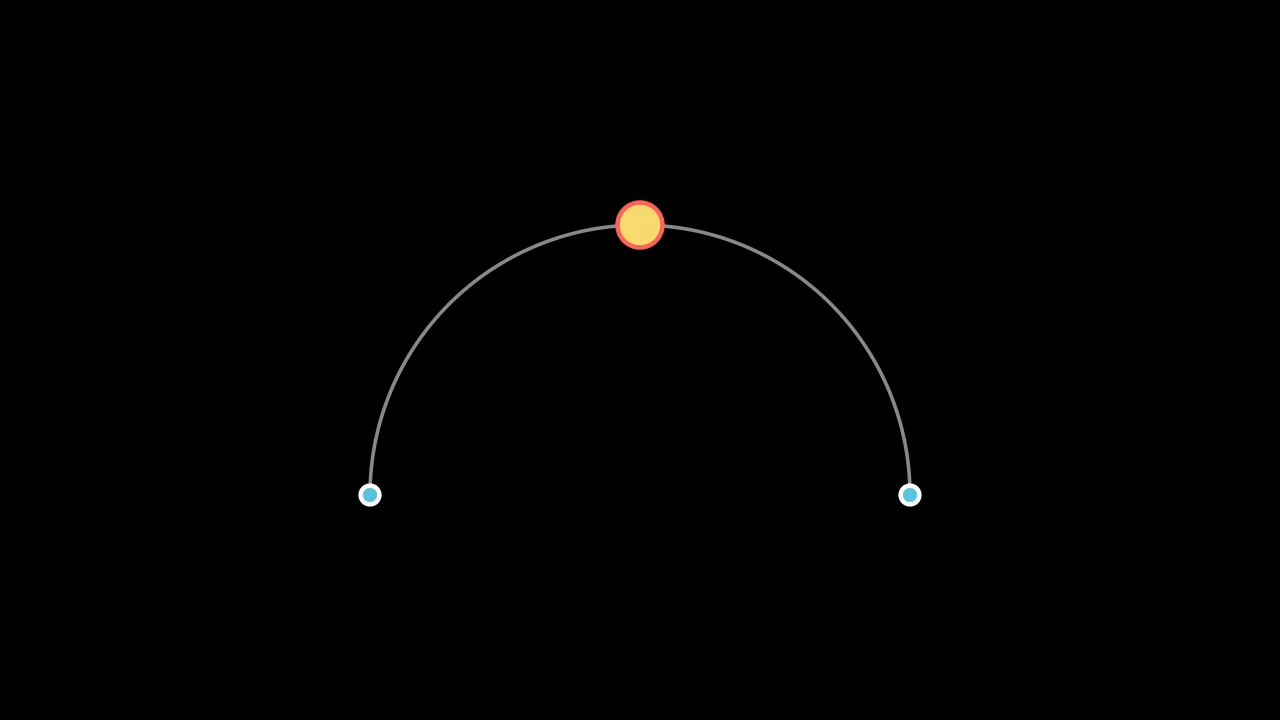
Code
import manimgx as m


class AnnotationDotExample(m.Scene):
    def construct(self) -> None:
        arc = m.Arc(radius=3, angle=m.PI, color=m.GREY).shift(1.5 * m.DOWN)
        start = m.AnnotationDot(point=arc.get_start())
        end = m.AnnotationDot(point=arc.get_end())
        top = m.AnnotationDot(
            0.25, point=arc.get_top(), fill_color=m.YELLOW, stroke_color=m.RED
        )
        self.add(arc, start, end, top)
A dot to mark a point with: a little larger than a Dot, blue with a thick white outline unless styled.
Its colors are its fill_color and its stroke_color, which color does not
change.
m.AnnotationDot(radius=DEFAULT_DOT_RADIUS * 1.3, *, point=ORIGIN, **kwargs)
radiusIts radius, in scene units (default 0.104, 1.3 times a dot's).
pointWhere its center goes.
colorThe color of both fill and stroke (default white; a Circle's is red); None for the class's default.
tip_lengthThe length of the tips add_tip makes, in scene units (default 0.35; an Arrow's may be shorter).
normal_vectorThe normal of the plane the path lies in (default OUT). Accepted for Manim compatibility; ignored and not retained.
tip_styleStyle keywords for the tips the path makes (default None: none). A tip's
fill_colorandstroke_colorare the path's color unless given here.fill_colorThe fill's color;
colorif not given. Several colors make a gradient alongsheen_direction.fill_opacityThe fill's opacity, from 0 to 1 (default 0: no fill).
stroke_colorThe stroke's color;
colorif not given. Several colors make a gradient.stroke_opacityThe stroke's opacity, from 0 to 1 (default 1).
stroke_widthThe stroke's width, in hundredths of a scene unit (default 4; 0: no stroke).
background_stroke_colorThe color of an outline drawn behind the fill (default black).
background_stroke_opacityThe outline's opacity, from 0 to 1 (default 1).
background_stroke_widthThe outline's width, in hundredths of a scene unit (default 0: none).
sheen_factorHow much the colors lighten toward
sheen_direction, from -1 to 1 (default 0); a negative factor darkens.sheen_directionThe direction the colors lighten toward (default
UL).joint_typeHow the stroke is joined where its path turns: round, beveled or mitered, as a two-dimensional scene draws it (see LineJointType; default AUTO: mitered).
cap_styleHow the stroke ends, at each end it shows (an open path's, a dash's): round, butt or square, as a two-dimensional scene draws it (see CapStyleType; default AUTO: butt).
shade_in_3dWhether a three-dimensional scene's light shades the mobject.
materialHow its surface reflects the scene's lights in a three-dimensional scene (see Material); None: Manim's shading (default).
nameA name for the mobject; its class's name if not given.
z_indexIts place in the drawing order: a higher index is drawn over a lower one (default 0).
targetThe state
MoveToTargetmoves the mobject to.
It also takes the tip keywords.
Source
src/manimgx/mobjects/shapes.py
Labels
Label 
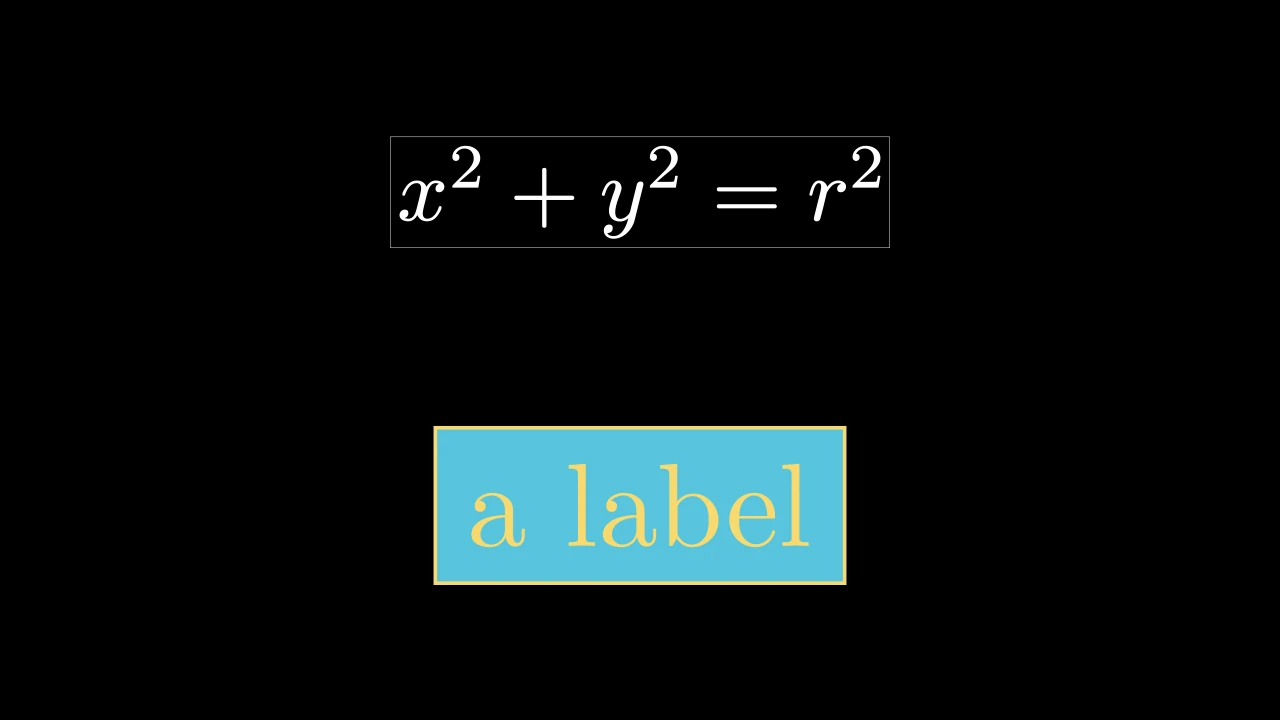
Code
import manimgx as m


class LabelExample(m.Scene):
    def construct(self) -> None:
        plain = m.Label("x^2 + y^2 = r^2")
        styled = m.Label(
            m.Text("a label", color=m.YELLOW),
            box_config={"color": m.BLUE, "buff": 0.2},
            frame_config={"color": m.YELLOW, "stroke_width": 4, "buff": 0.2},
        )
        self.add(m.VGroup(plain, styled).arrange(m.DOWN, buff=1).scale(2))
A label on a background, in a frame: text or math, over an opaque rectangle in the background's color, inside a thin white outline.
A string is typeset as math, white, at font size 48 (see MathTex); a mobject of text or math is used as it is. Its parts are its submobjects, in drawing order: its background_rect, its rendered_label and its frame.
labelThe label: a string, typeset as math, or a text or math mobject.
label_configMathTex keywords for a string label, over white at font size 48.
box_configSurrounding rectangle keywords for the background, over a margin of 0.05 and an opaque fill (see BackgroundRectangle).
frame_configSurrounding rectangle keywords for the frame, over white, a margin of 0.05 and an outline 0.5 wide.
colorThe color of both fill and stroke (default white); None for the class's default.
fill_colorThe fill's color;
colorif not given. Several colors make a gradient alongsheen_direction.fill_opacityThe fill's opacity, from 0 to 1 (default 0: no fill).
stroke_colorThe stroke's color;
colorif not given. Several colors make a gradient.stroke_opacityThe stroke's opacity, from 0 to 1 (default 1).
stroke_widthThe stroke's width, in hundredths of a scene unit (default 4; 0: no stroke).
background_stroke_colorThe color of an outline drawn behind the fill (default black).
background_stroke_opacityThe outline's opacity, from 0 to 1 (default 1).
background_stroke_widthThe outline's width, in hundredths of a scene unit (default 0: none).
sheen_factorHow much the colors lighten toward
sheen_direction, from -1 to 1 (default 0); a negative factor darkens.sheen_directionThe direction the colors lighten toward (default
UL).joint_typeHow the stroke is joined where its path turns: round, beveled or mitered, as a two-dimensional scene draws it (see LineJointType; default AUTO: mitered).
cap_styleHow the stroke ends, at each end it shows (an open path's, a dash's): round, butt or square, as a two-dimensional scene draws it (see CapStyleType; default AUTO: butt).
shade_in_3dWhether a three-dimensional scene's light shades the mobject.
materialHow its surface reflects the scene's lights in a three-dimensional scene (see Material); None: Manim's shading (default).
nameA name for the mobject; its class's name if not given.
z_indexIts place in the drawing order: a higher index is drawn over a lower one (default 0).
targetThe state
MoveToTargetmoves the mobject to.
It also takes the style keywords.
Source
src/manimgx/mobjects/annotations.py
LabeledDot 
Code
import manimgx as m


class LabeledDotExample(m.Scene):
    def construct(self) -> None:
        dots = m.VGroup(
            m.LabeledDot("A"),
            m.LabeledDot("42", color=m.BLUE),
            m.LabeledDot(m.MathTex(r"\alpha"), color=m.PURPLE, radius=0.5),
            m.LabeledDot(m.Text("hi", color=m.BLACK), color=m.YELLOW),
        ).arrange(buff=1)
        self.add(dots.scale(2))
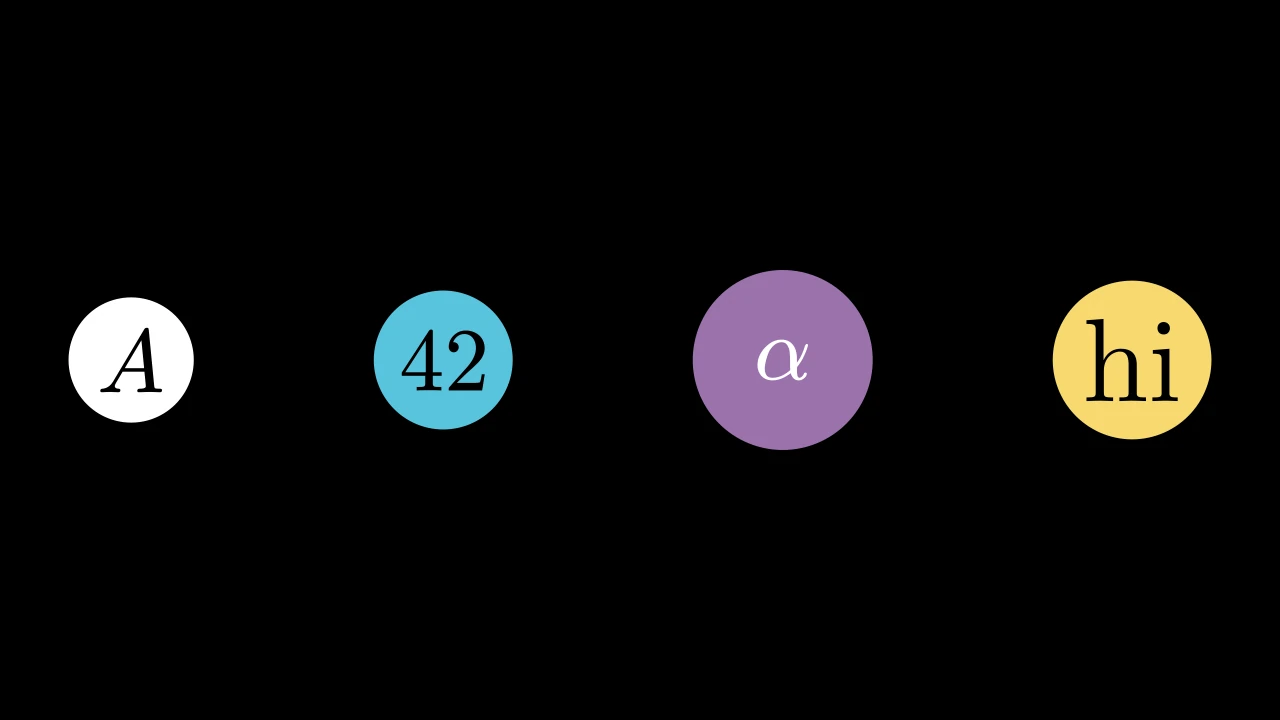
A dot with a label in its middle: a disc just large enough for the label unless given a radius; white, without an outline, unless styled.
It is made at the origin, and the label, centered on it, is its submobject.
m.LabeledDot(label, radius=None, buff=SMALL_BUFF, **kwargs)
labelThe label: a string, typeset as math in black (see MathTex), or a mobject, as it is.
radiusIts radius, in scene units; None for half the diagonal of the label's bounding box, plus
buff.buffThe margin between the label's corners and the dot's edge, in scene units, when the radius fits the label.
colorThe color of both fill and stroke (default white; a Circle's is red); None for the class's default.
tip_lengthThe length of the tips add_tip makes, in scene units (default 0.35; an Arrow's may be shorter).
normal_vectorThe normal of the plane the path lies in (default OUT). Accepted for Manim compatibility; ignored and not retained.
tip_styleStyle keywords for the tips the path makes (default None: none). A tip's
fill_colorandstroke_colorare the path's color unless given here.fill_colorThe fill's color;
colorif not given. Several colors make a gradient alongsheen_direction.fill_opacityThe fill's opacity, from 0 to 1 (default 0: no fill).
stroke_colorThe stroke's color;
colorif not given. Several colors make a gradient.stroke_opacityThe stroke's opacity, from 0 to 1 (default 1).
stroke_widthThe stroke's width, in hundredths of a scene unit (default 4; 0: no stroke).
background_stroke_colorThe color of an outline drawn behind the fill (default black).
background_stroke_opacityThe outline's opacity, from 0 to 1 (default 1).
background_stroke_widthThe outline's width, in hundredths of a scene unit (default 0: none).
sheen_factorHow much the colors lighten toward
sheen_direction, from -1 to 1 (default 0); a negative factor darkens.sheen_directionThe direction the colors lighten toward (default
UL).joint_typeHow the stroke is joined where its path turns: round, beveled or mitered, as a two-dimensional scene draws it (see LineJointType; default AUTO: mitered).
cap_styleHow the stroke ends, at each end it shows (an open path's, a dash's): round, butt or square, as a two-dimensional scene draws it (see CapStyleType; default AUTO: butt).
shade_in_3dWhether a three-dimensional scene's light shades the mobject.
materialHow its surface reflects the scene's lights in a three-dimensional scene (see Material); None: Manim's shading (default).
nameA name for the mobject; its class's name if not given.
z_indexIts place in the drawing order: a higher index is drawn over a lower one (default 0).
targetThe state
MoveToTargetmoves the mobject to.
It also takes the tip keywords.
Source
src/manimgx/mobjects/annotations.py
LabeledLine 
Code
import manimgx as m


class LabeledLineExample(m.Scene):
    def construct(self) -> None:
        a, b, c = [-4, -2, 0], [4, -2, 0], [4, 2.5, 0]
        sides = m.VGroup(
            m.LabeledLine("8", start=a, end=b, color=m.BLUE),
            m.LabeledLine("4.5", start=b, end=c, color=m.GREEN),
            m.LabeledLine("c", start=c, end=a, label_position=0.4),
        )
        self.add(sides)
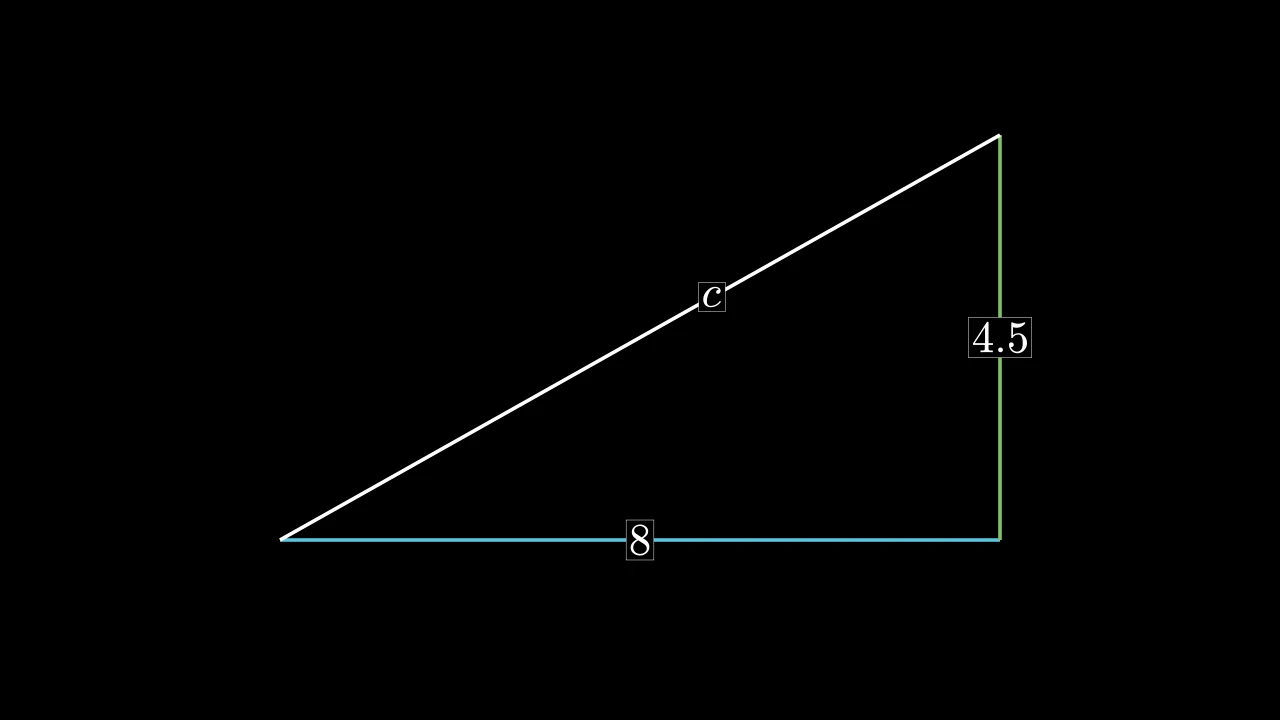
A line with a label on it: a Label centered at a point
label_position of the way from the line's start to its end; white unless styled.
The label is a submobject, the line's label. It is placed on the straight way between the ends, even when the line is bent.
labelThe label: a string, typeset as math, or a text or math mobject.
label_positionWhere the label goes, as a proportion of the way from the line's start (0) to its end (1).
label_configMathTex keywords for a string label (see Label).
box_configSurrounding rectangle keywords for the label's background.
frame_configSurrounding rectangle keywords for the label's frame.
startWhere the line starts: a point, or a mobject (see Line).
endWhere it ends: a point, or a mobject.
It also takes
the Line keywords.
Source
src/manimgx/mobjects/annotations.py
label 
The label, a submobject.
LabeledArrow 
Code
import manimgx as m


class LabeledArrowExample(m.Scene):
    def construct(self) -> None:
        arrows = m.VGroup(
            m.LabeledArrow("F", start=4 * m.LEFT, end=4 * m.RIGHT),
            m.LabeledArrow(
                "0.5",
                label_position=0.3,
                start=3 * m.LEFT + m.DOWN,
                end=3 * m.RIGHT + 2 * m.UP,
                color=m.YELLOW,
            ),
        ).arrange(m.DOWN, buff=1)
        self.add(arrows)
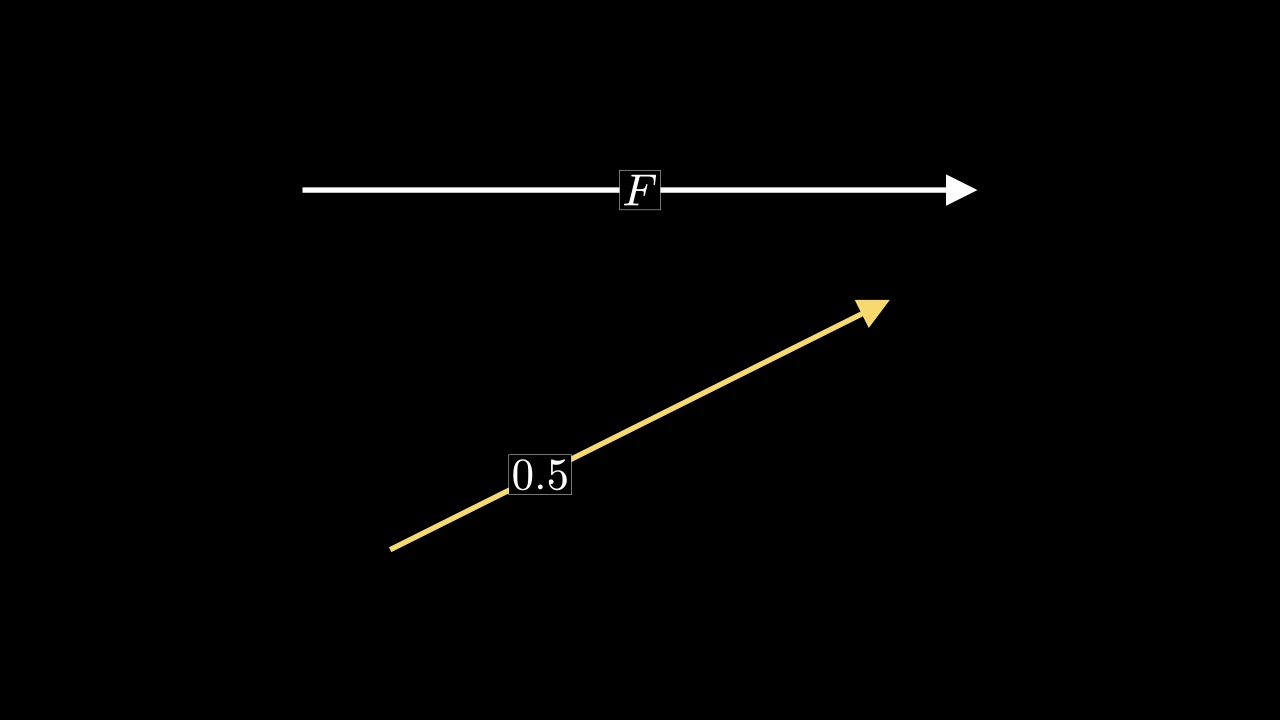
An arrow with a label on it: a LabeledLine that is an
Arrow, stopping 0.25 short of its ends unless given another
buff; white unless styled.
labelThe label: a string, typeset as math, or a text or math mobject.
label_positionWhere the label goes, as a proportion of the way from the arrow's start (0) to its tip's point (1).
label_configMathTex keywords for a string label (see Label).
box_configSurrounding rectangle keywords for the label's background.
frame_configSurrounding rectangle keywords for the label's frame.
startWhere the arrow starts: a point, or a mobject (see Line).
endWhere it points to: a point, or a mobject.
It also takes
the Line keywords.
Source
src/manimgx/mobjects/annotations.py
LabeledPolygram 
Code
import manimgx as m


class LabeledPolygramExample(m.Scene):
    def construct(self) -> None:
        outline = [[-6, -3, 0], [5, -3, 0], [6, 3, 0], [0, 0.5, 0], [-5, 3, 0]]
        hole = [[0, -2, 0], [0, -0.5, 0], [4, -0.5, 0], [4, -2, 0]]
        shape = m.LabeledPolygram(outline, hole, label="P", fill_opacity=0.3)
        reach = m.Circle(shape.radius, color=m.YELLOW).move_to(shape.pole)
        self.add(shape, reach)
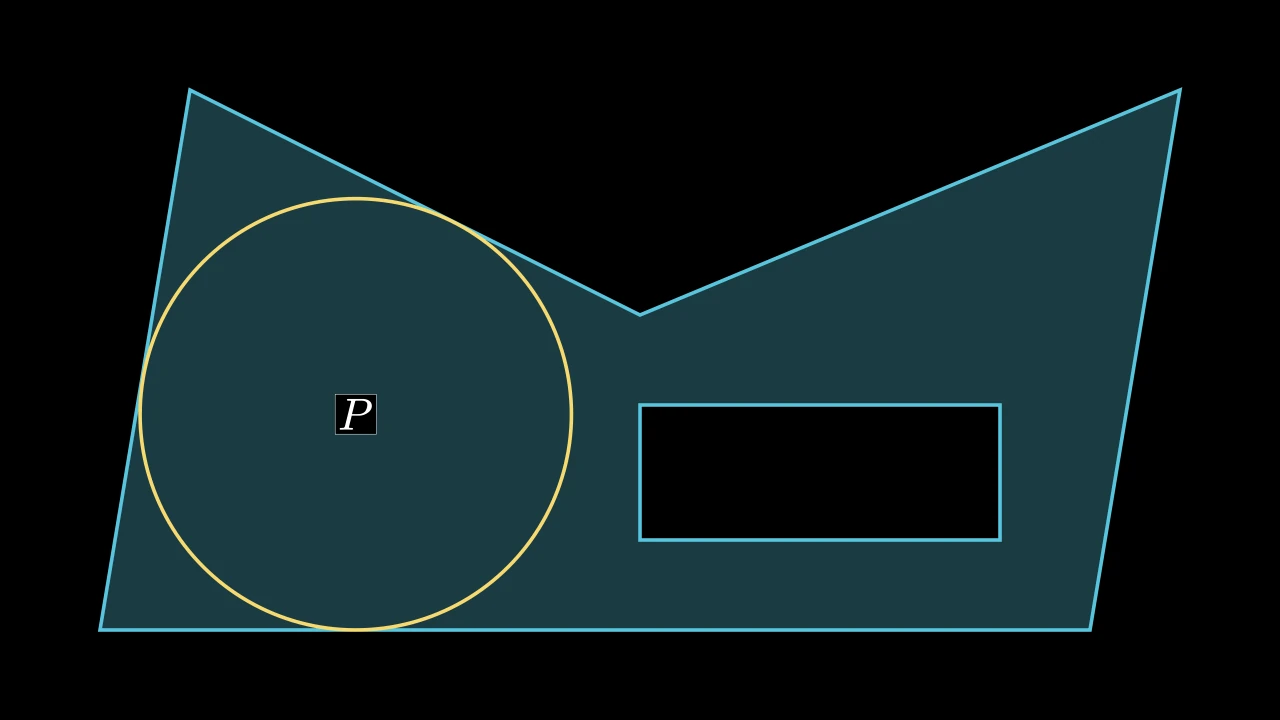
A polygram with a label inside it, at its pole of inaccessibility: the point
inside it farthest from its edges, found to within precision; blue unless styled.
The first group of vertices is its outline, and the others are holes the label is
kept out of. The label is a submobject, label;
pole is where it is, and radius how far that is from the nearest edge.
*vertex_groupsThe groups of vertices, each a closed path (see Polygram): the outline first, then its holes.
labelThe label: a string, typeset as math, or a text or math mobject.
precisionAllowed error in the largest distance from the polygon's edges, in scene units. Several label positions can meet this radius tolerance.
label_configMathTex keywords for a string label (see Label).
box_configSurrounding rectangle keywords for the label's background.
frame_configSurrounding rectangle keywords for the label's frame.
colorThe color of both fill and stroke (default white); None for the class's default.
fill_colorThe fill's color;
colorif not given. Several colors make a gradient alongsheen_direction.fill_opacityThe fill's opacity, from 0 to 1 (default 0: no fill).
stroke_colorThe stroke's color;
colorif not given. Several colors make a gradient.stroke_opacityThe stroke's opacity, from 0 to 1 (default 1).
stroke_widthThe stroke's width, in hundredths of a scene unit (default 4; 0: no stroke).
background_stroke_colorThe color of an outline drawn behind the fill (default black).
background_stroke_opacityThe outline's opacity, from 0 to 1 (default 1).
background_stroke_widthThe outline's width, in hundredths of a scene unit (default 0: none).
sheen_factorHow much the colors lighten toward
sheen_direction, from -1 to 1 (default 0); a negative factor darkens.sheen_directionThe direction the colors lighten toward (default
UL).joint_typeHow the stroke is joined where its path turns: round, beveled or mitered, as a two-dimensional scene draws it (see LineJointType; default AUTO: mitered).
cap_styleHow the stroke ends, at each end it shows (an open path's, a dash's): round, butt or square, as a two-dimensional scene draws it (see CapStyleType; default AUTO: butt).
shade_in_3dWhether a three-dimensional scene's light shades the mobject.
materialHow its surface reflects the scene's lights in a three-dimensional scene (see Material); None: Manim's shading (default).
nameA name for the mobject; its class's name if not given.
z_indexIts place in the drawing order: a higher index is drawn over a lower one (default 0).
targetThe state
MoveToTargetmoves the mobject to.
It also takes the style keywords.
Source
src/manimgx/mobjects/annotations.py
label 
The label, a submobject.
Angles
Angle 
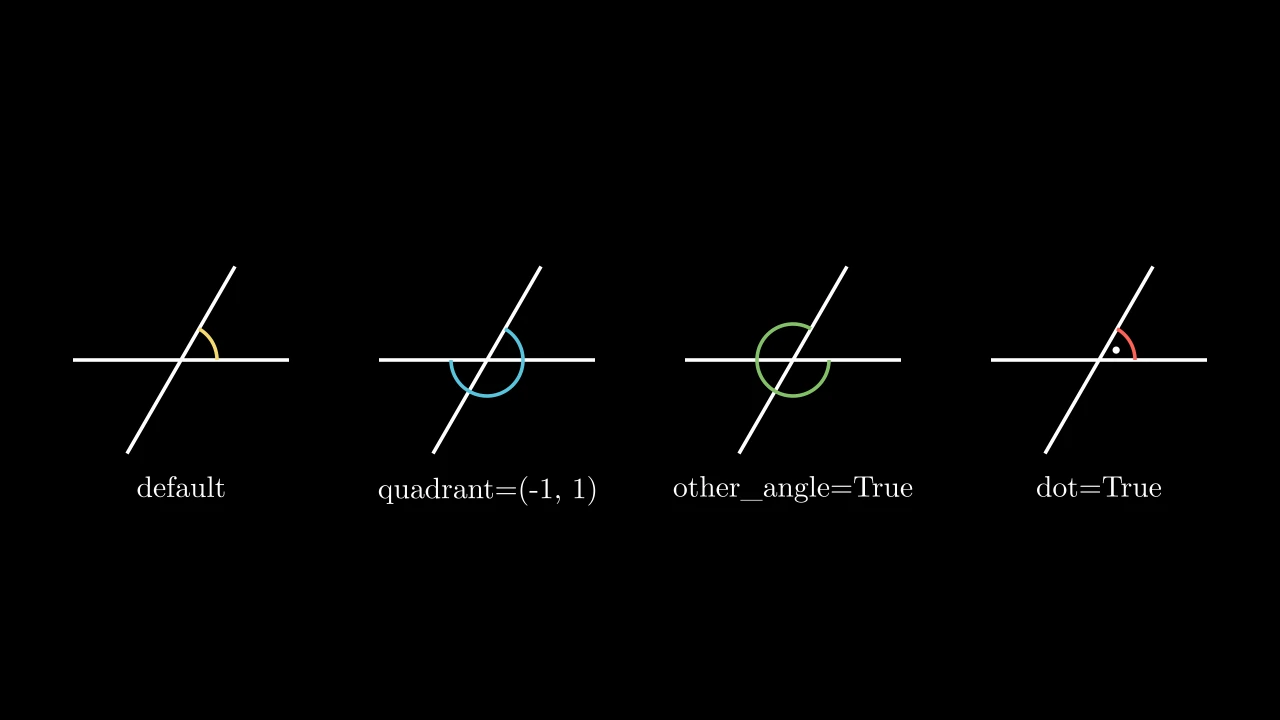
Code
import manimgx as m


class AngleExample(m.Scene):
    def construct(self) -> None:
        line1 = m.Line(1.2 * m.LEFT, 1.2 * m.RIGHT)
        line2 = m.Line(1.2 * m.DOWN, 1.2 * m.UP).rotate(-30 * m.DEGREES)
        angles = [
            m.Angle(line1, line2, color=m.YELLOW),
            m.Angle(line1, line2, quadrant=(-1, 1), color=m.BLUE),
            m.Angle(line1, line2, other_angle=True, color=m.GREEN),
            m.Angle(line1, line2, dot=True, color=m.RED),
        ]
        labels = ["default", "quadrant=(-1, 1)", "other_angle=True", "dot=True"]
        panels = m.VGroup()
        for angle in angles:
            panels.add(m.VGroup(line1.copy(), line2.copy(), angle))
        panels.arrange(buff=1)
        for panel, label in zip(panels, labels):
            text = m.Text(label, font_size=24).next_to(panel, m.DOWN)
            self.add(panel, text)
The mark of an angle between two lines: an arc about the point where they cross, counterclockwise from a side along the first line to a side along the second; white unless styled.
The lines are taken as infinite, so they need not reach the point where they cross.
From there, quadrant picks the way each side goes along its line, and
other_angle turns the arc clockwise instead, marking the rest of the full turn:
together they pick the angle marked, which may be more than half a turn. With
elbow, the mark is two segments instead, making a corner between the two sides,
as a right angle is marked. Parallel lines in the plane of the screen make an empty
mark, of value 0.
line1The line the angle is measured from.
line2The line it is measured to.
radiusThe arc's radius, or the elbow's side, in scene units; None for 0.4, or for short lines two thirds of the distance from the crossing to the nearer of the line ends the sides point to, when that is less than 0.6.
quadrantWhich way each side goes from the crossing: a sign for each line,
line1's first; 1 along the line's direction (from its start toward its end), -1 back toward its start.other_angleWhether the arc runs clockwise from the first side to the second instead, marking the rest of the full turn.
dotWhether to put a dot inside the arc (an elbow has none).
dot_radiusThe dot's radius, in scene units; None for a tenth of the arc's radius.
dot_distanceHow far the dot is from the crossing, as a fraction of the arc's radius.
dot_colorThe dot's color.
elbowWhether to mark the angle with an elbow instead of an arc.
colorThe color of both fill and stroke (default white); None for the class's default.
fill_colorThe fill's color;
colorif not given. Several colors make a gradient alongsheen_direction.fill_opacityThe fill's opacity, from 0 to 1 (default 0: no fill).
stroke_colorThe stroke's color;
colorif not given. Several colors make a gradient.stroke_opacityThe stroke's opacity, from 0 to 1 (default 1).
stroke_widthThe stroke's width, in hundredths of a scene unit (default 4; 0: no stroke).
background_stroke_colorThe color of an outline drawn behind the fill (default black).
background_stroke_opacityThe outline's opacity, from 0 to 1 (default 1).
background_stroke_widthThe outline's width, in hundredths of a scene unit (default 0: none).
sheen_factorHow much the colors lighten toward
sheen_direction, from -1 to 1 (default 0); a negative factor darkens.sheen_directionThe direction the colors lighten toward (default
UL).joint_typeHow the stroke is joined where its path turns: round, beveled or mitered, as a two-dimensional scene draws it (see LineJointType; default AUTO: mitered).
cap_styleHow the stroke ends, at each end it shows (an open path's, a dash's): round, butt or square, as a two-dimensional scene draws it (see CapStyleType; default AUTO: butt).
shade_in_3dWhether a three-dimensional scene's light shades the mobject.
materialHow its surface reflects the scene's lights in a three-dimensional scene (see Material); None: Manim's shading (default).
nameA name for the mobject; its class's name if not given.
z_indexIts place in the drawing order: a higher index is drawn over a lower one (default 0).
targetThe state
MoveToTargetmoves the mobject to.
It also takes the style keywords.
Source
src/manimgx/mobjects/shapes.py
3712 3713 3714 3715 3716 3717 3718 3719 3720 3721 3722 3723 3724 3725 3726 3727 3728 3729 3730 3731 3732 3733 3734 3735 3736 3737 3738 3739 3740 3741 3742 3743 3744 3745 3746 3747 3748 3749 3750 3751 3752 3753 3754 3755 3756 3757 3758 3759 3760 3761 3762 3763 3764 3765 3766 3767 3768 3769 3770 3771 3772 3773 3774 3775 3776 3777 3778 3779 3780 3781 3782 3783 3784 3785 3786 3787 3788 3789 3790 3791 3792 3793 3794 3795 3796 3797 3798 3799 3800 3801 3802 3803 3804 3805 3806 3807 3808 3809 3810 3811 3812 3813 | |
get_lines 
The two lines the angle is between.
Returns
A new group of the two lines, line1 first.
get_value 
The size of the angle marked: counterclockwise from its first side to its
second, or clockwise, and negative, with other_angle.
An angle marked with an elbow has no value: asking for it raises an exception.
degreesWhether to give it in degrees instead of radians.
Returns The angle, in radians (or degrees), from -TAU to TAU.
Source
src/manimgx/mobjects/shapes.py
from_three_points 
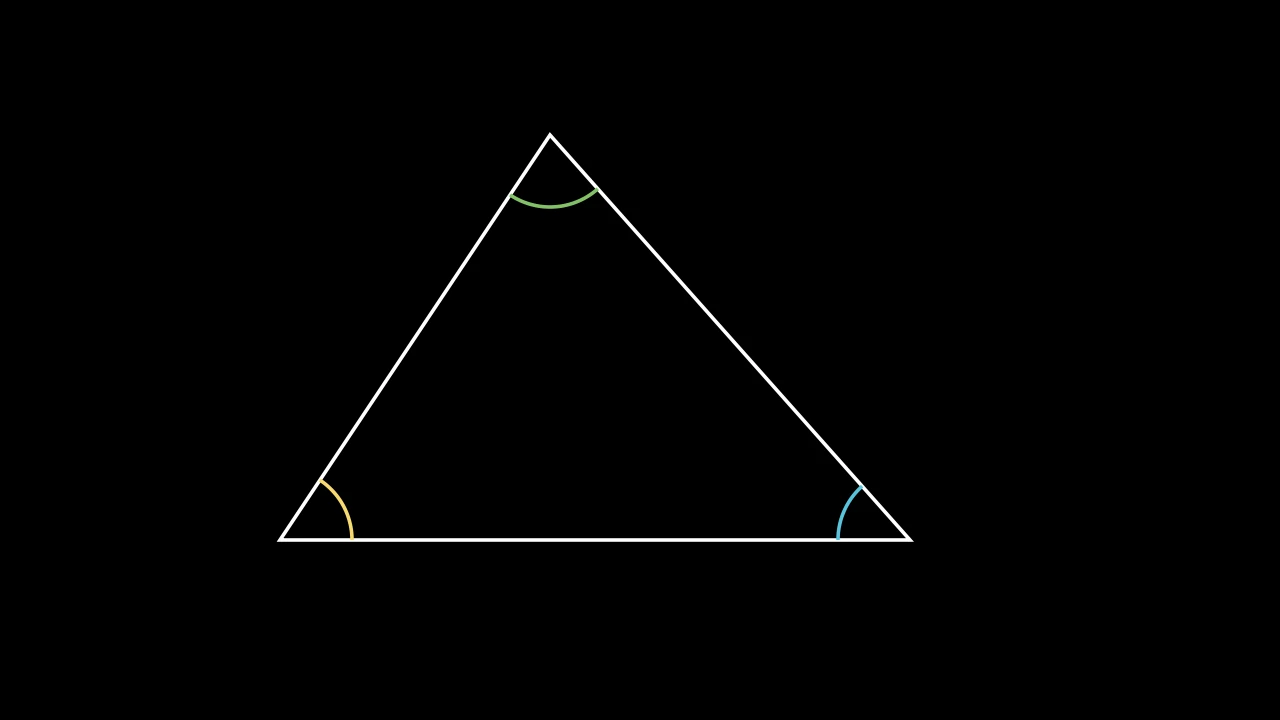
Code
import manimgx as m


class AngleFromThreePointsExample(m.Scene):
    def construct(self) -> None:
        a, b, c = [-4, -2, 0], [3, -2, 0], [-1, 2.5, 0]
        angles = m.VGroup(
            m.Angle.from_three_points(b, a, c, radius=0.8, color=m.YELLOW),
            m.Angle.from_three_points(c, b, a, radius=0.8, color=m.BLUE),
            m.Angle.from_three_points(a, c, b, radius=0.8, color=m.GREEN),
        )
        self.add(m.Polygon(a, b, c, color=m.WHITE), angles)
The mark of the angle ABC: at B, from the line toward A counterclockwise
to the line toward C.
AA point on the first side.
BThe vertex.
CA point on the second side.
It also takes
the Angle keywords.
Returns A new angle.
Source
src/manimgx/mobjects/shapes.py
RightAngle 
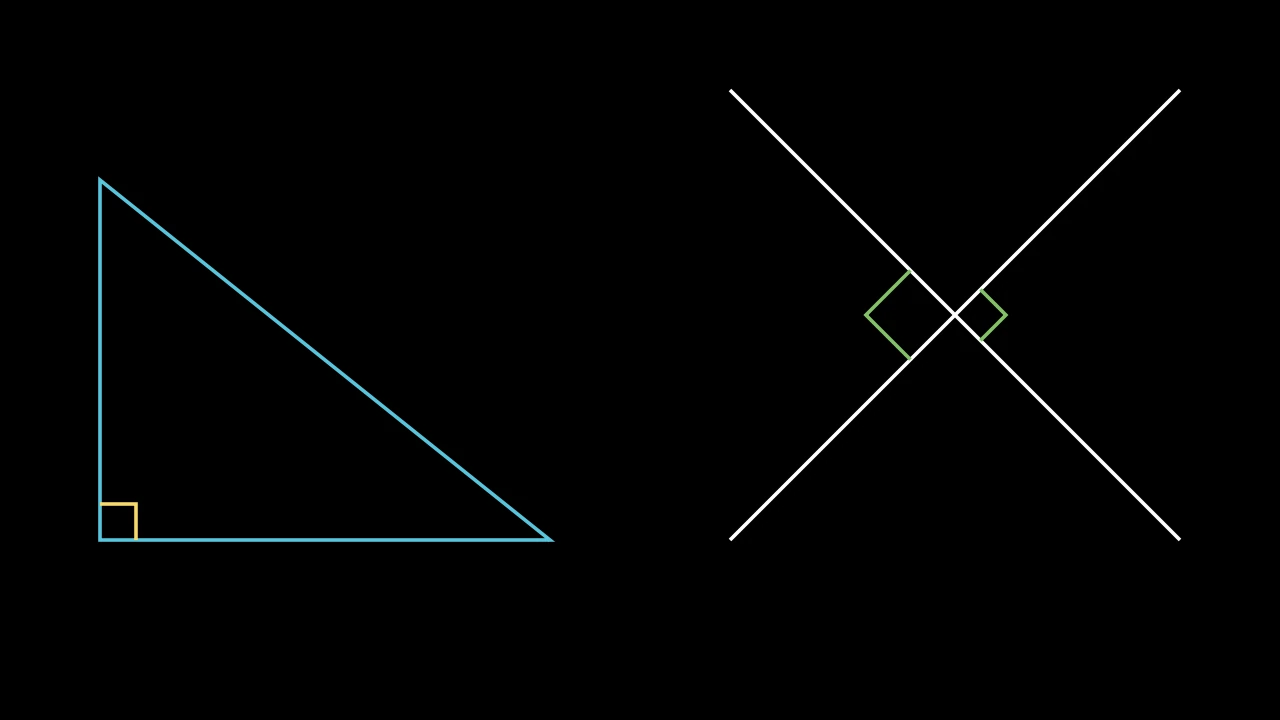
Code
import manimgx as m


class RightAngleExample(m.Scene):
    def construct(self) -> None:
        a, b, c = [-6, -2, 0], [-1, -2, 0], [-6, 2, 0]
        triangle = m.Polygon(a, b, c, color=m.BLUE)
        corner = m.RightAngle(m.Line(a, b), m.Line(a, c), color=m.YELLOW)
        line1 = m.Line([1, -2, 0], [6, 3, 0])
        line2 = m.Line([1, 3, 0], [6, -2, 0])
        marks = m.VGroup(
            m.RightAngle(line1, line2),
            m.RightAngle(line1, line2, length=0.7, quadrant=(-1, -1)),
        ).set_color(m.GREEN)
        self.add(triangle, corner, line1, line2, marks)
The mark of a right angle between two lines: an Angle marked with an elbow; white unless styled.
The lines need not be perpendicular: the elbow is then a corner of a parallelogram.
line1The first line.
line2The second line.
lengthThe length of the elbow's sides, in scene units; None for 0.4, or less for short lines (see Angle).
It also takes
the Angle keywords.
Source
src/manimgx/mobjects/shapes.py
Elbow 
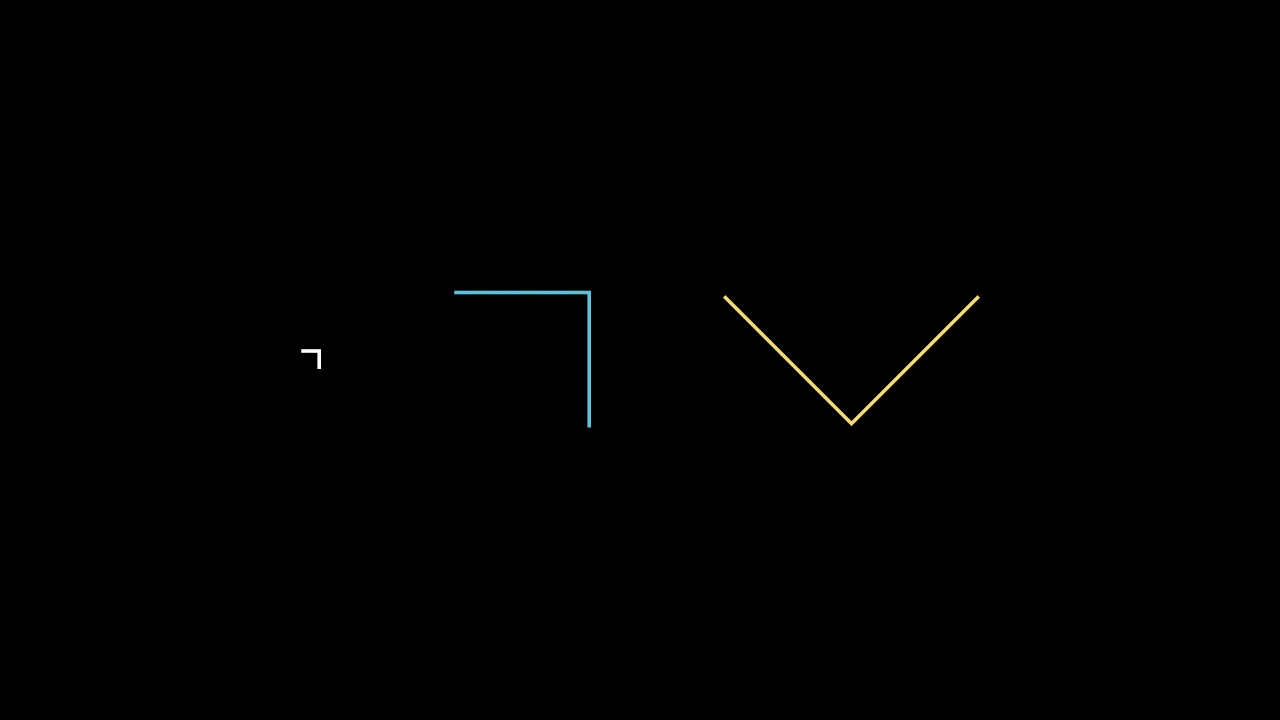
The mark of a right angle: two segments width long meeting at a square corner;
white unless styled.
Made at the origin, it marks the right angle between the positive x and y axes:
from (0, width) across to its corner at (width, width), and down to
(width, 0); angle turns it about the origin. To mark the angle between two
lines, see RightAngle.
widthThe length of each segment, in scene units.
angleThe angle it is turned through about the origin, in radians, counterclockwise.
colorThe color of both fill and stroke (default white); None for the class's default.
fill_colorThe fill's color;
colorif not given. Several colors make a gradient alongsheen_direction.fill_opacityThe fill's opacity, from 0 to 1 (default 0: no fill).
stroke_colorThe stroke's color;
colorif not given. Several colors make a gradient.stroke_opacityThe stroke's opacity, from 0 to 1 (default 1).
stroke_widthThe stroke's width, in hundredths of a scene unit (default 4; 0: no stroke).
background_stroke_colorThe color of an outline drawn behind the fill (default black).
background_stroke_opacityThe outline's opacity, from 0 to 1 (default 1).
background_stroke_widthThe outline's width, in hundredths of a scene unit (default 0: none).
sheen_factorHow much the colors lighten toward
sheen_direction, from -1 to 1 (default 0); a negative factor darkens.sheen_directionThe direction the colors lighten toward (default
UL).joint_typeHow the stroke is joined where its path turns: round, beveled or mitered, as a two-dimensional scene draws it (see LineJointType; default AUTO: mitered).
cap_styleHow the stroke ends, at each end it shows (an open path's, a dash's): round, butt or square, as a two-dimensional scene draws it (see CapStyleType; default AUTO: butt).
shade_in_3dWhether a three-dimensional scene's light shades the mobject.
materialHow its surface reflects the scene's lights in a three-dimensional scene (see Material); None: Manim's shading (default).
nameA name for the mobject; its class's name if not given.
z_indexIts place in the drawing order: a higher index is drawn over a lower one (default 0).
targetThe state
MoveToTargetmoves the mobject to.
It also takes the style keywords.
Source
src/manimgx/mobjects/shapes.py