Text
The film's code
import manimgx as m


class TextHero(m.Scene):
    def construct(self) -> None:
        title = m.Text("Text", font_size=72)
        styles = m.VGroup(
            m.Text("bold", weight=m.BOLD, font_size=40),
            m.Text("italic", slant=m.ITALIC, font_size=40),
            m.Text("monospace", font="monospace", font_size=40),
            m.Text("red and blue", t2c={"red": m.RED, "blue": m.BLUE}, font_size=40),
        ).arrange(buff=0.6)
        items = m.BulletedList("one idea", "at a time", font_size=40)
        page = m.VGroup(title, styles, items).arrange(m.DOWN, buff=0.7)
        self.play(m.Write(title))
        self.play(m.LaggedStart(*[m.FadeIn(style) for style in styles], lag_ratio=0.2))
        self.play(m.Write(items))
        self.wait()
Text writes words exactly as you give them, in a font: a new line (\n)
starts a new line. Its size is font_size, 48 unless you give another. Its parts are its
characters, so text[0] is the first one; t2c colors parts of it by their words.
A title, a bulleted list and a paragraph arrange lines of text for you, and a code listing highlights a program's source.
Text 
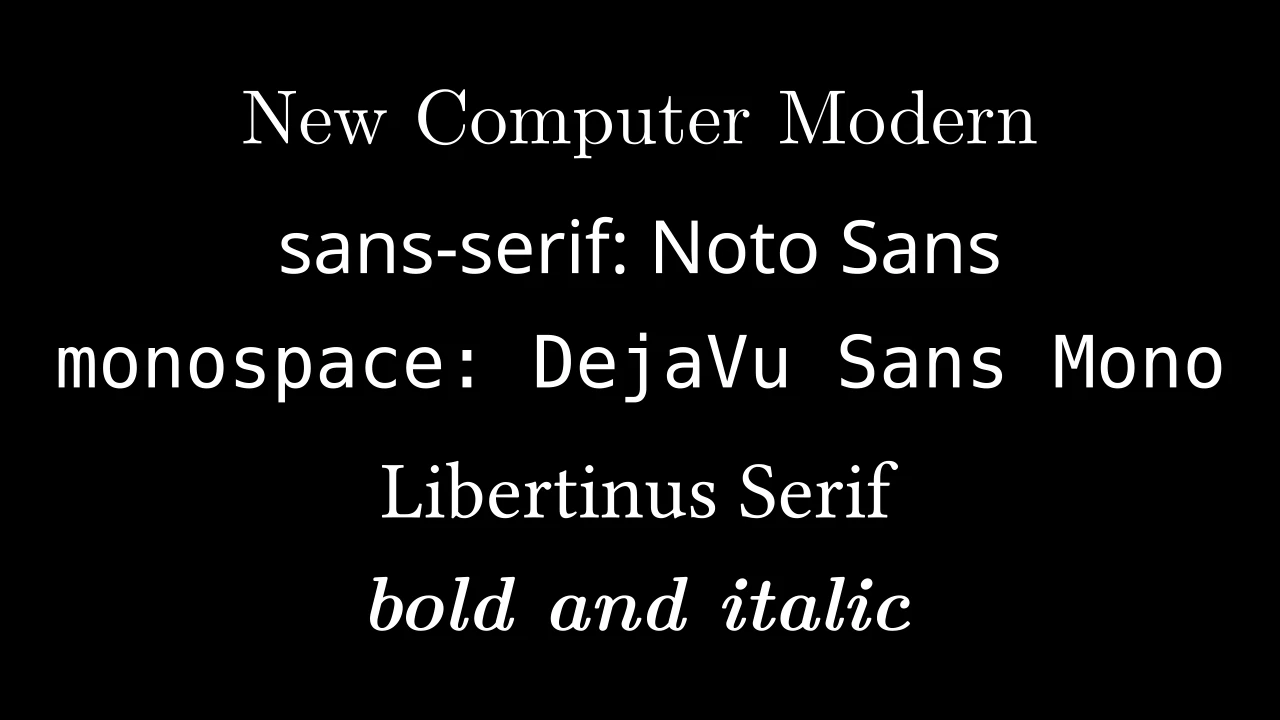
Code
import manimgx as m


class TextExample(m.Scene):
    def construct(self) -> None:
        texts = m.VGroup(
            m.Text("New Computer Modern"),
            m.Text("sans-serif: Noto Sans", font="sans-serif"),
            m.Text("monospace: DejaVu Sans Mono", font="monospace"),
            m.Text("Libertinus Serif", font="Libertinus Serif"),
            m.Text("bold and italic", weight=m.BOLD, slant=m.ITALIC),
        )
        self.add(texts.arrange(m.DOWN, buff=0.5).scale(1.3))
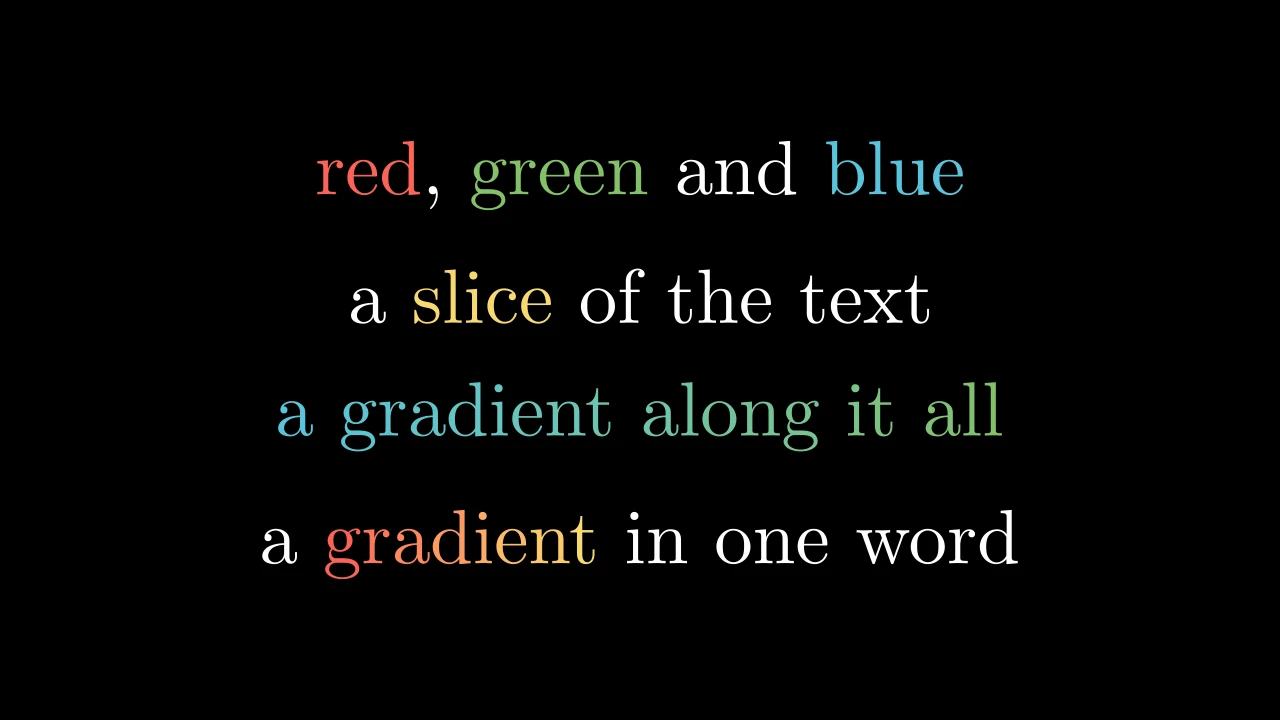
Code
import manimgx as m


class TextColoringExample(m.Scene):
    def construct(self) -> None:
        words = {"red": m.RED, "green": m.GREEN, "blue": m.BLUE}
        word = {"gradient": (m.RED, m.YELLOW)}
        texts = m.VGroup(
            m.Text("red, green and blue", t2c=words),
            m.Text("a slice of the text", t2c={"[2:7]": m.YELLOW}),
            m.Text("a gradient along it all", gradient=(m.BLUE, m.GREEN)),
            m.Text("a gradient in one word", t2g=word),
        )
        self.add(texts.arrange(m.DOWN, buff=0.5).scale(1.3))
Text in a font, typeset by Typst as it is written: white unless styled.
Spaces stay, a newline breaks the line, a tab is tab_width spaces, and nothing is
markup ("= Title" is no heading). The lines are set on a grid: their baselines are
1 + line_spacing ems apart, whatever the glyphs on them. The parts are the glyphs,
in reading order, spaces excluded: Text("Hello")[0] is the "H", a
TypstGlyph. A ligature is one glyph
(the "ffi" of "office", in the default font) unless disable_ligatures.
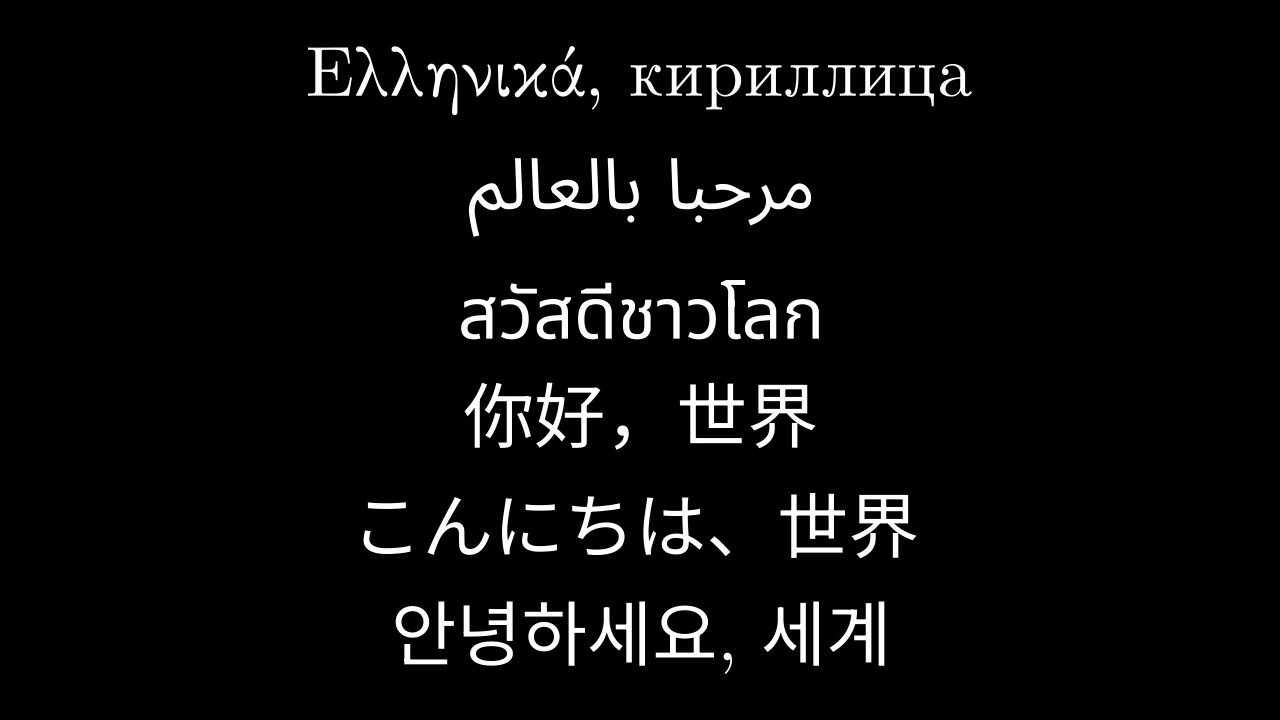
A text is set in one font, from the fonts manimgx ships, so it looks the same on
every machine: New Computer Modern unless font names another. "serif",
"sans-serif" (or "sans") and "monospace" (or "mono") are New Computer Modern, Noto
Sans and DejaVu Sans Mono. Fonts in font_paths come first; a family neither they
nor manimgx have is read from the system's fonts, and one found nowhere falls back
to New Computer Modern. A character the font lacks is set in another font that has
it: manimgx ships Noto faces for Arabic, Hebrew, the Indic scripts, Thai, Chinese,
Japanese, Korean and more, with symbols and emoji. In any font, a capital is 0.449
scene units tall at the default size, 48, and in proportion at others: each font is
scaled to that, and font_size still reads the size asked for.
A text whose first letter is from a right-to-left script (Arabic, Hebrew) is set as a right-to-left paragraph, its lines lined up on the right. A Chinese, Japanese or Korean text takes its language from its characters (Japanese with kana, Korean with hangul, else Chinese), which gives its Han characters their regional forms.
Keys pick characters: a slice "[a:b]" of the text as written, spaces included, or
a string, each occurrence of it (a key that occurs nowhere picks nothing). t2s and
t2w set what they pick in another slant or weight; gradient, then t2g, then
t2c color it, each over the one before. Color never changes the layout: the text
is laid out once, and each glyph takes the color of the characters it draws — a
ligature that a color boundary crosses is cut there, each piece in its characters'
color. A custom glyph's path-building methods also construct its color pieces.
textThe text, as written.
line_spacingThe space between lines, in ems: the baselines are
1 + line_spacingems apart; -1 for 0.3.fontThe font family, or "serif", "sans-serif" or "monospace"; "" for New Computer Modern.
slantNORMAL,ITALICorOBLIQUE.weightA weight by name, from
THINthroughNORMALandBOLDtoULTRAHEAVY; the font's nearest weight is used.t2cA color for each key.
t2gA gradient for each key: its colors spread along what the key picks.
t2sA slant for each key.
t2wA weight for each key.
gradientColors spread along the whole text, character by character, spaces included.
tab_widthHow many spaces a tab is set as.
disable_ligaturesWhether every character is a glyph of its own.
It also takes
the Typst keywords and the style keywords.
Source
src/manimgx/mobjects/text.py
text 
The text, as it was written.
Paragraph 
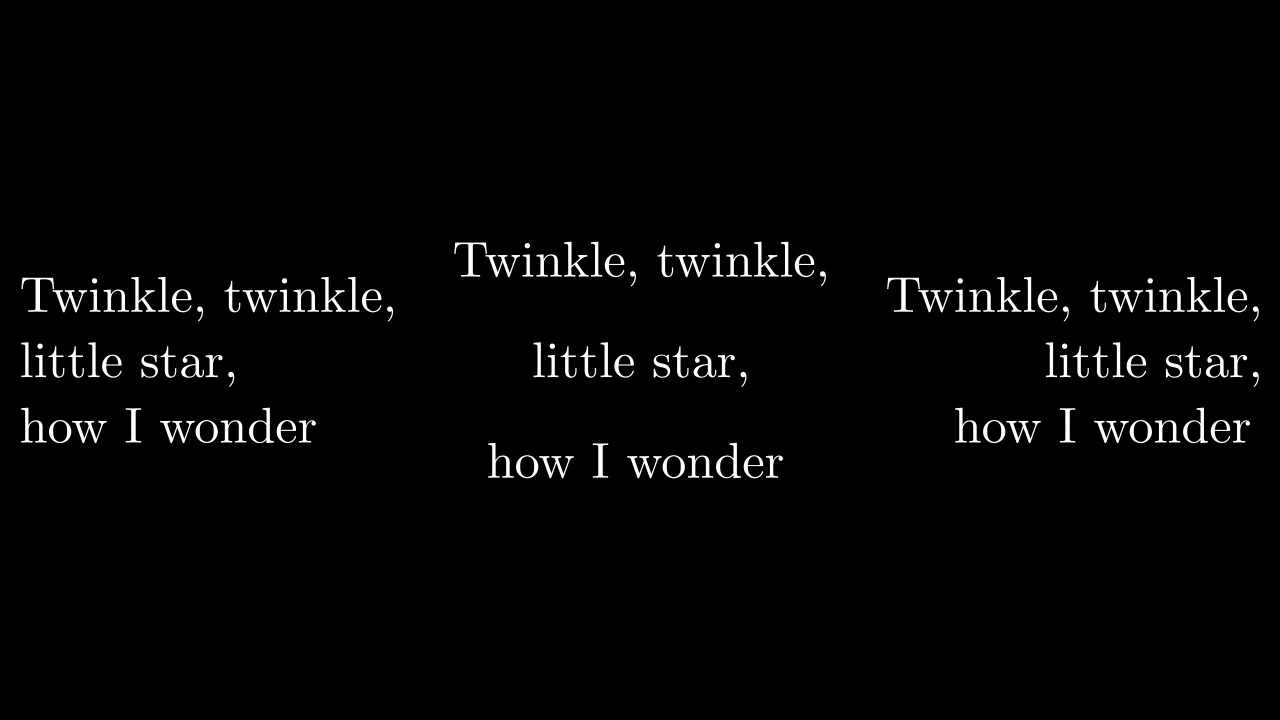
Code
import manimgx as m


class ParagraphExample(m.Scene):
    def construct(self) -> None:
        lines = ("Twinkle, twinkle,", "little star,", "how I wonder")
        paragraphs = m.VGroup(
            m.Paragraph(*lines),
            m.Paragraph(*lines, alignment="center", line_spacing=1),
            m.Paragraph(*lines, alignment="right"),
        )
        self.add(paragraphs.arrange(buff=0.8).scale(0.85))
Lines of text set as one paragraph: on one grid of baselines, each line at the
paragraph's start or where alignment puts it.
The lines are one Text (lines_text), joined by newlines, so they
share its grid: their baselines are 1 + line_spacing ems apart (1.3 unless
line_spacing is given). The paragraph's parts are its lines, from the top, each
the group of its glyphs.
*textThe lines: each string is one, or several, split at its newlines.
alignment"left", "center" or "right" to line the lines up on that side or center them; None to start each at the paragraph's start (the left, for left-to-right text).
It also takes
the Text keywords and the style keywords.
Source
src/manimgx/mobjects/text.py
Title 
A title: LaTeX text at the top of the frame, over a line across it.
The line is the last part, and the title's underline; a color colors it with
the text, as set_color would.
m.Title(*text_parts, include_underline=True, match_underline_width_to_text=False, underline_buff=MED_SMALL_BUFF, **kwargs)
*text_partsThe title, in LaTeX: a string per part.
include_underlineWhether a line is drawn under the title.
match_underline_width_to_textWhether the line is as wide as the title; if not, it spans the frame but 1 unit at each side.
underline_buffThe gap between the title and the line, in scene units.
It also takes
the MathTex keywords and the style keywords.
Source
src/manimgx/mobjects/text.py
underline 
The line under the title, its last part (a title made without one has none).
BulletedList 
A bulleted list: an item per line, each after a bullet, lined up on the left.
Typst sets the items as a list: each bullet is a centered dot (LaTeX's \cdot at
twice its size), SMALL_BUFF from its item, and the items are buff apart, in
scene units at the list's font size. Each item is LaTeX text (math between $
signs) and a part of its own, its bullet first: items[1] is the second item.
height and width scale the list as set.
m.BulletedList(*items, buff=MED_LARGE_BUFF, **kwargs)
*itemsThe items, in LaTeX.
buffThe space between items, in scene units.
It also takes
the MathTex keywords and the style keywords.
Source
src/manimgx/mobjects/text.py
fade_all_but 
Fade every item but one: the others' fill to opacity, the one's to 1.
indexThe item's index, from 0.
opacityThe other items' fill opacity, from 0 to 1.
Source
src/manimgx/mobjects/text.py
Code 
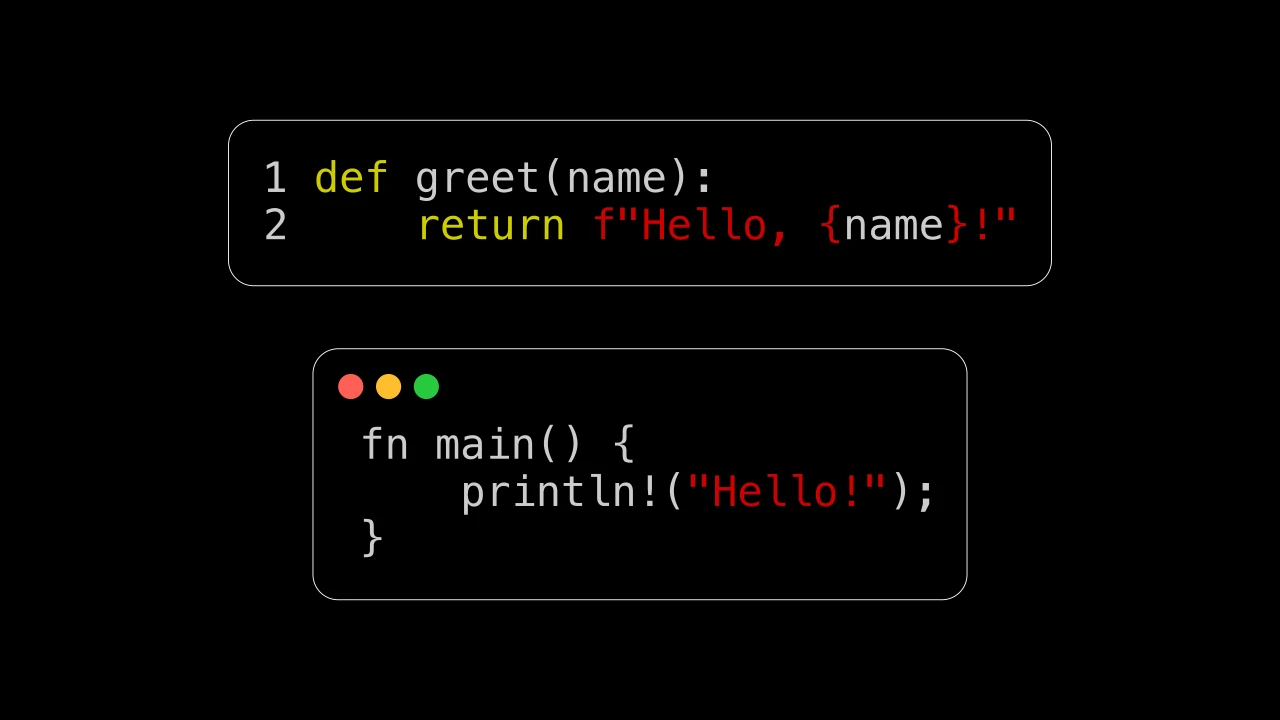
Code
import manimgx as m


class CodeExample(m.Scene):
    def construct(self) -> None:
        python = m.Code(
            code_string='def greet(name):\n    return f"Hello, {name}!"\n',
            language="python",
        )
        rust = m.Code(
            code_string='fn main() {\n    println!("Hello!");\n}\n',
            language="rust",
            background="window",
            add_line_numbers=False,
        )
        self.add(m.VGroup(python, rust).arrange(m.DOWN, buff=0.5).scale(1.4))
A listing of source code, highlighted: its lines, their numbers, and a rectangle or a window behind them.
The code is highlighted by Typst's grammars, in the colors of formatter_style, and
set on a fixed grid, each character a column. The parts are
background, line_numbers (if
the lines are numbered) and code_lines, whose i-th part is
the i-th line, a group of its glyphs, spaces excluded. Tabs are expanded, and blank
lines at the start and at the end are dropped.
code_fileA file to read the code from (UTF-8); its extension names the language unless
languagedoes.code_stringThe code, when there is no
code_file; one of the two is needed (ValueError otherwise).languageThe language to highlight the code as, by name or file extension ("python", "rust", "cpp", "js", …: those Typst's
rawknows); None, or a language it doesn't know, for plain text.formatter_styleThe colors: "vim", the only style, on a black background.
tab_widthHow many columns apart the tab stops are.
add_line_numbersWhether the lines are numbered, on their left.
line_numbers_fromThe first line's number.
background"rectangle", or "window": a rectangle with a window's three buttons at its top.
background_configSurrounding rectangle keywords for the background, over
default_background_config: a margin of 0.3, round corners, a thin white outline, and the style's background color.paragraph_configCode text keywords for the text, over
default_paragraph_config.
Source
src/manimgx/mobjects/code.py
300 301 302 303 304 305 306 307 308 309 310 311 312 313 314 315 316 317 318 319 320 321 322 323 324 325 326 327 328 329 330 331 332 333 334 335 336 337 338 339 340 341 342 343 344 345 346 347 348 349 350 351 352 353 354 355 356 357 358 359 360 361 362 363 364 365 366 367 368 369 370 371 372 373 374 375 376 377 378 379 380 381 382 383 384 385 386 387 388 389 390 391 392 393 394 395 396 397 398 399 400 401 | |
default_background_config 
The background's keywords unless background_config changes them; its fill is
the style's background color unless a fill_color is given.
default_paragraph_config 
The text's keywords unless paragraph_config changes them.
code_lines 
The lines, a part: its i-th part is the i-th line, a group of its glyphs.
line_numbers 
The line numbers, a part (if the lines are numbered): its i-th part is the i-th line's number, lined up on the right.
background 
The rectangle behind the listing, its first part; a window's buttons are its submobjects.
CodeText 
The text of a Code listing: its paragraph_config, the text
keywords that apply to a listing.
fontThe font family: "Monospace", the default, is Menlo where the system has it, and elsewhere DejaVu Sans Mono, which manimgx ships; any other family is one manimgx ships, or else the system's.
font_sizeThe size of the text: an em is
font_size / 72scene units (default 24).line_spacingHow far apart the lines are, beyond the font size: their baselines are
(1 + line_spacing) * font_size / 96scene units apart (default 0.5; -1 for 0.3).disable_ligaturesWhether every character is a glyph of its own, with no ligatures (default True).
font 
The font family: "Monospace", the default, is Menlo where the system has it, and elsewhere DejaVu Sans Mono, which manimgx ships; any other family is one manimgx ships, or else the system's.
font_size 
The size of the text: an em is font_size / 72 scene units (default 24).
line_spacing 
How far apart the lines are, beyond the font size: their baselines are
(1 + line_spacing) * font_size / 96 scene units apart (default 0.5; -1 for
0.3).
disable_ligatures 
Whether every character is a glyph of its own, with no ligatures (default True).
Weights and slants
A text's weight is how heavy its strokes are, and its slant how it leans.
m.NORMAL 
Text's normal slant, upright, and its normal weight (400).
m.ITALIC 
An italic slant of text.
m.OBLIQUE 
An oblique slant of text: its upright letters, slanted.
m.THIN 
A weight of text: thin (100).
m.ULTRALIGHT 
A weight of text: ultralight (200).
m.LIGHT 
A weight of text: light (300).
m.SEMILIGHT 
A weight of text: semilight (350).
m.BOOK 
A weight of text: book (380).
m.MEDIUM 
A weight of text: medium (500).
m.SEMIBOLD 
A weight of text: semibold (600).
m.BOLD 
A weight of text: bold (700).
m.ULTRABOLD 
A weight of text: ultrabold (800).
m.HEAVY 
A weight of text: heavy (900).
m.ULTRAHEAVY 
A weight of text: ultraheavy (950).