Numbers
The film's code
import manimgx as m


class NumbersHero(m.Scene):
    def construct(self) -> None:
        number = m.DecimalNumber(0, num_decimal_places=2, font_size=96, color=m.YELLOW)
        variable = m.Variable(0, m.MathTex("x"), num_decimal_places=2).scale(1.5)
        tracker = variable.tracker
        m.VGroup(number, variable).arrange(m.DOWN, buff=1)

        def follow(mobject: m.DecimalNumber) -> None:
            mobject.set_value(tracker.get_value())

        number.add_updater(follow)
        self.add(number, variable)
        self.play(tracker.animate.set_value(3.14), run_time=2)
        self.wait()
A number is a text that knows its value. set_value shows another value in its place, with the same look, so a number can count while a scene plays: by an updater that sets it at every frame, or by ChangeDecimalToValue.
DecimalNumber 
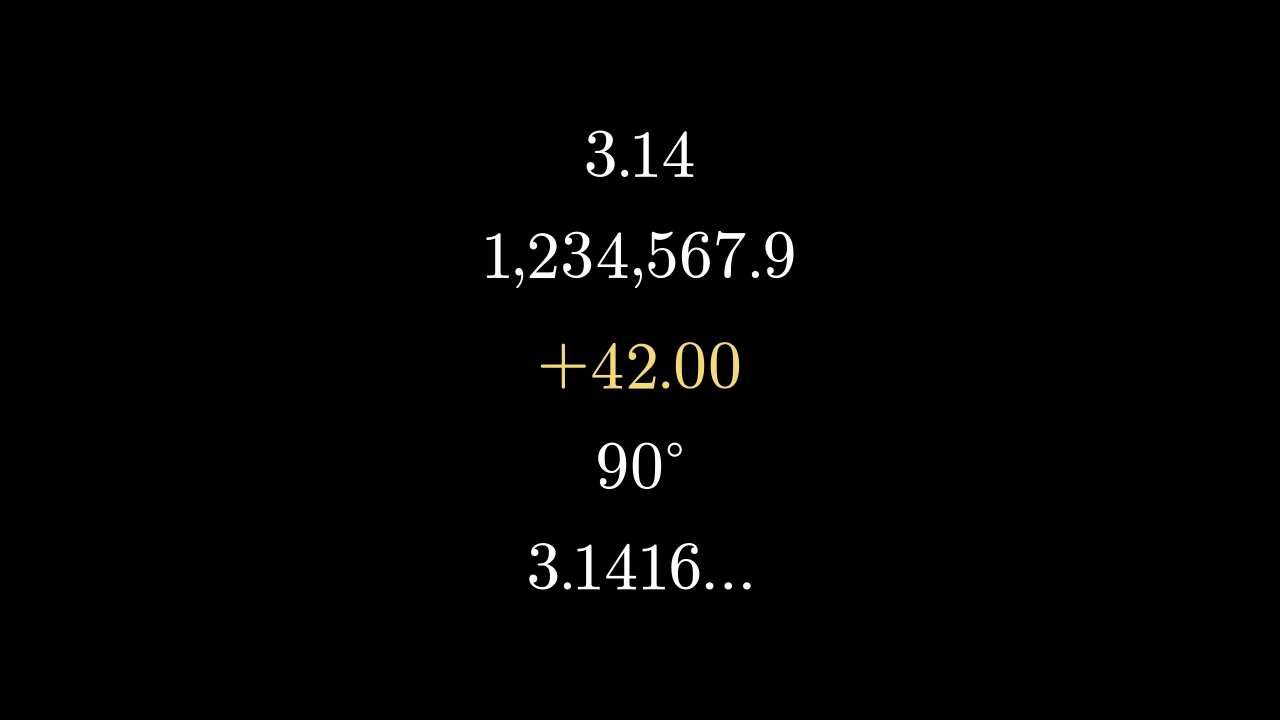
Code
import manimgx as m


class DecimalNumberExample(m.Scene):
    def construct(self) -> None:
        numbers = m.VGroup(
            m.DecimalNumber(3.14159),
            m.DecimalNumber(1234567.891, num_decimal_places=1),
            m.DecimalNumber(42, include_sign=True, color=m.YELLOW),
            m.DecimalNumber(90, num_decimal_places=0, unit=r"^\circ"),
            m.DecimalNumber(3.14159, num_decimal_places=4, show_ellipsis=True),
        )
        self.add(numbers.arrange(m.DOWN, buff=0.4).scale(1.5))
A number, written with a fixed number of decimal places: white and filled unless styled.
Its parts are its characters, in order, each typeset by mob_class: the sign, the
digits, the commas and the decimal point; then "…" and the unit, if any (and a
background rectangle before them all, if asked for). The number shown is rounded (a
negative one that rounds to zero loses its sign, in either component of a complex
number), and a complex one is written a+bi.
set_value shows another
number, keeping the font size, the color and the edge edge_to_fix where they are:
driven by a value tracker, or by
ChangeDecimalToValue, the number counts on screen.
numberThe number to show; a complex one too.
num_decimal_placesHow many digits follow the decimal point.
mob_classThe class each character is typeset with.
include_signWhether a number that is not negative is written with a plus sign.
group_with_commasWhether the digits before the decimal point are grouped in threes by commas.
digit_buff_per_font_unitThe gap between characters, per unit of font size (0.001: 0.048 scene units at 48).
show_ellipsisWhether "…" follows the number.
unitA unit after the number, in LaTeX math (
"^\circ",r"\text{ m}"); one that starts with "^" is raised to the number's top.unit_buff_per_font_unitThe gap before the unit, beyond the gap between characters, per unit of font size.
include_background_rectangleWhether a background rectangle is behind the number.
edge_to_fixThe edge, as a direction, that stays where it is when a new value changes the number's width.
font_sizeThe characters' font size, as
mob_classmeasures it.colorThe color of both fill and stroke (default white); None for the class's default.
fill_colorThe fill's color;
colorif not given. Several colors make a gradient alongsheen_direction.fill_opacityThe fill's opacity, from 0 to 1 (default 0: no fill).
stroke_colorThe stroke's color;
colorif not given. Several colors make a gradient.stroke_opacityThe stroke's opacity, from 0 to 1 (default 1).
stroke_widthThe stroke's width, in hundredths of a scene unit (default 4; 0: no stroke).
background_stroke_colorThe color of an outline drawn behind the fill (default black).
background_stroke_opacityThe outline's opacity, from 0 to 1 (default 1).
background_stroke_widthThe outline's width, in hundredths of a scene unit (default 0: none).
sheen_factorHow much the colors lighten toward
sheen_direction, from -1 to 1 (default 0); a negative factor darkens.sheen_directionThe direction the colors lighten toward (default
UL).joint_typeHow the stroke is joined where its path turns: round, beveled or mitered, as a two-dimensional scene draws it (see LineJointType; default AUTO: mitered).
cap_styleHow the stroke ends, at each end it shows (an open path's, a dash's): round, butt or square, as a two-dimensional scene draws it (see CapStyleType; default AUTO: butt).
shade_in_3dWhether a three-dimensional scene's light shades the mobject.
materialHow its surface reflects the scene's lights in a three-dimensional scene (see Material); None: Manim's shading (default).
nameA name for the mobject; its class's name if not given.
z_indexIts place in the drawing order: a higher index is drawn over a lower one (default 0).
targetThe state
MoveToTargetmoves the mobject to.
It also takes the style keywords.
Source
src/manimgx/mobjects/numbers.py
font_size 
The number's font size: the one it was made with, times how much it has been scaled since. Set it, to a positive size, to scale the number to it.
Source
src/manimgx/mobjects/numbers.py
get_value 
increment_value 
Show the number plus delta_t.
delta_tWhat to add.
set_value 
Code
import manimgx as m


class DecimalNumberSetValueExample(m.Scene):
    def construct(self) -> None:
        tracker = m.ValueTracker(0)
        number = m.DecimalNumber(0, font_size=144).shift(2 * m.LEFT)
        number.add_updater(lambda n: n.set_value(tracker.get_value()))
        self.add(number)
        self.play(tracker.animate.set_value(100), run_time=3)
Show another number, keeping the look: the font size, the edge edge_to_fix
where it is, and the color — every character takes the number's own, so a color
given to single characters is not kept.
numberThe number to show.
Source
src/manimgx/mobjects/numbers.py
Integer 
An integer: a DecimalNumber with no decimal places, white and filled unless styled.
A number with a fractional part is shown rounded, and get_value rounds it too.
numberThe number to show.
num_decimal_placesHow many digits follow the decimal point: none unless given.
It also takes
the DecimalNumber keywords.
Source
src/manimgx/mobjects/numbers.py
Variable 
Code
import manimgx as m


class VariableExample(m.Scene):
    def construct(self) -> None:
        x = m.Variable(2.0, "x", num_decimal_places=3)
        y = m.Variable(4.0, "x^2", num_decimal_places=3)
        self.add(m.VGroup(x, y).arrange(m.DOWN, buff=0.5).scale(2))
        t = x.tracker
        y.add_updater(lambda v: v.tracker.set_value(t.get_value() ** 2))
        self.play(t.animate.set_value(5), run_time=3, rate_func=m.linear)
A named value: a label, "=", and a number that shows a value tracker's value.
Its parts are its label, followed by "=", and its value, a DecimalNumber or an Integer that shows its tracker's value at every frame: animate the tracker, and the number counts.
m.Variable(var, label, var_type=DecimalNumber, num_decimal_places=2, **kwargs)
varThe value it starts with.
labelThe label: a string, typeset as math (MathTex), or a text or math mobject.
var_typeThe number's class: DecimalNumber or a subclass, such as Integer.
num_decimal_placesHow many digits follow the decimal point. Integer classes use their own precision defaults instead.
colorThe color of both fill and stroke (default white); None for the class's default.
fill_colorThe fill's color;
colorif not given. Several colors make a gradient alongsheen_direction.fill_opacityThe fill's opacity, from 0 to 1 (default 0: no fill).
stroke_colorThe stroke's color;
colorif not given. Several colors make a gradient.stroke_opacityThe stroke's opacity, from 0 to 1 (default 1).
stroke_widthThe stroke's width, in hundredths of a scene unit (default 4; 0: no stroke).
background_stroke_colorThe color of an outline drawn behind the fill (default black).
background_stroke_opacityThe outline's opacity, from 0 to 1 (default 1).
background_stroke_widthThe outline's width, in hundredths of a scene unit (default 0: none).
sheen_factorHow much the colors lighten toward
sheen_direction, from -1 to 1 (default 0); a negative factor darkens.sheen_directionThe direction the colors lighten toward (default
UL).joint_typeHow the stroke is joined where its path turns: round, beveled or mitered, as a two-dimensional scene draws it (see LineJointType; default AUTO: mitered).
cap_styleHow the stroke ends, at each end it shows (an open path's, a dash's): round, butt or square, as a two-dimensional scene draws it (see CapStyleType; default AUTO: butt).
shade_in_3dWhether a three-dimensional scene's light shades the mobject.
materialHow its surface reflects the scene's lights in a three-dimensional scene (see Material); None: Manim's shading (default).
nameA name for the mobject; its class's name if not given.
z_indexIts place in the drawing order: a higher index is drawn over a lower one (default 0).
targetThe state
MoveToTargetmoves the mobject to.
It also takes the style keywords.
Source
src/manimgx/mobjects/numbers.py
Count to a value
ChangeDecimalToValue 
Count a number to a value.
It goes from the value it has when the animation is made to target_number, eased
by the rate function.
decimal_mobThe number to change.
target_numberThe value it ends at.
run_timeHow long the animation plays, in seconds (default 1).
lag_ratioHow the parts of the mobject are staggered: each begins this fraction of its run after the one before it begins (default 0: all together; 1: one after another).
rate_funcHow the animation's progress runs with time: a function from [0, 1] to [0, 1] (default
smooth; see rate functions).reverse_rate_functionWhether to run the animation backward (default False).
nameA name for the animation.
removerWhether the mobject leaves the scene when the animation finishes (default False).
suspend_mobject_updatingWhether the mobject's updaters run beneath the animation (default True): they keep acting on the mobject, and each frame shows the animation applied to the result. If False, they act on the animated mobject itself.
introducerWhether the mobject joins the scene when the animation begins (default False); otherwise the play brings it in when the play begins, if the scene lacks it.
use_overrideWhether a mobject whose class plays another animation in place of this one does so (default True).
It also takes the animation keywords.
Source
src/manimgx/animation/motion.py
ChangingDecimal 
Change the value a number shows with the animation's progress.
At every frame, the number shows number_update_func of the progress, from 0 to 1,
eased by the rate function.
decimal_mobThe number to change.
number_update_funcA function from the progress to the value to show.
run_timeHow long the animation plays, in seconds (default 1).
lag_ratioHow the parts of the mobject are staggered: each begins this fraction of its run after the one before it begins (default 0: all together; 1: one after another).
rate_funcHow the animation's progress runs with time: a function from [0, 1] to [0, 1] (default
smooth; see rate functions).reverse_rate_functionWhether to run the animation backward (default False).
nameA name for the animation.
removerWhether the mobject leaves the scene when the animation finishes (default False).
suspend_mobject_updatingWhether the mobject's updaters run beneath the animation (default True): they keep acting on the mobject, and each frame shows the animation applied to the result. If False, they act on the animated mobject itself.
introducerWhether the mobject joins the scene when the animation begins (default False); otherwise the play brings it in when the play begins, if the scene lacks it.
use_overrideWhether a mobject whose class plays another animation in place of this one does so (default True).
It also takes the animation keywords.
Source
src/manimgx/animation/motion.py