Skip to content

Vector fields

The film's code
import manimgx as m
import numpy as np


def swirl(point: np.ndarray) -> np.ndarray:
    x, y = point[0], point[1]
    return np.array([-y, x, 0]) / 3 + np.array([0.3 * np.sin(y), 0, 0])


class VectorFieldsHero(m.Scene):
    def construct(self) -> None:
        field = m.ArrowVectorField(swirl)
        dots = m.VGroup(*[m.Dot([x, 0, 0], color=m.YELLOW) for x in [1, 2, 3]])
        self.play(m.Create(field))
        self.add(dots)
        for dot in dots:
            dot.add_updater(field.get_nudge_updater())
        self.wait(3)

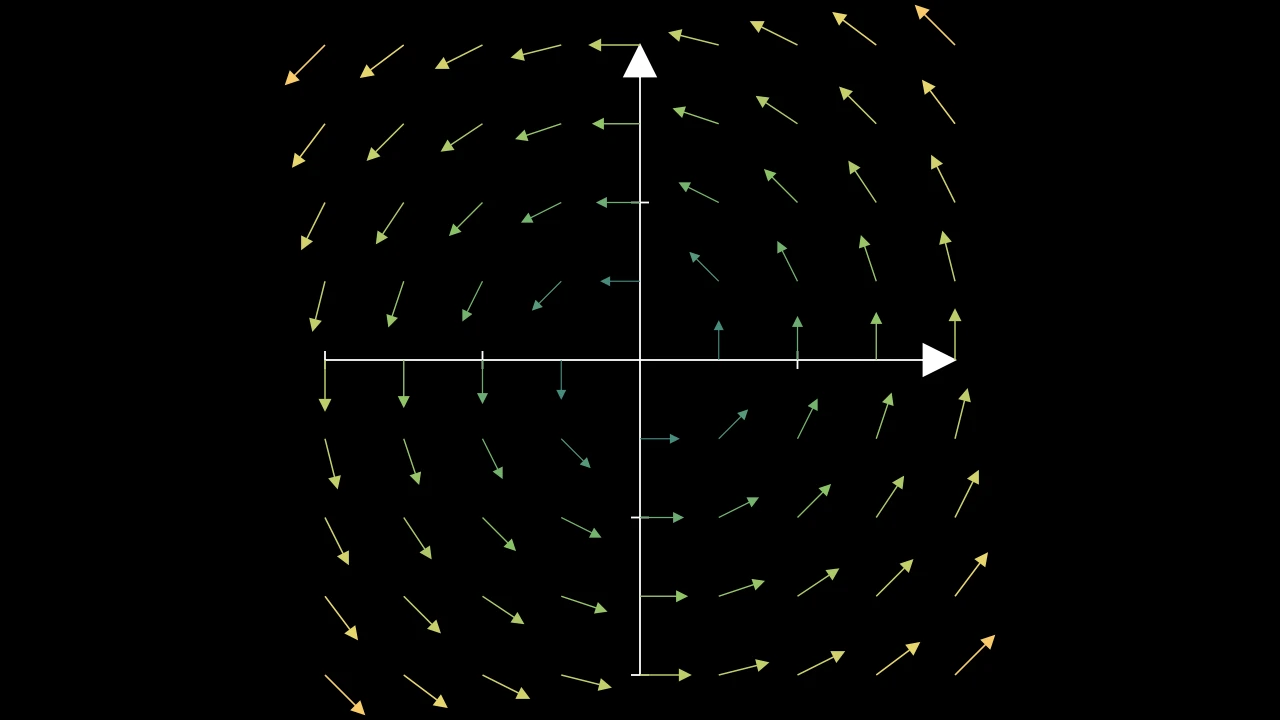
A vector field gives a vector at every point of the plane: a function from a point to a vector. Draw it as arrows, one at each point of a grid, or as stream lines, the paths that particles would follow. The field's color shows its strength. A field also moves mobjects: it carries them as a current carries a leaf.

VectorField

What the vector fields have in common: a function giving a vector at every point, colors by the vectors' lengths, and the tools to carry mobjects along the field.

A field is drawn by its kinds: as arrows (ArrowVectorField) or as the lines that follow it (StreamLines). Unless given one color, each part takes the field's color where it is: the vector's length there (or color_scheme's value), between min_color_scheme_value and max_color_scheme_value, placed along colors and blended between them; values beyond take the first or the last color. nudge carries a mobject along the field, and get_nudge_updater keeps it flowing.

m.VectorField(func, color=None, color_scheme=None, min_color_scheme_value=0, max_color_scheme_value=2, colors=DEFAULT_SCALAR_FIELD_COLORS, **kwargs)
func

The field: a function from a point (an array of its three coordinates, in scene coordinates) to the vector there.

color

One color for the whole field; None to color it by its vectors.

color_scheme

The value a vector is colored by, a function from the vector to a number; None for its length.

min_color_scheme_value

The value that takes the first color.

max_color_scheme_value

The value that takes the last color.

colors

The colors, spread evenly from the first value to the last.

fill_color

The fill's color; color if not given. Several colors make a gradient along sheen_direction.

fill_opacity

The fill's opacity, from 0 to 1 (default 0: no fill).

stroke_color

The stroke's color; color if not given. Several colors make a gradient.

stroke_opacity

The stroke's opacity, from 0 to 1 (default 1).

stroke_width

The stroke's width, in hundredths of a scene unit (default 4; 0: no stroke).

background_stroke_color

The color of an outline drawn behind the fill (default black).

background_stroke_opacity

The outline's opacity, from 0 to 1 (default 1).

background_stroke_width

The outline's width, in hundredths of a scene unit (default 0: none).

sheen_factor

How much the colors lighten toward sheen_direction, from -1 to 1 (default 0); a negative factor darkens.

sheen_direction

The direction the colors lighten toward (default UL).

joint_type

How the stroke is joined where its path turns: round, beveled or mitered, as a two-dimensional scene draws it (see LineJointType; default AUTO: mitered).

cap_style

How the stroke ends, at each end it shows (an open path's, a dash's): round, butt or square, as a two-dimensional scene draws it (see CapStyleType; default AUTO: butt).

shade_in_3d

Whether a three-dimensional scene's light shades the mobject.

material

How its surface reflects the scene's lights in a three-dimensional scene (see Material); None: Manim's shading (default).

name

A name for the mobject; its class's name if not given.

z_index

Its place in the drawing order: a higher index is drawn over a lower one (default 0).

target

The state MoveToTarget moves the mobject to.

It also takes the style keywords.

Source

src/manimgx/mobjects/vector_field.py

def __init__(
    self,
    func: FieldFunction,
    color: ParsableManimColor | None = None,
    color_scheme: Callable[[Vector3D], float] | None = None,
    min_color_scheme_value: float = 0,
    max_color_scheme_value: float = 2,
    colors: Sequence[ParsableManimColor] = DEFAULT_SCALAR_FIELD_COLORS,
    **kwargs: Unpack[StyleBase],
):
    super().__init__(**kwargs)
    self.func = func
    """The field: its function, from a point to the vector there."""
    if color is None:
        self.single_color = False
        self.color_scheme: Callable[[Vector3D], float] = color_scheme or (
            lambda vec: float(np.linalg.norm(vec))
        )
        self.rgbs: FloatRGB_Array = np.array(list(map(color_to_rgb, colors)))

        self._color_range = (min_color_scheme_value, max_color_scheme_value)
    else:
        self.single_color = True
        self.color = ManimColor.parse(color)
    self.submob_movement_updater: Callable[[VectorField, float], object] | None = (
        None
    )

func

The field: its function, from a point to the vector there.

pos_to_color

The field's color at a point.

field.pos_to_color(pos)
Source

src/manimgx/mobjects/vector_field.py

def pos_to_color(self, pos: Point3D) -> ManimColor:
    """The field's color at a point."""
    return rgb_to_color(self.pos_to_rgb(pos))

shift_func

Move a field: make the function of the field shifted by a vector.

VectorField.shift_func(func, shift_vector)
func

The field's function.

shift_vector

The vector to move it by, in scene units.

Returns A new function, which at a point p is func(p - shift_vector).

Source

src/manimgx/mobjects/vector_field.py

@staticmethod
def shift_func(func: FieldFunction, shift_vector: np.ndarray) -> FieldFunction:
    """Move a field: make the function of the field shifted by a vector.

    Args:
        func: The field's function.
        shift_vector: The vector to move it by, in scene units.

    Returns:
        A new function, which at a point p is `func(p - shift_vector)`.
    """
    return lambda p: func(p - shift_vector)

scale_func

Rescale a field's pattern: make the function of the field whose vector at a point p is the old field's at p × scalar.

A scalar below 1 spreads the pattern out, as if zoomed in; above 1, it draws it together. The vectors keep their lengths.

VectorField.scale_func(func, scalar)
func

The field's function.

scalar

The factor the points are multiplied by.

Returns A new function, which at a point p is func(p * scalar).

Source

src/manimgx/mobjects/vector_field.py

@staticmethod
def scale_func(func: FieldFunction, scalar: float) -> FieldFunction:
    """Rescale a field's pattern: make the function of the field whose vector at a
    point p is the old field's at p × `scalar`.

    A scalar below 1 spreads the pattern out, as if zoomed in; above 1, it draws it
    together. The vectors keep their lengths.

    Args:
        func: The field's function.
        scalar: The factor the points are multiplied by.

    Returns:
        A new function, which at a point p is `func(p * scalar)`.
    """
    return lambda p: func(p * scalar)

fit_to_coordinate_system

VectorFieldFitToCoordinateSystemExample
Code
import numpy as np

import manimgx as m


class VectorFieldFitToCoordinateSystemExample(m.Scene):
    def construct(self) -> None:
        axes = m.Axes(
            x_range=[-2, 2], y_range=[-2, 2], x_length=7, y_length=7
        )
        field = m.ArrowVectorField(
            lambda p: np.array([-p[1], p[0], 0]) / 2,
            x_range=[-2, 2, 0.5],
            y_range=[-2, 2, 0.5],
        )
        self.add(axes, field.fit_to_coordinate_system(axes))

Place the field on axes: move each point of its parts to the axes' point whose coordinates are the point's own.

A field made in the axes' coordinates (its ranges theirs) lands on them, its arrows stretched with the axes' units.

field.fit_to_coordinate_system(coordinate_system)
coordinate_system

The axes.

Source

src/manimgx/mobjects/vector_field.py

def fit_to_coordinate_system(self, coordinate_system: Axes) -> Self:
    """Place the field on axes: move each point of its parts to the axes' point
    whose coordinates are the point's own.

    A field made in the axes' coordinates (its ranges theirs) lands on them, its
    arrows stretched with the axes' units.

    Args:
        coordinate_system: The axes.

    Examples:
        ```python
        import numpy as np

        import manimgx as m


        class VectorFieldFitToCoordinateSystemExample(m.Scene):
            def construct(self) -> None:
                axes = m.Axes(
                    x_range=[-2, 2], y_range=[-2, 2], x_length=7, y_length=7
                )
                field = m.ArrowVectorField(
                    lambda p: np.array([-p[1], p[0], 0]) / 2,
                    x_range=[-2, 2, 0.5],
                    y_range=[-2, 2, 0.5],
                )
                self.add(axes, field.fit_to_coordinate_system(axes))
        ```
    """
    self.apply_function(lambda pos: coordinate_system.coords_to_point(*pos))
    return self

nudge

Carry a mobject along the field for a while, as a particle on its flow.

The field's vectors are velocities: the mobject moves with the field at its center, or, with pointwise, each of its points moves with the field where it is, which bends it. Each step is a fourth-order Runge–Kutta step.

field.nudge(mob, dt=1, substeps=1, pointwise=False)
mob

The mobject to move.

dt

How long it is carried, in the field's time; negative to carry it back.

substeps

How many steps the time is divided into: more follow the field more closely.

pointwise

Whether each point of the mobject moves on its own, rather than the whole mobject with its center.

Source

src/manimgx/mobjects/vector_field.py

def nudge(
    self, mob: Mobject, dt: float = 1, substeps: int = 1, pointwise: bool = False
) -> Self:
    """Carry a mobject along the field for a while, as a particle on its flow.

    The field's vectors are velocities: the mobject moves with the field at its
    center, or, with `pointwise`, each of its points moves with the field where it
    is, which bends it. Each step is a fourth-order Runge–Kutta step.

    Args:
        mob: The mobject to move.
        dt: How long it is carried, in the field's time; negative to carry it back.
        substeps: How many steps the time is divided into: more follow the field
            more closely.
        pointwise: Whether each point of the mobject moves on its own, rather than
            the whole mobject with its center.
    """

    def runge_kutta(p: Point3D, step_size: float) -> Vector3D:
        k_1 = self.func(p)
        k_2 = self.func(p + step_size * (k_1 * 0.5))
        k_3 = self.func(p + step_size * (k_2 * 0.5))
        k_4 = self.func(p + step_size * k_3)
        return step_size / 6.0 * (k_1 + 2.0 * k_2 + 2.0 * k_3 + k_4)

    step_size = dt / substeps
    for _ in range(substeps):
        if pointwise:
            mob.apply_function(lambda p: p + runge_kutta(p, step_size))
        else:
            mob.shift(runge_kutta(mob.get_center(), step_size))
    return self

nudge_submobjects

Carry each of the field's own parts along it for a while, as nudge carries a mobject.

field.nudge_submobjects(dt=1, substeps=1, pointwise=False)
dt

How long they are carried, in the field's time; negative to carry them back.

substeps

How many steps the time is divided into.

pointwise

Whether each point of a part moves on its own, rather than the whole part with its center.

Source

src/manimgx/mobjects/vector_field.py

def nudge_submobjects(
    self, dt: float = 1, substeps: int = 1, pointwise: bool = False
) -> Self:
    """Carry each of the field's own parts along it for a while, as
    [nudge][manimgx.VectorField.nudge] carries a mobject.

    Args:
        dt: How long they are carried, in the field's time; negative to carry them
            back.
        substeps: How many steps the time is divided into.
        pointwise: Whether each point of a part moves on its own, rather than the
            whole part with its center.
    """
    for mob in self.submobjects:
        self.nudge(mob, dt, substeps, pointwise)
    return self

get_nudge_updater

Code
import numpy as np

import manimgx as m


class VectorFieldGetNudgeUpdaterExample(m.Scene):
    def construct(self) -> None:
        def swirl(p: np.ndarray) -> np.ndarray:
            return np.sin(p[1] / 2) * m.RIGHT + np.cos(p[0] / 2) * m.UP

        field = m.ArrowVectorField(
            swirl, x_range=[-7, 7, 1], y_range=[-4, 4, 1]
        )
        circle = m.Circle(radius=1, color=m.YELLOW).shift(2 * m.LEFT)
        dot = m.Dot(2 * m.RIGHT, radius=0.15, color=m.RED)
        circle.add_updater(field.get_nudge_updater(pointwise=True))
        dot.add_updater(field.get_nudge_updater())
        self.add(field, circle, dot)
        self.wait(2.5)

Make an updater that carries a mobject along the field: added to a mobject, it moves it with the field every frame, by the time since the last.

field.get_nudge_updater(speed=1, pointwise=False)
speed

How fast the mobject is carried: the field's time per second.

pointwise

Whether each point of the mobject moves on its own, rather than the whole mobject with its center.

Returns The updater, a function of the mobject and the time step, to give add_updater.

Source

src/manimgx/mobjects/vector_field.py

def get_nudge_updater(
    self, speed: float = 1, pointwise: bool = False
) -> Callable[[Mobject, float], Mobject]:
    """Make an updater that carries a mobject along the field: added to a mobject,
    it moves it with the field every frame, by the time since the last.

    Args:
        speed: How fast the mobject is carried: the field's time per second.
        pointwise: Whether each point of the mobject moves on its own, rather than
            the whole mobject with its center.

    Returns:
        The updater, a function of the mobject and the time step, to give
        [add_updater][manimgx.Mobject.add_updater].

    Examples:
        ```python
        import numpy as np

        import manimgx as m


        class VectorFieldGetNudgeUpdaterExample(m.Scene):
            def construct(self) -> None:
                def swirl(p: np.ndarray) -> np.ndarray:
                    return np.sin(p[1] / 2) * m.RIGHT + np.cos(p[0] / 2) * m.UP

                field = m.ArrowVectorField(
                    swirl, x_range=[-7, 7, 1], y_range=[-4, 4, 1]
                )
                circle = m.Circle(radius=1, color=m.YELLOW).shift(2 * m.LEFT)
                dot = m.Dot(2 * m.RIGHT, radius=0.15, color=m.RED)
                circle.add_updater(field.get_nudge_updater(pointwise=True))
                dot.add_updater(field.get_nudge_updater())
                self.add(field, circle, dot)
                self.wait(2.5)
        ```
    """
    return lambda mob, dt: self.nudge(mob, dt * speed, pointwise=pointwise)

start_submobject_movement

Set the field's own parts moving along it: an updater carries them every frame, as nudge_submobjects does.

A movement already started is replaced.

field.start_submobject_movement(speed=1, pointwise=False)
speed

How fast they are carried: the field's time per second.

pointwise

Whether each point of a part moves on its own, rather than the whole part with its center.

Source

src/manimgx/mobjects/vector_field.py

def start_submobject_movement(
    self, speed: float = 1, pointwise: bool = False
) -> Self:
    """Set the field's own parts moving along it: an updater carries them every
    frame, as [nudge_submobjects][manimgx.VectorField.nudge_submobjects] does.

    A movement already started is replaced.

    Args:
        speed: How fast they are carried: the field's time per second.
        pointwise: Whether each point of a part moves on its own, rather than the
            whole part with its center.
    """
    self.stop_submobject_movement()
    self.submob_movement_updater = lambda mob, dt: mob.nudge_submobjects(
        dt * speed, pointwise=pointwise
    )
    self.add_updater(self.submob_movement_updater)
    return self

stop_submobject_movement

Stop the movement start_submobject_movement started, if any.

field.stop_submobject_movement()
Source

src/manimgx/mobjects/vector_field.py

def stop_submobject_movement(self) -> Self:
    """Stop the movement
    [start_submobject_movement][manimgx.VectorField.start_submobject_movement]
    started, if any.
    """
    if self.submob_movement_updater is not None:
        self.remove_updater(self.submob_movement_updater)
    self.submob_movement_updater = None
    return self

ArrowVectorField

ArrowVectorFieldExample
Code
import numpy as np

import manimgx as m


class ArrowVectorFieldExample(m.Scene):
    def construct(self) -> None:
        field = m.ArrowVectorField(lambda p: np.array([-p[1], p[0], 0]) / 2)
        self.add(field)

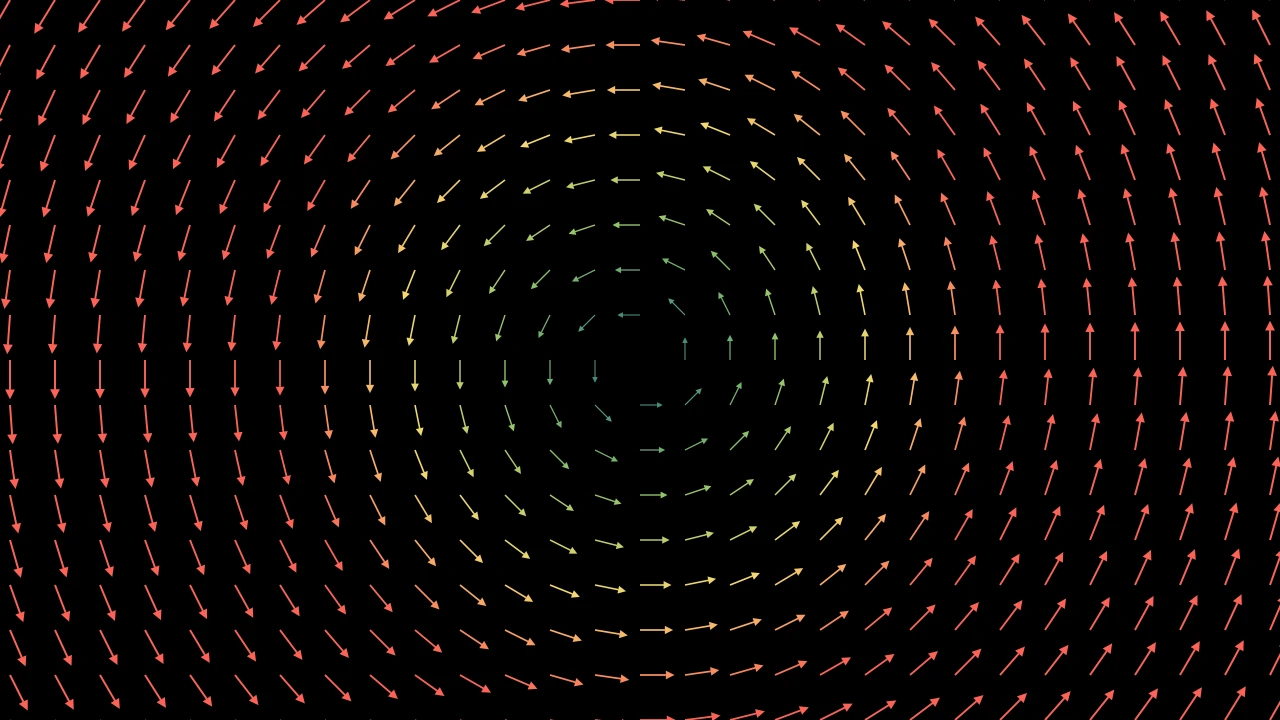
A vector field drawn as arrows: one at each point of a grid, from the point in the field's direction there; colored by the vectors' lengths, blue to red, unless given a color.

The grid spans x_range and y_range — by default the frame, every half unit — in the plane z = 0, or through z_range too. Each arrow is as long as length_func makes of its vector's length: by default 0.45 × sigmoid(length), from 0.225 for the shortest vectors to 0.45 for the longest, so that neighbours do not overlap (a zero vector makes no arrow).

m.ArrowVectorField(func, color=None, color_scheme=None, min_color_scheme_value=0, max_color_scheme_value=2, colors=DEFAULT_SCALAR_FIELD_COLORS, x_range=None, y_range=None, z_range=None, three_dimensions=False, length_func=lambda norm: 0.45 * sigmoid(norm), opacity=1.0, vector_config=None, **kwargs)
func

The field: a function from a point (an array of its three coordinates, in scene coordinates) to the vector there.

color

One color for every arrow; None to color them by their vectors.

color_scheme

The value a vector is colored by, a function from the vector to a number; None for its length.

min_color_scheme_value

The value that takes the first color.

max_color_scheme_value

The value that takes the last color.

colors

The colors, spread evenly from the first value to the last.

x_range

The grid's x values, [x_min, x_max, x_step] with both ends, or [x_min, x_max] for a step of 0.5; None for the frame's width, [-8, 8].

y_range

The grid's y values, likewise; None for the frame's height, [-4, 4].

z_range

The grid's z values, likewise; None for z = 0 alone, or the y values with three_dimensions.

three_dimensions

Whether the grid spans z too: by z_range, or by the y values.

length_func

The arrows' length, as a function of their vectors' length.

opacity

The arrows' opacity, from 0 to 1.

vector_config

Arrow keywords for the arrows: their tips, stroke_width, …; None for none.

fill_color

The fill's color; color if not given. Several colors make a gradient along sheen_direction.

fill_opacity

The fill's opacity, from 0 to 1 (default 0: no fill).

stroke_color

The stroke's color; color if not given. Several colors make a gradient.

stroke_opacity

The stroke's opacity, from 0 to 1 (default 1).

stroke_width

The stroke's width, in hundredths of a scene unit (default 4; 0: no stroke).

background_stroke_color

The color of an outline drawn behind the fill (default black).

background_stroke_opacity

The outline's opacity, from 0 to 1 (default 1).

background_stroke_width

The outline's width, in hundredths of a scene unit (default 0: none).

sheen_factor

How much the colors lighten toward sheen_direction, from -1 to 1 (default 0); a negative factor darkens.

sheen_direction

The direction the colors lighten toward (default UL).

joint_type

How the stroke is joined where its path turns: round, beveled or mitered, as a two-dimensional scene draws it (see LineJointType; default AUTO: mitered).

cap_style

How the stroke ends, at each end it shows (an open path's, a dash's): round, butt or square, as a two-dimensional scene draws it (see CapStyleType; default AUTO: butt).

shade_in_3d

Whether a three-dimensional scene's light shades the mobject.

material

How its surface reflects the scene's lights in a three-dimensional scene (see Material); None: Manim's shading (default).

name

A name for the mobject; its class's name if not given.

z_index

Its place in the drawing order: a higher index is drawn over a lower one (default 0).

target

The state MoveToTarget moves the mobject to.

It also takes the style keywords.

Source

src/manimgx/mobjects/vector_field.py

def __init__(
    self,
    func: FieldFunction,
    color: ParsableManimColor | None = None,
    color_scheme: Callable[[Vector3D], float] | None = None,
    min_color_scheme_value: float = 0,
    max_color_scheme_value: float = 2,
    colors: Sequence[ParsableManimColor] = DEFAULT_SCALAR_FIELD_COLORS,
    x_range: Sequence[float] | None = None,
    y_range: Sequence[float] | None = None,
    z_range: Sequence[float] | None = None,
    three_dimensions: bool = False,
    length_func: Callable[[float], float] = lambda norm: 0.45 * sigmoid(norm),
    opacity: float = 1.0,
    vector_config: ArrowTips | None = None,
    **kwargs: Unpack[StyleBase],
):
    x_range, y_range, z_range = _field_ranges(
        x_range, y_range, z_range, three_dimensions
    )
    super().__init__(
        func,
        color,
        color_scheme,
        min_color_scheme_value,
        max_color_scheme_value,
        colors,
        **kwargs,
    )
    self.length_func = length_func
    self.vector_config: ArrowTips = vector_config or {}
    grid = it.product(np.arange(*x_range), np.arange(*y_range), np.arange(*z_range))
    self.add(*(self.get_vector(x * RIGHT + y * UP + z * OUT) for x, y, z in grid))
    self.set_opacity(opacity)

get_vector

Make the field's arrow at a point: from the point, in the field's direction there, as long as length_func makes it, in the field's color there.

arrow_vector_field.get_vector(point)
point

The point, in scene coordinates.

Returns A new Vector, not added to the field.

Source

src/manimgx/mobjects/vector_field.py

def get_vector(self, point: Point3D) -> Vector:
    """Make the field's arrow at a point: from the point, in the field's direction
    there, as long as `length_func` makes it, in the field's color there.

    Args:
        point: The point, in scene coordinates.

    Returns:
        A new [Vector][manimgx.Vector], not added to the field.
    """
    output = np.array(self.func(point), dtype=float)
    norm = np.linalg.norm(output)
    if norm != 0:
        output *= self.length_func(float(norm)) / norm
    vect = Vector(output, **self.vector_config)
    vect.shift(point)
    vect.set_color(self.color if self.single_color else self.pos_to_color(point))
    return vect

StreamLines

StreamLinesExample
Code
import numpy as np

import manimgx as m


class StreamLinesExample(m.Scene):
    def construct(self) -> None:
        def func(p: np.ndarray) -> np.ndarray:
            return np.sin(p[0] / 2) * m.UR + np.cos(p[1] / 2) * m.LEFT

        self.add(m.StreamLines(func, stroke_width=2, padding=1))

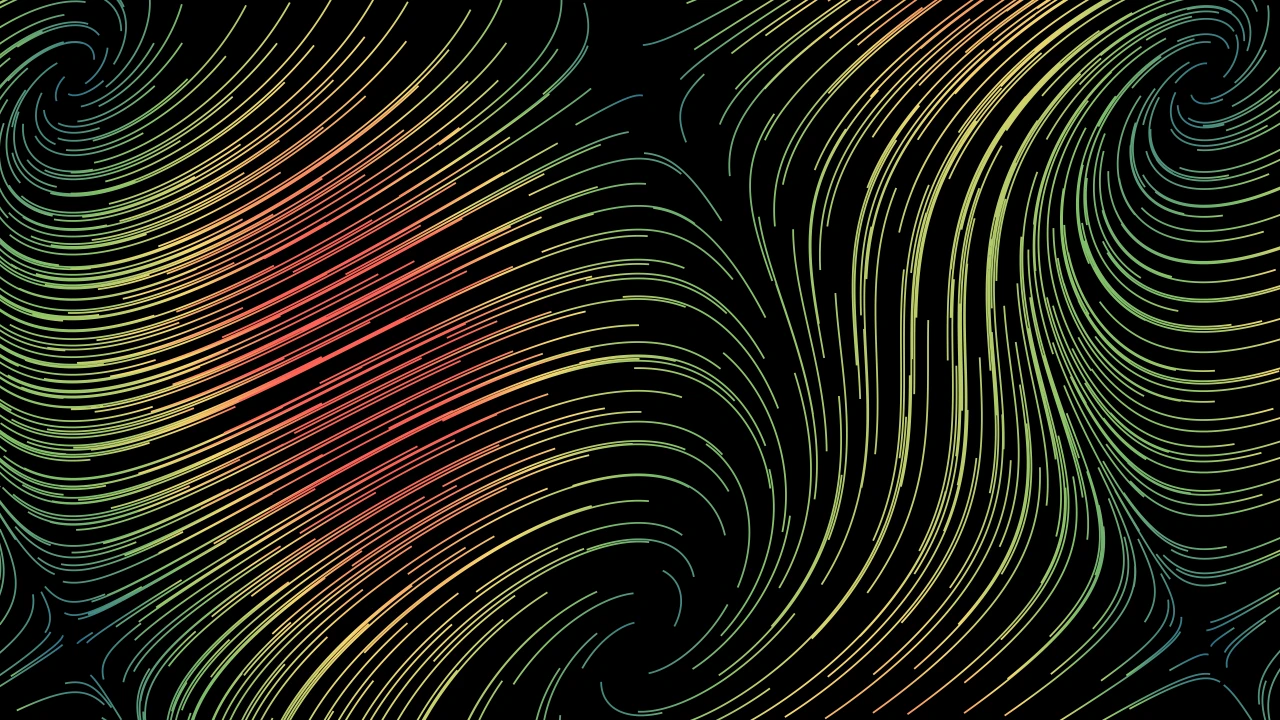
A vector field drawn as the lines that follow it: from points spread over a grid, the paths of particles the field carries; colored by the vectors' lengths, blue to red, unless given a color.

The lines start at the points of a grid (x_range, y_range, z_range, as an ArrowVectorField's), each moved a little at random — the same way every time — and n_repeats near each point. Each follows the field in steps of dt for virtual_time, and stops where it leaves the grid's box, widened by padding. A line takes the field's colors at its points, in a gradient from its start to its end. create draws them in; start_animation sets them flowing, and end_animation ends the flow.

m.StreamLines(func, color=None, color_scheme=None, min_color_scheme_value=0, max_color_scheme_value=2, colors=DEFAULT_SCALAR_FIELD_COLORS, x_range=None, y_range=None, z_range=None, three_dimensions=False, noise_factor=None, n_repeats=1, dt=0.05, virtual_time=3, max_anchors_per_line=100, padding=3, stroke_width=1, opacity=1, **kwargs)
func

The field: a function from a point (an array of its three coordinates, in scene coordinates) to the vector there.

color

One color for every line; None to color them by their vectors.

color_scheme

The value a vector is colored by, a function from the vector to a number; None for its length.

min_color_scheme_value

The value that takes the first color.

max_color_scheme_value

The value that takes the last color.

colors

The colors, spread evenly from the first value to the last.

x_range

The x values of the lines' starts, [x_min, x_max, x_step] with both ends, or [x_min, x_max] for a step of 0.5; None for the frame's width, [-8, 8].

y_range

The y values of the starts, likewise; None for the frame's height, [-4, 4].

z_range

The z values of the starts, likewise; None for z = 0 alone, or the y values with three_dimensions.

three_dimensions

Whether the starts span z too: by z_range, or by the y values.

noise_factor

How far each start may be moved, in scene units: up to half of it either way, in each coordinate; None for half the y step.

n_repeats

How many lines start near each point of the grid.

dt

The time step the lines are traced with: smaller follows the field more closely.

virtual_time

How long each line follows the field, in the field's time: longer makes longer lines.

max_anchors_per_line

The most points a line is smoothed through.

padding

How far beyond the grid the lines may go before they stop, in scene units.

stroke_width

The lines' width, in hundredths of a scene unit.

opacity

The lines' opacity, from 0 to 1.

background_stroke_color

The color of an outline drawn behind the fill (default black).

background_stroke_opacity

The outline's opacity, from 0 to 1 (default 1).

background_stroke_width

The outline's width, in hundredths of a scene unit (default 0: none).

sheen_factor

How much the colors lighten toward sheen_direction, from -1 to 1 (default 0); a negative factor darkens.

sheen_direction

The direction the colors lighten toward (default UL).

joint_type

How the stroke is joined where its path turns: round, beveled or mitered, as a two-dimensional scene draws it (see LineJointType; default AUTO: mitered).

cap_style

How the stroke ends, at each end it shows (an open path's, a dash's): round, butt or square, as a two-dimensional scene draws it (see CapStyleType; default AUTO: butt).

shade_in_3d

Whether a three-dimensional scene's light shades the mobject.

material

How its surface reflects the scene's lights in a three-dimensional scene (see Material); None: Manim's shading (default).

name

A name for the mobject; its class's name if not given.

z_index

Its place in the drawing order: a higher index is drawn over a lower one (default 0).

target

The state MoveToTarget moves the mobject to.

It also takes the style keywords.

Source

src/manimgx/mobjects/vector_field.py

def __init__(
    self,
    func: FieldFunction,
    color: ParsableManimColor | None = None,
    color_scheme: Callable[[Vector3D], float] | None = None,
    min_color_scheme_value: float = 0,
    max_color_scheme_value: float = 2,
    colors: Sequence[ParsableManimColor] = DEFAULT_SCALAR_FIELD_COLORS,
    x_range: Sequence[float] | None = None,
    y_range: Sequence[float] | None = None,
    z_range: Sequence[float] | None = None,
    three_dimensions: bool = False,
    noise_factor: float | None = None,
    n_repeats: int = 1,
    dt: float = 0.05,
    virtual_time: float = 3,
    max_anchors_per_line: int = 100,
    padding: float = 3,
    stroke_width: float = 1,
    opacity: float = 1,
    **kwargs: Unpack[Look],
):
    x_range, y_range, z_range = _field_ranges(
        x_range, y_range, z_range, three_dimensions
    )
    super().__init__(
        func,
        color,
        color_scheme,
        min_color_scheme_value,
        max_color_scheme_value,
        colors,
        **kwargs,
    )
    noise_factor = noise_factor if noise_factor is not None else y_range[2] / 2
    self.virtual_time = virtual_time
    """How long each line follows the field, in the field's time."""
    self.stroke_width = stroke_width
    half_noise = noise_factor / 2
    rng = np.random.default_rng(0)
    start_points = np.array(
        [
            (x - half_noise) * RIGHT
            + (y - half_noise) * UP
            + (z - half_noise) * OUT
            + noise_factor * rng.random(3)
            for n in range(n_repeats)
            for x in np.arange(*x_range)
            for y in np.arange(*y_range)
            for z in np.arange(*z_range)
        ]
    )
    pad = padding
    (x0, x1, xs), (y0, y1, ys), (z0, z1, zs) = (
        x_range,
        y_range,
        z_range,
    )

    def outside_box(p: Point3D) -> bool:
        return bool(
            p[0] < x0 - pad
            or p[0] > x1 + pad - xs
            or p[1] < y0 - pad
            or p[1] > y1 + pad - ys
            or p[2] < z0 - pad
            or p[2] > z1 + pad - zs
        )

    max_steps = ceil(virtual_time / dt) + 1
    self.stream_lines: list[StreamLine] = []
    """The lines, in the order of their starts."""
    for point in start_points:
        points = [point]
        for _ in range(max_steps):
            new_point = points[-1] + dt * func(points[-1])
            if outside_box(new_point):
                break
            points.append(new_point)
        line = StreamLine()
        line.duration = max_steps * dt
        line.set_points_smoothly(
            points[:: max(1, int(len(points) / max_anchors_per_line))]
        )
        if self.single_color:
            line.set_stroke(
                color=self.color, width=self.stroke_width, opacity=opacity
            )
        else:  # the field's color at each anchor, in order along the line: the gradient
            # runs from the line's start to its end (not across its box)
            line.set_stroke([self.pos_to_color(p) for p in line.get_anchors()])
            line.set_stroke(width=self.stroke_width, opacity=opacity)
            travel = np.sign(line.get_end() - line.get_start())
            if travel.any():
                line.set_sheen_direction(travel)
        self.add(line)
        self.stream_lines.append(line)
    self.flow_animation: Callable[[StreamLines, float], None] | None = None

virtual_time

How long each line follows the field, in the field's time.

stream_lines

The lines, in the order of their starts.

create

Code
import manimgx as m


class StreamLinesCreateExample(m.Scene):
    def construct(self) -> None:
        stream_lines = m.StreamLines(
            lambda p: (p[0] * m.UR + p[1] * m.LEFT) - p,
            color=m.YELLOW,
            x_range=[-7, 7, 1],
            y_range=[-4, 4, 1],
            stroke_width=3,
            virtual_time=1,
            max_anchors_per_line=6,
        )
        self.play(stream_lines.create())

Make an animation that draws the lines in, one after another in a random order.

Each line is drawn with Create over run_time, by default the field's virtual_time, each beginning lag_ratio of that after the one before: by default run_time / 2 divided by the number of lines. The order is shuffled with Python's random (seed it for the same order every time).

stream_lines.create(**kwargs)
run_time

How long the animation plays, in seconds (default 1).

lag_ratio

How the parts of the mobject are staggered: each begins this fraction of its run after the one before it begins (default 0: all together; 1: one after another).

rate_func

How the animation's progress runs with time: a function from [0, 1] to [0, 1] (default smooth; see rate functions).

reverse_rate_function

Whether to run the animation backward (default False).

name

A name for the animation.

remover

Whether the mobject leaves the scene when the animation finishes (default False).

suspend_mobject_updating

Whether the mobject's updaters run beneath the animation (default True): they keep acting on the mobject, and each frame shows the animation applied to the result. If False, they act on the animated mobject itself.

introducer

Whether the mobject joins the scene when the animation begins (default False); otherwise the play brings it in when the play begins, if the scene lacks it.

use_override

Whether a mobject whose class plays another animation in place of this one does so (default True).

It also takes the animation keywords.

Returns A new animation group.

Source

src/manimgx/mobjects/vector_field.py

def create(self, **kwargs: Unpack[AnimationOptions]) -> AnimationGroup:
    """Make an animation that draws the lines in, one after another in a random
    order.

    Each line is drawn with [Create][manimgx.Create] over `run_time`, by default
    the field's `virtual_time`, each beginning `lag_ratio` of that after the one
    before: by default `run_time / 2` divided by the number of lines. The order is
    shuffled with Python's `random` (seed it for the same order every time).

    Args:
        **kwargs: [Animation options][manimgx.animation.timeline.AnimationOptions]
            for each line's animation, and `lag_ratio` for the whole.

    Returns:
        A new animation group.

    Examples:
        ```python
        import manimgx as m


        class StreamLinesCreateExample(m.Scene):
            def construct(self) -> None:
                stream_lines = m.StreamLines(
                    lambda p: (p[0] * m.UR + p[1] * m.LEFT) - p,
                    color=m.YELLOW,
                    x_range=[-7, 7, 1],
                    y_range=[-4, 4, 1],
                    stroke_width=3,
                    virtual_time=1,
                    max_anchors_per_line=6,
                )
                self.play(stream_lines.create())
        ```
    """
    run_time = kwargs.pop("run_time", self.virtual_time)
    lag_ratio = kwargs.pop("lag_ratio", run_time / 2 / len(self.submobjects))
    kwargs["run_time"] = run_time
    animations = [Create(line, **kwargs) for line in self.stream_lines]
    random.shuffle(animations)
    return AnimationGroup(*animations, lag_ratio=lag_ratio)

start_animation

Code
import numpy as np

import manimgx as m


class StreamLinesStartAnimationExample(m.Scene):
    def construct(self) -> None:
        def func(p: np.ndarray) -> np.ndarray:
            return np.sin(p[0] / 2) * m.UR + np.cos(p[1] / 2) * m.LEFT

        stream_lines = m.StreamLines(
            func, stroke_width=3, max_anchors_per_line=7
        )
        self.add(stream_lines)
        stream_lines.start_animation(warm_up=False, flow_speed=1.5)
        self.wait(stream_lines.virtual_time / stream_lines.flow_speed)

Set the lines flowing: each flashes along itself, over and over, while the scene plays or waits.

An updater plays each line's animation — by default a ShowPassingFlash — along the line again and again, a cycle every virtual_time / flow_speed seconds, each line at a phase of its own, drawn with Python's random. end_animation ends the flow.

stream_lines.start_animation(warm_up=True, flow_speed=1, time_width=0.3, line_animation_class=ShowPassingFlash, **kwargs)
warm_up

Whether each line waits, empty, until its own time to begin, rather than all flowing from the start.

flow_speed

How fast the lines flow: the field's time per second.

time_width

The length of each flash, as a fraction of its line.

line_animation_class

The animation played along each line: a ShowPassingFlash, or a class of its kind.

lag_ratio

How the parts of the mobject are staggered: each begins this fraction of its run after the one before it begins (default 0: all together; 1: one after another).

rate_func

How the animation's progress runs with time: a function from [0, 1] to [0, 1] (default smooth; see rate functions).

reverse_rate_function

Whether to run the animation backward (default False).

name

A name for the animation.

remover

Whether the mobject leaves the scene when the animation finishes (default False).

suspend_mobject_updating

Whether the mobject's updaters run beneath the animation (default True): they keep acting on the mobject, and each frame shows the animation applied to the result. If False, they act on the animated mobject itself.

introducer

Whether the mobject joins the scene when the animation begins (default False); otherwise the play brings it in when the play begins, if the scene lacks it.

use_override

Whether a mobject whose class plays another animation in place of this one does so (default True).

It also takes the animation keywords.

Source

src/manimgx/mobjects/vector_field.py

def start_animation(
    self,
    warm_up: bool = True,
    flow_speed: float = 1,
    time_width: float = 0.3,
    line_animation_class: type[ShowPassingFlash] = ShowPassingFlash,
    **kwargs: Unpack[Untimed],
) -> Self:
    """Set the lines flowing: each flashes along itself, over and over, while the
    scene plays or waits.

    An updater plays each line's animation — by default a
    [ShowPassingFlash][manimgx.ShowPassingFlash] — along the line again and again,
    a cycle every `virtual_time / flow_speed` seconds, each line at a phase of its
    own, drawn with Python's `random`.
    [end_animation][manimgx.StreamLines.end_animation] ends the flow.

    Args:
        warm_up: Whether each line waits, empty, until its own time to begin,
            rather than all flowing from the start.
        flow_speed: How fast the lines flow: the field's time per second.
        time_width: The length of each flash, as a fraction of its line.
        line_animation_class: The animation played along each line: a
            ShowPassingFlash, or a class of its kind.
        **kwargs: [Animation options][manimgx.animation.timeline.Untimed] for each
            line's animation, but `run_time`; `rate_func` is `linear` unless given.

    Examples:
        ```python
        import numpy as np

        import manimgx as m


        class StreamLinesStartAnimationExample(m.Scene):
            def construct(self) -> None:
                def func(p: np.ndarray) -> np.ndarray:
                    return np.sin(p[0] / 2) * m.UR + np.cos(p[1] / 2) * m.LEFT

                stream_lines = m.StreamLines(
                    func, stroke_width=3, max_anchors_per_line=7
                )
                self.add(stream_lines)
                stream_lines.start_animation(warm_up=False, flow_speed=1.5)
                self.wait(stream_lines.virtual_time / stream_lines.flow_speed)
        ```
    """
    kwargs.setdefault("rate_func", linear)
    for line in self.stream_lines:
        line.anim = line_animation_class(
            line,
            run_time=line.duration / flow_speed,
            time_width=time_width,
            **kwargs,
        )
        line.anim.begin()
        line.time = random.random() * self.virtual_time * (-1 if warm_up else 1)
        self.add(line.anim.mobject)

    def updater(mob: StreamLines, dt: float) -> None:
        for line in mob.stream_lines:
            line.time += dt * flow_speed
            if line.time >= mob.virtual_time:
                line.time -= mob.virtual_time
            line.anim.interpolate(
                float(np.clip(line.time / line.anim.run_time, 0, 1))
            )

    self.add_updater(flow(updater))  # each line at the time it has run
    self.flow_animation = updater
    self.flow_speed = flow_speed
    self.time_width = time_width
    return self

end_animation

Make an animation that ends the flow: each line finishes its flash, then is drawn in with Create, easing out.

The flow's updater is removed at once, and a line still waiting to begin stays hidden until its time. Called before start_animation, it raises a ValueError.

Warning

The lines end hidden, not whole: a finished flash leaves its line trimmed past its end, and the Create that follows draws the line only as it finds it.

stream_lines.end_animation()

Returns A new animation group.

Source

src/manimgx/mobjects/vector_field.py

def end_animation(self) -> AnimationGroup:
    """Make an animation that ends the flow: each line finishes its flash, then is
    drawn in with [Create][manimgx.Create], easing out.

    The flow's updater is removed at once, and a line still waiting to begin stays
    hidden until its time. Called before
    [start_animation][manimgx.StreamLines.start_animation], it raises a
    ValueError.

    Warning:
        The lines end hidden, not whole: a finished flash leaves its line trimmed
        past its end, and the Create that follows draws the line only as it finds
        it.

    Returns:
        A new animation group.
    """
    if self.flow_animation is None:
        raise ValueError("You have to start the animation before fading it out.")

    def hide_and_wait(mob: Mobject, alpha: float) -> None:  # unseen until its turn
        mob.set_stroke(opacity=float(alpha >= 1))

    def finish_cycle(start: float) -> Callable[[StreamLine, float], None]:
        """The flow, on to the end of the line's cycle: its time at alpha (linear)."""

        def flow(line: StreamLine, alpha: float) -> None:
            line.time = start + alpha * (self.virtual_time - start)
            line.anim.interpolate(min(line.time / line.anim.run_time, 1))
            if alpha == 1:
                self.remove(line.anim.mobject)
                line.anim.finish()

        return flow

    max_run_time = self.virtual_time / self.flow_speed
    creation_rate_func = ease_out_sine
    creation_staring_speed = creation_rate_func(0.001) * 1000
    creation_run_time = (
        max_run_time / (1 + self.time_width) * creation_staring_speed
    )
    animations: list[Animation] = []
    self.remove_updater(self.flow_animation)
    self.flow_animation = None
    for line in self.stream_lines:
        create = Create(
            line, run_time=creation_run_time, rate_func=creation_rate_func
        )
        if line.time <= 0:
            animations.append(
                Succession(
                    UpdateFromAlphaFunc(
                        line, hide_and_wait, run_time=-line.time / self.flow_speed
                    ),
                    create,
                )
            )
            self.remove(line.anim.mobject)
            line.anim.finish()
        else:
            remaining_time = max_run_time - line.time / self.flow_speed
            animations.append(
                Succession(
                    UpdateFromAlphaFunc(
                        line,
                        finish_cycle(line.time),
                        run_time=remaining_time,
                        rate_func=linear,
                    ),
                    create,
                )
            )
    return AnimationGroup(*animations)